
75 USD
Demo heruntergeladen:
6 985
Veröffentlicht:
2 Februar 2012
Aktuelle Version:
26.326
Keinen passenden Roboter gefunden?
Geben Sie Ihren Eigenen in Auftrag
auf Freelance!
Gehen Sie zu Freelance
Geben Sie Ihren Eigenen in Auftrag
auf Freelance!
Wie man einen Roboter oder Indikator kaufen kann
Starte Deinen EA im
Virtual Hosting
Virtual Hosting
Teste einen Indikator/Roboter vor dem Kauf
Möchtest Du Geld im Market verdienen?
Wie man Produkte richtig präsentiert

Sie verpassen Handelsmöglichkeiten:
- Freie Handelsapplikationen
- Über 8.000 Signale zum Kopieren
- Wirtschaftsnachrichten für die Lage an den Finanzmärkte
Registrierung
Einloggen
Sie stimmen der Website-Richtlinie und den Nutzungsbedingungen zu.
Wenn Sie kein Benutzerkonto haben, registrieren Sie sich
Hola Vladislav,
La actualización de VirtualTradePad está espectacular, ya la estoy probando, felicitaciones y gracias por los botones añadidos
Hola Vladislav,
La actualización de VirtualTradePad está espectacular, ya la estoy probando, felicitaciones y gracias por los botones añadidos
Hola. gracias. Lo intenté muy duro. hay muchas más ideas y planes. Estoy trabajando en ello.
NEW VERSION 2020 !!!!
💛💛💛💛💛💛💛💛💛💛💛💛💛💛💛💛💛💛
VirtualTradePad One Click Trading
VirtualTradePad MT4: https://www.mql5.com/en/market/product/2892
VirtualTradePad MT5: https://www.mql5.com/en/market/product/167
brunosoper
Why?
Вот это привычка у людей.
Оставлять свои вопросы в отзывах. А отзывы писать в обсуждения.
Ребята. Так нечестно.
Подключился к одному пользователю, все работает.
Почему не хотите изменять отзыв? Все же работает!!!!
Я Вам обновления .................... А вы мне дорого перекрыли.
Обиделся...
Hello Vladislav. After a long time I'm back with some new needs ;-)
I cant use the keybord letters to quickly select Buy ; Sell ; or close orders. I have Always to come back and use the mouse to make the position I desire to.
My devise is a MACBOOK with Parallels installed emulating Windows instead of IOS.
I have also tried to change the letter direct into the config option in VTP but still not working.
Can you help please
Hello Vladislav. After a long time I'm back with some new needs ;-)
I cant use the keybord letters to quickly select Buy ; Sell ; or close orders. I have Always to come back and use the mouse to make the position I desire to.
My devise is a MACBOOK with Parallels installed emulating Windows instead of IOS.
I have also tried to change the letter direct into the config option in VTP but still not working.
Can you help please
Just did the corretcions in the reviews.
Just did the corretcions in the reviews.
Just did the corretcions in the reviews.
can i connect to you to find out the cause of the error? and try to fix it?
maybe this is a virtual system problem?
in normal Windows everything works.
Problem
I bought the rent for 1 week
there is a big problem
i didnt push any stop loss on the pannel, and only put top profit point
automatically the software close my losing trade after they passed random point
why is that?
i only clicked profit j and entered the number
all the other settings are not pinned
can you explain?
Problem
I bought the rent for 1 week
there is a big problem
i didnt push any stop loss on the pannel, and only put top profit point
automatically the software close my losing trade after they passed random point
why is that?
i only clicked profit j and entered the number
all the other settings are not pinned
can you explain?
how to reset it ? i canceled my settings but the software keep taking profit and loss without any setting on the pannel
how to reset it ? i canceled my settings but the software keep taking profit and loss without any setting on the pannel
@ kakau10 louzada
Hello.
You can install my program to any terminal.
Here's the instruction:
Installation and activation of the purchased adviser in the terminal.
After purchase, you can install an Expert Advisor in any terminal.
1 activation = 1 computer.
If you change the system or reinstall Windows, you need to re-enable (New Activation) the Expert Advisor on your computer.
You can activate the Expert Advisor 1 time on the computer and install the Expert Advisor in other terminals on the computer without activation.
Copying an Expert Advisor from one terminal to another is prohibited.
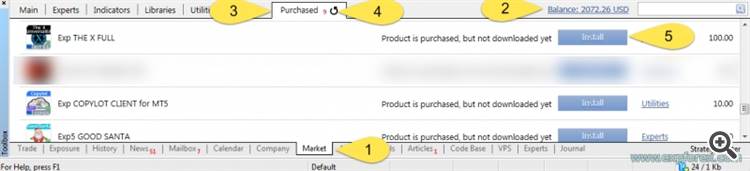
Our advisor will appear in your Navigator! Move it or double-click on the EA and install it on any currency pair, which will be an adviser to trade, for example, EURUSD.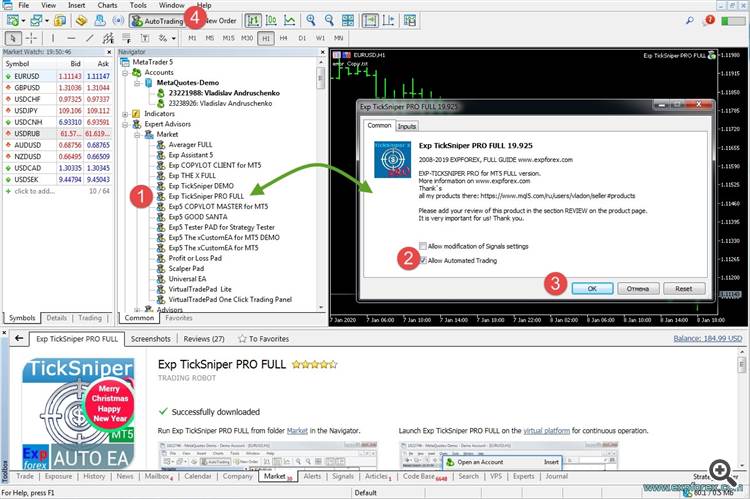
After successful installation, you will be shown on the chart, our adviser with a green smiley:The same actions for updating the Expert Advisor.
How to install two terminals on 1 computer?
Everything is simple!
When launching the installer, click on the SETTINGS button and select another folder for installation, for example, add at the end 2
Владислав, сделай пожалуйста CLP отключено по-умолчанию. Я уже несколько раз забывал его отключить перед удалением с графика и потом как накидываешь он "помнит" настройки и CLP включен. Это очень опасно. Например выставлен выход по лоссу или очень мелкий тейк и тп. Лучше если при накидывании на график CLP будет выключен. Спасибо!