Multi SAR MT5
39 USD
Demo heruntergeladen:
12
Veröffentlicht:
28 Oktober 2023
Aktuelle Version:
1.1
Keinen passenden Roboter gefunden?
Geben Sie Ihren Eigenen in Auftrag
auf Freelance!
Gehen Sie zu Freelance
Geben Sie Ihren Eigenen in Auftrag
auf Freelance!
Wie man einen Roboter oder Indikator kaufen kann
Starte Deinen EA im
Virtual Hosting
Virtual Hosting
Teste einen Indikator/Roboter vor dem Kauf
Möchtest Du Geld im Market verdienen?
Wie man Produkte richtig präsentiert

Sie verpassen Handelsmöglichkeiten:
- Freie Handelsapplikationen
- Über 8.000 Signale zum Kopieren
- Wirtschaftsnachrichten für die Lage an den Finanzmärkte
Registrierung
Einloggen
Sie stimmen der Website-Richtlinie und den Nutzungsbedingungen zu.
Wenn Sie kein Benutzerkonto haben, registrieren Sie sich
Hi,
Hi,
I put suffix assets, but remain only one.
I do not understand. If your symbols have a suffix, write it in the settings, for example SymbolSuffix = .ecn
In the dashboard, write the symbol names without the suffix.
I do not understand. If your symbols have a suffix, write it in the settings, for example SymbolSuffix = .ecn
In the dashboard, write the symbol names without the suffix.
Thank you for being so fast!
If the symbols have no suffix, leave the Symbol Suffix setting empty.
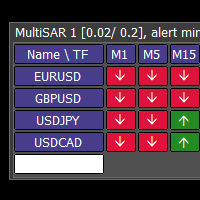
Enter the symbols one by one in the white field at the bottom of the dashboard.
Now goodnight, I hope that together we find a solution
Thank you, but I do it and nothing happens (sometimes I cannot add Symbols, sometimes it adds
Hi, it works perfectly, except the phone notifications.
It is necessary to set the notification in the MT5 menu - Tools - Options - Notifications. Also look in the logs (Experts tab at the bottom)
I do this, but nothing happens; many other indicators are functioning and sending signals, MultiSAR is like is not there 😢
Please contact, because push notification dont work.