Vladimir Pokora #: It is necessary to set the notification in the MT5 menu - Tools - Options - Notifications.Also look in the logs (Experts tab at the bottom)
I do this, but nothing happens; many other indicators are functioning and sending signals, MultiSAR is like is not there 😢
silvioit #: I do this, but nothing happens; many other indicators are functioning and sending signals, MultiSAR is like is not there 😢
Are you getting an Alert window?Do you have ShowAlert = true set?Do you have Send notification=true set?There is no error in the program.The error will be somewhere in your settings.
Are you getting an Alert window?Do you have ShowAlert = true set?Do you have Send notification=true set?There is no error in the program.The error will be somewhere in your settings.

Hi,
Hi,
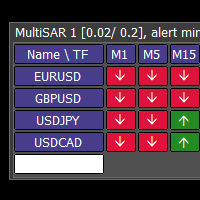
I put suffix assets, but remain only one.
I do not understand. If your symbols have a suffix, write it in the settings, for example SymbolSuffix = .ecn
In the dashboard, write the symbol names without the suffix.
I do not understand. If your symbols have a suffix, write it in the settings, for example SymbolSuffix = .ecn
In the dashboard, write the symbol names without the suffix.
Thank you for being so fast!
If the symbols have no suffix, leave the Symbol Suffix setting empty.
Enter the symbols one by one in the white field at the bottom of the dashboard.
Now goodnight, I hope that together we find a solution
Thank you, but I do it and nothing happens (sometimes I cannot add Symbols, sometimes it adds
Hi, it works perfectly, except the phone notifications.
It is necessary to set the notification in the MT5 menu - Tools - Options - Notifications. Also look in the logs (Experts tab at the bottom)
I do this, but nothing happens; many other indicators are functioning and sending signals, MultiSAR is like is not there 😢
Please contact, because push notification dont work.