Multi SAR MT5
39 USD
Versione demo scaricata:
12
Pubblicato:
28 ottobre 2023
Versione attuale:
1.1
Non hai trovato un robot adatto?
Ordina il tuo
su Freelance
Vai alla sezione Freelance
Ordina il tuo
su Freelance
Come acquistare un Robot di Trading o un indicatore
Esegui il tuo EA
hosting virtuale
hosting virtuale
Prova un indicatore/robot di trading prima di acquistarlo
Vuoi guadagnare nel Market?
Come presentare un prodotto per venderlo con successo

Ti stai perdendo delle opportunità di trading:
- App di trading gratuite
- Oltre 8.000 segnali per il copy trading
- Notizie economiche per esplorare i mercati finanziari
Registrazione
Accedi
Accetti la politica del sito e le condizioni d’uso
Se non hai un account, registrati
Hi,
Hi,
I put suffix assets, but remain only one.
I do not understand. If your symbols have a suffix, write it in the settings, for example SymbolSuffix = .ecn
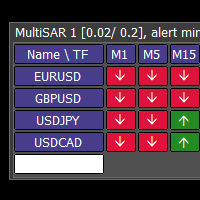
In the dashboard, write the symbol names without the suffix.
I do not understand. If your symbols have a suffix, write it in the settings, for example SymbolSuffix = .ecn
In the dashboard, write the symbol names without the suffix.
Thank you for being so fast!
If the symbols have no suffix, leave the Symbol Suffix setting empty.
Enter the symbols one by one in the white field at the bottom of the dashboard.
Now goodnight, I hope that together we find a solution
Thank you, but I do it and nothing happens (sometimes I cannot add Symbols, sometimes it adds
Hi, it works perfectly, except the phone notifications.
It is necessary to set the notification in the MT5 menu - Tools - Options - Notifications. Also look in the logs (Experts tab at the bottom)
I do this, but nothing happens; many other indicators are functioning and sending signals, MultiSAR is like is not there 😢
Please contact, because push notification dont work.