Konstantin Chechnev
Konstantin Chechnev
4.2 (5)
  • 信息
7+ 年
经验
18
产品
47
演示版
0
工作
0
信号
0
订阅者
Software engineer Eqorex RnD Studio
💻 01 / METATRADER 定制开发
────────────────────────

我可以开发任何复杂度的 MetaTrader 解决方案——从指标、交易面板和实用工具,到多层分析系统、EA、优化器以及专业的市场研究工具。

只要交易或分析思路能够清晰定义并形式化,我就能将其转化为完整可用的 MetaTrader 工具。


⚙️ 02 / 可开发内容
────────────────────────

• 交易算法和交易策略自动化;
• 市场数据分析指标及分析系统;
• Tick、价格流和统计数据处理;
• 交易参数优化与有效性验证;
• 高级界面、控制面板和数据可视化;
• 针对具体需求的自定义交易与分析逻辑。


🧩 03 / 从想法到完整产品
────────────────────────

我负责整个项目的开发流程——从最初的想法和数学逻辑,到系统架构、程序实现、界面设计、性能优化、测试和最终可用产品。

对我而言,优秀的工具不只是能够运行的代码。它还必须快速、清晰、稳定、易于使用,并准确解决其创建之初要解决的问题。


🧭 04 / 7 年以上开发经验
────────────────────────

拥有超过 7 年的 MetaTrader 及金融市场软件开发经验。

在此期间,我的开发工作从小型交易算法逐步发展到复杂的市场研究和专业分析系统。


💬 05 / 有想法或开发需求?
────────────────────────

联系我之前,无需先把想法整理成冗长的技术规格书。

您可以通过 MQL5 私信,用自己的语言描述需要实现的任务。我会评估其可行性,提出不包含多余功能的最佳实现方案,并提前明确工作范围、开发周期和预算。

小型任务会尽可能快速完成。复杂项目会被拆分为清晰的开发阶段,并由我从最初讨论到最终交付全程负责。

在项目的每个阶段,您都直接与开发者本人沟通,因此重要细节不会在讨论与实现之间丢失。
Konstantin Chechnev
Konstantin Chechnev
👉 Adaptive NeuroMatrix Trend on MQL5:
[https://www.mql5.com/ru/market/product/155563](https://www.mql5.com/ru/market/product/155563)

🚀 Adaptive NeuroMatrix Trend — price-action indicator with NO repainting 💹

Traders constantly face the same problems: lagging signals from classic MA/RSI/MACD, noisy breakouts, and indicators that repaint on history 😤
Adaptive NeuroMatrix Trend solves this with its own price-action model of price movement (not based on standard MT5 indicators) and works strictly on bar close, so there is NO repainting ✅

📈 What the indicator shows in a separate window:
🔵 Buy phase — bullish trend dominant
⚪ Flat / Exit — better to stay out or lock in profit
🔴 Sell phase — bearish trend dominant
🟡🟠 Gold/orange segments — impulse spikes and early warnings of potential reversals

✨ Key features:
✅ No repainting — signals are formed only at bar close; the picture does not change afterwards.
⚙️ Flexible tuning to your trading style via parameters:
⏱ Time-scale — reaction speed vs. smoothing
🎯 Entry sensitivity — how aggressively to enter
🚫 Anti-impulse strength — filters out noisy spikes
🧠 Predict layer strength — predictive smoothing of trend turns

🧩 Trend / flat / impulse separation — the internal algorithm combines smoothing filters, volatility and statistics to cut market “chop” and leave a clear trend structure.

📊 Built-in performance statistics:
📌 Cumulative result for the current symbol
🧾 Efficiency over the last 8 instruments
⏳ Tracking over a selected window in days — you immediately see where the model works best.

💡 How traders can use it:
🧭 As a trend filter for existing strategies and EAs
🔍 For pre-session instrument selection — finding “clean” trending symbols
📌 For spotting exit and re-entry zones after strong impulses

👇 Try it now:

Go to Adaptive NeuroMatrix Trend on MQL5, download the indicator and run it in the Strategy Tester on your favorite symbols and timeframes 🧪📉📊
If the results match your style — confidently add it to your trading setup as your main trend filter and statistics assistant 💼💰

➡️ Download Adaptive NeuroMatrix Trend:
[https://www.mql5.com/ru/market/product/155563](https://www.mql5.com/ru/market/product/155563)
Konstantin Chechnev 已发布产品

Correlation Monitor 是用于快速发现品种间关系的指标:帮助你找到具有强正 / 负相关性的品种对,识别背离,并在对冲、配对交易和篮子交易中做出更有依据的决策。 Meta traider 4. 主要功能 • 相关性矩阵与紧凑列表:即时显示所选品种之间的相关强度,颜色标识便于阅读。 • 相关品种的迷你图,与主图可见区域同步,方便直观地对比走势。 • Top‑5 模式:突出显示最强的正相关与负相关,便于快速聚焦。 • 多周期:可在不同周期上评估,并可设置计算窗口( K 线数量)。 • 支持 “ 市场报价 (Market Watch)” 中的任意交易品种,包括非标准品种。 • 资源优化:在大型品种列表下也能平滑更新,避免不必要的负担。 • 内置 50+ 语言界面,自动识别终端语言以本地化消息与标题。 • 切换图表时快速刷新数据。 Correlation Monitor 通过一体化方案节省日常对比品种的时间,帮助你更快做出更稳妥的决策:避免仓位重复暴露、寻找潜在对冲配对、并在不同周期上发现趋势背离。 参数 Correlation pair symbol —

Konstantin Chechnev
Konstantin Chechnev
Version 3.1!
Fixed the advisor's slow backtest issue. On average, speed has increased 10×.
We kicked the snail out of the advisor that was dragging calculations from one logic to another 🐌➡️✈️
No changes to the trading logic — just a few speed-pills in the code.We may speed it up further. Stay tuned for updates.
https://www.mql5.com/ru/market/product/148422
Konstantin Chechnev
Konstantin Chechnev
Meet version 3.0 of the most honest advisor!

https://www.mql5.com/ru/market/product/148422?source=Site+Profile

--- Update recommendation ---
Install the update on a demo account and run it for 24–72 hours in live/demo trading mode.

In short: we added automatic closing on an opposite signal and a ban on simultaneously opened opposite trades in the market. We focused on visualization and usability — spend less time in settings and more time understanding exactly what the advisor does. It’s a bit “heavier” (codebase grew roughly twofold), but more informative and more tolerant in operation.

--- What’s important (brief) ---

The main goal of this update is better visual feedback: all key parameters are now visible directly on the chart.

New trading logics were added to control the appearance of “opposite” trades.

Panel interfaces are localized into five languages; English is used by default for other locales.

It’s recommended to test the update on a demo account before switching to a real account.

--- Changes — detailed list ---

[Added]

Close on Opposite Signal — an option to automatically close a trade (or group of trades) when an opposite signal appears. Allows positions to be closed when the market clearly changes direction.

Prohibit opening opposite trades — blocks opening opposite trades: if long positions exist, short entries are blocked and vice versa. Simple logic — less cross-fire and trade noise.

Disable Panels Display — fully hide all panels on the chart for users who prefer a “clean” chart.

[Navigation & Visualization]

New operational notifications on the control panel — short statuses and messages about key events (standalone, non-intrusive).

Info panel — displays main settings and current modes of the advisor (quick overview without opening menus).

Auto arrow-signal search panel — shows active search parameters and arrow placement status.

When switching timeframes in automatic mode, the advisor automatically recalculates parameters and repositions arrows so they match the new timeframe.

All panels are collapsible to save chart space.

[Localization]
Panels are localized into: Russian, English, Simplified Chinese, Japanese, and German. If the terminal uses another language, English will be applied by default.

[Trading behavior / logic]
New options for handling “opposite” signals let you configure either soft blocking or hard closing/forbidding, depending on your strategy.

P.S.
If the terminal starts complaining about chart space and things feel cramped — tell it this is an investment in clarity :) You can’t have too many panels.

Good trading!
Konstantin Chechnev
Konstantin Chechnev
The most honest EA. The price will triple soon. We're finishing up another big update. Don't miss out if you're interested!

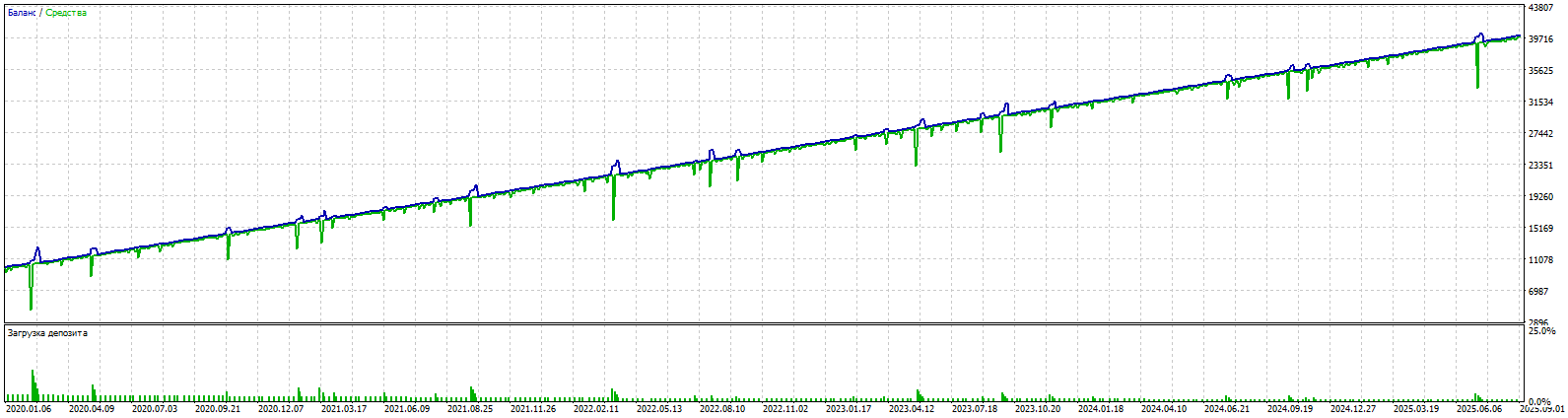
Real-time fast auto-learning for 2024 and backtest for 2025.
Lot trade 0.01
https://www.mql5.com/ru/market/product/148422
Konstantin Chechnev
Konstantin Chechnev
Hello, dear friends!In this version 2.1,
I added a cool feature — multi-currency trading. Now the advisor can work not only on one pair (as before, on the one where it is installed), but also on several currency pairs at the same time.

This is useful if you want to diversify risks and trade different instruments such as EURUSD, GBPUSD, or USDCAD.Previously, the advisor traded only on the current pair and used one signal file ("Data File Name = SignalFile" in the advisor settings). If the file was missing, it took signals from the built-in code inside the advisor. Now, if you enable the multi-currency mode (parameter Enable Multi Currency Mode = true), the advisor can trade up to 3 additional pairs. For each pair, you can specify your own signal file. If the file is not specified, it uses the general file Data File Name = SignalFile.

If that is also missing, it uses the built-in signals.If the mode is disabled (false), everything works as before — only on the current pair.I also added an option to close positions by equity separately for each pair. This means that if one pair reaches the profit threshold, the advisor will close only the positions of that pair, without affecting others.In addition, the automatic signal placement mode now includes a function called "Minimum ZigZag Bars for Signal."

Now you can filter not only by the number of points but also by the length of the ZigZag indicator, in order to avoid false news movements that may consist of 2–4 bars and later produce poor trading signals.

The most honest EA.

The price will triple soon.

https://www.mql5.com/ru/market/product/148422
Konstantin Chechnev
Konstantin Chechnev
The most honest EA. The price will triple soon. We're finishing up another big update. Don't miss out if you're interested!

how auto-learning works. For the sake of interest, we trained on the signals of 2025, but demo test for 2024 :) https://www.mql5.com/ru/market/product/148422
Konstantin Chechnev
Konstantin Chechnev
The most honest EA. The price will triple soon. We're finishing up another big update. Don't miss out if you're interested!
5 year backtest EURUSD M5. 100% quality tick.Set and SignalFile in comments https://www.mql5.com/ru/market/product/148422
Konstantin Chechnev 已发布产品

Arrow Strategy Builder —— 一个智能交易顾问 (EA),它会记住用户在图表上放置的向上/向下箭头,并在条件再次出现时生成交易信号。适合初学者和有经验的交易者,提供直观的界面和功能,可在任何金融工具上进行自动化交易。 Metatraider5 的多币种交易顾问的完整版本在这里。 主要特点 简单的策略创建: 通过在图表上放置箭头(买入/卖出)来构建交易策略,以标记入场点。 基于指标的信号: 使用四个流行的指标 —— RSI、CCI、DeMarker 和 WPR —— 根据用户设定的模式记录并重复交易信号。 多语言支持: EA 界面会根据终端语言(英语、俄语、德语、日语、中文)进行适配,方便全球用户使用。 灵活的信号匹配: 当当前市场条件与已记录的信号达到指定的最小相似百分比时,自动开仓。 EA 的工作原理 设置信号: 点击控制面板上的 [设置信号] 按钮,然后在图表上放置箭头(向上为买入,向下为卖出)。 记录信号: 点击 [Record signal],EA 会保存所选指标(RSI、CCI、DeMarker、WPR)在最近三个柱上的数值。 交易与优化:

Konstantin Chechnev
Konstantin Chechnev
https://www.mql5.com/ru/market/product/148422?source=Site+Profile

Dear friends! Downloaded the update. In the default settings, SET for M1 EURUSD for an example of operation.
Version 2.0 released with extended signal management functionality, improved filtering, and a redesigned control panel.
New
[MACD Indicator (Trade Entry Filter)]Added as an auxiliary filter for determining trade direction.
MACD > 0: only long trades are allowed.
MACD < 0: only short trades are allowed.
The indicator is not used in training and is not stored in the signal database.Enabled/disabled via parameter Use MACD for Trade Opening.
[Parameter "Number of Bars Before Signal to Store"]Defines the depth of analysis before a signal. By default, the last 5 bars are taken into account for more accurate recognition of recurring market scenarios.
[Parameter "Show Indicators on Chart"]Controls the display of indicators on the chart. Default is false, simplifying chart view and signal analysis.

[Parameter "Delay from instant opening of trades after EA launch (in min.)"]Delay for opening the first trade. Required for the time of EA launch and signal settings, so that the EA does not open an unplanned trade on the available internal or previously created signal base. Default is 60 minutes.
Improvements
— Updated control panel on chart
— Redesigned interface for better usability
— Added multilingual support (automatic detection of terminal language: Russian, English, German, Japanese, Chinese; English is used in all other cases)
— Improved informational messages
Update Recommendations
1.Reset advisor parameters on the chart and in the strategy tester.
2.Use the built-in signal database or recreate and optimize your own (database structure has changed).
3.Lower the parameter Minimum Signal Match Percent to Open Trade — entry criteria across indicators have become significantly stricter.
Konstantin Chechnev
Konstantin Chechnev
Fibonacci EA — an automatic advisor based on Fibonacci levels
Features
Automatic detection of local extremes and the construction of Fibonacci levels.
Customizable conditions for opening and closing deals based on Fibonacci levels.
Flexible risk management options: stop loss, take profit, limit the volume and number of orders.

https://www.mql5.com/ru/market/product/148769
Konstantin Chechnev
Konstantin Chechnev
Set the signals, get the strategy on autopilot! Quickly. Effectively. Simply.

MT4 Free https://www.mql5.com/ru/market/product/148439
MT4 Full https://www.mql5.com/ru/market/product/148427
MT5 Free (Here in the "Discussion" there are several questions from traders and answers from me.) https://www.mql5.com/ru/market/product/148426
MT5 Full https://www.mql5.com/ru/market/product/148422
Konstantin Chechnev 已发布产品

39.99 USD

Fibonacci MT5 是一个基于斐波那契水平的自动化交易智能顾问。它会在指定的K线数量中确定价格的最低点和最高点,绘制斐波那契水平,并在当前价格达到选定水平时开仓。EA 可以按照趋势或逆趋势进行交易,并可根据设定的参数调整。同时,它还允许设置平仓水平、风险管理和时间过滤。 特征 自动检测局部极值和斐波那契水平的构建。   基于斐波那契水平的可定制的开仓和平仓条件。   灵活的风险管理选项:止损,止盈,限制订单量和数量。 通用设置 Lot Size:开仓手数。 Max Open Buy Orders:最大买单数量。 Max Open Sell Orders:最大卖单数量。 Magic Number:EA订单的唯一标识符。 风险管理 Use Stop Loss:启用止损。 Stop Loss (pips):止损点数。 Use Take Profit:启用止盈。 Take Profit (pips):止盈点数。 时间过滤 Use Time Filter:启用时间过滤。 Start Trading Hour:开始交易的时间(小时)。 End