AZ Scale Fix and Zoom Panel

  • 实用工具
  • Jose Antonio Valle Magana
    Jose Antonio Valle Magana
    The profession of trader is something I love because once you learn a system, you do not need to be learning and learning new things, but all you have to do is apply the knowledge day by day with more and more discipline. I am an architect by profession and a trader at heart.
  • 版本: 1.8
  • 激活: 10
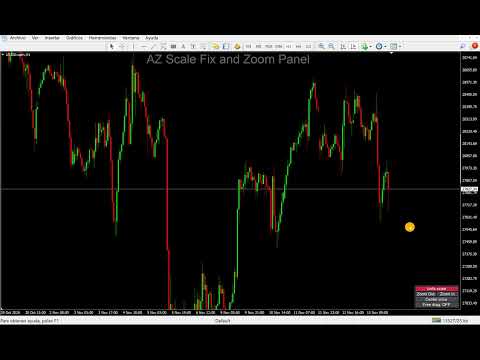
AZ Scale Fix and Zoom Panel adds a compact control panel to your MT4 chart so you can lock the price scale, zoom the price axis and position the chart exactly where you need it, all with one click.

Reading the candles next to the current price, or placing an order with precision, often means zooming far into the price axis. MT4 does this through several chart settings that are slow to reach and awkward to use. This panel puts them in one place.

WHAT THE PANEL DOES

Scale fix / Unfix scale
Locks the price scale at the range currently visible. While it is locked, the chart does not rescale on its own. Press the button again to unlock: the chart returns to automatic scaling and goes back to the latest candle, even when the market is closed.

Zoom Out / Zoom In
Zooms the price axis in or out in steps. By default the zoom is centered on the middle of the price scale, so the extra space is added evenly above and below. You can also anchor the zoom on the current price.

Center price
Moves the chart so the current price sits in the middle of the screen, keeping your zoom level.

Free drag
Hold the chart with the mouse and move it up, down, left or right without the vertical limit that MT4 applies in fixed-scale mode. Switch it off and the standard MT4 mouse behavior comes back.

INPUTS
- Panel corner and offsets: bottom right, bottom left, top right or top left.
- Zoom In and Zoom Out factors: how much each click changes the visible price range.
- Stop auto-scroll while the scale is locked: on or off.
- Zoom anchor: center of the price scale, or current price.
- Colors and font size of the panel.

NOTES
- Works on any symbol and any timeframe.
- The indicator draws only the panel. It does not plot signals, arrows or alerts, and it does not place orders.
- When you remove the indicator, the chart goes back to automatic scale and the standard mouse scrolling.
- Free drag replaces the standard mouse scrolling while it is switched on. Turn it off to scroll the usual way.

For MT4 only.
作者的更多信息
Az OrderGun
Jose Antonio Valle Magana
AZ_OrderGun MT4 - Professional 1-Click Trading Panel AZ_OrderGun is the all-in-one panel to execute and manage your trades without wasting time setting up SL/TP. KEY FEATURES: 1. 4 INSTANT ENTRIES: Buy SLL - Buy with SL on Low of previous candle Sell SLH - Sell with SL on High of previous candle Buy SLO / Sell SLO - SL on Open of previous candle > Fully configurable % Risk 2. ADVANCED VISUAL MANAGEMENT: Draggable lines for Pending and Market orders Auto calculation of Lot Size, $ Ri
Az Order Manager
Jose Antonio Valle Magana
Az Order Manager - Free Visual Hook Edition V1.2 The most visual order management panel, now available for free to try. This is the free version of Az Order Manager Diamond 9.41 (Best Seller). What is this tool? A professional panel to manage orders with visual lines. You can draw entry, stop loss and take profit lines, move them on the chart and see lot size, risk in $ and reward in real time before executing. WHAT YOU CAN DO IN THIS FREE VERSION (100% Working): Visual Lines - Click Pen
FREE
Az OrderGunF
Jose Antonio Valle Magana
<b>AZ_OrderGun FREE - 1-Click Trading Panel (Free Version)</b> The powerful free version of AZ_OrderGun to test the execution speed. <b> WHAT'S INCLUDED IN FREE?</b> 4 Instant Entries: Buy SLL / Sell SLH / Buy SLO / Sell SLO Automatic Lot Size calculation by % Risk Full Features: Close All, BE All, Close %, Close Pending 100% Visual and draggable panel <b> LIMITED FEATURES IN FREE:</b> Advanced management features Pend. Send, Mkt. Send, Close Winners and Close Losers are only avai
FREE
AZ Vwap Dpoc
Jose Antonio Valle Magana
AZ VWAP + DPOC 在 MetaTrader 4 图表上绘制成交量加权平均价(VWAP)及其偏差带、动态 DPOC 和动态价值区域(VAH / VAL),并提供可配置的穿越提醒。 功能介绍 带偏差带的 VWAP • VWAP 线配有三条上方和三条下方偏差带(按成交量加权的标准差)。 • 默认偏差值:0.6、1.12 和 1.8。每个值都可以修改或隐藏(0 = 隐藏)。 • 按周或按日重置,可设置交易时段开始时间和每周起始日。 • 可选择计算价格:典型价、收盘价、中间价或加权价。 • 默认情况下,各时段之间的线条保持连续,也可以在每个新周期处断开。 • 可选择显示多少个 VWAP 周期。 动态 DPOC 和价值区域 • DPOC(控制点):所选周期内成交量最大的价格水平,以阶梯线显示。 • VAH 和 VAL:价值区域的上限和下限,以虚线显示。 • 价值区域百分比可调(默认 70%)。 • DPOC 周期可选按周或按日,最多可显示 30 个周期。 • 成交量分布基于 M1 K 线构建。价格步长可自动设置,也可按点数手动设置。 穿越提醒(每项可单独开启或关闭) • VW
AZ Smart Levels and Zones
Jose Antonio Valle Magana
AZ Smart Levels and Zones 在 MetaTrader 4 图表上直接绘制三种基础 SMC(市场结构)工具:结构突破、公允价值缺口(Fair Value Gap)和订单块(Order Block)。 绘制内容 市场结构(BOS / CHoCH) • 基于已收盘 K 线识别摆动高点和低点(摆动长度可调)。 • 结构突破(BOS):一根 K 线收盘于最近的摆动点之外,且方向与当前趋势一致。以实线绘制。 • 性质转变(CHoCH):一根 K 线收盘于最近的摆动点之外,且方向与当前趋势相反。以点线绘制。 • 每条线都带有标签,并按方向着色。显示最近的若干次突破。 公允价值缺口(FVG) • 识别看涨和看跌的三根 K 线缺口。 • 每个缺口绘制为向右延伸的填充方框,在其区间 50% 处有一条点线,并带有“FVG”标签。 • 只要没有 K 线收盘穿过缺口,它就会一直显示。穿过区间的影线不会使其消失。 订单块(OB) • 看涨 OB:一根强势阳线(收盘高于其最高价)之前的最后一根阴线。看跌 OB:相反的情况。 • 以向右延伸的虚线方框绘制,颜色与结构线相同,并带有“O
AZ OrderGun Pro
Jose Antonio Valle Magana
AZ_OrderGun - Professional Order Management Panel AZ_OrderGun is a lightweight and fast trade management tool designed for manual traders who need full control over their trades directly from the chart. MAIN FEATURES One-Click Trading: Buy SLL, Sell SLH, Buy SLO, Sell SLO with predefined Stop Loss Visual SL/TP Management: Drag and drop Stop Loss and Take Profit lines directly on the chart Smart Risk Calculation: Automatic lot size calculation based on % risk and SL distance Risk/Reward Ratio:
筛选:
无评论
回复评论