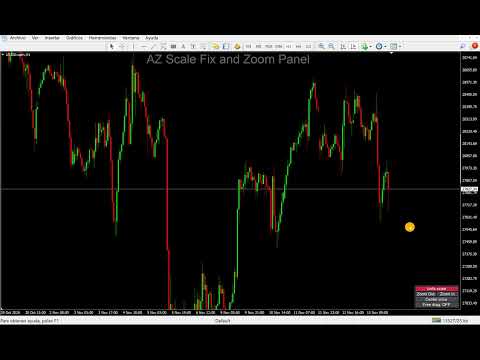
AZ Scale Fix and Zoom Panel
- Utilitários
-
Jose Antonio Valle Magana
 The profession of trader is something I love because once you learn a system, you do not need to be learning and learning new things, but all you have to do is apply the knowledge day by day with more and more discipline. I am an architect by profession and a trader at heart.
- Versão: 1.8
- Ativações: 10
AZ Scale Fix and Zoom Panel adds a compact control panel to your MT4 chart so you can lock the price scale, zoom the price axis and position the chart exactly where you need it, all with one click.
Reading the candles next to the current price, or placing an order with precision, often means zooming far into the price axis. MT4 does this through several chart settings that are slow to reach and awkward to use. This panel puts them in one place.
WHAT THE PANEL DOES
Scale fix / Unfix scale
Locks the price scale at the range currently visible. While it is locked, the chart does not rescale on its own. Press the button again to unlock: the chart returns to automatic scaling and goes back to the latest candle, even when the market is closed.
Zoom Out / Zoom In
Zooms the price axis in or out in steps. By default the zoom is centered on the middle of the price scale, so the extra space is added evenly above and below. You can also anchor the zoom on the current price.
Center price
Moves the chart so the current price sits in the middle of the screen, keeping your zoom level.
Free drag
Hold the chart with the mouse and move it up, down, left or right without the vertical limit that MT4 applies in fixed-scale mode. Switch it off and the standard MT4 mouse behavior comes back.
INPUTS
- Panel corner and offsets: bottom right, bottom left, top right or top left.
- Zoom In and Zoom Out factors: how much each click changes the visible price range.
- Stop auto-scroll while the scale is locked: on or off.
- Zoom anchor: center of the price scale, or current price.
- Colors and font size of the panel.
NOTES
- Works on any symbol and any timeframe.
- The indicator draws only the panel. It does not plot signals, arrows or alerts, and it does not place orders.
- When you remove the indicator, the chart goes back to automatic scale and the standard mouse scrolling.
- Free drag replaces the standard mouse scrolling while it is switched on. Turn it off to scroll the usual way.
For MT4 only.