Trade Copier Local
FREE
Yayınlandı:
17 Şubat 2021
Mevcut sürüm:
1.3
Uygun bir robot bulamadınız mı?
Freelance üzerinden kendi
robotunuzu sipariş edin
Freelance'e git
Freelance üzerinden kendi
robotunuzu sipariş edin
Bir alım-satım robotu veya gösterge nasıl satın alınır?
Uzman Danışmanınızı
sanal sunucuda çalıştırın
sanal sunucuda çalıştırın
Satın almadan önce göstergeyi/alım-satım robotunu test edin
Mağazada kazanç sağlamak ister misiniz?
Satış için bir ürün nasıl sunulur?

Alım-satım fırsatlarını kaçırıyorsunuz:
- Ücretsiz alım-satım uygulamaları
- İşlem kopyalama için 8.000'den fazla sinyal
- Finansal piyasaları keşfetmek için ekonomik haberler
Kayıt
Giriş yap
Web sitesi politikasını ve kullanım şartlarını kabul edersiniz
Hesabınız yoksa, lütfen kaydolun
Do you have any version for MT5?
Many thank you.
Do you have any version for MT5?
Your welcome. thanks for using our EA.
Unfortunately no.
This copier can be used on vps?
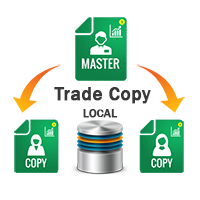
This is a local trade copier. so if you want to copy your trades on several met trader on ONE pc/vps, yes.
Do I need to put it in every chart?
no. JUST On chart from Metatrader1 as a master (store the positions)
and attach EA on Metatrader1 2 on one chart as a client to copy Metatrader1 1 positions
Hi,What are the uses of Master/Client and On/Off buttons on the chart?
To change master to client or client to a master :)
Does the trade copier work if you have 2 separate instances of MT4 running 2 separate accounts?
you can JUST use 1 master mode but you can have unlimited client
how to solve this ?
Does it have a reverse function Sara???
what do you mean about reverse?
is he copying SL, TP, Trailing Stop and Modifies?
Thank you
is he copying SL, TP, Trailing Stop and Modifies?
Thank you
Yes friend
Can this be used to modify the orders coming from signals?
Its a signal/trade copier, What do you mean about modify?
not working I dont know why, can you have video on yt how to connect 2 accounts?
Note that you have to set the master and client from your chart button.
click on red green button on the chart to set the master and client