Trade Copier Local
FREE
Publié:
17 février 2021
Version actuelle:
1.3
Vous ne trouvez aucun robot qui vous convient ?
Commandez le vôtre
dans la section Freelance
Aller à la section Freelance
Commandez le vôtre
dans la section Freelance
Comment acheter un robot de trading ou un indicateur
Exécutez votre EA sur
hébergement virtuel
hébergement virtuel
Test un indicateur/robot de trading avant d'acheter
Vous voulez gagner de l'argent sur Market ?
Comment présenter un produit pour qu'il se vende bien

Vous manquez des opportunités de trading :
- Applications de trading gratuites
- Plus de 8 000 signaux à copier
- Actualités économiques pour explorer les marchés financiers
Inscription
Se connecter
Vous acceptez la politique du site Web et les conditions d'utilisation
Si vous n'avez pas de compte, veuillez vous inscrire
Do you have any version for MT5?
Many thank you.
Do you have any version for MT5?
Your welcome. thanks for using our EA.
Unfortunately no.
This copier can be used on vps?
This is a local trade copier. so if you want to copy your trades on several met trader on ONE pc/vps, yes.
Do I need to put it in every chart?
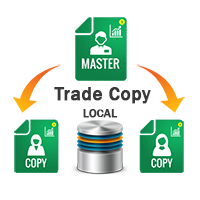
no. JUST On chart from Metatrader1 as a master (store the positions)
and attach EA on Metatrader1 2 on one chart as a client to copy Metatrader1 1 positions
Hi,What are the uses of Master/Client and On/Off buttons on the chart?
To change master to client or client to a master :)
Does the trade copier work if you have 2 separate instances of MT4 running 2 separate accounts?
you can JUST use 1 master mode but you can have unlimited client
how to solve this ?
Does it have a reverse function Sara???
what do you mean about reverse?
is he copying SL, TP, Trailing Stop and Modifies?
Thank you
is he copying SL, TP, Trailing Stop and Modifies?
Thank you
Yes friend
Can this be used to modify the orders coming from signals?
Its a signal/trade copier, What do you mean about modify?
not working I dont know why, can you have video on yt how to connect 2 accounts?
Note that you have to set the master and client from your chart button.
click on red green button on the chart to set the master and client