UPD1 Murrey Math Levels

FREE
Yayınlandı:
21 Ağustos 2020
Mevcut sürüm:
1.36
Uygun bir robot bulamadınız mı?
Freelance üzerinden kendi
robotunuzu sipariş edin
Freelance'e git
Freelance üzerinden kendi
robotunuzu sipariş edin
Bir alım-satım robotu veya gösterge nasıl satın alınır?
Uzman Danışmanınızı
sanal sunucuda çalıştırın
sanal sunucuda çalıştırın
Satın almadan önce göstergeyi/alım-satım robotunu test edin
Mağazada kazanç sağlamak ister misiniz?
Satış için bir ürün nasıl sunulur?

Alım-satım fırsatlarını kaçırıyorsunuz:
- Ücretsiz alım-satım uygulamaları
- İşlem kopyalama için 8.000'den fazla sinyal
- Finansal piyasaları keşfetmek için ekonomik haberler
Kayıt
Giriş yap
Web sitesi politikasını ve kullanım şartlarını kabul edersiniz
Hesabınız yoksa, lütfen kaydolun
Hi,
please please add the possibility to change the colors of the level. I mean i want to choose the colors 100% freely for every single level, like this:
Hi,
please please add the possibility to change the colors of the level. I mean i want to choose the colors 100% freely for every single level, like this:
Can you do this please? :) Thank you
Hi. This change will not be convenient for everyone. Being a developer, you often have to choose popular solutions. But I'll think about it.
Hi. This change will not be convenient for everyone. Being a developer, you often have to choose popular solutions. But I'll think about it.
I just want to be able to set this up like in Murreys book. I like to follow the master himself. I want to color the levels to represent the probability of each level. See here:
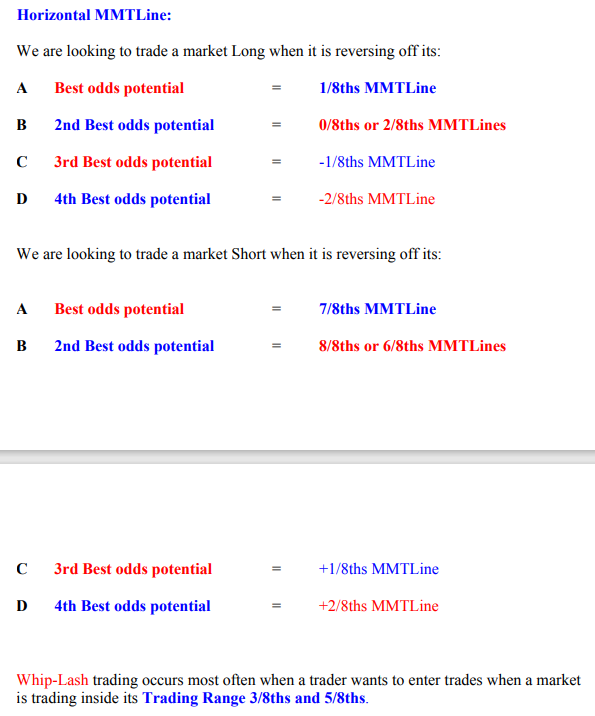
Wouldn´t it make sense to color code the levels based on the explanations above?
My videos, screenshots of the theory in the blog have the coloring that is now. I don't see the point in changing anything. Don't get me wrong. One change will entail a series of inconsistencies.
I think your book has a free publisher's coloring. The author did not have color levels. Tk the colors that I gave, from many years of experience.I think i have found a bug. Please open the indicator in AUDCAD M15 chart. You should see this:
As you see on the screenshot, the indicator draws numbers in wrong places... Thank you
Hello. I don't see a mistake. Draw on the screenshot what you think is wrong. And then show an example of how to correctly.
The indicator uses the classic Murray levels formula, which is available in the source code here on the codebase website.
Hello. I don't see a mistake. Draw on the screenshot what you think is wrong. And then show an example of how to correctly.
The indicator uses the classic Murray levels formula, which is available in the source code here on the codebase website.
You are totally right Vitaliy. I am tired today. I saw something which is not there. :) EVERYTHING is fine. You are right. Sorry for that.
HI Vitaliy
I follow your information and add Murrey combo with the 2 other tools (pixel and level)
for use mostly in M1 (sometimes in M5) what is your advice for the 2 parameters ? (period Length)
Thanks a lot
warmly
for use mostly in M1 (sometimes in M5) what is your advice for the 2 parameters ? (period Length)
The default period 128 is the best for any timeframe. The second parameter - length - is just a visual
The default period 128 is the best for any timeframe. The second parameter - length - is just a visual
Thanks so much for so quick response, warmly