Clustra Footprint and Trade Panel
- Yardımcı programlar
-
Alisher Madaminov
 Developer of Clustra — footprint, volume profile and a trade panel for MetaTrader 5. I build tools that show what happens inside every bar: clusters, profiles, levels, replay of past days and a paper account for practice. Questions about my products — write in private messages.
- Sürüm: 3.20
- Etkinleştirmeler: 10
Clustra is a workplace for reading order flow on any MetaTrader 5 symbol. It replaces the chart bars with clusters (footprint), adds volume profiles, levels and bar marks, and lets you place and manage trades from the same chart. Everything is drawn on one canvas: the chart keeps working smoothly with hundreds of bars and does not fill up with objects.
It is an Expert Advisor so that the analysis and the trading tools run together. It does not open trades by itself: every trade starts with your click. The analysis works with Algo Trading switched off; the trade panel needs it on.
Data
- Clustra builds every bar from the ticks of your broker and keeps them in a cache, so the history loads once.
- Symbols with real traded volume (exchange futures and stocks with Last prices): volume and the side of each trade from the tick flags.
- Forex and CFD symbols have no exchange volume: Clustra counts the ticks (price changes) and finds the side with the tick rule. The legend says so ("Tick vol", "~Δ"): read it as where and how one-sided the market was active, not as contracts traded.
Clusters
- Bid x Ask, Delta, Volume, Volume + Delta, volume profile of the candle and other views; rows merge when you zoom out, the numbers follow the zoom.
- Diagonal imbalance, stacked imbalance zones that stay until the price trades through them, POC of every candle, big cells, unfinished auctions, absorption and exhaustion in the cells.
- Cluster search: your own conditions for cells (volume, delta, imbalance, place in the bar) with marks on the chart.
Profiles and levels
- Volume profile of the visible bars, the day, the week or a range you choose; POC, value area, TPO of each day.
- Previous day, week and month: high, low, close, POC and value area; developing POC; naked POC; HVN and LVN; POC of higher timeframes; automatic profiles per period.
- Local profile: hold Shift and drag across bars to see their profile with its own delta.
- VWAP with bands, impulse levels, sessions with their high and low, initial balance, pivots, equal highs and lows, round levels, moving averages and bands.
- Automatic support and resistance, trend lines, market structure (BOS / CHoCH), fair value gaps, ZigZag with the volume and delta of each wave.
Bar marks and panels
- Candle character, delta divergences, big delta, reversal patterns, tick bursts, wicks pushed back.
- Panels under the chart: volume, delta, cumulative delta, oscillators, a bar statistics table.
- Direction of several timeframes, a summary of the current bar and of the layers in one table.
- Order book in the right column and book layers when your broker provides market depth.
Trading
- Trade panel: market and pending orders, volume by risk in money or percent, stop and target in pips or by price. The free margin is checked before an order goes out; an optional largest lot per order.
- Lines on the chart: drag the stop, the target and pending orders; buttons on a position for half close, breakeven, reverse and close.
- A question before sending (can be switched off), Esc cancels.
- Position management: breakeven, trailing stop, partial targets, one-cancels-other orders. It works while the terminal runs: keep a real stop at the broker for the time the terminal is off.
- Discipline rules: trades per day, loss of the day, drawdown, a time to be flat. When a rule is reached, new entries are refused.
- Paper account: practice with the same panel and lines without sending anything to the broker, with its own balance and history.
- Binary options training: virtual Up / Down deals with an expiry from the panel, a virtual balance and statistics by expiry, hour and side. Nothing is sent to the broker.
- Trade history on the chart and a trade journal with statistics by hour, session, day, symbol, side and your own tags.
MultiView
- One or two panes of other timeframes beside the chart (for example H1 above and M1 below an M15 chart). Each pane counts its own bars and keeps its own look.
Replay
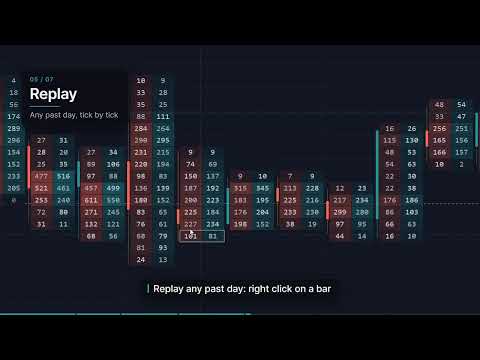
- Replay any past day tick by tick on a separate chart, with all layers, at the speed you choose. Trade it on the paper account to test your own reading of the chart.
Alerts
- Alerts on bar marks and level touches: popup, sound, push notification to your phone, a message to your own Telegram bot (a bot token in the settings window; the address of the Telegram server must be allowed in the terminal options).
Interface
- One settings window with search, layers you switch from the top bar, presets (ready ones for scalping, intraday and short-term reading, and your own), a light and a dark theme, English and Russian (the language of the terminal is chosen at the first start), drawing tools, hotkeys.
Start
1. Attach Clustra to a chart. One Clustra a chart; it can run on several charts at once.
2. For trading, switch on Algo Trading in the terminal.
3. Open the settings with the gear on the top bar; the layers menu switches the main features.
Strategy Tester (demo)
- Choose "Every tick based on real ticks" or "Every tick": Clustra needs ticks. In "1 minute OHLC" and "Open prices only" it shows a notice instead of clusters.
- The tester has no ticks before the start date, so the chart fills as the test runs; start the test a few days earlier than the dates you want to see.
- The trade panel is on in the tester: buy, sell, drag the stop and the target on the tester's own account.
- In the visual tester MetaTrader shows its own price and time scales next to the scales of Clustra; on a chart they are hidden.
- The replay and the Telegram messages work on a chart, not in the tester.
Notes
- Clustra describes the market; it does not forecast and does not trade by itself.
- The quality of the clusters depends on the ticks of your broker.