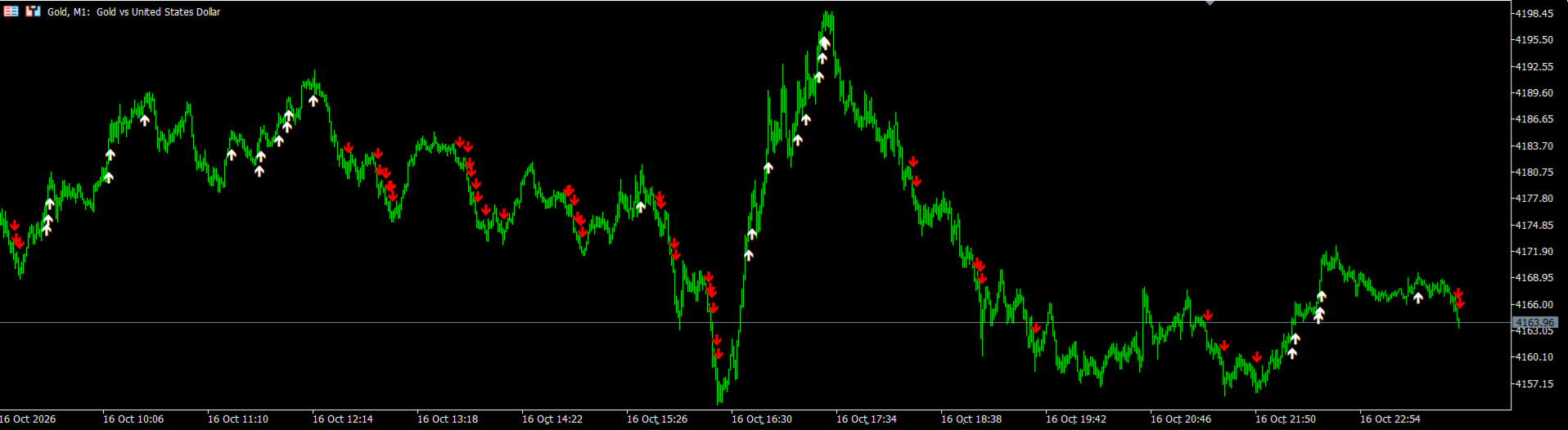
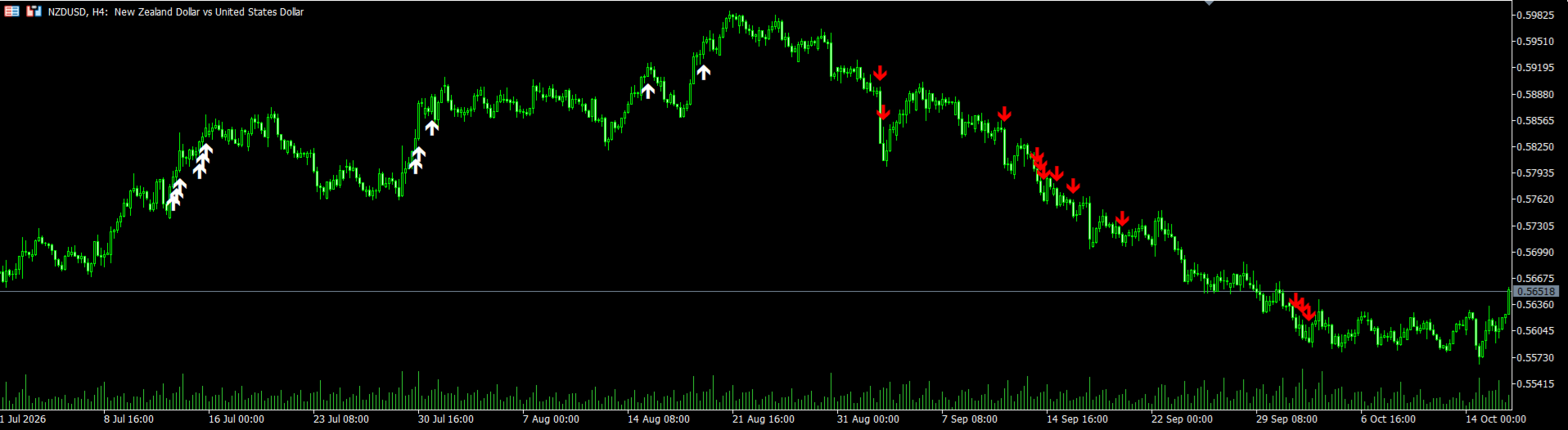
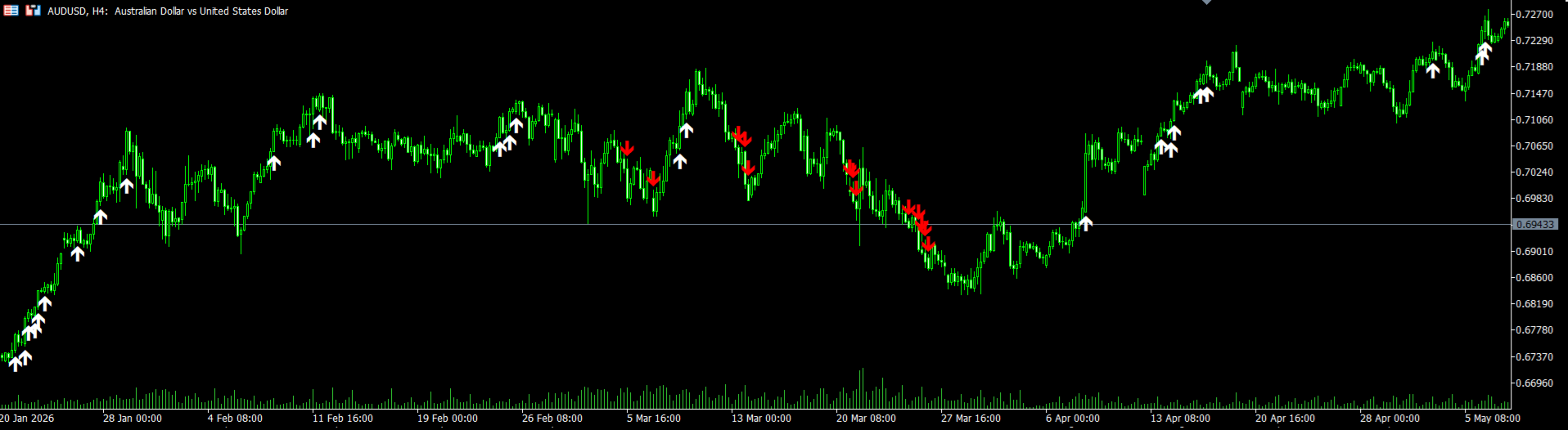
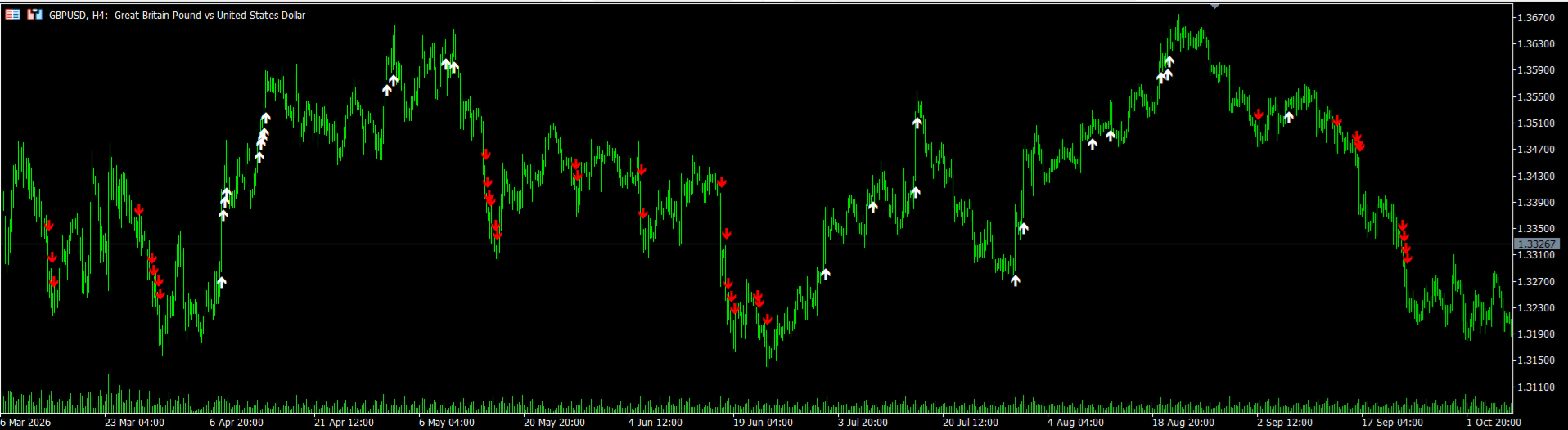
Axos Pro
- Göstergeler
- Sürüm: 2.5
- Etkinleştirmeler: 5

Multi-Indicator Confirmation | Price Action | Higher Timeframe Alignment | Forex | Gold | Crypto
Introduction
AXOS PRO is an advanced trend-confirmation indicator developed for MetaTrader 5. It combines multiple technical indicators with price action analysis to identify potential trend changes and continuation opportunities.
Unlike traditional indicators that attempt to predict reversals prematurely, AXOS PRO waits for confirmation of a potential change in market direction before generating its entry signal.
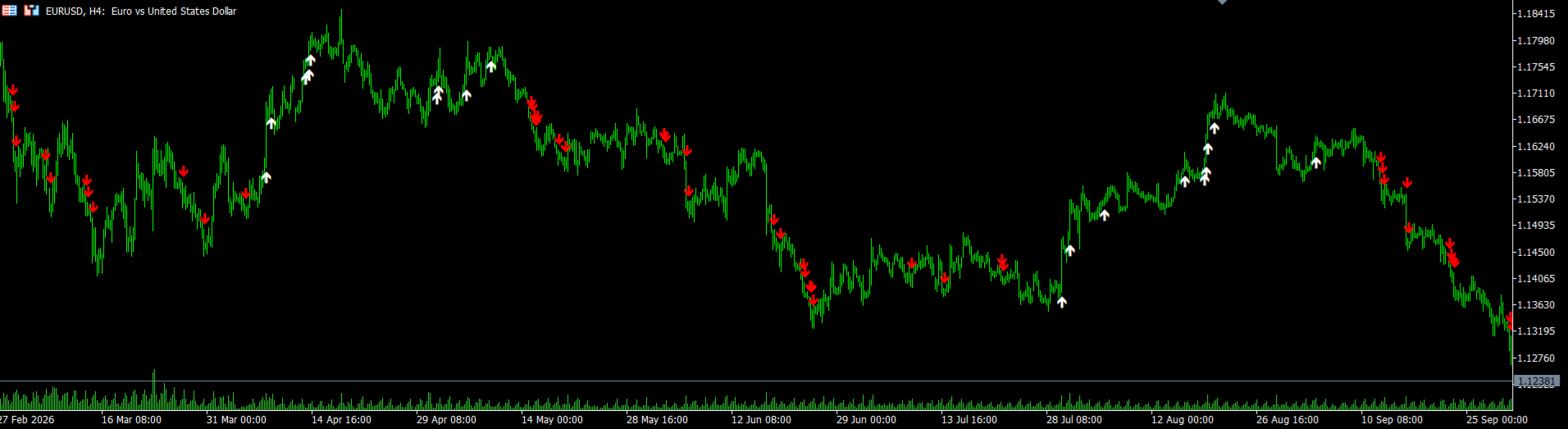
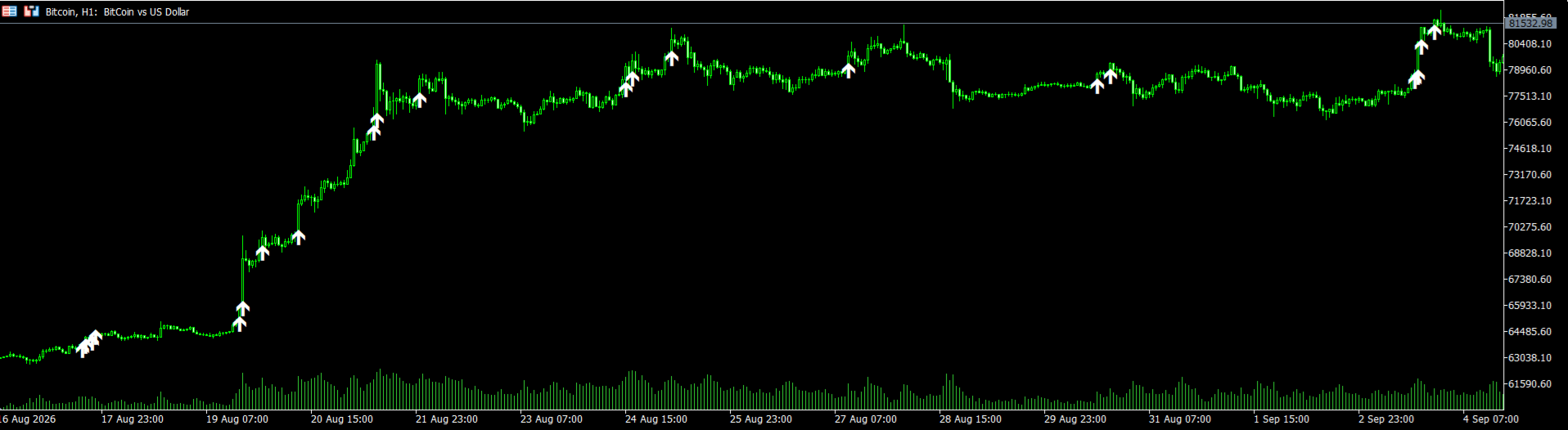
The system provides clear BUY and SELL arrows directly on the chart, allowing traders to identify potential entries and evaluate whether an existing trend remains supported.
AXOS PRO is designed for Forex currency pairs, Gold (XAUUSD), and cryptocurrency markets.
Main Features
-
Non-Repainting Confirmed Signals: Confirmed arrows are designed to remain fixed after the signal candle closes.
-
Trend Change Confirmation: Entry signals appear after the required trend-change conditions are satisfied.
-
Multi-Indicator Analysis: Combines several technical calculations and price action principles.
-
First Arrow Entry System: The first confirmed directional arrow indicates a potential trading opportunity.
-
Trend Continuation Arrows: Additional arrows in the same direction help traders evaluate whether to HOLD an existing position.
-
High Quality Signal Mode: Optional higher-timeframe alignment filter for more selective signal generation.
-
Swing-Based Stop Loss: Stop Loss placement can be based on the nearest relevant swing high or swing low.
-
Built-In Alerts: Alert and mobile push notification settings are available.
-
Email Notifications: Optional email notifications can be enabled.
-
Customizable Arrow Colors: BUY and SELL arrow colors and widths can be adjusted.
-
Multi-Market Support: Applicable to Forex, Gold, and cryptocurrency instruments.
High Quality Signal Mode – Higher Timeframe Alignment
One of the key features of AXOS PRO is its optional High Quality Signal filter.
This feature allows traders to choose between standard signal generation and a more selective approach based on higher-timeframe market alignment.
Standard Mode – High Quality Signal: FALSE
When the High Quality Signal option is disabled, AXOS PRO operates using its standard multi-indicator and price action confirmation system.
This mode provides more trading opportunities because it does not apply the additional higher-timeframe alignment requirement.
Developer-Reported Historical Test Results:
During approximately two years of historical testing, the developer observed a reported winning-signal rate of approximately 85% to 90% in standard mode.
These figures represent the developer's historical observations under the tested conditions and are not guaranteed future results.
High Quality Mode – High Quality Signal: TRUE
When the High Quality Signal option is enabled, AXOS PRO applies an additional confirmation filter that considers alignment with the higher-timeframe trend.
This mode is designed to reduce the number of signals and focus on opportunities that satisfy stricter market conditions.
Key Characteristics:
-
Higher-timeframe trend alignment.
-
More selective BUY and SELL signals.
-
Fewer signals compared with Standard Mode.
-
Additional confirmation of market direction.
-
Designed for traders who prioritize signal selectivity over trading frequency.
Developer-Reported Historical Test Results:
In the developer's historical testing, the High Quality mode produced a reported winning-signal rate of over 90% under the tested conditions.
This historical result does not imply that more than 90% of future trades will be profitable. Results can vary depending on the instrument, timeframe, market conditions, execution costs, and the method used to evaluate signals.
Standard Mode vs High Quality Mode
| Feature | Standard Mode | High Quality Mode |
|---|---|---|
| High Quality Signal setting | FALSE | TRUE |
| Multi-indicator confirmation | Yes | Yes |
| Price action analysis | Yes | Yes |
| Higher-timeframe alignment filter | Not additionally required | Enabled |
| Signal frequency | Higher | Lower |
| Developer-reported historical winning-signal rate | Approximately 85–90% | Over 90% |
| Trading approach | More opportunities | More selective opportunities |
Important: The reported percentages are historical test observations, not verified live-account performance or guaranteed profitability.
How AXOS PRO Signals Work
First BUY Arrow – Entry
When the indicator confirms a potential bullish trend change, the first BUY arrow appears after the signal candle closes.
This arrow represents a potential BUY entry.
Suggested Trade Management:
-
Wait for the signal candle to close.
-
Consider entering a BUY position.
-
Place the Stop Loss below the nearest relevant swing low, with an appropriate buffer.
-
Manage the position according to market structure and risk tolerance.
First SELL Arrow – Entry
When the indicator confirms a potential bearish trend change, the first SELL arrow appears after the signal candle closes.
This arrow represents a potential SELL entry.
Suggested Trade Management:
-
Wait for the signal candle to close.
-
Consider entering a SELL position.
-
Place the Stop Loss above the nearest relevant swing high, with an appropriate buffer.
-
Manage the position according to market structure and risk tolerance.
Additional Arrows – Trend Continuation and HOLD
IMPORTANT: Not every arrow is a new entry signal.
After the first confirmed directional arrow, AXOS PRO may display additional arrows in the same direction.
These arrows indicate that the indicator continues to detect conditions supporting the current trend.
They are intended as trend-continuation information rather than automatic instructions to open additional trades.
BUY Example:
First BUY Arrow → Potential BUY Entry
Second BUY Arrow → Bullish Trend Continuation / HOLD
Third BUY Arrow → Bullish Trend Continuation / HOLD
SELL Example:
First SELL Arrow → Potential SELL Entry
Second SELL Arrow → Bearish Trend Continuation / HOLD
Third SELL Arrow → Bearish Trend Continuation / HOLD
Continuation arrows do not guarantee that the current trend will persist.
Indicator Settings
AXOS PRO provides straightforward settings that allow traders to customize signal filtering and notifications.
Indicator Settings
InpHighQualitySignal
-
FALSE: Standard signal mode.
-
TRUE: High Quality mode with higher-timeframe alignment.
Alert and Notification Settings
EnableAlert
Enables or disables terminal alerts.
Push Notification (Mobile)
Enables or disables push notifications to a configured MetaTrader mobile application.
EnableEmail
Enables or disables email notifications when the MetaTrader terminal has been configured for email delivery.
Visual Settings
BUY Arrow: White by default.
SELL Arrow: Red by default.
Traders can customize arrow colors and widths through the indicator's Colors settings.
Recommended Markets and Timeframes
Forex Currency Pairs
Recommended Timeframes: M15, M30, H1, H4 and higher.
According to the developer's observations, AXOS PRO has demonstrated particularly promising performance on Forex currency pairs from M15 upward.
Gold – XAUUSD
Recommended Timeframes: M1 and M5.
AXOS PRO has been developed and evaluated with particular attention to Gold scalping.
The developer has observed encouraging signal behavior on the one-minute and five-minute charts.
Because Gold can experience rapid price movements, traders should carefully consider spreads, slippage, volatility, and Stop Loss placement.
Cryptocurrency Markets
AXOS PRO can also be applied to cryptocurrency instruments, including Bitcoin, depending on broker availability.
Traders should test the indicator on their preferred symbols and timeframes before using it with real capital.
Recommended Trading Workflow
Step 1: Select the preferred instrument and timeframe.
Step 2: Choose Standard Mode or High Quality Mode according to your trading approach.
Step 3: Wait for the first confirmed BUY or SELL arrow after candle closure.
Step 4: Evaluate the entry using market structure and the potential risk-to-reward ratio.
Step 5: Place a protective Stop Loss beyond the nearest relevant swing.
Step 6: Use additional same-direction arrows as trend-continuation information.
Step 7: Continue managing the position according to your risk management plan.
Why Choose AXOS PRO?
AXOS PRO brings multiple analytical techniques into one chart-based indicator.
Its confirmation-based design aims to help traders avoid premature reversal entries while maintaining a clear distinction between initial entry signals and continuation information.
The optional Higher Timeframe Alignment filter provides an additional level of selectivity for traders who prefer fewer signals under stricter conditions.
With built-in alert settings, customizable chart arrows, and support for different markets and timeframes, AXOS PRO provides a structured technical analysis framework for both short-term and higher-timeframe trading.
Important Information and Risk Disclaimer
AXOS PRO is a technical analysis tool and does not guarantee profitable trading.
Historical winning-signal rates reported by the developer are based on historical testing and may not reflect future trading performance.
Actual results depend on the trading instrument, timeframe, market conditions, spreads, commissions, slippage, and risk management.
Non-repainting confirmed signals do not eliminate false signals or trading losses.
Because AXOS PRO waits for trend confirmation, signals may appear after the initial market reversal has already started.
Traders are encouraged to evaluate the indicator using historical data, forward testing, and demo trading before using real capital.
AXOS PRO
CONFIRM THE TREND.
ENTER WITH STRUCTURE.
FOLLOW THE MOVE.
AXOS PRO – Advanced Trend Confirmation for MetaTrader 5.