 MetaTrader 5
 Эксперты
 Индикаторы
 Библиотеки
 Утилиты
 Виджеты
 Правила
Смотри обучающее видео по маркету на YouTube
Как купить торгового робота или индикатор
Запусти робота на
виртуальном хостинге
виртуальном хостинге
Протестируй индикатор/робота перед покупкой
Хочешь зарабатывать в Маркете?
Как подать продукт, чтобы его покупали
Бесплатные торговые утилиты для MetaTrader 4 - 17
 Ниже представлены торговые программы, упрощающие торговлю на форексе в MetaTrader 4. Наведите курсором на товар из списка ниже, чтобы прочесть описание и его предназначение.
StarBot Demo - данная утилита работает с открытыми ордерами Sell и Buy, закрывает частично прибыль при прохождении задаваемого уровня. Имеется три уровня частичного закрытия для ордеров Sell и Buy. Утилита также переводит Stop Loss при прохождении задаваемого уровня в безубыток. Работает на всех валютных парах и на всех периодах. Демо-версия ограничена торговлей на одной валютной паре EURUSD и ограниченным начальным лотом 0.04. Полную версию можно приобрести по ссылке: https://www.mql5.com/ru/ma
FREE
Утилита Visibility Switch Demo входит в серию продуктов MT4 Quality of Life Improvement. Индикатор упрощает переключение видимости индивидуальных объектов. Это позволяет устранить хаотическое смешение объектов на графиках, когда трейдеры создают объекты, затем переключаются на более крупный таймфрейм и видят, что эти объекты ухудшают видимость на графике. Демо-версия Visibility Switch работает только на паре AUDNZD. Полная версия Visibility Switch доступна здесь. По умолчанию каждый вновь создан
FREE

Панель показывает взаимное положение цены и выбранных скользящих средних (МА) по выбранным таймфреймам и символам.
Возможность контролировать одновременно: до 3-х символов; до 6-ти периодов; до 10-ти разных Moving Average. Версия для MetaTrader 4: https://www.mql5.com/ru/market/product/28281 Версия для MetaTrader 5: https://www.mql5.com/ru/market/product/28096
Параметры NUM_BAR - номер бара, на котором происходит работа (для работы только по закрытым барам параметр > 0); timeframe_1....timefr
FREE
Управляйте риском и упростите свою торговлю Бесплатная версия без ограничений с возможностью использовать до 20 сделок доступна здесь . С Fx Easy Trade вы можете легко оправлять ордера с автоматически рассчитанным объемом, создавать статистические отчеты, строить уровни поддержки и сопротивления на всех доступных таймфреймах в один клик, создавать оповещения, отправлять уведомления, сканировать рынок и т.д. Смотрите подробности ниже. Определите свой риск в евро или долларах (например, 20€), и си
FREE

Находите хорошие пары для торговли. Демо-версия без ограничений и со всеми функциями, но отображает не более 3 результатов. До 4 критериев. Свечные модели. Создавайте собственный фильтр с условиями ИЛИ/И. Например: (условие 1 ИЛИ условие 2) И (условие 3 ИЛИ условие 4). Нажмите на название пары в панели результатов, чтобы отобразить этот символ на всех открытых графиках. Загружайте собственный список пар. По умолчанию программа работает с парами: AUDCAD, AUDCHF, AUDJPY, AUDUSD, CADJPY, CADCHF, CH
FREE
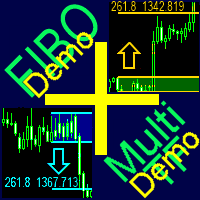
Готовая мультитаймфреймовая торговая система на основе автоматического построения и сопровождения уровней Фибоначчи на продажу и покупку по любому символу. Демо-версия - расчет последних 390 баров не производится.
Преимущества Определение направления тренда по 14 индикаторам в комплексе ( Cx ), на экстремумах ZigZag ( Z ), RSI ( R ), Impulse ( I ) Отображение значений 14 индикаторов, составляющих направление тренда ( Cx ) Построение горизонтальных уровней, линий поддержки и сопротивления, канал
FREE

Полнофункциональная ознакомительная версия для работы на "CADCHF". Полная версия - Risk Controller Если есть активные сделки на счёте и будет запущен робот, то все они кроме CADCHF будут закрыты! Утилита для автоматического контроля сделок и убытков, связанных с переторговками или любыми другими эмоциональными действиями.
Основные преимущества Ограничение суммарных потерь счета. При достижении MinimalDepo любая сделка будет закрываться. Ограничение убытков на день. Ограничение потерь в каждой
FREE

Общая информация Утилита URL html and xml to csv предназначена для получения содержимого формата html или xml из URL-адресов и для загрузки его в выходной файл формата txt или csv. Она позволяет получать веб-страницы целиком, начиная с протокола http, в виде документа для дальнейшего в мобильном приложении или в терминале MetaTrader. Это полезно для получения наибольшей пользы из данных о событиях и экономических календарях, а также публикаций, связанных с инструментами, доступными на торговом т
FREE

Выполняет клонирование графика, на котором выполняется. Открывает такой же график с теми же графическими построениями, набором индикаторов (с сохранением параметров) и остальными элементами. По сути, происходит глубокое копирование исходного графика с переносом шаблона на открываемый график. Символ и таймфрейм исходного графика так же сохраняются.
FREE

Это демонстрационная версия торговой утилиты CyberTrader Assistant. В демонстрационной версии невозможно задать размер лота (он всегда равен минимальному значению для данного символа), а также отсутствует функция округления цены для отложенных ордеров Данная утилита позволяет упростить осуществление основных торговых операций (открытие рыночных и установку отложенных ордеров, закрытие всех ордеров и ордеров по параметру), осуществлять контроль и минимизацию убытков при помощи автоматического пер
FREE

Утилита « Loss Control Panel » является информационной панелью для контроля убытков. Во входных параметрах пользователь задает начальный депозит и минимально допустимый размер эквити, при достижении которого все ордера, включая отложенные, принудительно закрываются, предотвращая, таким образом, потерю средств. Также есть возможность детально настроить цветовую схему панели. На панели отображаются следующие данные: Start deposit Начальный депозит. Min allowable deposit Минимально допустимый разме
FREE

Translated with Google:
Увеличьте размер лота сигнала, который вы подписали Когда вы пользуетесь услугами торгового копирования, у вас будет возможность торговать больше размерами лотов с этим советником. Например, если поставщик сигналов торгует микро-лотами, вы сможете добавить увеличенные размеры лотов в следующий тик после получения торгового сигнала. Описание параметра: Включено: включить / отключить EA EA магическое число: EA Магический номер Новый размер лота для торговли: Процент от ра
FREE

A script that allows you to deselect all selected items on the current chart.
Very simple, but at the same time can be a very useful script, especially when a keyboard shortcut is assigned to it.
MT4 has the same functionality under the right mouse button, but using the keyboard shortcut running this script is much faster and more convenient.
The script does not have any input parameters.
Have fun using this free tool.
FREE

HelloTrader - это совершенно новый вид продукта для платформы MetaTrader. Сразу после запуска утилита выводит случайным образом (random) одну из строчек фразы, цитаты известных людей или афоризму в левом верхнем углу терминала. Через каждые 5 минут запись меняется. В состав Demo версии входит 32 фразы, цитаты или афоризмы только на английском языке. Работать утилита начинает сразу после запуска и никаких настроек и функций больше не имеет. Единственная задача – рандомно выводить цитаты, фразы
FREE

Тестер поможет протестировать вашу ручную стратегию или проверить чужую . В обращении тестер достаточно прост,есть возможность регулировать скорость теста и лот, отдельно закрывать и модифицировать ордера. У данного тестера имеются следующие настройки: "Начальный лот" по умолчанию"0.01" "Шаг изменения лота" по умолчанию "0.01" "Шаг изменения скорости" по умолчанию "50" (условная величена, чем она больше, тем быстрее меняется скорость)
FREE

Этот скрипт для того, чтобы трейдер мог определиться со средней продолжительностью торговых сделок, при которой соотношение возможных прибыли и убытков будет оптимальным. Сначала давайте рассмотрим общий подход к определению оптимальной продолжительности торговых сделок. Введем следующие переменные: R – результат сделки; T – время, в течение которого сделка была открытой; W – время между закрытием предыдущей сделки и открытием следующей. Каждый трейдер стремится к тому, чтобы получить максимальн
FREE

Выбор уровней StopLoss и TakeProfit может оказать очень сильное влияние на общую результативность торговли. Кроме очевидных параметров торговой сделки – размеров возможного выигрыша или вероятного проигрыша – уровни StopLoss и TakeProfit также влияют на ожидаемую продолжительность сделки, и на прибыльность торговли в целом. Если вы с помощью скрипта « AIS-ODT » уже определили оптимальные длительности сделок, то можно приступать к определению параметров, связанных с уровнями StopLoss и TakeProfit
FREE
Утилита предназначена для приёма котировок из терминала МТ5 и МТ4 и открытие оффлайн графиков для дальнейшего анализа. Котировки передаются по тем символам которые находятся в "Обзоре рынка" в терминале МТ5. Утилита служит исключительно для приёма котировок, не производит никаких торговых операций и не выводит ни какой информации на оффлайн графике. Передатчик котировок из МТ5: https://www.mql5.com/ru/market/product/41628 Для отображение оффлайн графиков нужно сделай всё по инструкции: 1. От
FREE

Script utility to clean up your template from every object. Convenient and quick to use. Just drag the script onto your template and it will be cleaned of all visible and non-visible objects present. Very useful for objects that cannot be eliminated simply by writing or shapes, etc. We would appreciate your feedback, so we can better ourselves. Happy Trading.
FREE

Информационная панель показывает рыночную информацию о выбранном символе, которая скрыта от глаз трейдера. Можно менять цвет панели панели, цвет текста на панели. Её можно перемещать по экрану. Доступен на двух языках(русский и английский). Данные: Символ - названия символа; Поинт - Размер пункта в валюте котировки; Спрэд - Спрэд в пунктах; Стоп левел - Минимально допустимый уровень стоп-лосса/тейк-профита в пунктах; Размер контракта - Размер контракта в базовой валюте инструмента; Цена одного п
FREE

"Dimea Profit" is just a little helper keeping you informed about your current profit or loss. It shows the volume, the margin and the profit/loss of all open positions on a chart. Furthermore, the percentage progress is displayed. Daily swaps are also considered. There are no parameters to set up.
It is free of charge. Please check it out and leave a rating/comment. Happy trading
FREE

This is a basic tool that displays the Pip Value and Margin required for each symbol. It displays the same information for both a standard lot and the amount based on lot amount entered in the input section. It allows you to use different colors for each line Font Size FontType (Based on what fonts are installed in the system folder on the pc. Set to Ariel by default if the font entered is not available.) Allows X &Y coordinates so you can decide where on the chart the info is displayed.
FREE

Stop controller – утилита, которая следит за тем, чтобы у ордеров были установлены стоп-приказы и за уровнем просадки или прибыли. Стоп-приказы можно установить, как пользовательские, так и расчётные. Также она способна сопровождать рыночные ордера. Сопровождение выглядит следующим образом: утилита отслеживает промежуточные между ценой открытия и тейкпрофитом цели и частично закрывает сделки, при этом переводя стоплосс на уровень предыдущей цели. Частичное закрытие ордеров можно отключить. Чтобы
FREE

What is it
PricerEA is a utility to help any trader to place pending orders (stop or limit) at a specific price. It is designed for easy use. There is a parameter to set the prices you want to place orders. The expert can calculate automatically the lot size for each order. In addition, there is the possibility run trailing stop (work only for market orders) if triggered a pending order.
How use it
Use BuyStop to open buy order over than current price. Use BuyLimit to open buy order under than
FREE

Waddah Attar Fastest Close All.
This utility will Close all your orders in fastest possible way.
say you have 100 EURUSD , 75 GBPUSD and 120 USDJPY orders ... and you decide to close all of them .
the expert will make hedge to all thats orders in three orders only .. one to eurusd and one to usdjpy and one to gbpusd .
then close this 100% hedge of your all orders by CloseBy method.
you can set ProfitDollar (more than zero) and LossDollar (less than zero) proprties to auto close all orders
FREE
RSI Signalz ---------------------------------------------------------------------------------------------------------------------------------------------------------------------------------------------------------------------------------------------------------------------------------------------------------------------- NOW FREE FOR EVERYONE! TUNABLE IN THE INPUT SETTINGS - ENJOY :)
(IT DOES NOT TRADE FOR YOU. THIS IS TOO JUST HELP WITH MANUAL TRADING)
Fully Automated EA for marking good en
FREE

Order management can become difficult, especially when many orders are open at the same time, long and short. With the standard tools from Metatrader, only one order can be changed at the time.
In case you want to change the stop loss level or the take profit level of all your open orders this tool is for you. This tool allows to change easily the Stop loss level of ALL the open orders with a simple "Drag and Drop" on the chart.
All the orders with the same chart symbol will be modified. Add thi
FREE

My Account Brokers Details List This script displays the account data and broker terms regarding its operation. For example, broker name, account number, financial leverage, account currency, automatic trading approval, minimum lot, lot step, maximum number of lot, margin call, stop out and many other important data. It is easier to display such data on the chart in one moment with a click of the mouse, than to look for it in the contract or call the broker. Details are printed not on the scree
FREE
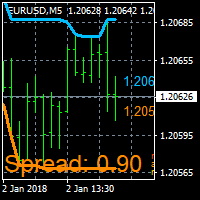
On Screen Display that shows highest highs and lowest lows on chart. Very helpful with manually trading.
DEFAULT SETTINGS (INPUTS) Highest high candle -10 meaning it goes back 10 candles on the timeframe you are on, to get the highest high point of that candle. Lowest low candle - 10 meaning it goes back 10 candles on the timeframe you are on, to get the lowest low point of that candle. Colors- you can change the colors of the lines. IT THEN TRACES THE LINE SO IT MAKES IT EASIER TO SEE WHATS
FREE

EXTERNAL EA MANAGER - это программа, предназначенная для помощи в управлении торговлей. Если вы хотите, чтобы какой-либо советник прекратил торговлю в определенный момент, например в ПЯТНИЦУ вечером, и вы хотели бы сделать это удаленно и автоматически ... EXTERNAL EA MANAGER - программа для вас. Он деинициализирует весь терминал и все работающие советники. В процессе деинициализации есть возможность убить все сделки и открытые ордера. Вы можете использовать максимум 20 магических чисел.
FREE

Утилита предназначена для закрытия и удаления позиций при достижении указанных значений убытка/прибыли в валюте/процентах от депозита. На графике отображается панель с информацией: прибыль/убыток на счете, количество открытых позиций, суммарные позиции в лотах. Параметры SHOW THE DASHBOARD - Показ информационной панели: TRUE - Да, FALSE - Нет. CURRENCY PAIRS - Валютные пары: TRUE - Все, FALSE - Текущая. STOP PROFIT IN $ OF THE DEPOSIT - Значение прибыли в валюте депозита. STOP LOSS IN $ OF
FREE

Utility for know all informations and settings of account where the platform is connected The informations that you can know are for example:
- The difference from server time and time of your PC
- The limit orders that you can place at market
- The credit that you have
- The stopout mode of your broker
- The exact name of company of your broker
and other informations
FREE

Utility for know all informations and settings of terminal where the utility is loaded. The informations that you can know are for example:
- The path of folder where the terminal start
- The path of folder where the terminal store the indicators, experts advisors etc
- The path of common folder
- The permission to use DLL, to automated trading etc
- The permission to send email, FTP or notifications to smartphone
and many other informations
FREE

Script to load on chart the orders, starting from "Signal history report" downloaded from MQL5. If you found a good signal on "Signals" section of this site and you want to see the history orders on chart, you can do it, following this steps: - Download the csv file of history orders - Copy file in the common folder - Launch the script and set the input that are: - Report type (MT4 or MT5) - File name - Delimiter (default is ;) - Name of symbol to load (if symbol on file is for example EURUSDi,
FREE

Utility for know all informations and settings of all symbols available on your broker The informations that you can know are for example:
- Spread
- Digits
- Tick value
- Size step
- Size minimum
- Size maximum
- Swap buy and sell
- Margin required (for 1 standard lot)
- Rollover day
- Execution mode
and many other informations You can filter the symbols by group or you can also choose to see the informations only of symbols available on market watch.
FREE

Product Overview
This tool is discretionary trading aid that executes a one-time entry when the conditions are set.
Action after the newest bar is fixed (opening action)
For example, there is no need to worry about being pruned by the shadow of the same price before that if you set it in the condition of when the closing price was broken.
It is not possible to set complicated conditions, and it is not designed for continuous automatic trading, but since it works after the time period is fix
FREE

Introduction Utility informer 'Know Your Symbols' quickly and easy let you know important information about your symbol. This utility covers any symbol i guess, attach it to one chart (time frame and symbol does not matter) and select what symbols you need information about and voila...Equipped with inputs for symbol prefix/suffix if they have such. Informs about; Current price Day high price Day low price Spread points Point size Money required for 1 lot Pip value in quote currency Swap for a b
FREE

Dear Friends, Market Inforamtion Downloader is a simple utilities program to download the market informations in a separate excel file with the name of the current chart you are using with same time frame. You needed to enter the number of periods. example. I'm in EURUSD, Day time frame. I choose to download the data last 50 candles(50 days) then I will enter 50 in the periods. After you getting the data, you use it for various analysis. Regards, Sankar Ganesh
FREE

Утилита открывает копии открытых сделок. Очень удобно, если вы пользуетесь сервисом " Сигналы " и хотите увеличить объем сделок.
Настройки: Символы: все символы только текущий символ Сделки: Buy Sell Magic Любой Magic Определенный Magic Лот Original - объем лота из "Оригинала"; Fix Lot - фиксированный объем лота; Lot X Mult - объем лота из "Источника" умноженный на коэффициент; Stop Loss From sender - Stop Loss из Источника; Without - без Stop Loss; Plus Fix - Stop Loss из Источника плюс фикси
FREE

Lines Resource is an technical indicator that dysplay lines in the chart giving some notion of supports and resistance levels for the correct functionallity of Optimal Investor EA an multicurrency EA that gives an 52% return monthly. Please install it, to run Optimal Investor EA correctly. Next to it, install Profitnator Resources Indicator FREE , to Run Optimal Investor EA.the second and last one resource.
FREE

Current Order Take Profit this indicator shows settled level of Take profit current opened order. If order Take Profit will be changed it will be shown on screen immediately. The same with pips left to get so as to close the position. If the price will drop beneeth the open order price it will change the color of pips digits left to gain. That is usefull when you change Take profit level by drag the price line using mouse to new level na wykresie.
FREE

Совершайте сделки на связанных символах, которые не имеют смысла. Так что, если мы можем проверить, какие из символов не связаны друг с другом и находятся в текущем тренде.
Для этого простого и быстрого анализа вы можете использовать эту утилиту. Просто запустите и посмотрите список пар символов, которые противопоставляются друг другу. Результаты анализа будут напечатаны в журнале стратегий.
Дублирование A -> B == B -> A не отображается.
FREE

Australia Bank Functions: Navigates movements in the AUDUSD, a highly traded currency pair. Facilitates risk management and order adjustments based on your settings. Trades within specified hours with the AUDUSD pair, reducing noise. Please note: Trading involves risks. The Australia Bank expert advisor provides tools for analysis; however, results may vary. Use at your own discretion. The Australia Bank expert advisor is a user-friendly tool designed to assist you in your trading experience. Do
FREE

EA England Bank Functions: Exclusively trades the GBPUSD pair on the 1-hour timeframe. Relies on technical and fundamental analysis, combining indicators like "Gap size 75" and events such as Bank of England decisions. Automatically adjusts Stop Loss and Take Profit levels based on user-configured settings for risk management. Executes trades starting from 01:00:00 (broker's time) onwards and focuses solely on the GBPUSD pair.
FREE

Good EA to help to earn money easily. (Full Version)
Strategy:
MA - A moving average (MA) is a stock indicator that is commonly used in technical analysis. The reason for calculating the moving average of a stock is to help smooth out the price data over a specified period of time by creating a constantly updated average price.
BB - Bollinger Bands work as an oscillator measurer. It indicates whether the market has high or low volatility, as well as overbought or oversold conditions. The m
FREE

EA New Zealand Bank - Automated Trading for NZDUSD Instructions: Compatible brokers: TICKMILL, TitanFX, IcMarkets, FXPig. Symbol: NZDUSD. Recommended account type: LOW SPREAD. Timeframe: 1 HOUR. Please note that I do not recommend using this expert advisor with any broker outside the list. It has been specifically developed and tested for optimal performance with the mentioned brokers and symbol. To get started, I recommend testing the strategy on a demo account. Conduct a thorough strategy test
FREE

Patrick Loquema is a fully automatic robot, entering the market randomly will always remain with a sell order and another open buy order ... he uses a system similar to martingale, only without keeping open orders, but increasing the volume by multiplying by 1.5 for each new losing order until it closes positively. The only parameters to be changed by the user is the initial lot, of course ... and “Stopp Distance”. Now you ask yourself, and take profit? double the stop ... And what is the multi
FREE

This script TEST and show the REAL commissions applied. It will open minimal (0.01) size orders, so your account WILL BE charged. Wait the orders to reach the TakeProfit, then in the Account History, check the Commission, Profit and Comment of each position. MUST run on REAL account. Example:
+ Take Profit 70
- Spread 25
- Commission 18
= Profit 0
I made this script because tired of brokers lying on spread and commissions.
FREE

A script that allows you to select all items on the current chart.
Very simple, but at the same time can be a very useful script, especially when a keyboard shortcut is assigned to it. You no longer need to manually select all objects on the chart. This is the opposite script to my "Unselect All" script. The script does not have any input parameters.
Have fun using this free tool. Please let me know what do you think about it.
FREE

This script is a part of the Sounder_TopBottomLevels product which is intended to alarm the trader by sound when a Symbol's price goes above or below certain level(s). One of the product's features is a handy operation. You manage the levels by dragging lines on the chart with the mouse. Another feature is an optional Windows application which shows the chart that currently alarms the trader. And the sounds are customizable which may be useful for office with a number of the terminals running
FREE

Garfield Equity Loss Closer is an expert advisor who will stay in control of the equity / float of the account, when the negative float reaches the amount defined from the inputs, he will close all existing orders.
Only one input, it is the negative amount in the currency of your account that you must reach to start closing all positions.
Its use is recommended for those expert advisors who use a volume increase system, either hedging (recovery zone) or martingale since sometimes without real
FREE

Martingala Assistance, as its name says ... It is an assistant, an expert advisor that monitors all the orders for the asset in which it has been placed, no matter if that order was by some other expert advisor or by the trader placed on the Manually, he will start his work after each order that is negative.
See more products on: https://www.mql5.com/en/users/joaquinmetayer/seller .
FREE

Simply Parabolic SAR EA is an expert advisor that places orders in favor of the trend changes of the "Parabolic Stop And Reverse" indicator, placing its take profit, stop loss and trailing stop. You can see more of my products here: https://www.mql5.com/en/users/joaquinmetayer/seller
Inputs: Lots TakeProfit in points StopLoss in points TrailingStop distance in points Step PSAR Max PSAR
FREE

Virtual Exchange Reserve Equity Monitor In an environment where exchanges offer increasingly high leverage ratios, it is all the more important for traders to tightly regulate their level of equity . This software is designed to be run in the background on any virtual private server that can run Meta Trader 4/5. It implements basic equity control functions ahead of the broker---allowing users to set their own equity trailing stop, an equity limit to lock-in a certain profit margin, and a unive
FREE

What is a tool ? Tracking your profit from the present - the past 30 days, Presented profit summary and movement is greater or less than 0 only. notice : must select show all history at account history tab. How to use Place the tool on any currency pair, any timeframe and set magic number to track your profits. Currency Pair : Any Timeframe : Any Input Parameter Track from Magic number (Manual order set 0) Meaning : Input the magic number to tracking the profit from present - the past 3
FREE

Show the account information on the chart, change the color automatically depending on the background, it adjusts to each chart and is updated every time the price moves a tick, that's why it is an expert advisor even if it is used as an indicator. Cannot change size.
You can see my other products here: https://www.mql5.com/en/users/joaquinmetayer/seller
FREE

Close All Pendings is a simple script that, when thrown on the graph, closes all pending orders that are open, ONLY pending orders, orders already open will not be closed, no matter in which pair it is thrown ... it will close all. It has no inputs, just throw it on the chart and it will run.
You can see more of my products here: https://www.mql5.com/en/users/joaquinmetayer/seller
FREE

PRODUCT description:
Market Data Logger is a utility tool specially created for the sole purpose of logging your Broker's market data to a text file. With this tool, you will be able to record and export metrics from your MT4 Broker such as the "MT4 Market Watch Time", "Bid Price", "Ask Price", "High Price", "Low Price" and various measures of "Spread". This tool may be of interest to traders, data scientists wanting to capture and analyze market data, entrepreneurs, archival purposes, hobbyi
FREE

This expert advisor is a reverse version of the operation of "Dexter EA" ( https://www.mql5.com/en/market/product/67307 ) which works with the martingale method ... therefore it works in the opposite way. For each positive order, it will open one in the same direction with its respective increase in volume if the trader so wishes, on the side of negative orders, its lot will not increase.
Inputs Lot size Multiplier First order stop loss Profit distance to place a stop limit order Revert aver
FREE

You can check out comment #1 how does it work This is a very useful tool, enter the currency charts you need to open, use the symbol "/" to distinguish them, and select the periodicity /TF of the chart, press the button and they will open the charts for you in batches without you having to manually open them each! Because some EA use multiple currency pairs strategy, but do not support one chart to support all currency pairs, so I developed this tool, hope you like it, if you are satisfied with
FREE
If you use several charts open at the same time, you know how boring it is to apply formats to each chart individually. This script can change all open charts using a single command. Parameters: 1 - Choose symbol to put on charts: apply the selected symbol to all charts. If "current", it does not change the symbol; 2 - Choose timeframe or leave empty: apply the selected timeframe to all charts. If "CURRENT", it does not change the timeframe; 3 - Apply template to the charts: If true, apply the t
FREE

Waddah Attar Easy Positions Risk Management
This EA gives you a full ability to close one position or close all positions . Close buy or sell trades in any position . Close profit or loss position . by clicking on a command button on the chart with confirmation message . Show you a full information about your positions like : count - lots - average price - points - profit - profit % - used margin for this position and the risk percent . and also the scrolled table of trades that position has
FREE
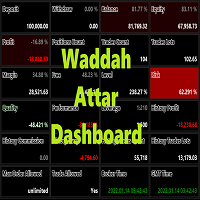
Waddah Attar Dashboard
Simple App show you the most important information about your account , trades and history . Risk , Quality and Performance are the most important numbers you must watch them carefully . also the important thing you must do is Focus on the RED Color on the board . you can control the font name , font size , width , height and padding properties . the information is auto arranged on the chart . don't worry about it .
Thanks .
recommended product for position risk manage
FREE
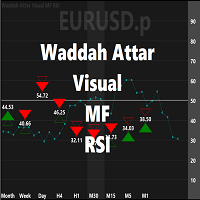
Waddah Attar Visual MF RSI
this App show you RSI values and status for all frames in one chart .
Filled Triangle means current RSI Value . Framed Triangle means previous RSI Value . Up Arrow and Green Color means the direction of RSI is up . Down Arrow and Red Color means the direction of RSI is down .
when you move mouse cursor on frame column .. the full RSI chart will drawn .
you can change RSI Period in the app properties .. the default is 14 .
thanks and good luck .
FREE
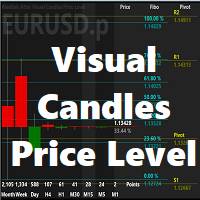
Waddah Attar Visual Candles Price Level
This utility shows you the last candle of every time frame in same scale . and show you the levels of fibo and pivot for this candles according to the big time frame . you can set then first big time frame by change time period for the chart .
the main benefits for this utility is you can see all last candles on the same drawing scale . and know where is the current price movements and directions area .
Thanks .
FREE

Tetris remains one of the most fun and addictive pieces of software to ever grace the computing scene. That's right, everything that everyone loves about Tetris can now be experienced on MT4 platform. Its beautiful simplicity and surprisingly fast-paced gameplay make it an exceptionally easy thing to just pick up and play on short notice. This version comes with everything everyone loves about Tetris. It has all six of the classic tetrimino shapes, the steadily growing level of challenge tha
FREE

Currency Pair Information
Useful indicator to have the following information on the chart: 1. Asset Name 2. Current Spread 3. Current ATR of the actual time frame 4. Time to close of the candle
It is located at the top right of the chart. If you request it, I can add the parameterization of the location of the information.
Other tools:
AMS Forex System
hockfx Price Alert Pro
hockfx
FREE

Индикатор Week7D помогает трейдерам определить день недели на ценовом графике. Он просто помечает каждый период или каждую свечу днем недели в начале нового торгового дня. Это позволяет трейдерам наблюдать, как цены движутся в любой день.
Индикатор Week7D имеет несколько параметров настройки, которые трейдеры могут использовать для изменения визуального представления индикатора.
Переменная “BarCount” изменяет количество дней, в течение которых индикатор будет обозначать день недели в каждый д
FREE

This is an expert advisor that works more like an indicator.
Its functions are the following: - Print the balance and equity in Arial font size 40 (cannot be changed) - Change chart background and candle colors depending on the close of the previous candle and the current price level.
Now... what is this for or what can I use it for? Good. Personally I use it to put it as the main chart while in other charts I leave other expert advisors working, what I care to see is the balance and equity..
FREE

Это развлекательная игра, разработанная на МТ4, и данная программа предоставляется бесплатно. как проходит игра Используйте игровую ручку, чтобы управлять направлением змеи вверх и вниз, влево и вправо, и искать что-нибудь поесть.Вы можете получить определенное количество очков за каждый укус, и тело змеи будет становиться все длиннее и длиннее, а чем длиннее тело, тем сложнее играть. Единственная цель Снейка - вырасти в самую длинную змею! Двигайте джойстиком, чтобы управлять положением змеи,
FREE
MetaTrader Маркет - уникальная площадка по продаже роботов и технических индикаторов, не имеющая аналогов.
Памятка пользователя MQL5.community расскажет вам и о других возможностях, доступных трейдерам только у нас: копирование торговых сигналов, заказ программ для фрилансеров, автоматические расчеты через платежную систему, аренда вычислительных мощностей в MQL5 Cloud Network.

Вы упускаете торговые возможности:
- Бесплатные приложения для трейдинга
- 8 000+ сигналов для копирования
- Экономические новости для анализа финансовых рынков
Регистрация
Вход
Вы принимаете политику сайта и условия использования
Если у вас нет учетной записи, зарегистрируйтесь