Trade Dashboard MT4

40 USD
Download demo:
692
Publicado:
20 abril 2022
Versão atual:
10.21
Não encontrou o robô certo? Encomende um para você
no serviço Freelance.
Ir para o Freelance
no serviço Freelance.
Como comprar um robô de negociação ou indicador?
Execute seu EA na
hospedagem virtual
hospedagem virtual
Teste indicadores/robôs de negociação antes de comprá-los
Quer ganhar dinheiro no Mercado?
Como apresentar um produto para o consumidor final?

Você está perdendo oportunidades de negociação:
- Aplicativos de negociação gratuitos
- 8 000+ sinais para cópia
- Notícias econômicas para análise dos mercados financeiros
Registro
Login
Você concorda com a política do site e com os termos de uso
Se você não tem uma conta, por favor registre-se
Quality product + quality customer service: one cannot ask for more!!! 😉
The Trade Dashboard is a great tool, I really like it! I totally agree that this product deserves 5 stars and more. And I also can say that the feedback from the author/programmer is very fast and amazing! I asked for some little changes like for example that some settings should stay the same if you switch the time frame of the chart, and the author pretty quickly realized and changed this. For me as an active daily trader those "little" things are quite important and I was very glad for these changes/updates! Another thing would be very helpful for me, maybe also for other traders, if this feature could be added:
If a have some/several positions open in the same market, it would be great if I could set/change ALL positions to the SAME Stop Loss and Take Profit, in points/Pips or in levels. Then this Trade Dashboard, which I enjoy already very much, would be even better in my view and close to perfect.
I want to say it again, because I have been searching for such a trading tool for a long time: This product is a very helpful, nice and very well conceived, amazing tool! Congratulations!
Hello mate. Thanks for the continuous updates and improvements, and for listening to suggestions. I think version 4.50 has a little bug: although 'Keep Reward to Ratio' is set to True, if I drag the SL level, the TP does not maintain the initial ratio. I hope I'm not missing something.
Hello mate. Thanks for the continuous updates and improvements, and for listening to suggestions. I think version 4.50 has a little bug: although 'Keep Reward to Ratio' is set to True, if I drag the SL level, the TP does not maintain the initial ratio. I hope I'm not missing something.
Hello mate, thanks for sharing this, I've tested the function, it seems fine, in your video the "TP/SL Ratio" button is not pressed. why don't you press it? you are showing that in the setting it is false, but although it is false you obviously can press and unpress it from the dashboard. the setting only imposes the initial way of dashboard loading. Plz let me know if it won't work the way you expect. thanks.
Hello mate, thanks for sharing this, I've tested the function, it seems fine, in your video the "TP/SL Ratio" button is not pressed. why don't you press it? you are showing that in the setting it is false, but although it is false you obviously can press and unpress it from the dashboard. the setting only imposes the initial way of dashboard loading. Plz let me know if it won't work the way you expect. thanks.
Well, after all this time that I have been using your EA I didn't even know that was a button as I never touched it before LOL. After updating to the new version I simply applied a template that I was using with the previous versions, which never required me to touch that button to keep the settings before. But now that I'm paying attention to it, I noticed something even weirder: if I press the Ratio button and then press either Draw or SL/TP , the button goes back to the un-pressed position and needs pressed again to keep the ratio. Saving a template doesn't work either. I hope that's not the way you intend it to work as it would not be practical! Thanks
Well, after all this time that I have been using your EA I didn't even know that was a button as I never touched it before LOL. After updating to the new version I simply applied a template that I was using with the previous versions, which never required me to touch that button to keep the settings before. But now that I'm paying attention to it, I noticed something even weirder: if I press the Ratio button and then press either Draw or SL/TP , the button goes back to the un-pressed position and needs pressed again to keep the ratio. Saving a template doesn't work either. I hope that's not the way you intend it to work as it would not be practical! Thanks
Hello You, Thanks for the comment.
In the new version (4.6) I modified that issue, however, keep in mind that if you have both SL and TP line locked to the chart, when you draw trade lines, the TP/SL ratio button will get unpressed automatically, because logically it cannot keep a certain ratio between TP and SL when both lines are supposed to stay on a certain price.
Hello You, Thanks for the comment.
In the new version (4.6) I modified that issue, however, keep in mind that if you have both SL and TP line locked to the chart, when you draw trade lines, the TP/SL ratio button will get unpressed automatically, because logically it cannot keep a certain ratio between TP and SL when both lines are supposed to stay on a certain price.
Hello again. I was wondering: is there a way to change the default % to partially close on the panel? I would like to set my own rather than the fixed 50% that I keep seeing now.
Hello you, Good idea, I ll add that in the next update.
... Another thing would be very helpful for me, maybe also for other traders, if this feature could be added:
If a have some/several positions open in the same market, it would be great if I could set/change ALL positions to the SAME Stop Loss and Take Profit, in points/Pips or in levels. Then this Trade Dashboard, which I enjoy already very much, would be even better in my view and close to perfect.
I want to say it again, because I have been searching for such a trading tool for a long time: This product is a very helpful, nice and very well conceived, amazing tool! Congratulations!
I second this request 100%. For that purpose I use a script which for traditional SL/TP works perfectly, although it would be handy to have it implemented with the EA. But the very cherry on the cake would be to have such a tool for hidden SL/TP. Not sure if that's possible but I wouldn't be surprised if Fatemeh would be able to bake it sooner or later, since his proven talent. ;)
I second this request 100%. For that purpose I use a script which for traditional SL/TP works perfectly, although it would be handy to have it implemented with the EA. But the very cherry on the cake would be to have such a tool for hidden SL/TP. Not sure if that's possible but I wouldn't be surprised if Fatemeh would be able to bake it sooner or later, since his proven talent. ;)
Hi, thanks for your good suggestions, currently I am working on the product add some great features, I ll include this feature in the near future.
Hello again. I was wondering: is there a way to change the default % to partially close on the panel? I would like to set my own rather than the fixed 50% that I keep seeing now.
Hello you,
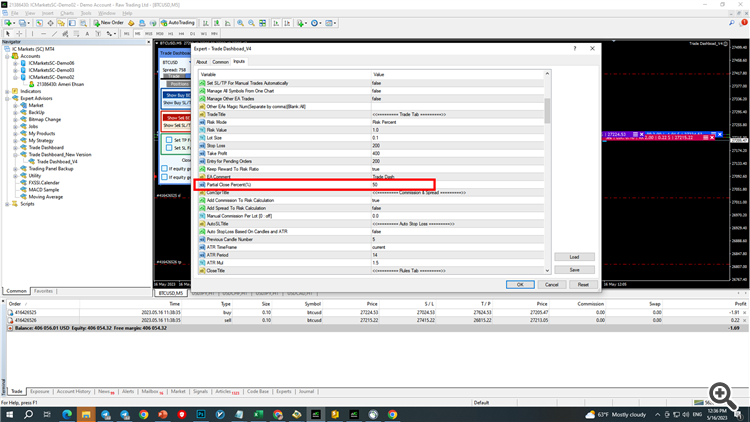
This feature has been added in the recent version 4.7. You can change the default close % on the dashboard in the setting under Partial Close Percent.
In the last version 4.7, a big modification has happened as follows.
1-In the setting tab, you can check "Manage All Symbols From one chart" and "Manage Other EA Trades"
--> if you check: "Mange All Symbols From one chart" then you can freely go from one chart to another with the same dashboard and take trades. you don't need to open multiple dashboards.
--> if you check: "Manage Other EA Trades" You can manage trades that are taken by other EAs, you can specify which other EA magic numbers the dashboard must verify and manage under "Other EA Magic Num" input setting, if you leave this setting blank the EA will manage all other magic numbers by checking this feature.
---> "Orders" tab: It is just like position tab but it shows pending orders not active orders.2-The "Close" tab has been removed and instead the "Basket" tab has been added. Basket tab has three sub tabs.
---> "Positions" tab: in this tab you can see all the trades that is currently under the management of dashboard. if you click on "Ticket" title it will show the symbols of trades instead of tickets. You can see whether PC or RF or TS feature are on for each trade. if you click on any trade, the modification panel will pop up and you can change that trade features.
---> "Rules" tab: It is very important tab, if you press on "Show Buy BE" the dashboard calculate the buy breakeven price and show it on the chart. if you press on "Show Buy SL/TP", the dashboard shows some imaginary SL/TP line on the chart that you can visually drag and change, if you check "Set TP" the EA change the TP for the whole buy trades and set all TPs to the specified value, you can set the TP/SL based on account currency or based on point distance. if you keep "Set TP" checked, the dashboard will modify TP for the whole buy trades after every new buy trade or any buy trade closure. Basically it will update buy breakeven price and following SL/TP size. So if you don't want it to update SL/TP, uncheck it.
The same story will happen for checking "Set SL" for buy and sell basket.
In this tab, you can set and aggregate TP and SL in account currency for the whole basket, for example if you set "Basket TP" to 100$, then if the total profit of whole basket comes to 100 it will close all trades, on the other hand if you set "Basket SL" to 100$, if the total profit of whole basket comes to -100$ lost it will close the whole basket.
The equity part I suppose is easy to understand.
These features has been added as per my customers demand, plz play with the new features and give me your feedbacks, Also I am not sure how much the old "Close" tab was helpful, but it is gone now, if you think it was helpful for you I can bring it back, Let me know your suggestions and preference under this very page.
Thank you all.
The Trade Dashboard is a great tool, I really like it! I totally agree that this product deserves 5 stars and more. And I also can say that the feedback from the author/programmer is very fast and amazing! I asked for some little changes like for example that some settings should stay the same if you switch the time frame of the chart, and the author pretty quickly realized and changed this. For me as an active daily trader those "little" things are quite important and I was very glad for these changes/updates! Another thing would be very helpful for me, maybe also for other traders, if this feature could be added:
If a have some/several positions open in the same market, it would be great if I could set/change ALL positions to the SAME Stop Loss and Take Profit, in points/Pips or in levels. Then this Trade Dashboard, which I enjoy already very much, would be even better in my view and close to perfect.
I want to say it again, because I have been searching for such a trading tool for a long time: This product is a very helpful, nice and very well conceived, amazing tool! Congratulations!
Your suggestion has been added to the product, plz try.
That is exactly what I wished - and you have added even more basket functions! For my way of trading these new basket features are extremely helpful. Now your Trade Dashboard is not just great, it's now extraordinary great!
In my opinion: This Trade Dashboard tool is great for every trader. But especially for traders, who have gained good experience by trading over a time period of 3 or 5 years or more, your Trade Dashboard is really helpful and professional. Thanks a lot!
Would it be possible to hide the info while keeping the panel still open? Or even better, to pick which ones we would like to see? Sometimes looking at the current loss/win might lead one to manage trades incorrectly. Thank you
I second MasterMag1298's comment 100%! This EA never stops getting better and better!
Would it be possible to hide the info while keeping the panel still open? Or even better, to pick which ones we would like to see? Sometimes looking at the current loss/win might lead one to manage trades incorrectly. Thank you
Thanks for you comment, can you give me more details of your request, I am not exactly sure what you mean?
Thanks for you comment, can you give me more details of your request, I am not exactly sure what you mean?
Sure. I mean the option to hide the lots traded, the loss/win amoun and the percentage, while still displaying the SL/TP pips and the relative price levels.
Adding a picture
I got it now, can u explain how removing those information can help one trade better?