Visual Order Tracking EA

79 USD
Download demo:
18
Publicado:
26 setembro 2020
Versão atual:
1.45
Não encontrou o robô certo? Encomende um para você
no serviço Freelance.
Ir para o Freelance
no serviço Freelance.
Como comprar um robô de negociação ou indicador?
Execute seu EA na
hospedagem virtual
hospedagem virtual
Teste indicadores/robôs de negociação antes de comprá-los
Quer ganhar dinheiro no Mercado?
Como apresentar um produto para o consumidor final?

Você está perdendo oportunidades de negociação:
- Aplicativos de negociação gratuitos
- 8 000+ sinais para cópia
- Notícias econômicas para análise dos mercados financeiros
Registro
Login
Você concorda com a política do site e com os termos de uso
Se você não tem uma conta, por favor registre-se
Hi Everyone,
I released a major update today, version 1.6, which adds a few things:
Here is a gif video that shows the new features in operation (you may need to click on the image to see it):
Hello, great EA, can you make the window larger?
with over 20 pairs, you quickly lose track when scrolling.
And maybe a comment field for closed trades, as with the open trades already present....
Thanks
Hello, i set start time 22.04.2021 21:00 , but EA doesnt show the closed trades from last Night...other Report Tool show the trades with same settings..
Hello, great EA, can you make the window larger?
with over 20 pairs, you quickly lose track when scrolling.
And maybe a comment field for closed trades, as with the open trades already present....
Thanks
Hi Wroger,
Good idea. I know exactly what you mean.
I likewise trade lots of pairs and sometimes find it inconvenient to scroll. When trading 20 pairs, only 10 show up, and I have to scroll down to see the rest, as seen in this screenshot:
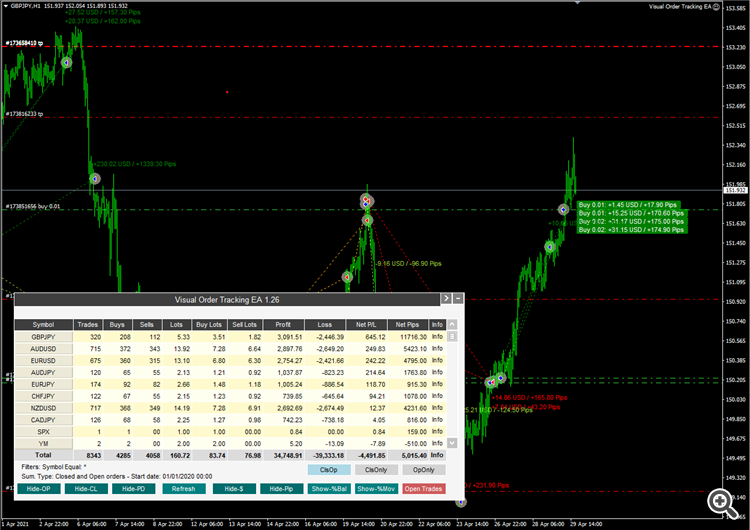
Because of your suggestion, I will be creating an option to indicate the maximum quantity of lines of the grid.
Hello, i set start time 22.04.2021 21:00 , but EA doesnt show the closed trades from last Night...other Report Tool show the trades with same settings..
Odd, it should be reporting all closed trades. It's been a few days for you to test things out more. Are you still having trouble with reporting trades from previous nights?
Also, to get instant help and feedback on any of my utilities, I've set up a telegram discussion group:
https://t.me/algosamurai_utilities
Thanks to wronger's suggestion about increasing the rows in the panel to accommodate more symbols one can see at a glance, I added a parameter, Max grid lines=10, to enable you to increase the number of symbol rows that you can see at a glance. Before I had created the panel with max 10 symbol rows with the option for you to scroll down to see all other symbols. Now you can indicate Max grid lines=20 to see all your 20 instruments at a glance.
Thanks to wronger's suggestion about increasing the rows in the panel to accommodate more symbols one can see at a glance, I added a parameter, Max grid lines=10, to enable you to increase the number of symbol rows that you can see at a glance. Before I had created the panel with max 10 symbol rows with the option for you to scroll down to see all other symbols. Now you can indicate Max grid lines=20 to see all your 20 instruments at a glance.
Thank you for Update, great....
In version 1.35 I have created a button on panel that exports summary report to CSV file, saved at Data Folder > MQL4 > Files
In version 1.35 I have created a button on panel that exports summary report to CSV file, saved at Data Folder > MQL4 > Files
Great, can we have this EA also on mt5 ???
thanks for new Version 1.36 , great to see now also the Comment in History, i have lot of Strategys with different Comment. Now i see quick how which Strategy works good or not...