Cross Trend Line to Trade

Este consultor fornece os seguintes recursos:

  • Abra uma posição: quando o preço cruzar a linha de tendência, abra uma ordem longa ou curta.
  • Fechar: Quando o preço cruzar a linha de tendência, feche sua posição longa ou curta.
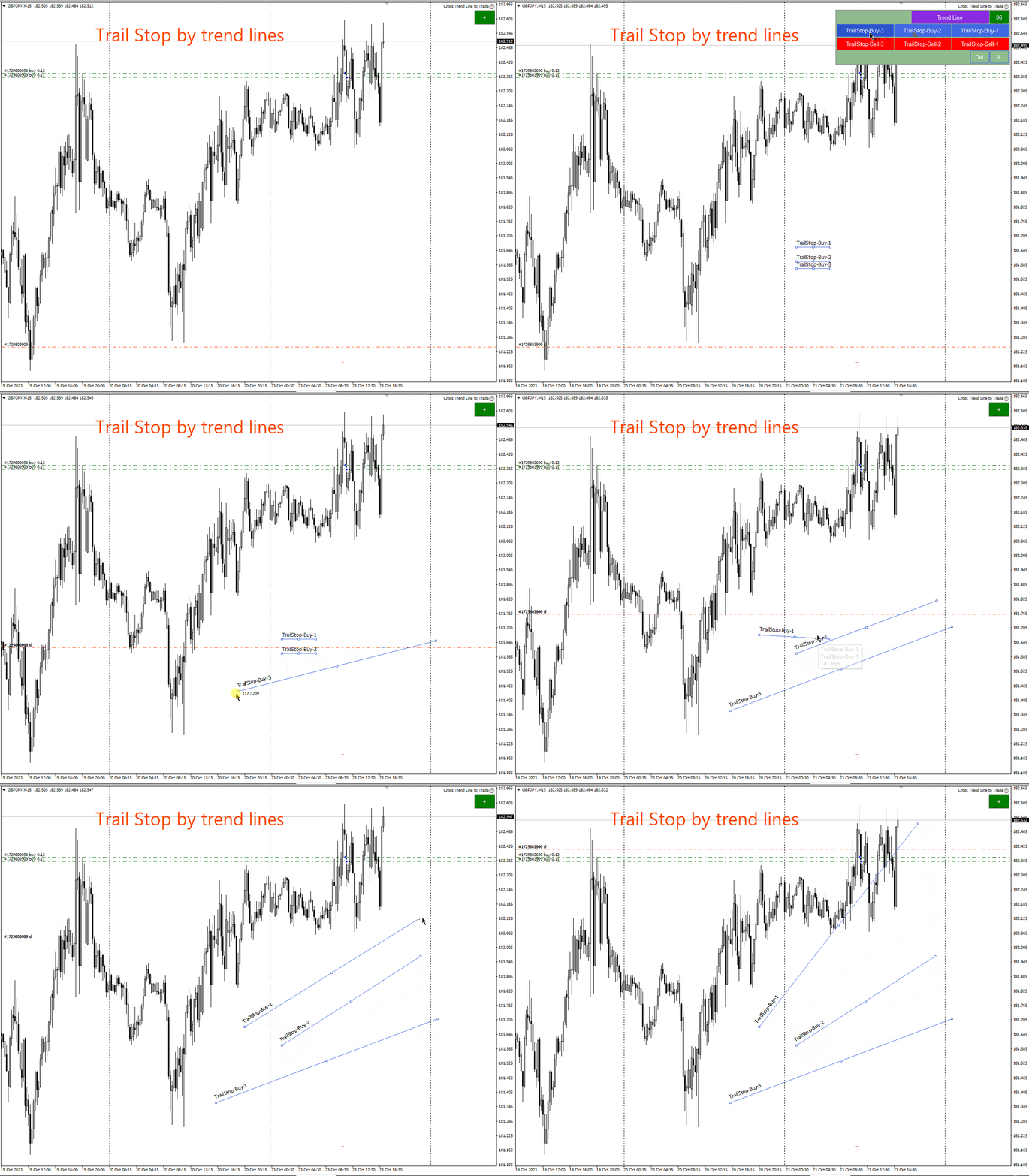
  • Trailing Stop Loss – O EA continuará a aumentar o stop loss para pedidos longos ou reduzir o stop loss para pedidos curtos ao longo da linha de tendência.
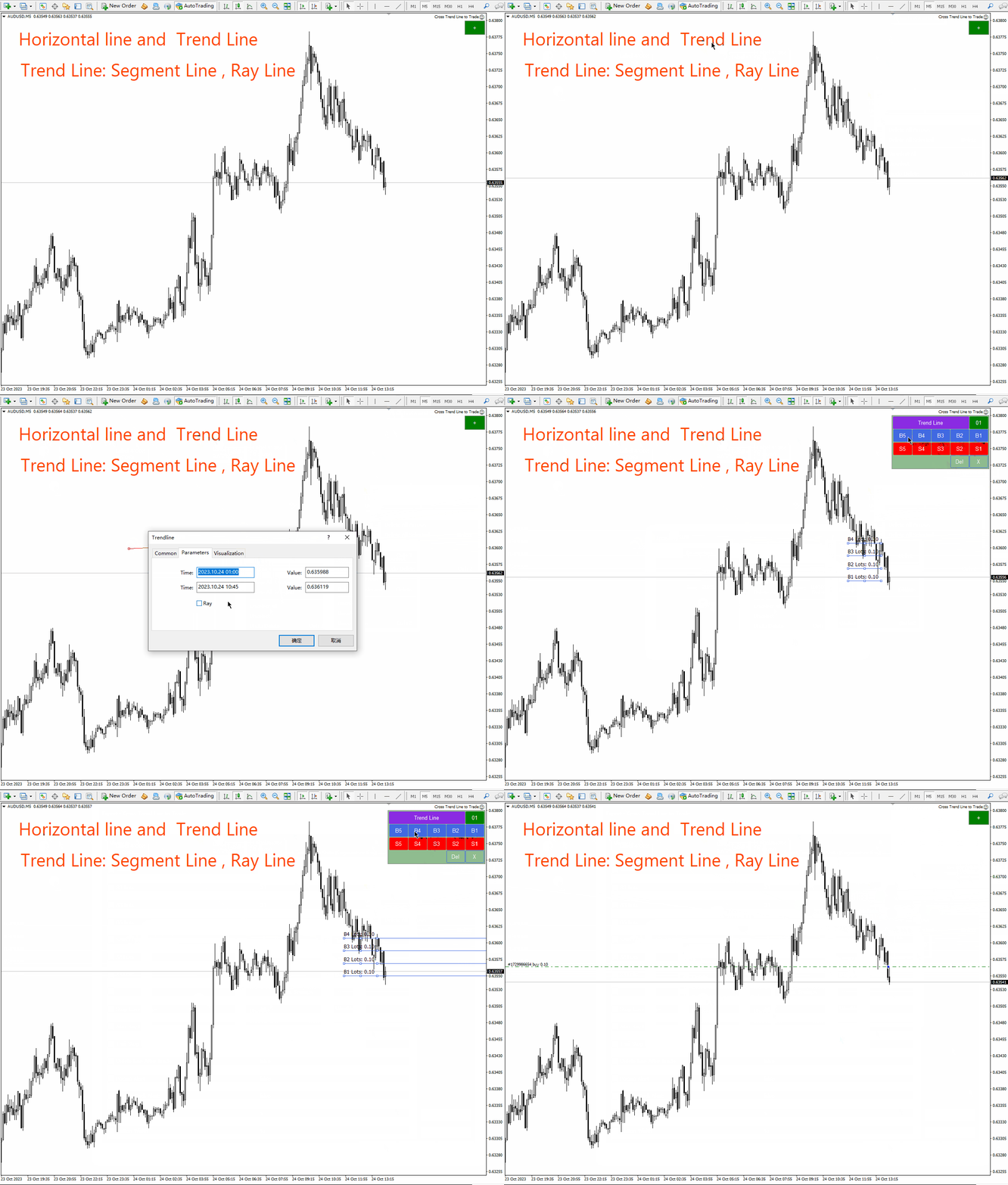
  • A linha pode ser uma linha de tendência ou uma linha horizontal,   As linhas de tendência podem ser raios ou segmentos de linha. Os segmentos de linha têm uma função especial, que é negociar apenas no período em que a linha está localizada.
  • Essas linhas, que podem abrir e fechar posições, possuem nomes específicos. EA fornece um painel de desenho de linha em vez de desenhar linhas manualmente.
  • Capturas de tela de todas as posições abertas e fechadas serão salvas na pasta MQL4/Files/Cross Trend Line to Trade.
  • EA pode ser usado no   estratégia   provador. Experimente no testador de estratégia antes de pagar.

Painel de desenho de linha:

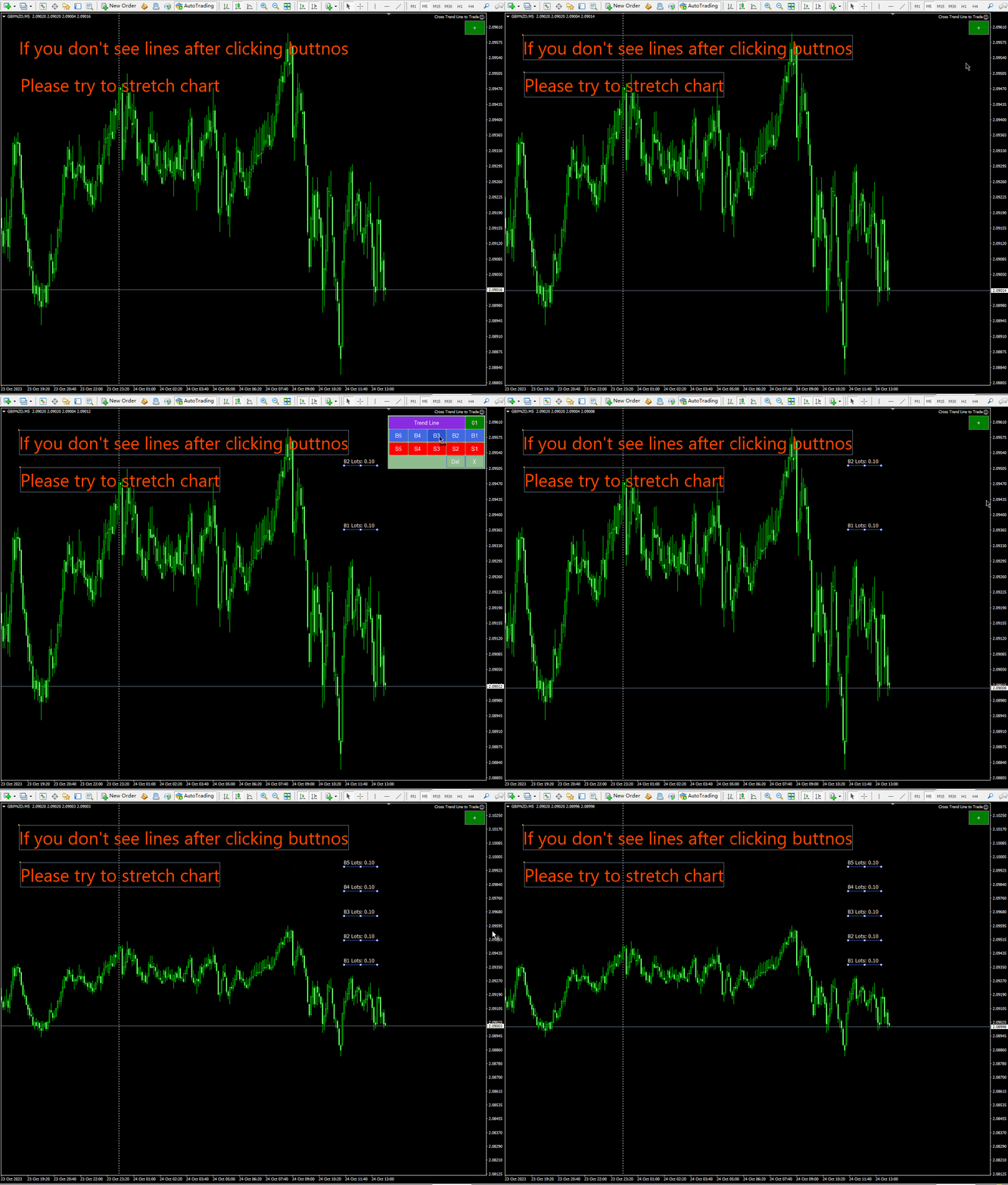
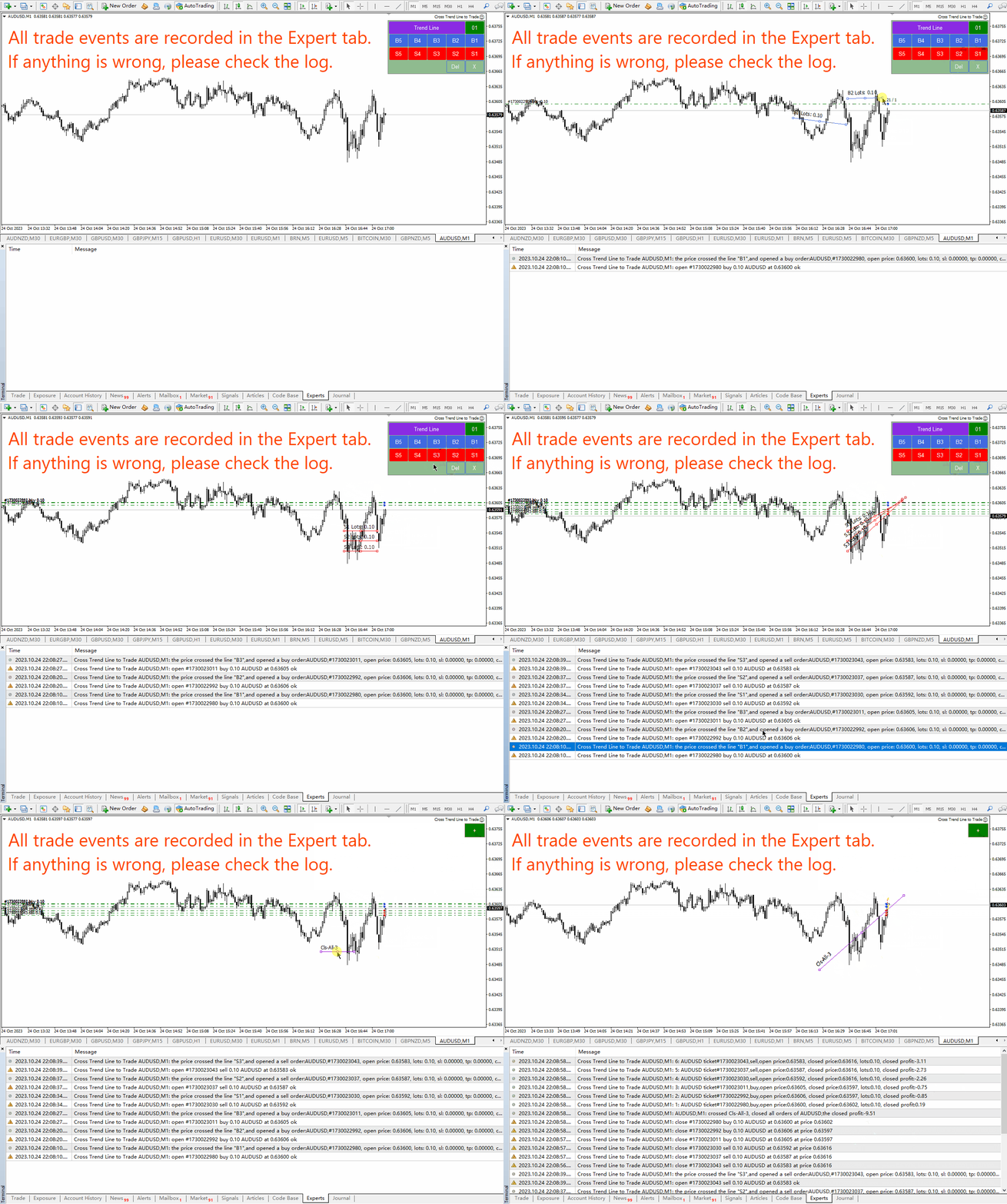
  • Clique no botão verde “+” e 6 grupos de painéis serão gerados um após o outro. Cada grupo de painéis pode clicar no botão correspondente para desenhar linhas de tendência ou linhas horizontais.
  • Clique no botão roxo para selecionar o tipo de linha: linha de tendência ou linha horizontal.
  • Pressione Del para excluir todas as linhas desenhadas.
  • Pressione X para fechar o painel e retornar ao seu estado original.
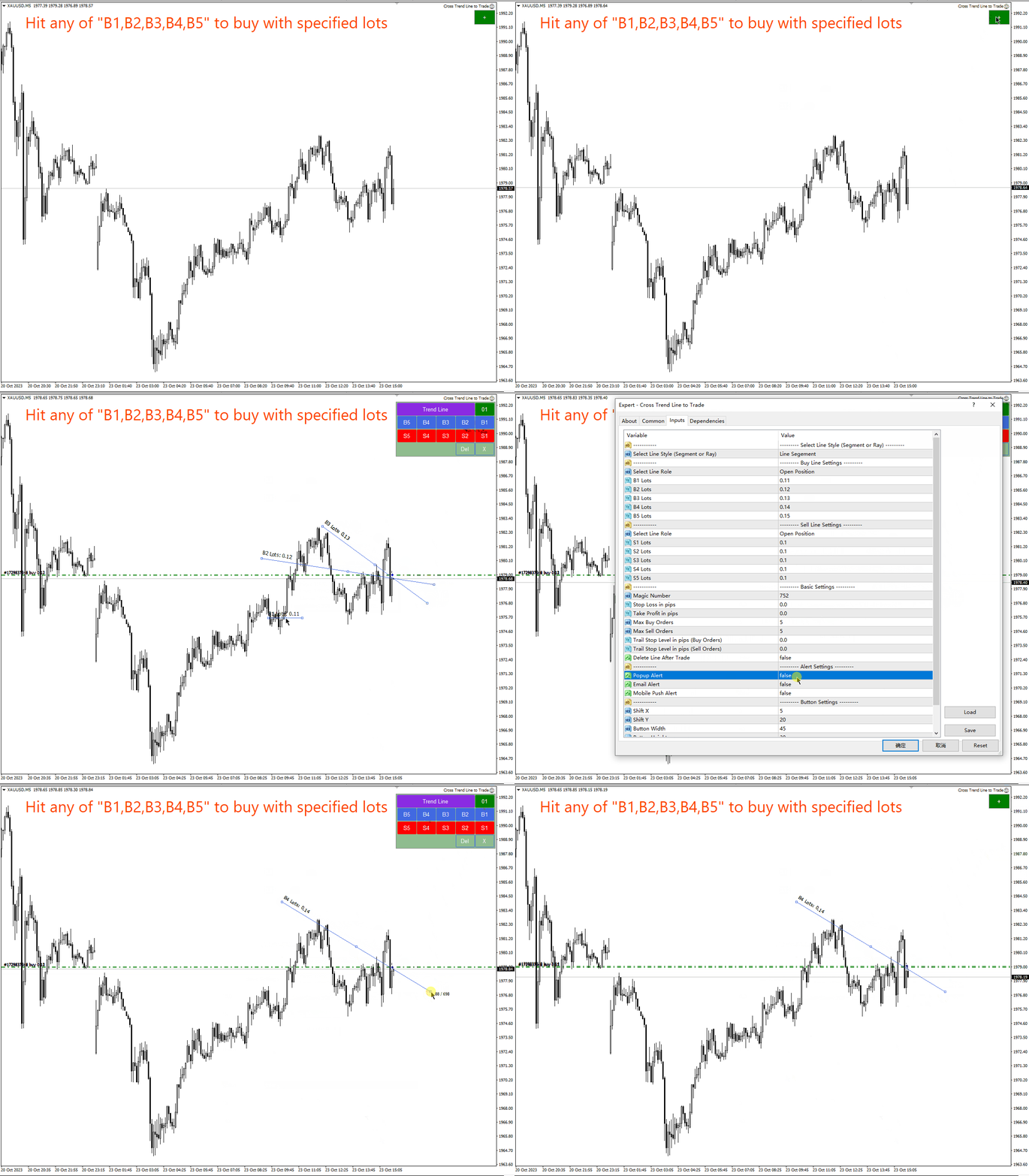
  • Pressionar os botões B1, B2, B3, B4 e B5 desenhará cinco linhas. Quando o preço cruzar qualquer uma dessas cinco linhas, uma ordem longa será aberta.
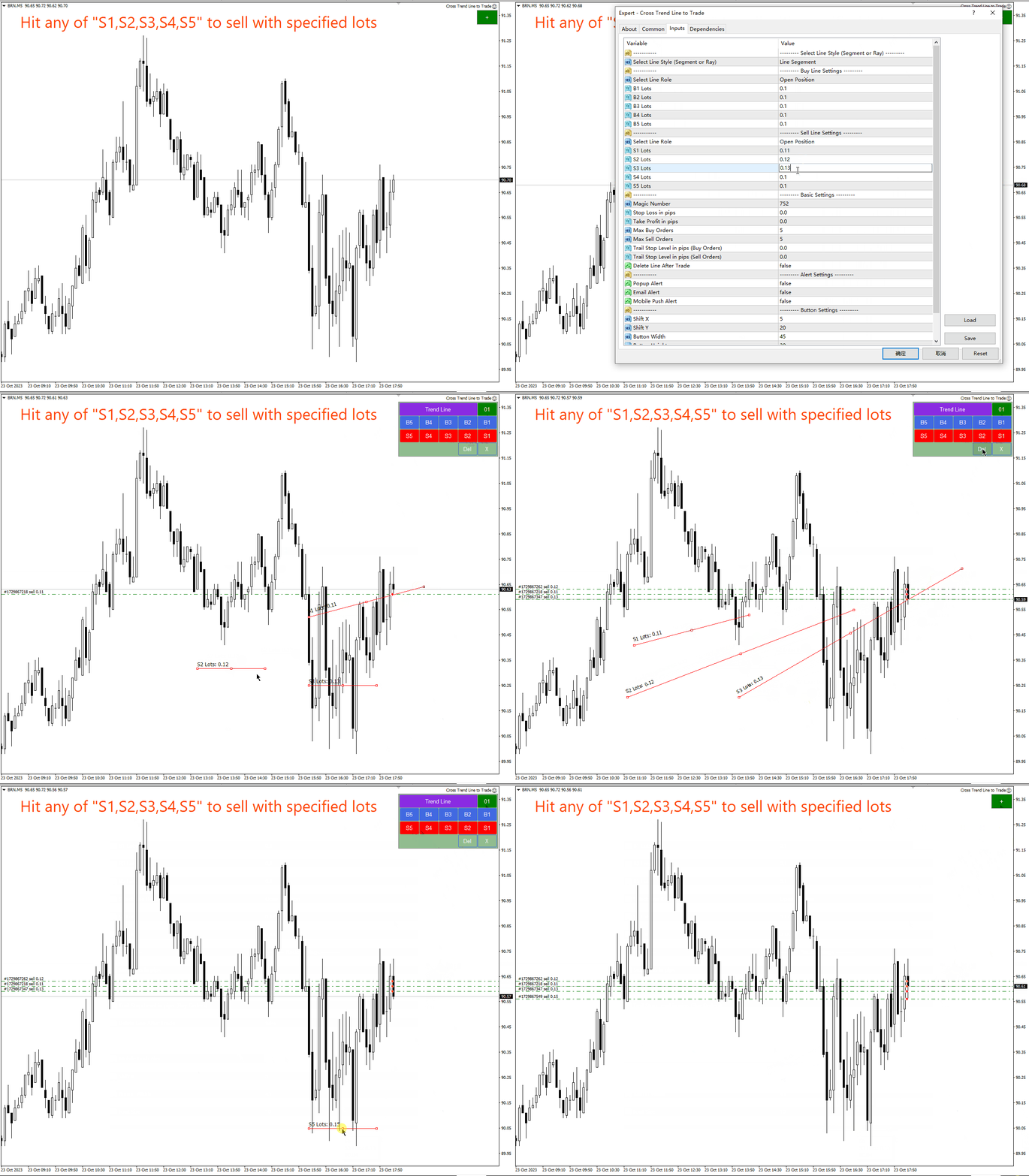
  • Pressionar os botões S1, S2, S3, S4 e S5 desenhará cinco linhas. Quando o preço atingir qualquer uma dessas cinco linhas, uma ordem curta será aberta.
  • Leia abaixo uma descrição detalhada dos nomes e funções de todas as linhas de tendência.


Nomes e funções das linhas de tendência:

  1. Posição longa aberta: B1, B2, B3, B4, B5 -   Quando o preço cruzar qualquer uma dessas cinco linhas, uma ordem longa será aberta. Apenas um pedido pode ser aberto em cada linha por vez. A ordem terá comentários especiais contendo o nome da linha para evitar repetidas aberturas de posições na mesma linha.
  2. Abra uma posição curta: S1, S2, S3, S4, S5 – Esses 5 nomes são usados para abrir ordens curtas. Tal como acontece com a abertura de uma posição longa acima, apenas uma ordem pode ser aberta em cada linha.
  3. Feche todos os pedidos longos: Cls-Buy-All-1, Cls-Buy-All-2, Cls-Buy-All-3. Quando o preço cruzar qualquer uma dessas três linhas, todas as ordens longas serão fechadas.
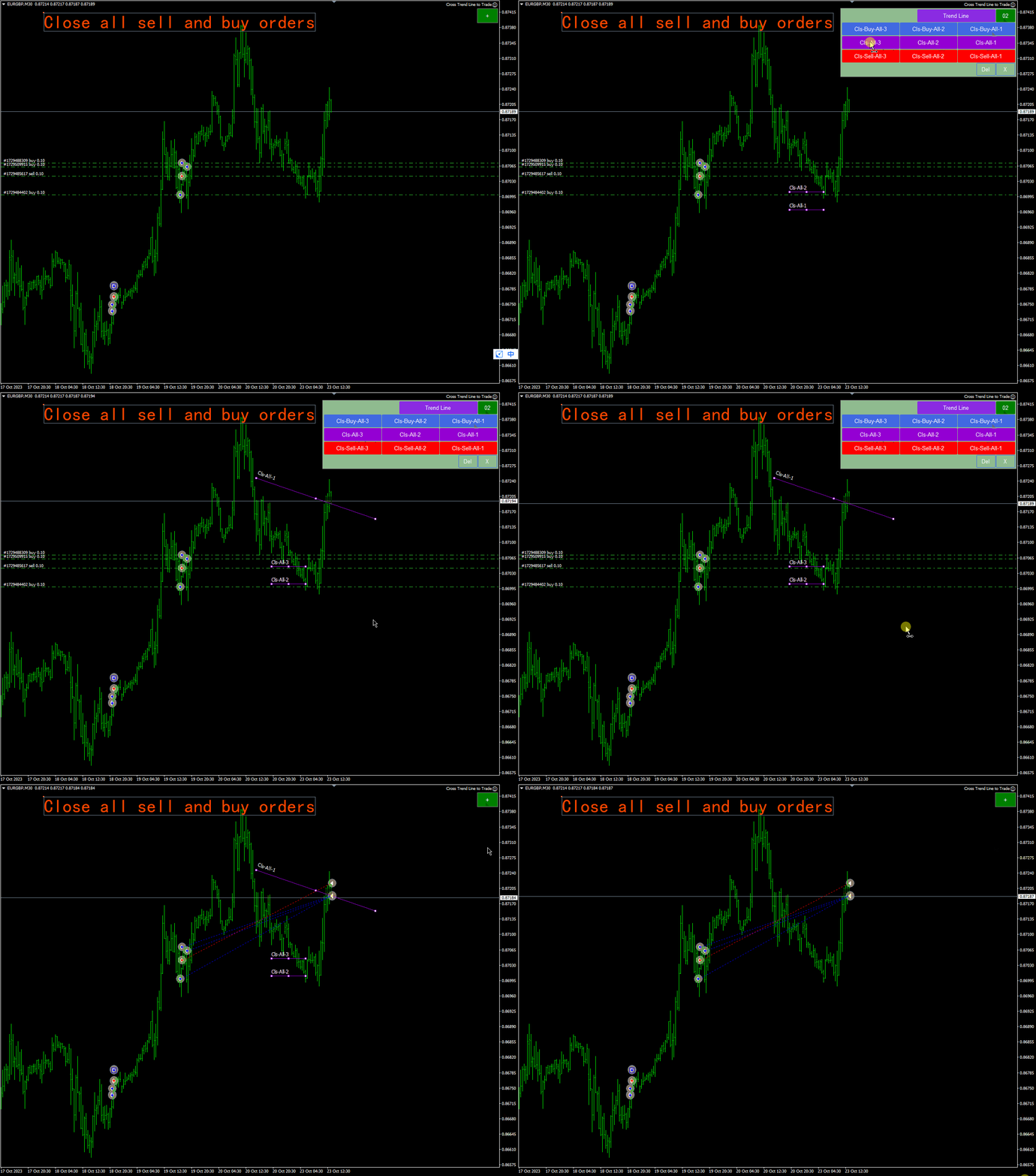
  4. Feche todas as ordens longas e curtas: Cls-All-1, Cls-All-2, Cls-All-3. Quando o preço cruzar qualquer uma dessas três linhas, todas as ordens longas e curtas serão fechadas.
  5. Feche todos os pedidos curtos:   Cls-Vender-Tudo-1,   Cls-Vender-Tudo-2 ,   Cls-Sell-All-3, quando o preço cruza qualquer uma dessas 3 linhas, todas as posições curtas são fechadas.
  6. As ordens longas lucrativas são fechadas: Cls-Buy-Win-1, Cls-Buy-Win-2, Cls-Buy-Win-3. Quando o preço cruza qualquer uma dessas três linhas, todas as ordens longas lucrativas são fechadas. estoque.
  7. Para fechar uma ordem longa com perda:   Cls-Compra-Perda-1   ,   Cls-Compra-Perda-2 ,   Cls-Buy-Loss-3, quando o preço cruza qualquer uma dessas 3 linhas, todas as ordens longas não lucrativas são fechadas.
  8. Mesmo ganhos de curto prazo:   Cls-Vender-Win-1,   Cls-Vender-Win-2 ,   Cls-Sell-Win-3, quando o preço cruza qualquer uma dessas 3 linhas, todas as posições curtas lucrativas são fechadas.
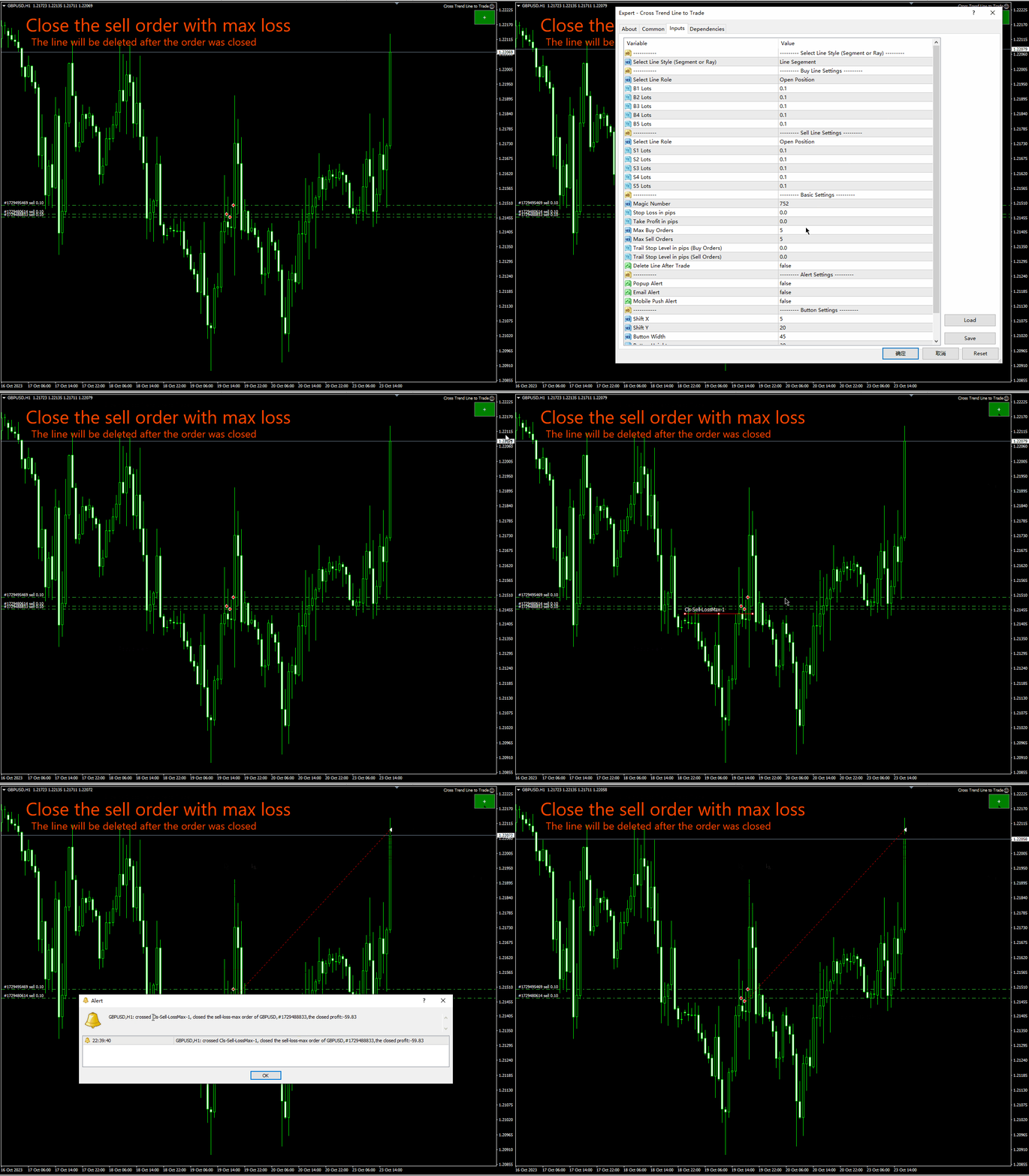
  9. Para fechar uma ordem curta perdedora:   Cls-Venda-Perda-1   ,   Cls-Venda-Perda-2   ,   Cls-Sell-Loss-3 , se o preço cruzar qualquer uma dessas três linhas, todas as posições curtas serão fechadas com prejuízo.
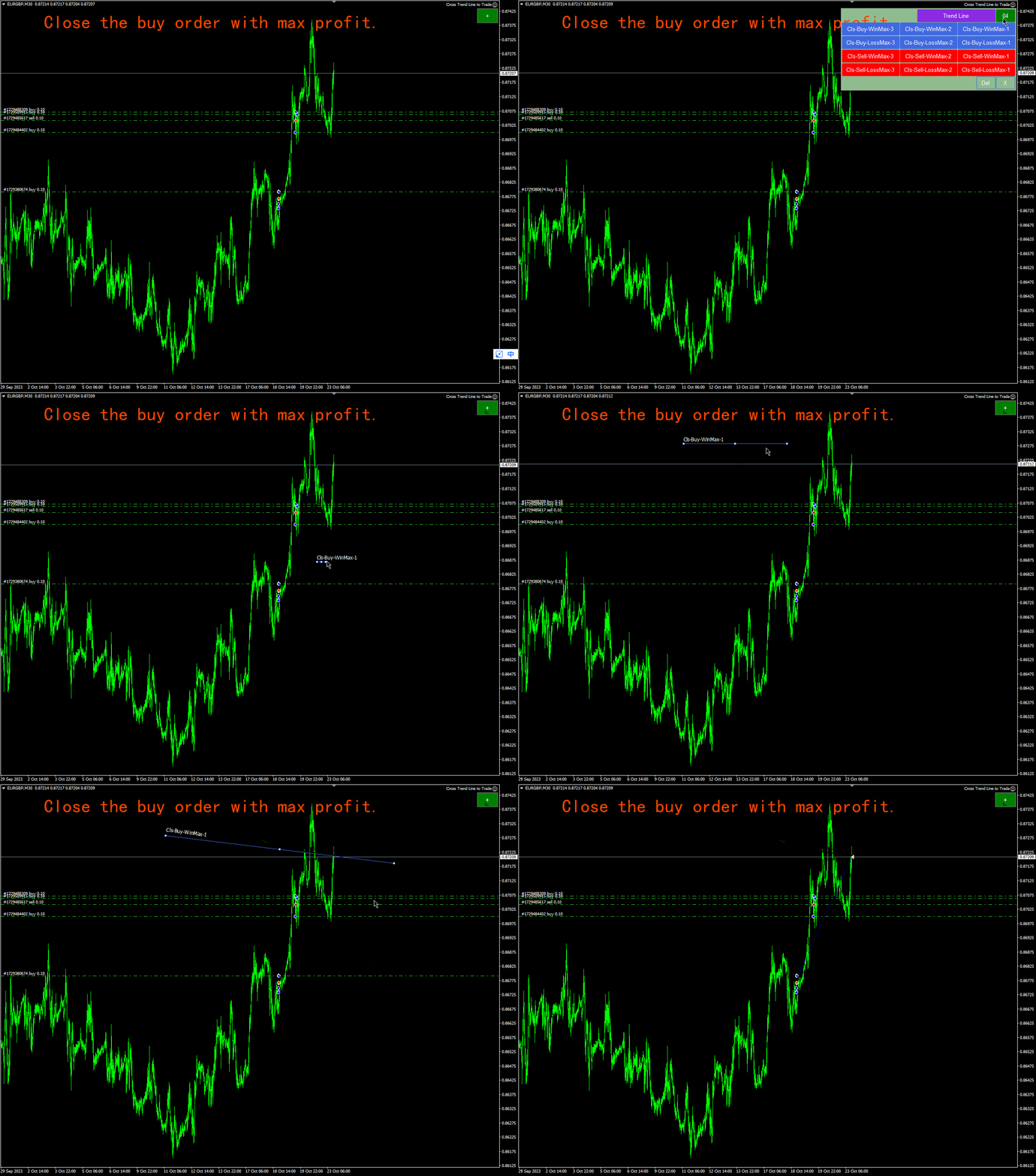
  10. O pedido longo mais lucrativo: Cls-Buy-WinMax-1,   Cls-Compre-WinMax-2 ,   Cls-Buy-WinMax-3, quando o preço cruzar qualquer uma dessas 3 linhas, a ordem longa com maior lucro será fechada e esta linha será removida imediatamente para evitar fechamentos repetidos.
  11. Pedido longo com maior perda:   Cls-Compra-LossMax-1,   Cls-Buy-LossMax-2   ,   Cls-Compra-LossMax-3,   Quando o preço cruzar qualquer uma dessas três linhas, a posição longa será fechada com maior perda.   , esta linha será removida imediatamente para evitar que seja fechada novamente.
  12. O pedido curto mais lucrativo:   Cls-Sell-WinMax-1,   Cls-Sell-WinMax-2   ,   Cls-Sell-WinMax-3, quando o preço cruzar qualquer uma dessas 3 linhas, a posição curta será fechada com maior lucro.   , esta linha será removida imediatamente para evitar que seja fechada novamente.
  13. Posição curta com maior perda:   Cls-Venda-PerdaMax-1,   Cls-Venda-PerdaMax-2   ,   Cls-Venda-PerdaMax-3,   Quando o preço cruzar qualquer uma dessas três linhas, a posição curta será fechada com uma perda maior.     , esta linha será removida imediatamente para evitar que seja fechada novamente.
  14. Primeira ordem comprada para fechar uma posição: Cls-Buy-First-1, Cls-Buy-First-2,   Cls-Buy-First-3, quando o preço cruzar qualquer uma dessas três linhas, a ordem longa com o primeiro horário de abertura será fechada.   , esta linha será removida imediatamente para evitar que seja fechada novamente.
  15. Última ordem longa para fechar uma posição:   Cls-Compra-Último-1, Cls-Compra-   Durar   -2,   Cls-   Durar   -Primeiro-3 Quando o preço cruza qualquer uma dessas três linhas, a ordem longa será fechada com o último horário de abertura.
  16. Primeira ordem curta para fechar uma posição:   Cls-Vender-Primeiro-1, Cls-Vender-Primeiro-2,   Cls-Sell-First-3, quando o preço cruzar qualquer uma dessas três linhas, a posição curta será fechada no primeiro horário de abertura.   , esta linha será removida imediatamente para evitar que seja fechada novamente.
  17. Última ordem longa para fechar uma posição:   Cls-Venda-Último-1, Cls-Venda-   Durar   -2,   Cls -Vender -Primeiro-3   - Quando o preço cruzar qualquer uma destas três linhas, a posição curta será fechada com o último horário de abertura.     , esta linha será removida imediatamente para evitar que seja fechada novamente.
  18. Stop móvel para ordens longas: TSB1, TSB2, TSB3: Linhas de stop loss para ordens longas, essas 3 linhas são usadas para mover o stop loss para ordens longas. Quando o preço de mercado está acima da linha, o stop loss para ordens longas se move em direção à linha.
  19. Movendo Stop Loss para Ordens Curtas: TSS1, TSS2, TSS3 é a linha de rastreamento de stop loss para ordens curtas, essas 3 linhas são usadas para mover ordens curtas de stop loss. Quando o preço de mercado está abaixo da linha, o stop curto se move em direção à linha.


Explicação do parâmetro de entrada:

1. Configurações relacionadas à linha
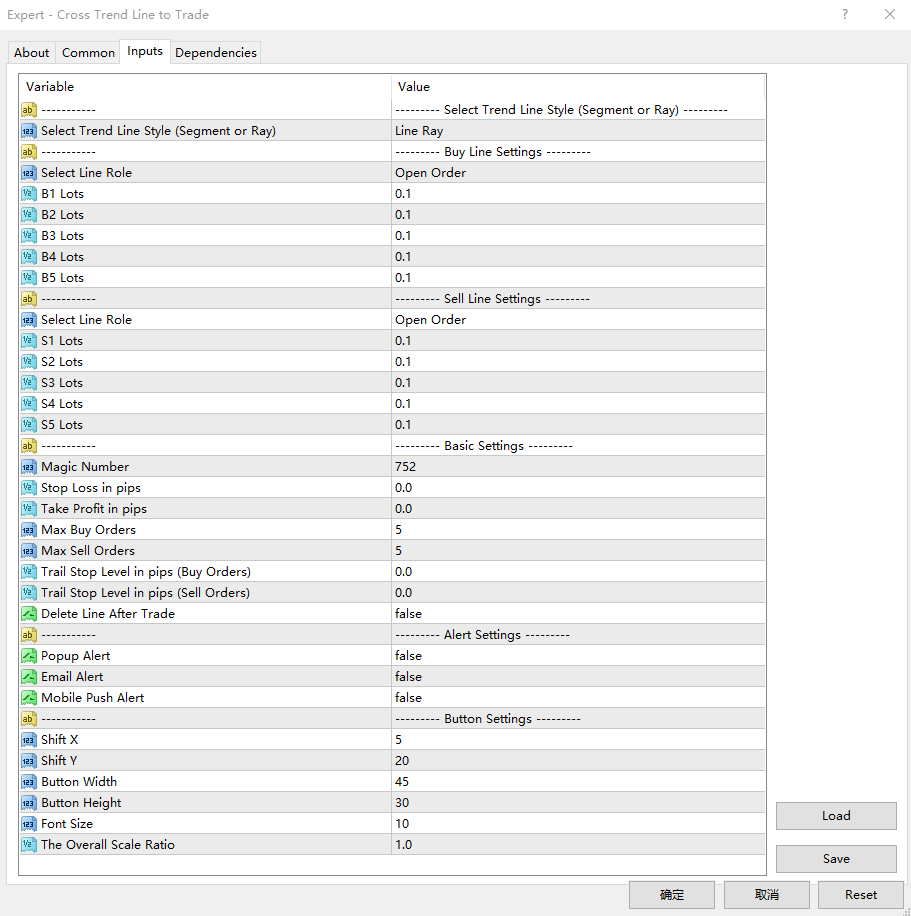
  • Trend Line Style : selecione o tipo de linha a ser desenhada: segmento de linha, raio de linha.
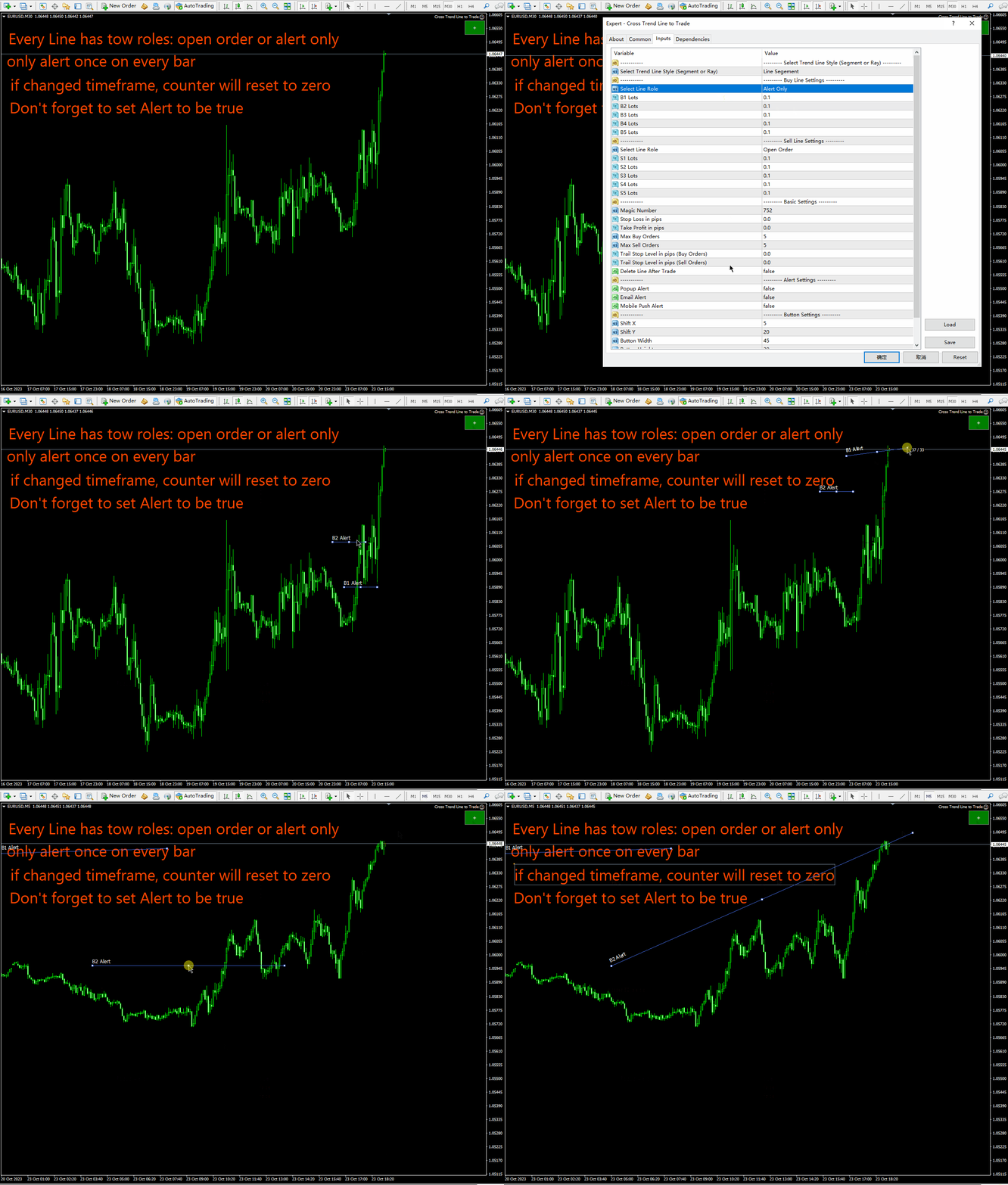
  • Select Line Role: Selecione a função desempenhada pelas linhas B1, B2, B3, B4 e B5: Posição Aberta ou Somente Alerta.
  • B1 Lots: O número do lote inicial correspondente à linha “B1”.
  • B2 Lots: O número do lote inicial correspondente à linha “B2”.
  • B3 Lots: Número do lote inicial correspondente à linha “B3”.
  • B4 Lots: Número inicial do lote correspondente à linha “B4”.
  • B5 Lots: Número inicial do lote correspondente à linha “B5”.
  • Select Line Role: Selecione a função desempenhada pelas linhas S1, S2, S3, S4, S5: Posição Aberta ou Somente Alerta.
  • S1 Lots: O número do lote inicial correspondente à linha “S1”.
  • S2 Lots: O número do lote inicial correspondente à linha “S2”.
  • S3 Lots: O número do lote inicial correspondente à linha “S3”.
  • S4 Lots: O número do lote inicial correspondente à linha “S4”.
  • S5 Lots: O número do lote inicial correspondente à linha “S5”.
2. Obtenha pontos de lucro e stop loss, controle de número de pedido, pop-ups, e-mail, notificações push de um telefone celular e outras configurações.
  • Magic Number: Este é o número mágico da EA, que é o codinome da EA.
  • Stop loss in pips: stop loss em pontos. Quando o EA abre uma posição, ele define o preço do stop loss para a ordem de acordo com este parâmetro de item.
  • Take Profit in pips: Realize lucros em pips. Quando o EA abre uma posição, ele define o preço de lucro para a ordem com base neste parâmetro pip.
  • Max Buy Orders: Número máximo de pedidos longos. Na verdade, você pode abrir até 5 ordens longas, já que existem apenas 5 linhas de tendência: B1, B2, B3, B4 e B5. Supondo que este parâmetro esteja definido como 2, quando o preço cruzar quaisquer duas linhas, 2 ordens serão abertas e nenhuma posição será aberta, mesmo que cruze as outras linhas.
  • Max Sell Orders: número máximo de ordens curtas. Na verdade, você pode abrir até 5 ordens curtas, pois existem apenas 5 linhas de tendência: B1, B2, B3, B4, B5. Supondo que este parâmetro esteja definido como 2, quando o preço cruzar quaisquer duas linhas, 2 ordens serão abertas e nenhuma posição será aberta, mesmo que cruze as outras linhas.
  • Delete Line After Trade: Se definido como verdadeiro, o consultor excluirá a linha após a conclusão de uma transação (abertura ou fechamento de uma posição).
  • Trail Stop Level in pips (Buy Orders): A ordem longa deve lucrar com esse pip antes que o stop loss possa ser rastreado. Se este parâmetro for 0, você não precisa atingir o nível de lucro do pip antes de seguir o stop loss.
  • Trail Stop Level in pips (Sell Orders): uma ordem curta deve lucrar com esse pip antes de poder seguir o trailing stop. Se este parâmetro for 0, você não precisa atingir o ponto de lucro antes de seguir o stop.
  • Popup Alert: Quando você abre ou fecha uma posição, uma janela pop-up aparece.
  • Email Alert: Um lembrete por e-mail será enviado ao abrir ou fechar uma posição.
  • Mobile Push Alert   Quando uma posição é aberta ou fechada, uma mensagem push será enviada para o seu celular com um lembrete.

3. Configurações de posição do painel e tamanho dos botões.

  • Shift X: Deslocamento horizontal do canto superior direito do gráfico.
  • Shift Y: Deslocamento vertical em relação ao canto superior direito do gráfico
  • Button Width: largura do botão
  • Button Height: A altura do botão.
  • Font Size: O tamanho da fonte do botão.
  • The Overall Scale Ratio: O número de vezes que o painel é ampliado ou reduzido.


Outras notas:

  1. Cada vez que você inicia o MT4 ou carrega um EA no gráfico, o EA irá pausar por 3 segundos enquanto o gráfico é atualizado no momento em que o MT4 inicia, portanto, a negociação durante esse período deve ser evitada.
  2. Quando o parâmetro trailing stop loss é 0, o stop loss segue a linha de tendência.
  3. Quando o parâmetro de trailing stop loss for maior que 0, apenas as ordens com pontos de lucro superiores ao valor do parâmetro moverão o stop loss ao longo da linha de tendência.
  4. O preço do stop loss para pedidos longos nunca cairá.
  5. O preço do stop loss de uma ordem curta nunca aumentará.
  6. Para evitar negociações inesperadas causadas pelo preço cruzar a linha de tendência durante um gap na segunda-feira, é recomendado remover a linha de tendência na sexta-feira ou mover a linha de tendência para o lado esquerdo do gráfico.

//---


Produtos recomendados
TradePilot
Hossein Khalil Alishir
TradePilot Expert Advisor (EA) for MetaTrader 4 TradePilot is a professional and user-friendly Expert Advisor (EA) for MetaTrader 4 (MT4) . It simplifies automated trading , risk management , and trade execution using a smart trading panel . Perfect for beginners and experienced traders looking for a reliable trade manager EA with automated lot size calculation . Key Advantages User-Friendly Trading Panel: Customizable panel with buttons and hotkeys. Smart Risk Management: Supports percen
VR Cub
Vladimir Pastushak
VR Cub é um indicador para obter pontos de entrada de alta qualidade. O indicador foi desenvolvido para facilitar cálculos matemáticos e simplificar a busca por pontos de entrada em uma posição. A estratégia de negociação para a qual o indicador foi escrito tem provado a sua eficácia há muitos anos. A simplicidade da estratégia de negociação é a sua grande vantagem, o que permite que até mesmo os comerciantes novatos negociem com sucesso com ela. VR Cub calcula os pontos de abertura de posição e
Trendiness Index
Libertas LLC
5 (3)
"The trend is your friend" is one of the best known sayings in investing, because capturing large trendy price movements can be extremely profitable. However, trading with the trend is often easier said than done, because many indicators are based on price reversals not trends. These aren't very effective at identifying trendy periods, or predicting whether trends will continue. We developed the Trendiness Index to help address this problem by indicating the strength and direction of price trend
Fibonacci System
Maksim Neimerik
The system applies Fibo levels. Apart from basic Fibo levels (23.6; 38.2; 50.0; 61.8; 100.0;), the EA features custom levels (34.0; 36.0; 64.0; 66.0;). You can decide the levels trading is to be performed from. Sample trade: when the market is bullish and the price rolls back to the levels (as we remember, we select the levels on our own), the EA opens buy orders. The opposite is true for sell orders. The EA can work in three modes. Each of the modes is a separate Fibo levels construction method
Point61 Indicator
Evgeniy Machok
5 (1)
The Point61 indicator is the result of many years of monitoring of price behavior of currency pairs and metals. It is not a secret, that in times of uncertainty, traders are looking for possible levels of support and resistance - the point, where price should stop its movement. There are 2 possible scenarios at these points: 1. Reverse (correction) to the opposite direction; 2. Breakthrough to continue movement. Very often these points are used to set stop orders - TakeProfit or StopLoss
hello friends bollinger Bands signal traders. I am happy to announce that I have completed the robot that follows the market according to the signal that the closing candle is above the upper Bollinger Bands and the closing candle is below the lower Bollinger Bands, the robot will send the image to Telegram then you will check see if it is a signal that matches your order opening rules. because I find the signal system really useful for traders, so I am trying to complete many products to serve
Trade with Gann on your side!! MASTER CIRCLE 360 CIRCLE CHART, originally created by Gann admitted that this is “The Mother of all charts”. It is one of the last studies that this great trader left for us. The numeric tab le is apparently quite simple like all the tables and is based on square numbers, the SQUARE OF 12 and is by evolution, one of the most important square numbers. Here we can find CYCLE, PRICE AND TIME thanks to angles and grades, to show past and future support and resistance.
Magic Point Calculation System Support, resistance, target position... Use scientific calculations to help your trades Find the corresponding and low points Through our observation of the current chart, find the corresponding high and low points Enter the high and low points and calculate Enter the high and low point at the corresponding positions and click calculate to get the support, resistance, target, etc. Pre-order and wait for the result Pre-order at the price calculatedthe risk of ext
Daily Candle Predictor é um indicador que prevê o preço de fechamento de uma vela. O indicador destina-se principalmente ao uso em gráficos D1. Este indicador é adequado tanto para negociação forex tradicional quanto para negociação de opções binárias. O indicador pode ser usado como um sistema de negociação autônomo ou pode atuar como um complemento ao seu sistema de negociação existente. Este indicador analisa a vela atual, calculando certos fatores de força dentro do próprio corpo da vela, be
O indicador Crypto_Forex "Auto FIBO Pro" é uma ótima ferramenta auxiliar na negociação! - O indicador calcula e coloca automaticamente no gráfico os níveis de Fibonacci e as linhas de tendência locais (cor vermelha). - Os níveis de Fibonacci indicam áreas-chave onde o preço pode reverter. - Os níveis mais importantes são 23,6%, 38,2%, 50% e 61,8%. - Pode utilizá-lo para scalping de reversão ou para negociação de grelha de zona. - Existem muitas oportunidades para melhorar o seu sistema atual u
Virtual SL TP Trailing Pro for MT4 – Client-Side Stop Loss / Take Profit and Trade Management Looking for MetaTrader 5 version?  I t is available separately in the Market:   Virtual SL TP Trailing Pro MT5 Public channel:   CLICK HERE Virtual SL TP Trailing Pro for MT4 is a trade management utility that keeps Stop Loss (SL) and Take Profit (TP) levels on the client side instead of sending them to the trading server. It is designed to help you manage exits in a structured way using a clear on-cha
Vizzion
Joel Protusada
Vizzion is a fully automated scalping Expert Advisor that can be run successfully using GBPJPY currency pair at H1 timeframe. Very Important This Expert Advisor can not run with any EAs in the same account. As part of the money management plan, it calculates and monitors the Margin Level % and assumes that all open trades are created by it. If you want an Expert Advisor that trades in a daily basis, this EA is not for you because using this requires a patience to wait for a few days or weeks on
For sure, this indicator has become very popular amongst traders. Through coding this indicator will give you the most accurate levels possible for your trading analysis. We have also added in the ability for you to receive alerts when the price breaks above or below a Support or Resistance lines! HOW TO USE The red rectangles represent your resistance/supply zone. The green rectangles represent your support/demand zone.  BONUS FEATURES We coded this indicator with the ability to switch between
Smartility
Syed Oarasul Islam
This utility is designed to help you with your Manual Trading. It allows different ways of closing trades. It can display total number of BUY and SELL orders individually and also their individual profits. It can enter trades without stopl loss and take profits. However upon selecting UseStopLossTakeProfit from the settings it can use best possible stop loss and take profits based on the market conditions. Upon selecting the CloseOppositeTrades  from the settings it can close opposite trades. Fo
Trading Helper
Siarhei Vashchylka
Trading Helper - Program for trading and money management. It works with pending and immediate orders, and is equipped with trailing stop, breakeven and take profit functions. Manual (Be sure to read before purchasing) Advantages 1. Comfortable trading in a few clicks. Immediate and pending orders are available in the panel 2. Fixed percent method. The panel can select the lot size based on a predetermined risk 3. Trading with a fixed lot. In a few clicks, select a lot and open a Trade 4. Posi
Gann Square of 144
Taras Slobodyanik
5 (6)
A Gann Box (ou Gann Square) é um método de análise de mercado baseado no artigo "Fórmula matemática para previsões de mercado" de WD Gann. Este indicador pode representar três modelos de Quadrados: 90, 52(104), 144. Existem seis variantes de grades e duas variantes de arcos. Você pode plotar vários quadrados em um gráfico simultaneamente. Parâmetros Square — seleção de um modelo quadrado de Gann: 90 — quadrado de 90 (ou quadrado de nove); 52 (104) — quadrado de 52 (ou 104); 144 — quadrado uni
Risk Commander
Adisorn Soodkanueng
Product Name: Risk Commander: Trade Assistant & Strategy Simulator Risk Commander is more than just a trade panel—it is a complete Manual Trading Ecosystem . It serves two powerful purposes: Live Assistant: Helps you execute trades with speed, precision, and perfect risk management in real-time markets. Training Simulator: Fully compatible with the Strategy Tester (Visual Mode) , allowing you to practice manual trading on historical data without risking a cent. NEW! Built-in Simulator Mode S
Infinity Trend Pro
Yaroslav Varankin
1 (1)
This is a trend indicator without redrawing Developed instead of the binary options strategy (by the color of the Martingale candlestick) Also works well in forex trading When to open trades (binary options) A signal will appear in the place with a candle signaling the current candle It is recommended to open a deal for one candle of the current timeframe M1 and M5 When a blue dot appears, open a deal up When a red dot appears, open a trade down. How to open trades on Forex. When a signal is rec
Space Phoenix EA
Zenzile Jetro Siwela
1. TrendLine Monitoring : The EA can detect immediate breaks above or below any specified trend line drawn on the chart. It can monitor up to 25 trend lines simultaneously. 2. Automatic Take Profit and Stop Loss : The EA includes functionality for setting predetermined levels of take profit and stop loss. This feature helps to establish and maintain favorable risk-to-reward ratios. 3. Trailing Stop : A trailing stop mechanism is implemented, allowing you to secure profits by automatically adj
Auto SLTP Maker MT4  is an assistant for all those who forget to set StopLoss and/or TakeProfit in deal parameters, or trade on a very fast market and fail to place them in time. This tool automatically tracks trades without StopLoss and/or TakeProfit and checks what level should be set in accordance with the settings. The tool works both with market and pending orders. The type of orders to work with can be set in the parameters. It can track either trades for the instrument it runs on, or all
OneClick VZ
Kusuma Nungki S
Simple panel of trade on your chart with OneClick VZ . This trade panel will make it easier for you. Equipped with several functions that make it very easy for you. You can try Trial Version OneClick V1 in here . This version includes: Open Order Buy Open Order Sell Open Pending Order [Buy Limit - Buy Stop - Sell Limit-Sell Stop] Close ALL orders Close Order Buy Close Order Sell Delete Pending Order [Buy Limit - Buy Stop - Sell Limit-Sell Stop] Order Management: Stop Loss Take Profit Trailing S
FreqoMaster
Stanislav Korotky
The main idea of this indicator is rates analysis and prediction by Fourier transform. The indicator decomposes exchange rates into main harmonics and calculates their product in future. The indicator shows 2 price marks in history, depicting price range in the past, and 2 price marks in future with price movement forecast. Buy or sell decision and take profit size are displayed in a text label in the indicator window. The indicator uses another indicator as an engine for calculations - FreqoMet
Hello traders! I present to you Argo Gold Edition - an expert built for gold trading, which is tailored to the specifics of gold movements on international markets. The basis of its logic is that it follows profitable patterns drawn from past periods. Mathematical algorithms are based on the correlation between the values of the indicators used and the corresponding movement of the price of gold. The expert is built on the basis of the ARGO series. It specializes in GOLD / XAUUSD trading. 2 or 3
H4 GBPUSD Trend Scalper is a trend signal scalper The EA trades according to the trend strategy using original built-in indicator for opening and closing orders. The external inputs for limiting trading on Fridays and Mondays are available. The purpose of the strategy is to use the current trend with the most benefit. According to the results of testing and working on demo and real accounts, the best results achieved by using the Н4 timeframe on the GBP/USD pair Works on MetaTrader 4 Build 971+
Automated Forex Trading Program - Stochastic Indicator Strategy with Customizable Settings Key Features: Stochastic Indicator Strategy : Utilizes a sophisticated trading strategy based on the stochastic indicator, which is a momentum oscillator. The algorithm identifies potential reversal points at overbought or oversold levels, providing precise trade signals. Customizable Settings : Adjust key parameters like stochastic periods, overbought and oversold levels, as well as Take Profit and Stop
Stepping Trend
Mpendulo Chiliza
The Stepping Trend Indicator     The Steppi ng Trend indicator uses the  average true range  (ATR indicator) in its calculation. This gives you control to set your own average true range period, I set the Default as 10.   Indicator Details. Green Arrow Up: This means you are at the starting point of a new bullish trend, it’s time to buy.   Red  Arrow  Down : This means you are at the starting point of a new  bearish  trend, it’ s time to sell .   What if you miss the Arrow Signal?   No prob
VN Trade Panel II
Vyacheslav Nekipelov
4 (1)
The new version of the trading panel, which now has the ability to separately close Buy and Sell orders, display targets for all orders on the chart, as well as the ability to use the panel to trade with brokers working on the FIFO rule. Also, the new version adds option buttons for separate management of open orders. It has a convenient visualized interface and intuitive control without a lot of additional tabs to which traders have to be distracted and switch their attention. Thanks to this,
Matrixs
Andriy Sydoruk
Matrix is a Forex arrow indicator. Displays signals simply and clearly! The arrows show the direction of the transaction, and are colored accordingly, which can be seen in the screenshots. As you can see, trading with such an indicator is easy. I waited for an arrow to appear in the desired direction - I opened a deal. An arrow formed in the opposite direction - closed the deal. The indicator also displays the lines with the help of which the arrow signals are formed, taking into account the int
С этим драйвером вы можете превратить трендовую линию в линию Ганна, поместив значение угла в виде NxM в ее описании, например 4x1, где N - это количество поинтов, а M - количество таймфреймов на текущем графике. Драйвер автоматически отображает значение угла в виде метки у правого конца линии. По умолчанию, размер поинта равен размеру пипса, но в настройках вы можете сами указать подходящий вам размер поинта. Вы можете комбинировать этот индикатор с индикатором  Colored Channels , разделяя проб
As it is known, one of the winning parameters in Forex market is Money Management, which is more crucial than a good strategy. So it is good to know that there is a hidden fact in the market, so called pip's value. Most traders pay no attention to this fact. Here comes an example to brighten up. If you have an EUR account, pip's value for each 0.1 lots on EURGBP is around 1.10380 (it depends on the current rate) and on EURUSD is around 0.85050, it means if you take a trade on each of these curre
Os compradores deste produto também adquirem
Bem-vindo ao Trade Manager EA—uma ferramenta de gestão de risco criada para tornar o trading mais intuitivo, preciso e eficiente. Não é apenas uma ferramenta para executar ordens, mas uma solução abrangente para planejamento de operações, gerenciamento de posições e controle de risco. Seja você um iniciante, trader avançado ou scalper que precisa de execução rápida, o Trade Manager EA adapta-se às suas necessidades, oferecendo flexibilidade em todos os mercados, desde forex e índices até commodi
The product will copy all telegram signal to MT4   ( which you are member  ) , also it can work as remote copier.  Easy to set up, copy order instant, can work with almost signal formats, image signal, s upport to translate other language to English Work with all type of channel or group, even channel have "Restrict Saving Content", work with  multi channel, multi MT5 Work as remote copier: with signal have ticket number, it will copy exactly via ticket number. Support to backtest signal. How to
Copy Cat More Trade Copier MT4 (Cópia Gato MT4) não é apenas um simples copiador local de operações; é uma estrutura completa de gestão de risco e execução, projetada para os desafios atuais do trading. Desde desafios de prop firms até a gestão de contas pessoais, adapta-se a cada situação com uma combinação de execução robusta, proteção de capital, configuração flexível e tratamento avançado das operações. O copiador funciona tanto no modo Master (emissor) quanto no modo Slave (receptor), sincr
Exp COPYLOT CLIENT for MT4
Vladislav Andruschenko
4.69 (65)
Copiadora comercial para MetaTrader 4. Ele copia negociações, posições e pedidos em forex de qualquer conta. É uma das melhores copiadoras comerciais  MT4 - MT4, MT5 - MT4 para a versão COPYLOT MT4  (ou MT4 - MT5 MT5 - MT5 para a versão COPYLOT MT5 ). Versão MT5 Descrição completa +DEMO +PDF Como comprar Como instalar    Como obter arquivos de log    Como testar e otimizar    Todos os produtos da Expforex Versão da copiadora para o terminal MetaTrader 5 ( МТ5 - МТ5, МТ4 - МТ5 ) -  Copylot Cli
TradePanel MT4
Alfiya Fazylova
4.84 (89)
O Trade Panel é um assistente comercial multifuncional. A aplicação contém mais de 50 funções de negociação para negociação manual e permite automatizar a maioria das operações de negociação. Atenção, a aplicação não funciona no testador de estratégia. Antes de comprar, pode testar a versão de demonstração numa conta de demonstração. Versão de demonstração aqui . Instruções completas aqui . Comércio. Permite realizar operações de negociação com um clique: Abra as ordens e posições pendentes com
Unlimited Trade Copier Pro is a tool to copy trade remotely to multiple MT4, MT5 and cTrader accounts at different computers/locations over internet. This is an ideal solution for you if you are a signal provider and want to copy your trades to other receivers globally on your own rules. One provider can copy trades to multiple receivers and one receiver can get trade from multiple providers as well. The provider can even set the subscription expiry for each receiver, so that receiver will not b
Strategy Builder offers an incredible amount of functionality. It combines a trade panel with configurable automation (covert indicators into an EA), real-time statistics (profit & draw down) plus automatic optimization of SL, TP/exit, trading hours, indicator inputs. Multiple indicators can be combined into an single alert/trade signal and can include custom indicators, even if just have ex4 file or purchased from Market. The system is easily configured via a CONFIG button and associated pop-up
O MT4 para Telegram Signal Provider é uma ferramenta fácil de usar e totalmente personalizável que permite o envio de sinais para o Telegram, transformando sua conta em um provedor de sinais. O formato das mensagens é totalmente personalizável! No entanto, para uso simples, você também pode optar por um modelo predefinido e habilitar ou desabilitar partes específicas da mensagem. [ Demonstração ]   [ Manual ] [ Versão MT5 ] [ Versão Discord ] [ Canal do Telegram ]  New: [ Telegram To MT5 ] Conf
Ultimate Extractor - Professional Trading Analytics for MT4 Ultimate Extractor transforms your MetaTrader 4 trading history into actionable insights with comprehensive analytics, interactive charts, and real-time performance tracking. Ability to combine multiple accounts and MT4 and MT5 into a single dashboard. What It Does Automatically analyzes your MT4 trading history across all Expert Advisors and generates detailed HTML reports with interactive visualizations. Tracks live performance metric
Take a Break
Eric Emmrich
5 (31)
The most advanced news filter on MQL market - free demo available Take a Break has transformed from a basic news filter into a comprehensive account protection solution. It seamlessly pauses any other Expert Advisors during news events or based on your custom filters, all while safeguarding your EA settings - restoring them automatically when trading resumes for complete peace of mind. Typical use cases: A single news filter for all your EAs. Stop trading during news/high volatility (+ close all
Discord To MT4 Receiver
Levi Dane Benjamin
5 (1)
Copie sinais de qualquer canal do qual você seja membro (   sem a necessidade de um Token de Bot ou Permissões de Administrador  diretamente para o seu MT4. Foi projetado com o usuário em mente, oferecendo muitos recursos que você precisa Este produto é apresentado em uma interface gráfica fácil de usar e visualmente atraente. Personalize suas configurações e comece a usar o produto em minutos! Guia do Usuário + Demo  | Versão MT5 | Versão Telegram Se quiser experimentar uma demonstração, vá p
Trade Manager MT4 DaneTrades
Levi Dane Benjamin
4.09 (11)
Trade Manager para ajudá-lo a entrar e sair rapidamente de negociações enquanto calcula automaticamente seu risco. Incluindo recursos para ajudar a evitar negociações excessivas, negociações de vingança e negociações emocionais. As negociações podem ser gerenciadas automaticamente e as métricas de desempenho da conta podem ser visualizadas em um gráfico. Esses recursos tornam este painel ideal para todos os traders manuais e ajudam a aprimorar a plataforma MetaTrader 4. Suporte multilíngue. Vers
News Filter EA: Advanced Algo Trading Assistant News Filter EA is an advanced algo trading assistant designed to enhance your trading experience. By using the   News Filter EA , you can integrate a Forex economic news filter into your existing expert advisor, even if you do not have access to its source code. In addition to the news filter, you can also specify   trading days   and   hours   for your expert. The News Filter EA also includes   risk management   and   equity protection   features
Everything for chart Technical Analysis indicator MT4 in one tool Draw your supply demand zone with rectangle and support resistance with trendline and get alerts to mobile phone or email alert -  Risk reward indicator Video tutorials, manuals, DEMO download   here .  Find contacts on my   profile . 1.   Extended rectangles and trendlines Object will be extended to the right edge of the chart when price will draw new candles on chart. This is rectangle extender or trendline extender. 2. Price to
Copier4Fee Advanced
Vladimir Tkach
4.75 (16)
The utility copies trades from the signal provider accounts (master accounts, one or multiple providers) to unlimited number of receiver accounts (slave accounts).  Attention! Y ou need to use identifiers (Provider number) of the same length if you use several master copiers. For example. 1, 2, 3 or 11, 13, 22. The copying can be set in the opposite direction. The comments with all the recently performed actions are displayed on the screen to monitor the utility actions in slave mode. To avoid p
Automate your Trendsurfer trailing stop management - day and night With this Expert Advisor for Metatrader 4 you save time, avoid mistakes and trade more relaxed - specially developed for the Trendsurfer trading system. Always the right stop loss Fully automatic Simple to use Saves you time How it works 1. download the Expert Advisor and install it in Metatrader 4 (I will give you instructions on how to do this) 2. define your stop-loss rule 3. run your computer or VPS - the Expert Advisor
Trade Copier Global
Laszlo Tormasi
5 (15)
Trade Copier Global: The name speaks for itself. This copier allows you to copy orders between MT4 terminals even if they are not installed on the same computer. Features Copying trades between MT4 terminals around the world with a short delay. Automatically recognizes symbol prefixes. Can connect many Slaves to the same Master. Supports pending and market orders. Supports partial order close (with limitations, see below) Can send messages and notifications to the Slaves from the Master Several
Copiadora->Interação de interface conveniente e rápida, os usuários podem usá-la imediatamente       ->>>> Recomendado para uso em computadores Windows ou VPS Windows Características: Configurações de negociação de cópias diversificadas e personalizadas: 1. Diferentes modos de lote podem ser definidos para diferentes fontes de sinal 2. Diferentes fontes de sinal podem ser definidas para negociação de cópias direta e reversa 3. Os sinais podem ser definidos com comentários 4. Se deve calibrar o
EchoTrade Telegram to MT4 Copier
Perpetual Chinemerem Vincent
5 (2)
EchoTrade Telegram to MT5 Copier Seamless, Instant, and Reliable Signal Copying - Direct from Telegram to MetaTrader 4! The product does not run in the strategy tester but you can get free trial version   here  for testing before purchase. Tired of manually executing trades from Telegram signals? EchoTrade automates the process, instantly copying trades from any Telegram channel or group directly into your MT5 account—accurately, efficiently, and without delay. Key Features: Universal Compatib
VirtualTradePad mt4 Extra
Vladislav Andruschenko
4.86 (59)
Painel de negociação para negociação em 1 clique.  Trabalhando com posições e pedidos!  Negociar a partir do gráfico ou do teclado. Usando nosso painel de negociação, você pode negociar com um clique no gráfico e realizar operações de negociação 30 vezes mais rápido do que o controle MetaTrader padrão. Cálculos automáticos de parâmetros e funções que tornam a vida mais fácil para um trader e ajudam-no a conduzir suas atividades de trading com muito mais rapidez e conveniência. Dicas gráficas e i
The News Filter
Leolouiski Gan
5 (25)
Este produto filtra todos os consultores especializados e gráficos manuais durante o horário das notícias, para que você não precise se preocupar com picos de preços repentinos que possam destruir suas configurações de negociação manuais ou negociações realizadas por outros consultores especializados. Este produto também vem com um sistema de gerenciamento de pedidos completo que pode lidar com suas posições abertas e ordens pendentes antes do lançamento de qualquer notícia. Depois de comprar o
Riskless Pyramid
Snapdragon Systems Ltd
5 (1)
Introduction This powerful MT4 trade mangement EA offers a way potentially to aggressively multiply trade profits in a riskfree manner. Once a trade has been entered with a defined stoploss and take profit target then the EA will add three pyramid add-on trades in order to increase the overall level of profit. The user sets the total combined profit target to be gained if everything works out. This can be specified either as a multiple of the original trade profit or as a total dollar amount. Fo
Este é um painel de negociação visual que ajuda você a realizar e gerenciar operações facilmente, evitando erros humanos e aprimorando sua atividade comercial. Ele combina uma interface visual fácil de usar com uma abordagem sólida de gerenciamento de riscos e posições. [ Guia de instalação | Guia de atualização | Solução de problemas | FAQ | Todos os produtos ] Surpreendentemente fácil de usar Negocie facilmente a partir do gráfico Negocie com gerenciamento preciso de riscos, sem complicações
Veja instantaneamente o seu histórico de negociações fechadas por dia e semana, as suas negociações abertas atuais e a exposição forex num gráfico! Utilize o mapa de calor para identificar operações lucrativas e onde está o seu drawdown atual dentro do seu portfólio de negociação. Botões de fecho rápido Utilize os botões de fecho rápido para fechar todas as operações num único símbolo, fechar operações individuais por completo ou obter lucros ou perdas parciais com o clique de um botão. Chega
Telegram Signal pro
Sara Sabaghi
4.86 (7)
What is it? Think about it, you can send all the orders/positions info to your telegram channel or group to create your community or VIP signals on telegram. Position info means this EA forward all of your new positions open details (Open price, Open time, Position Type, position Symbol and volume), positions changes ( SL or TP modifying or pending price changes) and position close (Close price, profit or loss, position duration time) and also EA Send NEWS alert (Economic calendar event) on you
Wouldn't it be great if AI had a second look at your trading data — graphics, indicators, and beyond? Introducing AI Trading Station , a revolutionary utility seamlessly integrated with the MetaTrader platform. Powered by the advanced intelligence of OpenAI's ChatGPT, this complete solution covers every step of your trading journey, from data gathering to trade execution. The Complete Trading Process. Reinvented Data Gathering & Visualization: Collect and display vital market data on intuitive
Custom Alerts: Monitore vários mercados e não perca nenhuma oportunidade importante Visão geral Custom Alerts é uma solução dinâmica para traders que desejam monitorar configurações potenciais em vários instrumentos a partir de um único local. Integrando dados de nossas ferramentas principais — como FX Power, FX Volume, FX Dynamic, FX Levels e IX Power — o Custom Alerts notifica automaticamente sobre movimentos importantes do mercado, sem a necessidade de alternar entre diversos gráficos ou pe
Ultimate Trailing Stop EA
BLAKE STEVEN RODGER
4.33 (15)
This EA Utility allows you to manage (with advanced filtering) unlimited open orders (manual or EA) with 16 trailing stop methods: fixed, percent, ATR Exit, Chandelier Exit, Moving Average, Candle High Low Exit, Bollinger Bands, Parabolic, Envelope, Fractal, Ichimoku Kijun-Sen, Alligator, Exit After X Minutes or Bars, RSI and Stochastic. The trailing stop can be either real or virtual, and you can exit fully or with a partial close percent on touch or bar close.  Moreover, you can add (overrid
Hedge Trade
Mothusi Malau
1 (1)
️ Hedge Trade — Smart Fixed-Offset Hedging EA Turn adverse moves into controlled recovery cycles. Hedge Trade is a professional-grade MetaTrader 4 Expert Advisor that protects any open trade by automatically placing and managing one intelligent hedge order. It’s built for traders who prefer to open their own base position but want an automated, disciplined hedging system to manage drawdown and capture counter-moves — safely, transparently, and without martingale. Key Features Automatic Hedg
Telegram to MT4 Coppy
Sergey Batudayev
3.75 (8)
Telegram para MT4:   A solução definitiva para cópia de sinais Otimize suas negociações com   o Telegram para MT4   , o utilitário de última geração desenvolvido para copiar sinais de negociação diretamente de canais e chats do Telegram para sua plataforma MetaTrader 4 — sem a necessidade de DLLs. Esta solução robusta garante a execução perfeita de sinais com precisão incomparável e opções de personalização, economizando seu tempo e aumentando sua eficiência. [ Instructions and DEMO ] Principais
Mais do autor
Este indicador mostra a força relativa de 8 moedas principais: USD, EUR, GBP, AUD, NZD, CAD, CHF e JPY. O valor da força é normalizado no intervalo 0-100: Um valor superior a 60 significa forte. Uma leitura abaixo de 40 indica fraqueza. Ingressos Only Show Current Pair     -       se verdadeiro, apenas o par de gráficos atual será exibido; caso contrário, todas as 8 curvas serão exibidas. Bars To Show     – Número de barras para exibir a curva de força. Ma Periods To Smooth Curves       : perí
Slippage Monitor MT5
Ziheng Zhuang
4.33 (3)
This EA is designed to monitor the slippage of opening and closing orders, and save the records in csv file. It is useful to record the slippage and evaluate brokers. The record files are saved in the folder  MT5_Data_Folder\MQL5\Files.  Go to   "File " --> "Open Data Folder"   . Warning :   Do NOT open the files directly, otherwise it will affect the exectution of EA, just copy them to another folder and open them. Usage: Open a chart and load the EA on it, just need only one EA to run, it mo
FREE
O indicador inclui duas partes. Parte I: Velas coloridas mostram a tendência principal Velas coloridas servem para identificar o estado do mercado por meio de castiçais coloridos. Conforme mostrado nas imagens, se a cor for Aqua, o mercado está em um estado em que você deve fazer pedidos longos ou sair de pedidos curtos. Se a cor for Tomate, é hora de fazer pedidos curtos ou sair de pedidos longos. Se a cor estiver mudando, é melhor aguardar sua conclusão (até que a barra atual seja fechada). Pa
Beta Bands
Ziheng Zhuang
5 (1)
This indicator shows main trend, entry zone and exit zone. This is a muti-timeframe indicator, so it is always repainting in the current period of the higher timeframe. Features Colorful Histogram: it indicates the main trend, the tomato means the market is bearish,and the sky blue means the market is bullish. Inner Blue Bands: it is entry zone for entry market, the market is relatively safe for entry. Outer Yellow Bands: it is exit zone for exit market, the market is oversold or overbought.
Slippage Monitor
Ziheng Zhuang
4.8 (5)
This EA is designed to monitor the slippage of opening and closing orders, and save the records in files. It is useful to record the slippage and evaluate brokers. The record files are saved in the folder  MT4_Data_Folder\MQL4\Files.  Go to "File " --> "Open Data Folder" . Warning : Do NOT open the files directly, otherwise it will affect the exectution of EA, just copy them to another folder and open them. Usage: Open a chart and load the EA on it, just need only one EA to run, it monitors al
FREE
This is a MetaTrader 4 script. It helps to summarize all trades into every symbol. Input Select Period: This is 7-option input. It includes Last Month, This Month, Last Week, This Week, Today, All History, and Date Specified. Specify Starting Date: Enter a date if you selected Date Specified in "Select Period" input. Specify Ending Date: Enter a date if you selected Date Specified in "Select Period" input. The summary is saved into a file in MQL4\Files folder. Also, there is pop-up window for a
FREE
This is a MetaTrader 5 script. It helps to summarize all trades into every symbol. Input Select Period: This is 7-option input. It includes Last Month, This Month, Last Week, This Week, Today, All History, and Date Specified. Specify Starting Date: Enter a date if you selected Date Specified in "Select Period" input. Specify Ending Date: Enter a date if you selected Date Specified in "Select Period" input. The summary is saved into a file in MQL5\Files folder. MT4 Version:   https://www.mql5.co
FREE
Account Export
Ziheng Zhuang
5 (1)
This is a MetaTrader 4 script. It helps to export all trades into a CSV file as per Symbol and selected periods. Input Select Symbol: This is 2-option input. Select current symbol or all symbols to export its orders. Select Period: This is 7-option input. It includes Last Month, This Month, Last Week, This Week, Today, All History, and Date Specified. Specify Starting Date: Enter a date if you selected Date Specified in "Select Period" input. Specify Ending Date: Enter a date if you selected Da
FREE
Este painel é um Expert Advisor, que oferece seis grupos de painéis de negociação. Versão MT5:   Cobertura Rápida de Painel Características A maioria das operações de negociação pode ser realizada rapidamente clicando no botão desses painéis. A troca de painéis é rápida, bastando clicar no botão verde. O EA pode ser executado em um gráfico visual no testador de estratégia, que fornece um método fácil para praticar a negociação com base em dados históricos. Clique com o mouse para modificar rapi
Quick Panel Pro
Ziheng Zhuang
5 (1)
Este EA é uma ferramenta de negociação profissional que integra controle de risco flexível e seis conjuntos de painéis de negociação. Versão MT5:  Quick Panel Pro Hedging característica Calcular lotes é rápido e fácil: mova a linha de parada e o cálculo é feito imediatamente A maioria das operações comerciais pode ser concluída rapidamente clicando nos botões destes painéis. Basta clicar no botão verde para alternar rapidamente os painéis. O EA pode ser executado no testador de estratégia; Use e
Este indicador mostra a força relativa de 8 moedas principais: USD, EUR, GBP, AUD, NZD, CAD, CHF e JPY. O valor da força é normalizado no intervalo 0-100: Um valor superior a 60 significa forte. Uma leitura abaixo de 40 indica fraqueza. O princípio básico Dadas oito moedas, USD,EUR,GBP,AUD,NZD,CAD,CHF,JPY, onde cada par de duas pode ser combinado, resultando num total de 28 pares, um algoritmo reverso é usado para extrair a força das oito moedas. desses 28 pares EURUSD,GBPUSD,AUDUSD,NZDUSD, USD
This indicator shows the main trend on the current chart. Features This indicator includes two bands, one is the inner white bands, another is the outer blue bands. If the white dotted line crosses down the white solid line, this means that the trend has changed to be bearish. If the white dotted line crosses up the white solid line, this means that the trend has changed to be bullish. Once the crossing happened, it will not repaint. Settings ShowColorCandle: if 'true', it will show the color
Este consultor é um painel de negociação de um clique para vários pares. Dar um click       ABRIR       Botão para abrir pedidos para pares selecionados. Dar um click       APROXIMAR       Botão para fechar pedidos dos pares selecionados. O lote do pedido é o número inserido pelo usuário. Um número positivo corresponde a uma ordem de compra, um número negativo corresponde a uma ordem de venda. Clique no botão   FECHAR   para fechar o pedido inteiro em vez de um fechamento parcial. A ação de fec
This indcator shows the trend with the color histogram. It is simple and easy to use. Usage: If the histogram changes from the aqua to the fuchsia, which means the trend is up. If the histogram changes from the fuchsia to the aqua,which means the trend is down. Inputs: MaPeriods: the periods of moving average. f1: the multiplier of inner bands f2: the multiplier of outer bands Popup Window Alert Email Alert Mobile Push Alert Alerts When the trend changes from the long trend to the short trend or
Pair Power Matrix
Ziheng Zhuang
3.67 (3)
This indicator is designed to show the pair power of the major 28 paris with RSI,Stochostic,and CCI. The power value is sorted from the weak to the strong. The weaker pairs: the pairs occurs at least 2 times in the top 3 rows The stronger pairs:   the pairs occurs at least 2 times in the bottom 3 rows Users can add another symbol, so it can calculate 28+1 symbols. My advice: https://www.mql5.com/en/blogs/post/729880 A free EA with Pair Power Matrix  ---  https://www.mql5.com/en/blogs/post/7328

The purpose of the inidcator is to identify the reversal point. The blue arrow is buy signal and the yellow star is its stop loss. The red arrow is sell signal and the yellow star is its stop loss. Alert feature: if there is a signal, the indicator will send alerts of  popup window,email or mobile push. Inputs: Popup Window Alert: it is false in default Email Alert : it is false in default Mobile Push Alert: it is false in default. MetaTrader 5 Version: Reversal Point Please note that the singal
O indicador inclui duas partes. Parte I: Velas coloridas mostram a tendência principal Velas coloridas servem para identificar o estado do mercado por meio de castiçais coloridos. Conforme mostrado nas imagens, se a cor for Aqua, o mercado está em um estado em que você deve fazer pedidos longos ou sair de pedidos curtos. Se a cor for Tomate, é hora de fazer pedidos curtos ou sair de pedidos longos. Se a cor estiver mudando, é melhor aguardar sua conclusão (até que a barra atual seja fechada). Pa
Observação. Este consultor trabalha apenas na conta de hedge. Versão MetaTrader 4       Quick Panel Pro característica Calcular lotes é rápido e fácil: mova a linha de parada e o cálculo é feito imediatamente A maioria das operações comerciais pode ser concluída rapidamente clicando nos botões destes painéis. Basta clicar no botão verde para alternar rapidamente os painéis. Clique com o mouse para modificar rapidamente o stop loss e o take profit (não pode ser usado para backtesting) Mostre o
Nota: Este EA funciona apenas em contas de hedge. Versão MetaTrader 4       painel rápido Este painel é um consultor especializado que oferece seis grupos de painéis de negociação. Características A maioria das operações de negociação pode ser realizada rapidamente clicando no botão desses painéis. Alternar entre painéis é rápido, bastando clicar no botão verde. O EA pode ser executado em um gráfico visual no testador de estratégia, fornecendo um método fácil para praticar a negociação com dad
Gamma Bands   This indcator shows the trend with the color histogram. It is simple and easy to use. Usage: If the histogram changes from the aqua to the fuchsia, which means the trend is up. If the histogram changes from the fuchsia to the aqua,which means the trend is down. Inputs: MaPeriods: the periods of moving average. f1: the multiplier of inner bands f2: the multiplier of outer bands   Popup Window Alert Email Alert Mobile Push Alert Alerts When the trend changes for the long trend to the
The purpose of the inidcator is to identify the reversal point. The blue arrow is buy signal and the yellow star is its stop loss. The red arrow is sell signal and the yellow star is its stop loss. Please note that the singal is against trend,it could be continual fail. Alert feature: if there is a signal, the indicator will send alerts of  popup window,email or mobile push. Inputs: Popup Window Alert: it is false in default Email Alert : it is false in default Mobile Push Alert: it is false in
Este consultor fornece os seguintes recursos: Abra uma posição: quando o preço cruzar a linha de tendência, abra uma ordem longa ou curta. Fechar: Quando o preço cruzar a linha de tendência, feche sua posição longa ou curta. Trailing Stop Loss – O EA continuará a aumentar o stop loss para pedidos longos ou reduzir o stop loss para pedidos curtos ao longo da linha de tendência. A linha pode ser uma linha de tendência ou uma linha horizontal,       As linhas de tendência podem ser raios ou segment
Este consultor é um painel de negociação de um clique para vários pares. Dar um click       ABRIR       Botão para abrir pedidos para pares selecionados. Dar um click       APROXIMAR       Botão para fechar pedidos dos pares selecionados. O lote do pedido é o número inserido pelo usuário. Um número positivo corresponde a uma ordem de compra, um número negativo corresponde a uma ordem de venda. Clique no botão   FECHAR   para fechar o pedido inteiro em vez de um fechamento parcial. A ação de fec
Filtro:
Sem comentários
Responder ao comentário