OnceADay
- Experts
- Versão: 1.3

OnceADay EA – one trade per day, at the time you choose
OnceADay is a simple, rule-based Expert Advisor that opens at most one trade per day at a fixed time. It is built for time-based strategies such as session opens (London, New York, index cash open) or news-free breakout times. The EA comes with a compact on-chart trading panel, full trade management (Stop Loss, Take Profit, Break Even, Trailing Stop) and a per-weekday schedule for entry and closing.
Available for MetaTrader 5 and MetaTrader 4.
ENTRY MODES
1. Straddle (Buy Stop + Sell Stop, OCO)
At the entry time the EA places a Buy Stop above and a Sell Stop below a reference level. As soon as one order is triggered, the opposite pending order is deleted automatically. The reference can be the current price or the high/low of the last closed candle (timeframe selectable).
2. Candle direction
At the entry time the EA opens a market order in the direction of the last closed candle of a selectable timeframe (default H1). A bullish candle opens a Buy, a bearish candle opens a Sell. A minimum candle body can be required, and the direction can be inverted.
3. Always Buy / Always Sell
Opens a market order in a fixed direction at the entry time.
KEY FEATURES
- One trade per day, entry time configurable separately for every weekday
- Daily close time, also configurable per weekday: closes all open trades and deletes pending orders
- Stop Loss, Take Profit, Break Even with offset, Trailing Stop (fixed distance or percentage of the move)
- Optional hidden (virtual) SL/TP – levels are not sent to the broker
- Fixed lot or risk-based lot size (% of equity, based on the Stop Loss)
- Maximum spread filter at entry
- Optional expiry for unfilled pending orders (otherwise deleted at the end of the day)
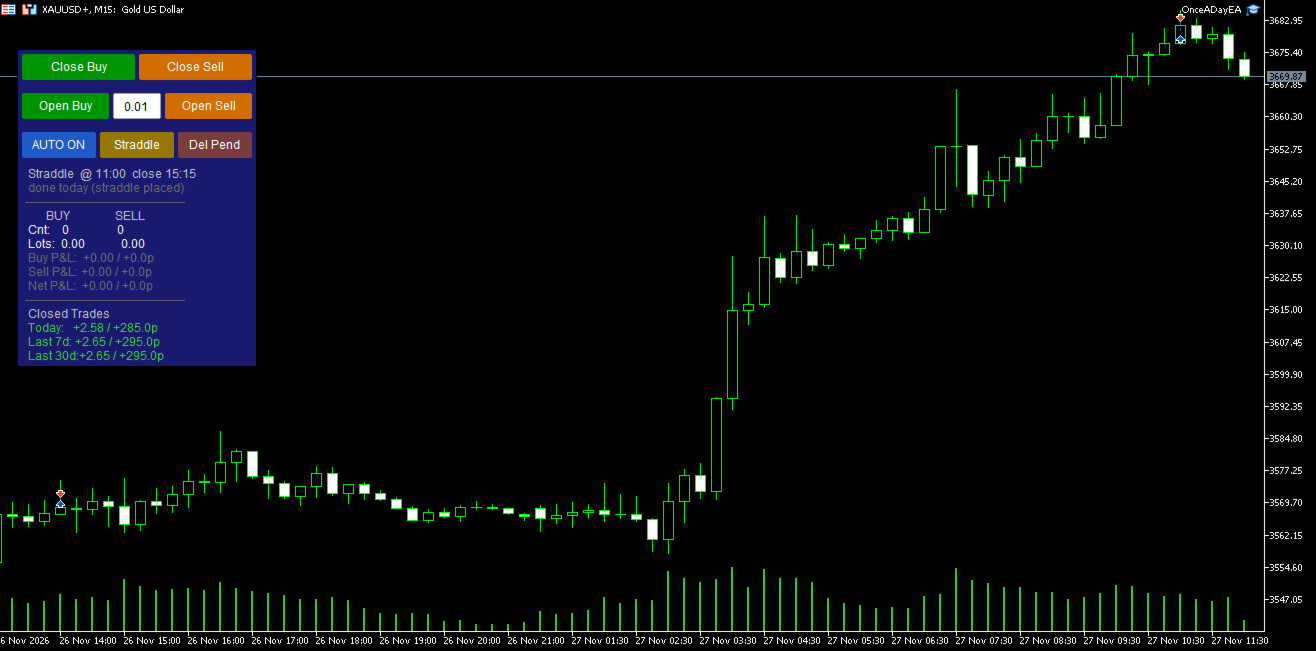
- On-chart panel: Open Buy / Open Sell with editable lot size, Close Buy / Close Sell, AUTO ON/OFF, manual Straddle button, Delete Pending button
- Live statistics: open positions per side (count, lots, P&L in money and pips) and closed-trade results for today, the last 7 days and the last 30 days
- Works with its own magic number, so it can run alongside other EAs and manual trading
- State is saved, so a terminal restart does not cause a second trade on the same day
INPUT PARAMETERS
=== Trading ===
Magic number – identifies the EA's own orders
Order comment
Lot size – fixed lot (can also be changed in the panel)
Risk % – risk per trade in % of equity, requires a Stop Loss (0 = use fixed lot)
Slippage – in points
Max spread – maximum spread at entry in pips (0 = no check)
=== Once a day entry ===
Entry mode – Straddle / Candle direction / Always Buy / Always Sell
Entry time Monday ... Sunday – HH:MM server time, empty = no trade on that day
Entry window – minutes after the entry time in which a trade may still be opened (e.g. after a restart)
Skip if open – do not open a new trade while a trade of this EA is still open
=== Straddle ===
Pending level reference – current price or last closed candle high/low
Distance – distance of the stop orders from the reference in pips
OCO – delete the opposite pending order once one is filled
Pending expiry – delete unfilled pending orders after N minutes (0 = end of day)
=== Candle direction ===
Timeframe – timeframe of the last closed candle (default H1)
Min body – minimum candle body in pips (smaller = no trade)
Invert direction – a bullish candle opens a Sell and vice versa
=== Daily close ===
Close time – default close time for every day (HH:MM, empty = off)
Close time Monday ... Sunday – empty = use the default, "-" = no close on that day
=== Risk management ===
Hide SL/TP from broker – manage SL/TP virtually
Stop Loss / Take Profit – on/off and distance in pips
Break Even – trigger in pips profit and offset in pips above/below the open price
Trailing Stop – distance and step in pips, start after X pips profit
Trailing in % mode – lock a percentage of the move from open to the best price
Line colours for SL, TP and BE
=== Panel / Appearance ===
Button and background colours, panel width, position and font size, statistic colours
NOTES
- All times are broker server times.
- Pips are calculated as 10 points on 3/5-digit symbols and 1 point otherwise. Please adapt the pip values to your symbol (e.g. gold or indices need larger values than forex pairs).
- Test the settings in the Strategy Tester ("Every tick" mode recommended) before trading live.
- Trading involves risk. Past results do not guarantee future results.