EA Fleet Guard MT5
- Utilitários
- Versão: 1.0
- Ativações: 10

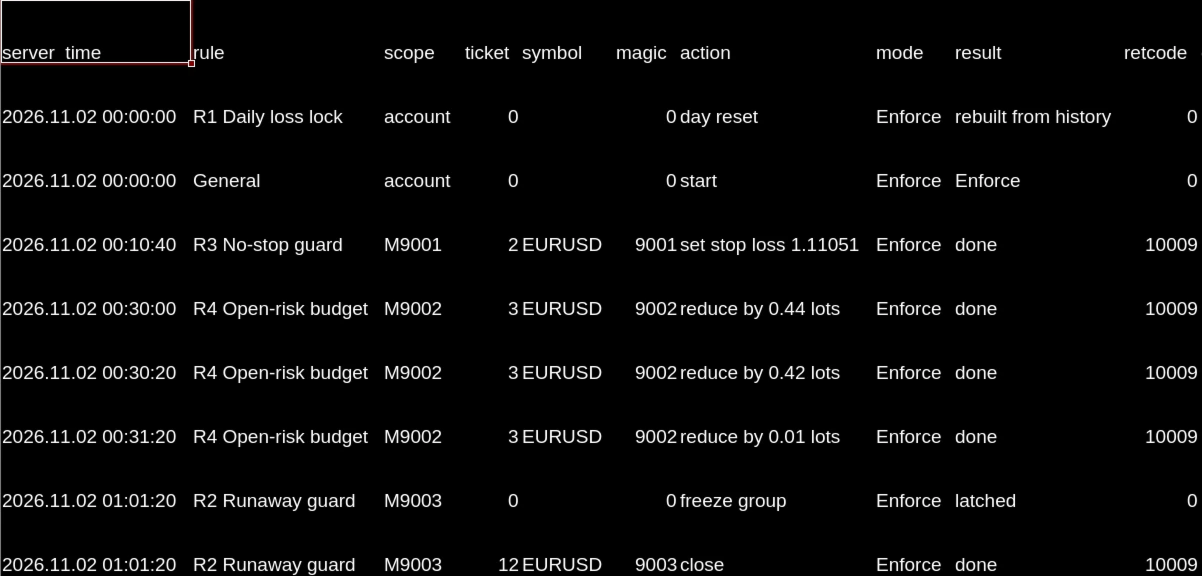
Each Expert Advisor on an account controls only its own risk. Nothing controls the total. EA Fleet Guard MT5 runs on one chart, reads every position and pending order on the account, and checks them against limits you set: a daily loss limit, an open-risk budget, a no-stop-loss rule, a burst limit for runaway EAs, exposure caps and an optional weekend window. Every decision is written to a CSV log.
It does not open trades on your account and does not generate trading signals.
What it does
EA Fleet Guard MT5 is a risk utility for traders who run several Expert Advisors, or Expert Advisors together with manual trading, on one MetaTrader 5 account. Attach it to any one chart. It reads the whole account: all symbols, all magic numbers and manual trades.
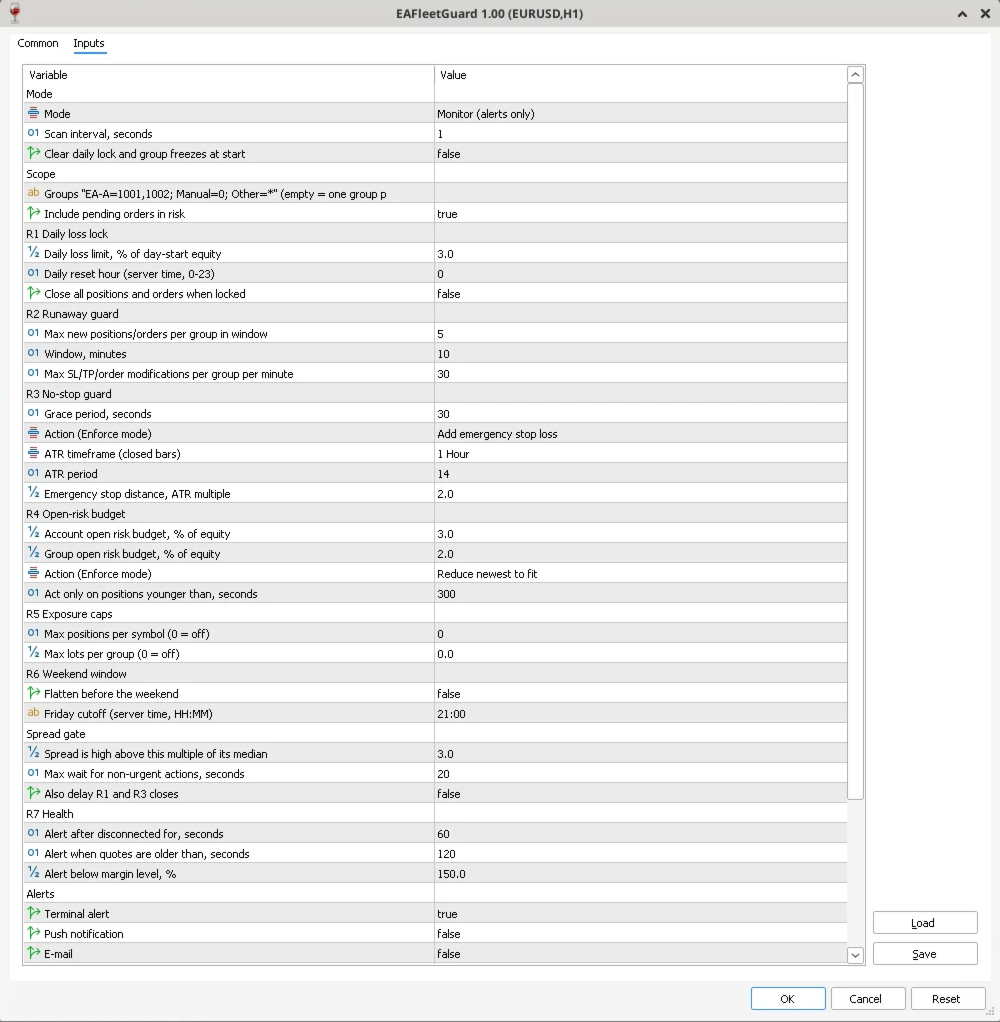
Positions are grouped by magic number. You can define up to 16 named groups (for example "Trend=1001,1002; Manual=0; Other=*"), or leave the field empty and the utility creates one group per magic number.
Two modes
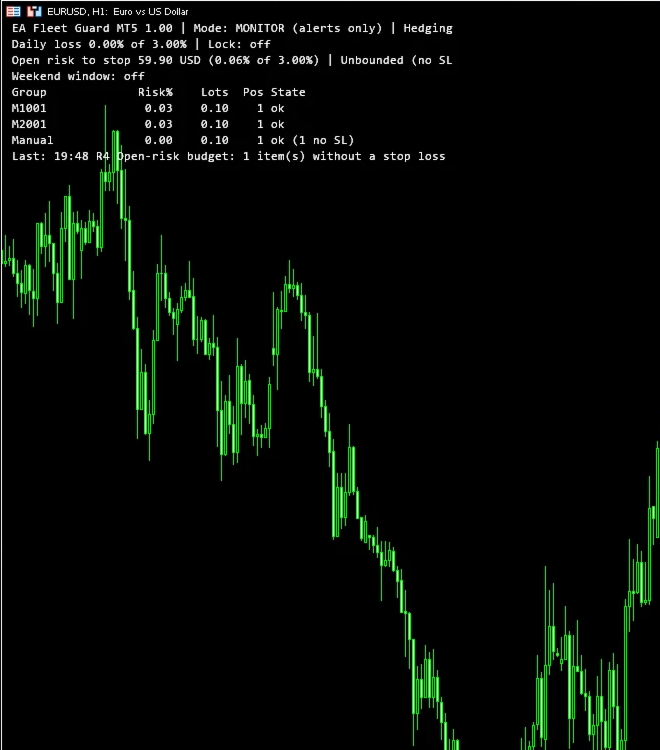
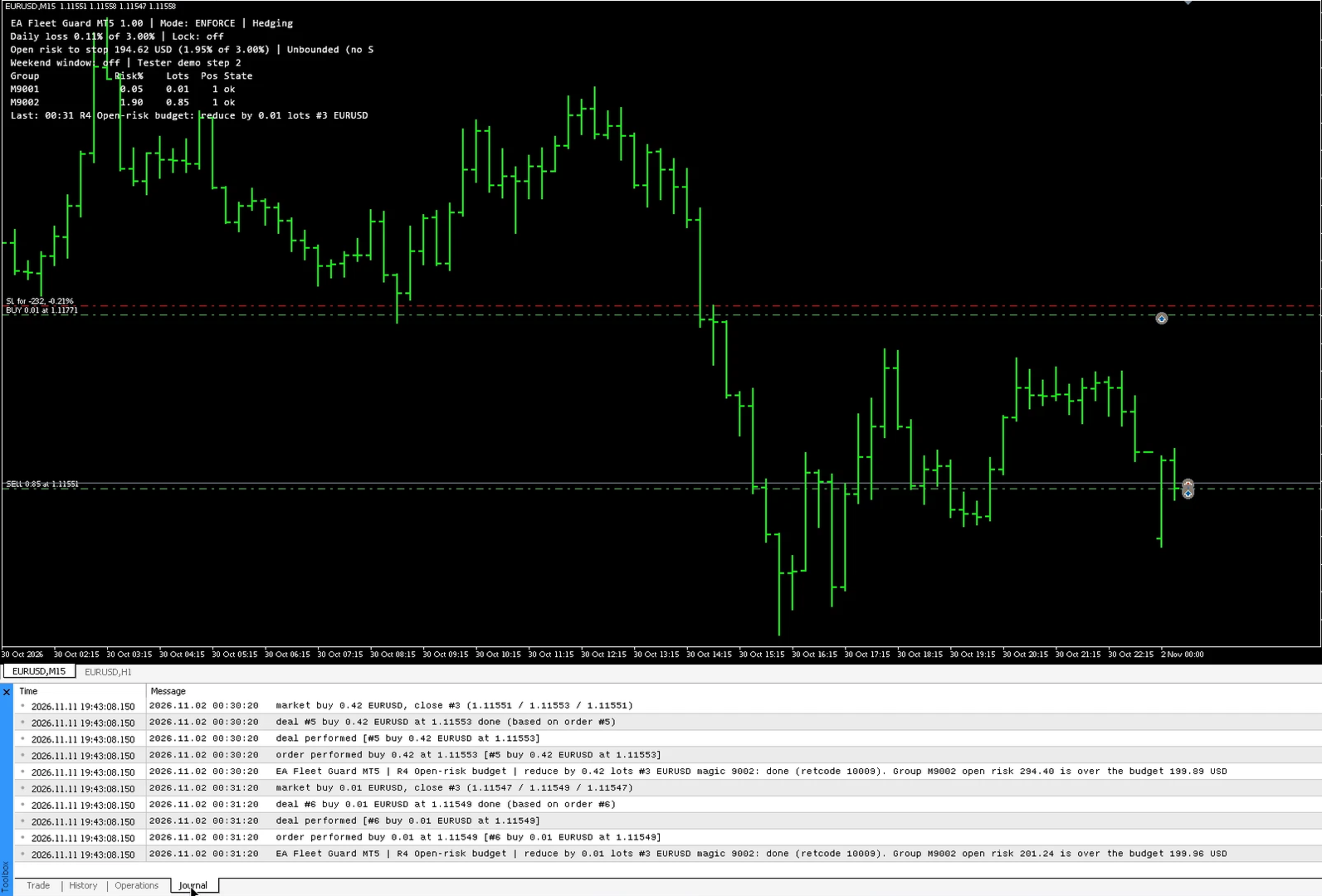
Monitor (default): the utility only reports. It shows the state on the chart, writes the CSV log and sends alerts. It does not change any position.
Enforce: the utility may add a stop loss to, partially close, close, or delete positions and orders opened by other Expert Advisors or by hand, according to the rules you enable. Choose Enforce only after you have watched Monitor mode on your own account.
Rules, in priority order
R1 Daily loss lock. When equity falls by the set percentage below the day-start equity (deposits and withdrawals are accounted for), a lock latches until the next daily reset hour in server time. While locked, new positions are closed and new pending orders are deleted. You can also choose to close everything when the lock latches. The lock survives a terminal restart.
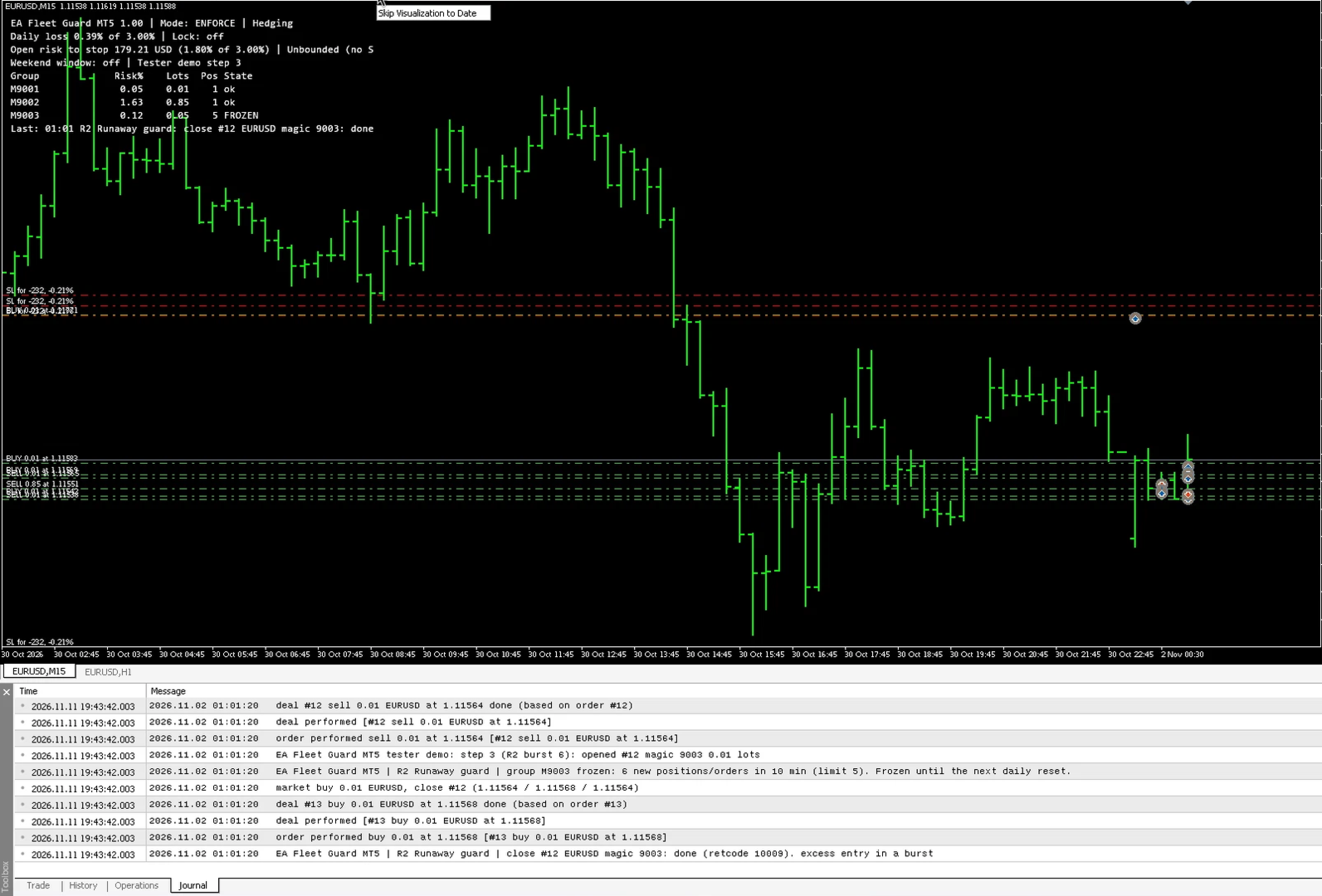
R2 Runaway guard. When one group opens more than the allowed number of positions or orders within the set window, or modifies stops and orders too often, the group is frozen. The excess entries are closed, its pending orders are deleted, and anything new it opens is closed until the next daily reset.
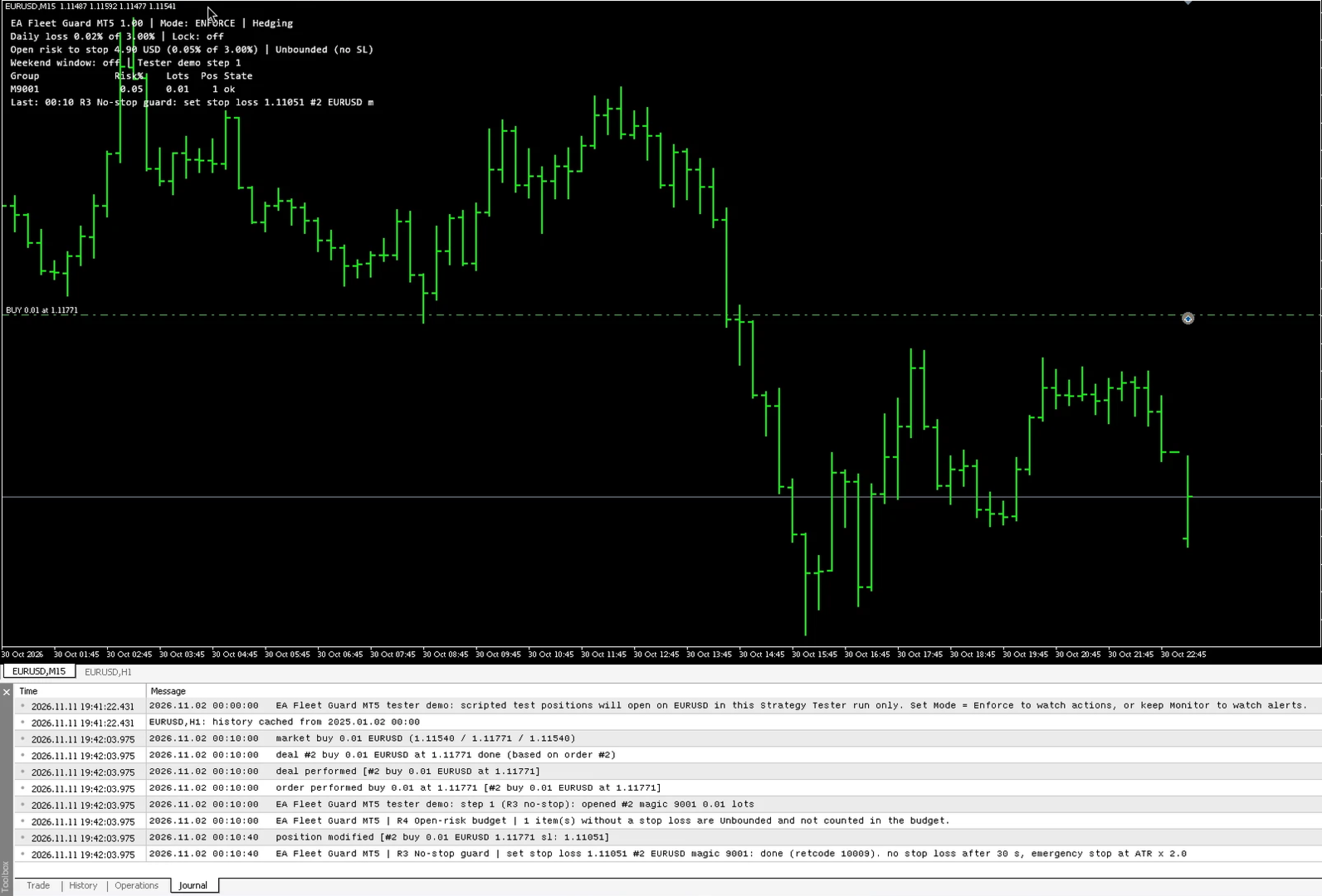
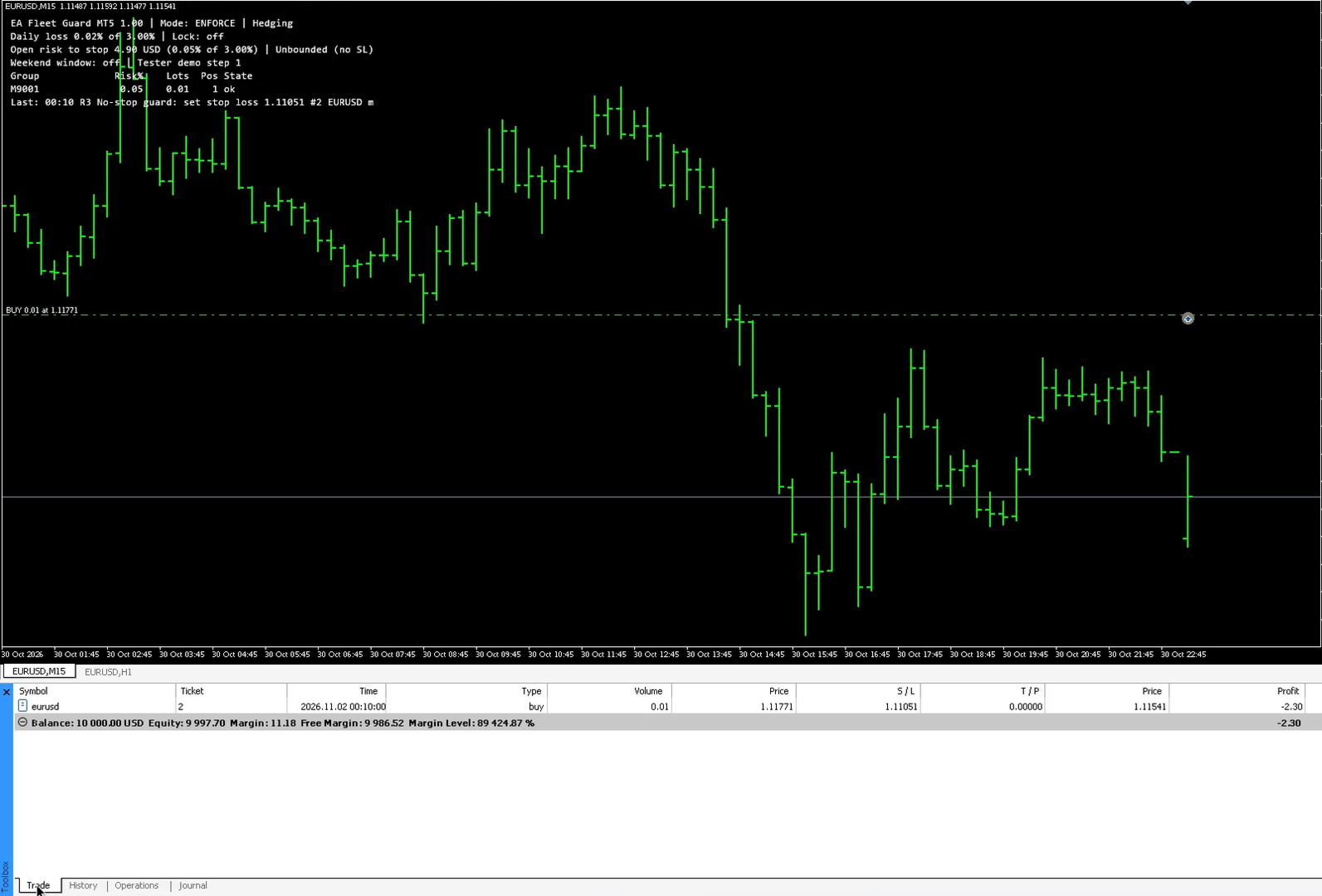
R3 No-stop guard. A position without a stop loss after a grace period is reported, given an emergency stop loss based on the ATR of a closed bar (never closer than the broker's stops level, freeze level and spread allow), or closed. You choose the action.
R4 Open-risk budget. The loss to stop of every position and pending order is priced in account currency with the broker's own contract data (OrderCalcProfit). It works the same way for forex, metals, index CFDs and crypto symbols. When the total for the account or a group goes over its budget, the newest position is reduced to fit or closed. Older positions are not reduced; they only raise an alert. Positions without a stop loss are shown as Unbounded, not as zero risk.
R5 Exposure caps. Optional limits on positions per symbol and lots per group.
R6 Weekend window. Optional: positions and orders are closed after a Friday cutoff time and anything new is closed until Monday 00:00 server time.
R7 Health alerts. Alerts when the terminal is disconnected, Algo Trading is switched off, quotes of a held symbol stop updating during its session, or the margin level falls below your limit. These are alerts only.
How it works
The utility scans once per second and on every trade event. A spread gate lets non-urgent actions wait a few seconds while the spread is unusually wide. Daily-lock and no-stop actions do not wait unless you choose that. Requests are retried on requotes, and closed markets are retried later with a growing delay. The daily state and group freezes are saved in terminal global variables and a small file, so a restart does not reset them.
The panel is a few lines of text, updated at most once per second, and can be turned off.
Alerts are sent only through the terminal: pop-up alert, push notification to the MetaTrader mobile app, and e-mail as configured in the terminal options.
How to try it
The Strategy Tester version includes a demonstration. In the Strategy Tester only, on a hedging test account, the utility opens a scripted set of test positions on the tested symbol: one without a stop loss, one oversized, a burst of entries, and a losing sequence that reaches the daily loss limit. Run it in visual mode with Mode set to Enforce to watch each rule act, or keep Monitor to watch the alerts. These test positions are never opened on a live or demo trading account. A one-month rental is also available.
Recommended setup
Attach it to a chart of a symbol that receives regular quotes. Keep that chart open on the same terminal or VPS as your Expert Advisors.
Allow Algo Trading in the terminal if you use Enforce mode.
Check that the daily reset hour matches your broker's server time.
Start in Monitor mode and read the log for a few days before you switch to Enforce.
Limitations
MetaTrader 5 gives no way for one program to block another program's order before it is sent. The utility can act only after a position or order exists.
The calculated risk to stop is not a maximum loss. A real loss can be larger because of gaps, fast markets, slippage, requotes and disconnects.
The utility cannot switch Algo Trading off or stop other Expert Advisors from running.
On netting accounts, version 1.00 works in monitor-only mode.
If the terminal, the VPS or the chart is closed, protection stops. When a rental expires, MetaTrader 5 removes the utility from the chart and protection stops.
After a restart in the middle of a day without saved state, the day-start reference is rebuilt from the balance and today's deal history; floating results at the start of the day are not known in that case.
It does not generate trading signals and does not change the results of any strategy.
Support
Please use the comments section of this product or MQL5 private messages.
Risk notice
Trading involves risk of loss. This utility is a risk control tool. It does not guarantee any result and cannot prevent every loss. Test it on a demo account before you use it on a live account.
It does not open trades on your account and does not generate trading signals.
What it does
EA Fleet Guard MT5 is a risk utility for traders who run several Expert Advisors, or Expert Advisors together with manual trading, on one MetaTrader 5 account. Attach it to any one chart. It reads the whole account: all symbols, all magic numbers and manual trades.
Positions are grouped by magic number. You can define up to 16 named groups (for example "Trend=1001,1002; Manual=0; Other=*"), or leave the field empty and the utility creates one group per magic number.
Two modes
Monitor (default): the utility only reports. It shows the state on the chart, writes the CSV log and sends alerts. It does not change any position.
Enforce: the utility may add a stop loss to, partially close, close, or delete positions and orders opened by other Expert Advisors or by hand, according to the rules you enable. Choose Enforce only after you have watched Monitor mode on your own account.
Rules, in priority order
R1 Daily loss lock. When equity falls by the set percentage below the day-start equity (deposits and withdrawals are accounted for), a lock latches until the next daily reset hour in server time. While locked, new positions are closed and new pending orders are deleted. You can also choose to close everything when the lock latches. The lock survives a terminal restart.
R2 Runaway guard. When one group opens more than the allowed number of positions or orders within the set window, or modifies stops and orders too often, the group is frozen. The excess entries are closed, its pending orders are deleted, and anything new it opens is closed until the next daily reset.
R3 No-stop guard. A position without a stop loss after a grace period is reported, given an emergency stop loss based on the ATR of a closed bar (never closer than the broker's stops level, freeze level and spread allow), or closed. You choose the action.
R4 Open-risk budget. The loss to stop of every position and pending order is priced in account currency with the broker's own contract data (OrderCalcProfit). It works the same way for forex, metals, index CFDs and crypto symbols. When the total for the account or a group goes over its budget, the newest position is reduced to fit or closed. Older positions are not reduced; they only raise an alert. Positions without a stop loss are shown as Unbounded, not as zero risk.
R5 Exposure caps. Optional limits on positions per symbol and lots per group.
R6 Weekend window. Optional: positions and orders are closed after a Friday cutoff time and anything new is closed until Monday 00:00 server time.
R7 Health alerts. Alerts when the terminal is disconnected, Algo Trading is switched off, quotes of a held symbol stop updating during its session, or the margin level falls below your limit. These are alerts only.
How it works
The utility scans once per second and on every trade event. A spread gate lets non-urgent actions wait a few seconds while the spread is unusually wide. Daily-lock and no-stop actions do not wait unless you choose that. Requests are retried on requotes, and closed markets are retried later with a growing delay. The daily state and group freezes are saved in terminal global variables and a small file, so a restart does not reset them.
The panel is a few lines of text, updated at most once per second, and can be turned off.
Alerts are sent only through the terminal: pop-up alert, push notification to the MetaTrader mobile app, and e-mail as configured in the terminal options.
How to try it
The Strategy Tester version includes a demonstration. In the Strategy Tester only, on a hedging test account, the utility opens a scripted set of test positions on the tested symbol: one without a stop loss, one oversized, a burst of entries, and a losing sequence that reaches the daily loss limit. Run it in visual mode with Mode set to Enforce to watch each rule act, or keep Monitor to watch the alerts. These test positions are never opened on a live or demo trading account. A one-month rental is also available.
Recommended setup
Attach it to a chart of a symbol that receives regular quotes. Keep that chart open on the same terminal or VPS as your Expert Advisors.
Allow Algo Trading in the terminal if you use Enforce mode.
Check that the daily reset hour matches your broker's server time.
Start in Monitor mode and read the log for a few days before you switch to Enforce.
Limitations
MetaTrader 5 gives no way for one program to block another program's order before it is sent. The utility can act only after a position or order exists.
The calculated risk to stop is not a maximum loss. A real loss can be larger because of gaps, fast markets, slippage, requotes and disconnects.
The utility cannot switch Algo Trading off or stop other Expert Advisors from running.
On netting accounts, version 1.00 works in monitor-only mode.
If the terminal, the VPS or the chart is closed, protection stops. When a rental expires, MetaTrader 5 removes the utility from the chart and protection stops.
After a restart in the middle of a day without saved state, the day-start reference is rebuilt from the balance and today's deal history; floating results at the start of the day are not known in that case.
It does not generate trading signals and does not change the results of any strategy.
Support
Please use the comments section of this product or MQL5 private messages.
Risk notice
Trading involves risk of loss. This utility is a risk control tool. It does not guarantee any result and cannot prevent every loss. Test it on a demo account before you use it on a live account.