Multiplier Breakout
- Experts
- Versão: 1.0
- Ativações: 5

MULTIPLIER BREAKOUT — Automated Breakout Trading for MetaTrader 5
Overview
Multiplier Breakout is an Expert Advisor (EA) for MetaTrader 5 designed to identify breakout trading opportunities and manage positions using predefined risk and trade management rules.
The EA focuses on breakout entries and includes configurable position sizing, stop-loss management, partial take-profit levels and trade protection features.
Key Features
- Breakout Strategy: Designed for trading opportunities based on price breakouts.
- Risk-Based Position Sizing: Calculates trade volume according to the configured risk percentage and stop-loss distance.
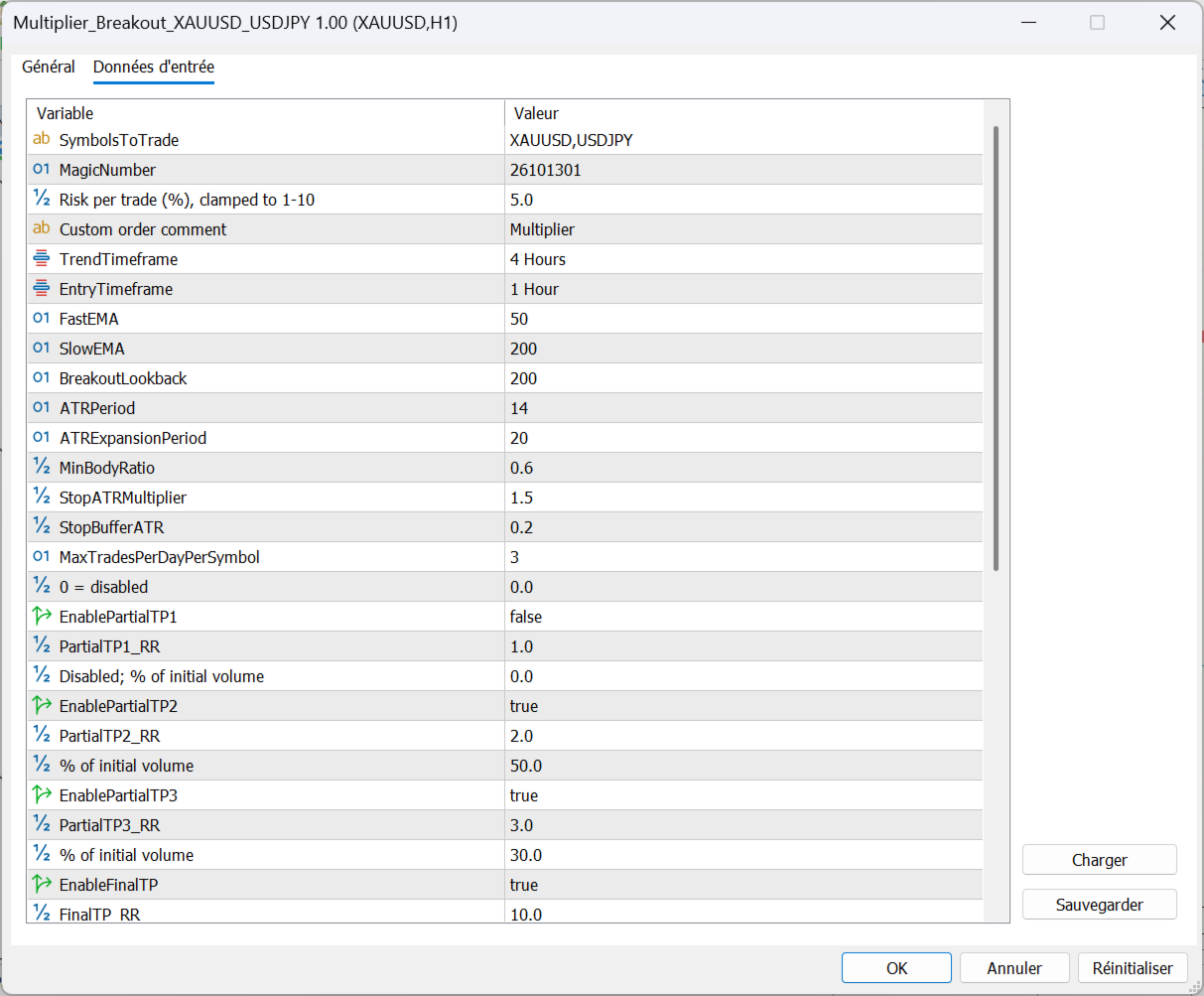
- Configurable Risk: Default risk setting of 5% per trade, adjustable from 1% to 10%.
- Partial Take Profit: Configurable profit-taking levels at different risk-to-reward ratios.
- Stop-Loss Protection: Each trade uses stop-loss parameters defined by the strategy.
- Trade Management: Includes trailing-stop functionality and additional position management rules.
- Opposite Expansion Candle Protection: Can close a profitable position before the first target when a strong opposite-direction expansion candle closes, according to the EA's rules.
- Custom Order Comment: Allows users to customize the comment attached to orders.
- Multi-Symbol Operation: Can be configured for supported instruments, subject to broker symbol names, trading conditions and available market data.
Risk Management
The default risk setting is 5% per trade and can be adjusted between 1% and 10%.
These settings are user-configurable. A higher risk percentage can result in substantial losses, and the actual risk may differ because of slippage, gaps, spreads and execution conditions.
Always test the EA on a demo account before using it on a live account.
USER MANUAL — IMPORTANT SETTINGS
1. Recommended Setup
Multiplier Breakout is designed to be used with its default settings.
For the recommended setup, keep all input parameters at their default values, except for the risk percentage per trade.
The default configuration has been selected to work with the EA's intended trading logic. Changing other parameters may affect trade entries, position management and risk exposure.
2. Risk Per Trade
The only setting we recommend changing is Risk Percent Per Trade.
- Lower risk: Choose a lower percentage for a more conservative approach.
- Higher risk: A higher percentage increases potential losses as well as potential gains.
- Default risk: 5% per trade.
- Available range: 1% to 10%, if supported by the current EA version.
Choose a risk level appropriate for your account balance, trading experience and tolerance for losses. If you are unsure, start with a lower risk percentage and test the EA on a demo account first.
Important: The risk percentage is not a guarantee that every trade will lose no more than the selected percentage. Slippage, gaps, spread changes and execution conditions can cause actual losses to differ.
3. Installation and Startup
1. Install the EA in MetaTrader 5.
2. Attach Multiplier Breakout to a chart.
3. Enable algorithmic trading.
4. Open the EA's Inputs tab.
5. Leave all settings unchanged except Risk Percent Per Trade.
6. Confirm that the broker supports the required symbols: XAUUSD and USDJPY. Some brokers use different symbol names or suffixes.
7. Test the EA on a demo account before using it on a live account.
4. Important Recommendations
- Do not change other parameters unless you understand their effect.
- Do not run multiple copies with conflicting settings on the same account.
- Monitor your account and available margin regularly.
- Test the EA again after changing brokers, symbols or account types.
- Never trade money you cannot afford to lose.
5. Risk Disclaimer
Multiplier Breakout is an automated trading tool, not a guarantee of profit. Trading leveraged financial instruments involves a substantial risk of loss. Past performance does not guarantee future results.
The user is responsible for selecting the risk level and monitoring the trading account.
2. Chart Setup — IMPORTANT
Attach Multiplier Breakout to an XAUUSD chart on the H1 (1-hour) timeframe.
The EA is designed to use this chart as its main operating chart while monitoring the configured trading symbols, XAUUSD and USDJPY.
- Required chart symbol: XAUUSD
- Required timeframe: H1 (1 hour)
- Additional symbol monitored: USDJPY
Make sure the XAUUSD symbol is available in your broker's Market Watch. If your broker uses a suffix, such as "XAUUSD.a", check that the EA's symbol settings match your broker's exact symbol names.
Important Risk Disclaimer
Trading Forex, CFDs and other leveraged instruments involves a high level of risk and may not be suitable for all investors. Past performance does not guarantee future results.
Multiplier Breakout does not guarantee profits. Users are responsible for selecting appropriate risk settings, testing the EA and monitoring their trading activity.