Basalt Breakout
- Experts
-
Felipe Camargo Zamudio
 Master Consultant in financial technology and risk analyst.
Work at DAFSYS, is a company of Development of automated financial systems. - Versão: 1.15
- Ativações: 5
Basalt Breakout — The market builds the level. You catch the break.
Basalt Breakout turns support and resistance breakouts into trades with clearly defined entry and exit rules.
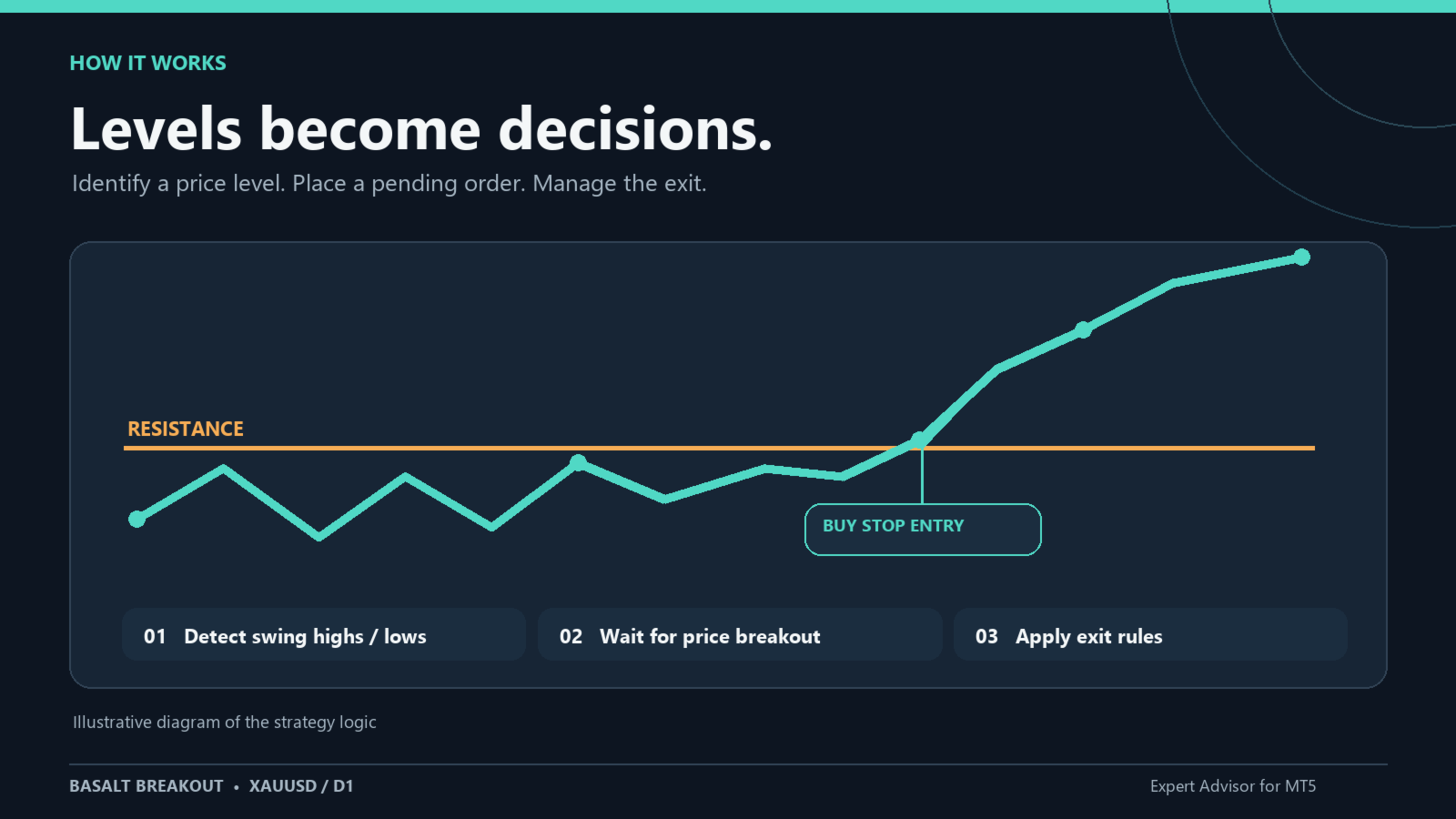
The market spends hours building a level… and seconds breaking it. Most traders get there too early or too late. Basalt Breakout is already waiting: it tracks the key highs and lows, stays patient, and places a Buy Stop or Sell Stop right where the move begins.
No guessing. No staring at charts. No chasing candles.
Available to you for the first time
We have traded this EA for 7 years, and now, for the first time, we have decided to make it available to other traders. Behind it are 18 years of market experience and real logic, not a black box: check every variable and every parameter, because we are transparent. And you won’t be on your own: we offer first-class support. We are not new to this. Just give it a chance: try it!
Every trade is born with a plan
- You decide the entry distance, the number of pending orders and how long they stay alive.
- Stop loss, take profit, trailing stop, trailing take profit and break-even, all built in.
- Optional spread, trading-hours and news filters (NFP, rate decisions, CPI).
- Configurable margin and drawdown protection.
- The news filter reads the MQL5 economic calendar live; in the tester it uses a CSV of historical events.
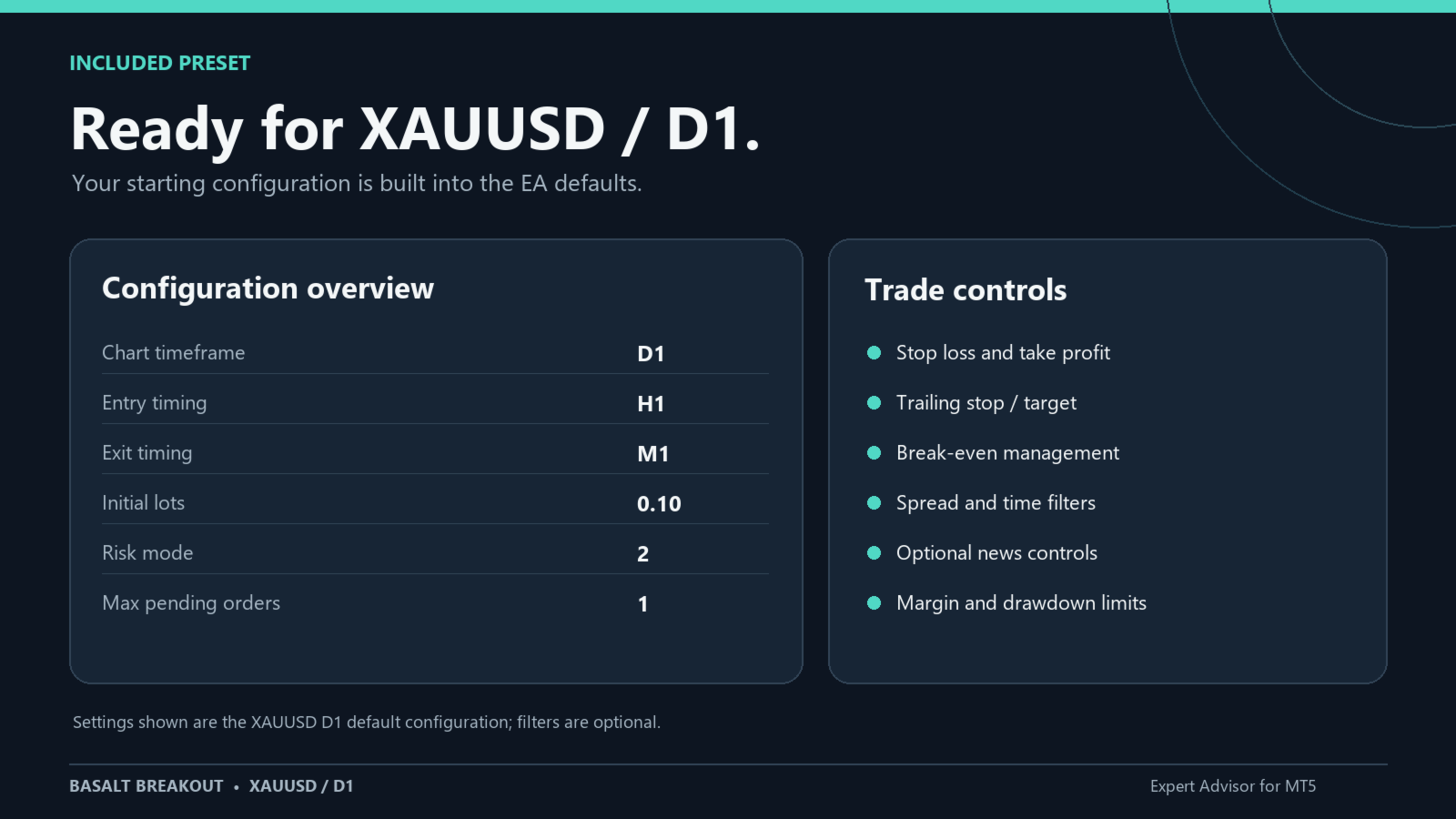
Ready in minutes: start with XAUUSD/D1. The included preset loads a complete configuration, so you can repeat the tests on your own broker and see the results for yourself. Starting lot: 0.10. Check the calculated size before using it on a trading account. News filters are disabled in this preset.
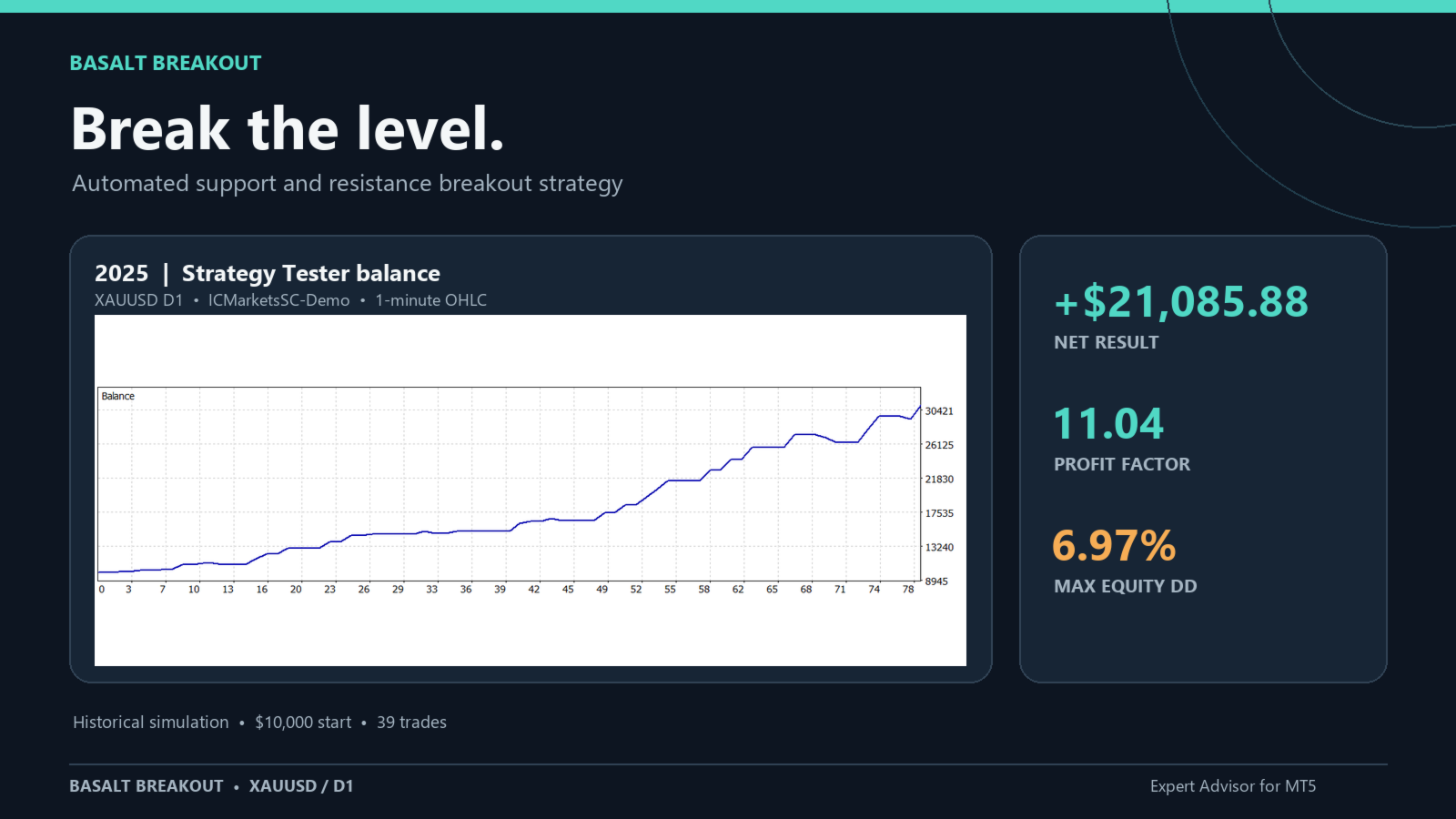
Strategy Tester results, XAUUSD/D1 preset
| Period | Net result | Profit factor |
|---|---|---|
| 2024 | +6,966.29 USD | 1.96 |
| 2025 | +21,085.88 USD | 11.04 |
| Jan 1 – Oct 5, 2026 | +7,650.69 USD | 2.74 |
Three periods, three positive results. Don’t take our word for it. Load the preset, run the tester and judge the numbers yourself.
Initial setup
Run the EA on XAUUSD, D1 chart. The XAUUSD/D1 values are already built in as the default settings; there is no need to import a .set file. With this configuration, entries are checked on H1 ( Entry_Timing ) and positions are managed on every tick ( UseEveryTick=true ). Check the symbol, volume and your broker’s conditions before trading.
Risk control is configured with Risk , StartLots and, in mode 2, Manual_RiskPerTrade . The InpMaxDailyDrawdownPercent and InpMaxEquityDrawdownPercent limits are independent and are disabled with a value of 0 . How often opportunities appear depends on the detected levels and filters; this EA has no automatic frequency selector.
Entries and levels
- AllowBuyTrades / AllowSellTrades → enable Buy Stop and Sell Stop orders, respectively.
- ST1_Timeframe → timeframe in which highs and lows are searched; Current uses the chart timeframe (D1 in the preset).
- Entry_Timing → timeframe whose new bar triggers the entry analysis; H1 by default.
- ST1_HL_strength_L / ST1_HL_strength_R → number of candles required on each side to confirm a local high or low.
- ST1_countback → maximum number of closed candles scanned when searching for levels.
- ST1_MinDist_to_HL / ST1_MinDist_to_HL_percentage → minimum distance between price and the level, expressed in internal price units or as a percentage of the level; the larger of the two applies.
- ST1_UpDiff / ST1_DownDiff → offset of the pending order from the detected high or low.
- ST1_MaxPendingOrders → maximum pending orders per direction; the EA may replace an order with a closer one.
- MaxTrades → maximum open positions per direction.
- MinDist_orders → minimum spacing between orders of the same type; also prevents reusing levels that are too close together.
- ST1_Expiration_hours → lifetime of pending orders, combined with Virtual_expiration .
- EA_MagicNumber → identifier for this EA’s orders and positions. Use a different number if you run several configurations on the same symbol.
- EA_Comment → order comment. The default is Basalt Breakout ; if an old .set contains “Ultimate” or “UBS”, the EA sends Basalt Breakout as the comment.
- InpRequireUnbrokenLevel → requires that the high or low has not been broken by price afterwards.
Exits and position protection
- Exit_Timing → timeframe for checking exits when UseEveryTick=false . With UseEveryTick=true , management runs on every tick.
- UseEveryTick → enables position management on every tick.
- Exit_stop / Exit_limit → stop and target distances. Exit_stop also defines the reference used in the risk-based lot size calculation.
- Exit_TrailSL_size / Exit_TrailSL_Start → trailing stop distance and the profit required to activate it.
- Exit_TrailSL_Stop / Exit_TrailSL_step → trailing stop limit relative to the open price, and the minimum improvement required to modify it.
- Exit_TrailTP_size / Exit_TrailTP_Start → move the target closer when the position’s accumulated loss reaches the configured threshold.
- Exit_BE_start / Exit_BE_extra_pips → profit threshold that activates break-even, and the additional stop offset. With Exit_BE_start=0 , this function is not activated.
- Exit_TrailSL_after_X_Minutes / Exit_TrailSL_after_X_Minutes_size → additional trailing after the specified time since the position opened; both must be greater than zero.
- useVirtualStops → with a non-zero value, the EA may close the position when it reaches the virtual Exit_stop distance.
- InpHardStopMultiplier → multiplies the distance of the initial stop sent to the broker; with 0 , no initial stop is sent. It does not replace the EA’s exit management.
Distances are calculated using the internal Pip() unit and the EA’s scale factor. On a two-decimal XAUUSD, one base unit equals 0.01 in price before the scale factor is applied; verify the actual levels in the Strategy Tester.
Volume, scaling and spread
- Risk → 0 or 1 : uses StartLots as a fixed volume. 2 : calculates volume with Manual_RiskPerTrade . 3 , 4 , 5 , 6 and 7 : internal percentages of 0.1%, 0.2%, 0.5%, 1% and 2%, respectively. In modes 2–7, StartLots remains the minimum used by the calculation, so effective risk may exceed the selected percentage.
- StartLots → initial volume and the minimum for percentage-risk modes. If it is below the broker’s minimum, the order is not sent.
- Manual_RiskPerTrade → percentage of balance or equity, used only with Risk=2 .
- MaxLots → upper volume limit, in addition to the broker’s limit.
- UseEquity → uses equity instead of balance to calculate percentage-based volume.
- OnlyUp → prevents the calculation base from falling below the highest balance recorded since the EA started.
- CheckMargin → skips the order if free margin is insufficient to open it.
- SpreadFilter / MaxSpread → enable the spread filter and set the maximum spread for placing new orders.
- DistForSpreadFilter → if the spread exceeds the maximum, cancels pending orders located at this distance from price or closer.
- Virtual_expiration → with true , the EA cancels pending orders after ST1_Expiration_hours ; with false , it requests expiration from the broker if the symbol allows it.
- ATRDefault / ATR_Period / ATR_Timeframe → scale distances using ATR when ATRDefault>0 .
- DefaultValue → when ATR scaling is not used, scales distances by the open of the last closed D1 candle divided by this value. With 0 and no ATR, a factor of 1 is used.
News
- UseMQL5Calendar → queries the MQL5 economic calendar live when at least one news filter is enabled. In the tester, historical events are read from the CSV specified in InpNewsFile .
- MQL5_CalendarDays → number of days ahead queried in the live calendar.
- EnableNFP_Filter / EnableIR_Filter / EnableCPI_Filter → enable the US Non-Farm Payrolls, interest rate decision and CPI filters. All three are disabled in the supplied preset.
- NFP_MinutesBefore / NFP_MinutesAfter, IR_MinutesBefore / IR_MinutesAfter and CPI_MinutesBefore / CPI_MinutesAfter → entry-blocking window around each event.
- NFP_CloseOpenTrades / IR_CloseOpenTrades / CPI_CloseOpenTrades → close the EA’s own positions during the event window if the corresponding filter is enabled.
- NFP_ClosePendingOrders / IR_ClosePendingOrders / CPI_ClosePendingOrders → delete the EA’s own pending orders during that window.
- InpNewsFile → name of the historical CSV in Terminal/Common/Files . Format: server_time,category , with server time and categories NFP , IR or CPI . Required when the filters are enabled during a backtest; also used live if UseMQL5Calendar=false .
Trading hours and limits
- UseTradingTimeZones → enables trading hours. Disabled in the preset.
- Time_Source → clock used for trading hours: 0 GMT, 1 local PC time, 2 broker time.
- MondayStart/MondayEnd, TuesdayStart/TuesdayEnd, WednesdayStart/WednesdayEnd, ThursdayStart/ThursdayEnd, FridayStart/FridayEnd, SaturdayStart/SaturdayEnd and SundayStart/SundayEnd → start and end of each day in HH:MM format; sessions crossing midnight are supported. To set a Friday cut-off time, enable UseTradingTimeZones and adjust FridayEnd .
- KillPending / KillOpen → outside trading hours, cancel the EA’s own pending orders or close its own positions, respectively.
- InpMaxDailyDrawdownPercent → when equity drops by this amount from the start of the day, blocks new entries and cancels pending orders until the next day. 0 disables the limit.
- InpMaxEquityDrawdownPercent → when equity drops by this amount from the highest equity observed since the EA started, blocks new entries and cancels pending orders for as long as that instance is running. 0 disables the limit. These two limits do not, by themselves, close positions that are already open.
- InpDeviationPoints → maximum deviation used by trade requests, in symbol points.
- InpVerbose → prints additional diagnostics for rejected orders and modifications in the Journal.
Inputs kept for compatibility
LotsAdjustMinChangePercent , LotPerBalance_step , VirtualSL_Safety_Hardstop_dist , Broker_GMT_OFFSET_Summer , Broker_GMT_OFFSET_Winter and AutoGMT remain visible so older presets can be loaded; version 1.12 does not use them in its trading logic. Clock adjustment for trading hours is done with Time_Source .