Konstantin Chechnev
Konstantin Chechnev
4.2 (5)
  • 정보
7+ 년도
경험
19
제품
46
데모 버전
0
작업
0
거래 신호
0
구독자
Software engineer 에 Eqorex RnD Studio
💻 01 / METATRADER 맞춤 개발
────────────────────────

지표, 트레이딩 패널, 유틸리티부터 다층 분석 시스템, EA, 최적화 도구, 시장 연구용 전문 도구까지 난이도와 규모에 관계없이 개발합니다.

트레이딩 또는 분석 아이디어를 명확한 로직으로 정의할 수 있다면 완성된 MetaTrader 도구로 구현할 수 있습니다.


⚙️ 02 / 개발 가능한 분야
────────────────────────

• 트레이딩 알고리즘 및 전략 자동화
• 시장 데이터 분석 지표 및 시스템
• Tick, 가격 흐름 및 통계 데이터 처리
• 트레이딩 파라미터 최적화 및 검증
• 고급 인터페이스, 제어 패널 및 데이터 시각화
• 특정 요구사항에 맞춘 맞춤형 트레이딩 및 분석 로직


🧩 03 / 아이디어에서 완성된 제품까지
────────────────────────

아이디어와 수학적 로직부터 시스템 설계, 프로그램 구현, 인터페이스, 성능 최적화, 테스트 및 최종 제품까지 전체 프로젝트를 직접 진행합니다.

좋은 도구는 단순히 작동하는 코드가 아닙니다. 빠르고 이해하기 쉬우며 안정적이고 사용하기 편해야 하며, 처음 만들어진 목적을 정확하게 해결해야 합니다.


🧭 04 / 7년 이상의 개발 경험
────────────────────────

7년 이상 MetaTrader 및 금융시장용 소프트웨어를 개발해 왔습니다.

작은 트레이딩 알고리즘부터 시작해 현재는 복잡한 시장 연구 및 전문 분석 시스템까지 개발하고 있습니다.


💬 05 / 아이디어나 개발 과제가 있나요?
────────────────────────

처음부터 방대한 기술 명세서를 준비할 필요는 없습니다.

MQL5 개인 메시지로 원하는 작업을 편하게 설명해 주세요. 구현 가능성을 검토하고, 불필요한 기능을 제외한 최적의 구현 방법을 제안하며, 작업 범위와 개발 기간 및 예산을 미리 명확하게 안내해 드립니다.

작은 작업은 가능한 한 빠르게 완료합니다. 복잡한 프로젝트는 명확한 단계로 나누고 첫 상담부터 최종 결과물까지 제가 직접 진행합니다.

모든 단계에서 개발자와 직접 소통하므로 논의한 내용과 실제 구현 사이에서 중요한 세부사항이 누락되지 않습니다.
Konstantin Chechnev
Konstantin Chechnev
Indicator: Adaptive NeuroMatrix Trend (MT5)
https://www.mql5.com/ru/market/product/155563
Have you ever seen a “perfect” indicator in the tester and a totally different story on a live chart?
Most of the time it’s because of repainting – signals look great on history, but in real time they change after the fact 😤

Adaptive NeuroMatrix Trend was built specifically to avoid that. It’s a price-action based trend indicator that works **only on bar close**, so what you see in real time is exactly what will stay on the chart 💹

What it helps you see:
🔵 when buyers dominate (bullish phase)
🔴 when sellers dominate (bearish phase)
⚪ when the market is basically flat and better to stay out or take profit
🟡🟠 impulse zones that may lead to a reversal or at least to a pause in the current move

Inside, it combines smoothing, volatility and statistics to cut out random noise and leave a clean, readable structure of trend / flat / impulse ✅

You can tune its behavior to match your style:
⏱ adjust reaction speed vs. smoothness
🎯 make entries more conservative or more aggressive
🚫 suppress random spikes and noisy bars
🧠 enable a predictive layer that helps to catch trend phase shifts a bit earlier

Possible uses in a trading plan:
🧭 trend filter for your existing strategies and EAs
🔎 quick scan of symbols to see where a real move is happening right now
📌 spotting exit and re-entry areas after strong impulses

If you’re tired of indicators that “know the future” only on history and want a clearer view of who’s in control – buyers, sellers or nobody – take a look at Adaptive NeuroMatrix Trend, run it in the Strategy Tester on your own symbols and timeframes, and see how it behaves in your approach 📉📊

Page of the indicator:
https://www.mql5.com/ru/market/product/155563
Konstantin Chechnev
Konstantin Chechnev
👉 Adaptive NeuroMatrix Trend on MQL5:
[https://www.mql5.com/ru/market/product/155563](https://www.mql5.com/ru/market/product/155563)

🚀 Adaptive NeuroMatrix Trend — price-action indicator with NO repainting 💹

Traders constantly face the same problems: lagging signals from classic MA/RSI/MACD, noisy breakouts, and indicators that repaint on history 😤
Adaptive NeuroMatrix Trend solves this with its own price-action model of price movement (not based on standard MT5 indicators) and works strictly on bar close, so there is NO repainting ✅

📈 What the indicator shows in a separate window:
🔵 Buy phase — bullish trend dominant
⚪ Flat / Exit — better to stay out or lock in profit
🔴 Sell phase — bearish trend dominant
🟡🟠 Gold/orange segments — impulse spikes and early warnings of potential reversals

✨ Key features:
✅ No repainting — signals are formed only at bar close; the picture does not change afterwards.
⚙️ Flexible tuning to your trading style via parameters:
⏱ Time-scale — reaction speed vs. smoothing
🎯 Entry sensitivity — how aggressively to enter
🚫 Anti-impulse strength — filters out noisy spikes
🧠 Predict layer strength — predictive smoothing of trend turns

🧩 Trend / flat / impulse separation — the internal algorithm combines smoothing filters, volatility and statistics to cut market “chop” and leave a clear trend structure.

📊 Built-in performance statistics:
📌 Cumulative result for the current symbol
🧾 Efficiency over the last 8 instruments
⏳ Tracking over a selected window in days — you immediately see where the model works best.

💡 How traders can use it:
🧭 As a trend filter for existing strategies and EAs
🔍 For pre-session instrument selection — finding “clean” trending symbols
📌 For spotting exit and re-entry zones after strong impulses

👇 Try it now:

Go to Adaptive NeuroMatrix Trend on MQL5, download the indicator and run it in the Strategy Tester on your favorite symbols and timeframes 🧪📉📊
If the results match your style — confidently add it to your trading setup as your main trend filter and statistics assistant 💼💰

➡️ Download Adaptive NeuroMatrix Trend:
[https://www.mql5.com/ru/market/product/155563](https://www.mql5.com/ru/market/product/155563)
Konstantin Chechnev 출시돈 제품

Correlation Monitor 는 종목 간 관계를 빠르게 탐지하는 지표입니다 . 강한 양 / 음의 상관관계를 가진 페어를 찾고 , 다이버전스를 식별하며 , 헤지 · 페어 · 바스켓 트레이딩에서 보다 근거 있는 의사결정을 내리도록 돕습니다 . Meta traider 4. 주요 기능 • 상관관계 매트릭스와 컴팩트 리스트 : 선택한 심볼 간 관계의 강도를 즉시 보여 주며 , 색상 구분으로 가독성을 높입니다 . • 상관 심볼의 미니 차트 : 메인 차트의 가시 범위와 동기화되어 움직임을 직관적으로 비교할 수 있습니다 . • Top‑5 모드 : 가장 강한 양의 / 음의 관계를 강조 표시하여 빠르게 집중할 수 있습니다 . • 멀티 타임프레임 : 서로 다른 기간에서 평가하며 계산 창 ( 바 수 ) 을 설정할 수 있습니다 . • ‘ 시장 감시 (Market Watch)’ 의 모든 심볼을 지원하며 , 비표준 심볼도 가능합니다 . • 리소스 최적화 : 심볼 목록이 커도 불필요한 부하 없이 정교하게

Konstantin Chechnev
Konstantin Chechnev
Version 3.1!
Fixed the advisor's slow backtest issue. On average, speed has increased 10×.
We kicked the snail out of the advisor that was dragging calculations from one logic to another 🐌➡️✈️
No changes to the trading logic — just a few speed-pills in the code.We may speed it up further. Stay tuned for updates.
https://www.mql5.com/ru/market/product/148422
Konstantin Chechnev
Konstantin Chechnev
Meet version 3.0 of the most honest advisor!

https://www.mql5.com/ru/market/product/148422?source=Site+Profile

--- Update recommendation ---
Install the update on a demo account and run it for 24–72 hours in live/demo trading mode.

In short: we added automatic closing on an opposite signal and a ban on simultaneously opened opposite trades in the market. We focused on visualization and usability — spend less time in settings and more time understanding exactly what the advisor does. It’s a bit “heavier” (codebase grew roughly twofold), but more informative and more tolerant in operation.

--- What’s important (brief) ---

The main goal of this update is better visual feedback: all key parameters are now visible directly on the chart.

New trading logics were added to control the appearance of “opposite” trades.

Panel interfaces are localized into five languages; English is used by default for other locales.

It’s recommended to test the update on a demo account before switching to a real account.

--- Changes — detailed list ---

[Added]

Close on Opposite Signal — an option to automatically close a trade (or group of trades) when an opposite signal appears. Allows positions to be closed when the market clearly changes direction.

Prohibit opening opposite trades — blocks opening opposite trades: if long positions exist, short entries are blocked and vice versa. Simple logic — less cross-fire and trade noise.

Disable Panels Display — fully hide all panels on the chart for users who prefer a “clean” chart.

[Navigation & Visualization]

New operational notifications on the control panel — short statuses and messages about key events (standalone, non-intrusive).

Info panel — displays main settings and current modes of the advisor (quick overview without opening menus).

Auto arrow-signal search panel — shows active search parameters and arrow placement status.

When switching timeframes in automatic mode, the advisor automatically recalculates parameters and repositions arrows so they match the new timeframe.

All panels are collapsible to save chart space.

[Localization]
Panels are localized into: Russian, English, Simplified Chinese, Japanese, and German. If the terminal uses another language, English will be applied by default.

[Trading behavior / logic]
New options for handling “opposite” signals let you configure either soft blocking or hard closing/forbidding, depending on your strategy.

P.S.
If the terminal starts complaining about chart space and things feel cramped — tell it this is an investment in clarity :) You can’t have too many panels.

Good trading!
Konstantin Chechnev
Konstantin Chechnev
The most honest EA. The price will triple soon. We're finishing up another big update. Don't miss out if you're interested!

Real-time fast auto-learning for 2024 and backtest for 2025.
Lot trade 0.01
https://www.mql5.com/ru/market/product/148422
Konstantin Chechnev
Konstantin Chechnev
Hello, dear friends!In this version 2.1,
I added a cool feature — multi-currency trading. Now the advisor can work not only on one pair (as before, on the one where it is installed), but also on several currency pairs at the same time.

This is useful if you want to diversify risks and trade different instruments such as EURUSD, GBPUSD, or USDCAD.Previously, the advisor traded only on the current pair and used one signal file ("Data File Name = SignalFile" in the advisor settings). If the file was missing, it took signals from the built-in code inside the advisor. Now, if you enable the multi-currency mode (parameter Enable Multi Currency Mode = true), the advisor can trade up to 3 additional pairs. For each pair, you can specify your own signal file. If the file is not specified, it uses the general file Data File Name = SignalFile.

If that is also missing, it uses the built-in signals.If the mode is disabled (false), everything works as before — only on the current pair.I also added an option to close positions by equity separately for each pair. This means that if one pair reaches the profit threshold, the advisor will close only the positions of that pair, without affecting others.In addition, the automatic signal placement mode now includes a function called "Minimum ZigZag Bars for Signal."

Now you can filter not only by the number of points but also by the length of the ZigZag indicator, in order to avoid false news movements that may consist of 2–4 bars and later produce poor trading signals.

The most honest EA.

The price will triple soon.

https://www.mql5.com/ru/market/product/148422
Konstantin Chechnev
Konstantin Chechnev
The most honest EA. The price will triple soon. We're finishing up another big update. Don't miss out if you're interested!

how auto-learning works. For the sake of interest, we trained on the signals of 2025, but demo test for 2024 :) https://www.mql5.com/ru/market/product/148422
Konstantin Chechnev
Konstantin Chechnev
The most honest EA. The price will triple soon. We're finishing up another big update. Don't miss out if you're interested!
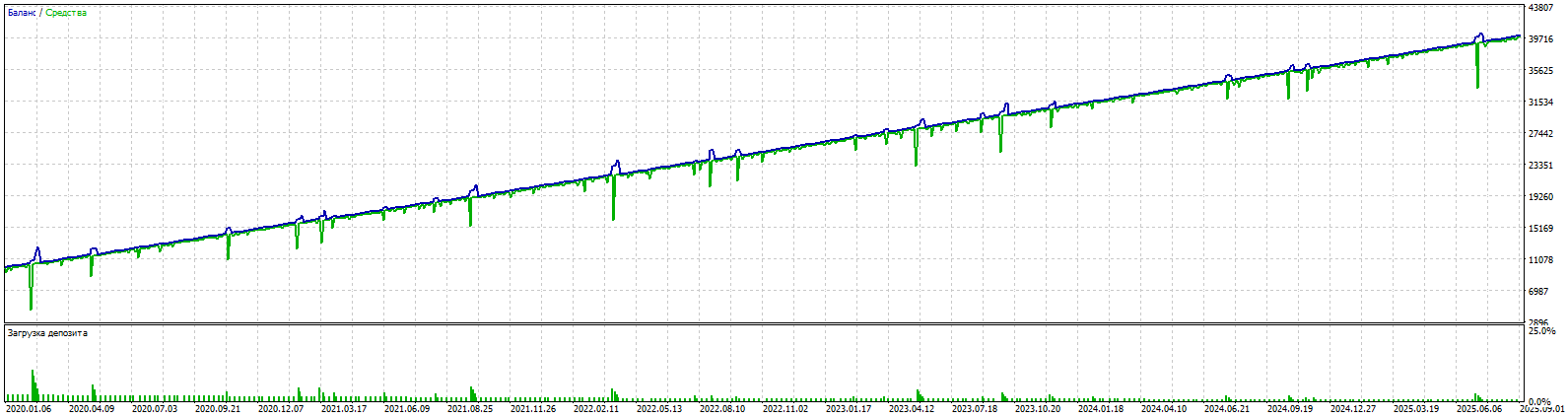
5 year backtest EURUSD M5. 100% quality tick.Set and SignalFile in comments https://www.mql5.com/ru/market/product/148422
Konstantin Chechnev 출시돈 제품

Arrow Strategy Builder — 사용자가 차트에 배치한 상승/하락 화살표를 기억하고 동일한 조건이 반복될 때 거래 신호를 생성하는 전문가용 어드바이저(EA)입니다. 초보자와 숙련자 모두에게 적합하며, 직관적인 인터페이스와 자동 매매 기능을 통해 모든 금융 상품에서 사용할 수 있습니다. 메타 레이더 5 에 대한 다중 통화 거래 고문의 전체 버전은 여기에있다. 주요 특징 간단한 전략 생성: 차트에 화살표(매수/매도)를 배치하여 진입 지점을 표시하고 거래 전략을 구성합니다. 지표 기반 신호: RSI, CCI, DeMarker, WPR 네 가지 인기 지표를 사용해 사용자 정의 패턴에 따라 거래 신호를 기록·재현합니다. 다국어 지원: EA 인터페이스는 터미널 언어(영어, 러시아어, 독일어, 일본어, 중국어)에 맞춰 자동으로 적용됩니다. 유연한 신호 매칭: 현재 시장 조건이 기록된 신호와 지정된 최소 일치율 이상으로 일치하면 포지션을 엽니다. EA 작동 방식 신호 설정: 제어

Konstantin Chechnev
Konstantin Chechnev
https://www.mql5.com/ru/market/product/148422?source=Site+Profile

Dear friends! Downloaded the update. In the default settings, SET for M1 EURUSD for an example of operation.
Version 2.0 released with extended signal management functionality, improved filtering, and a redesigned control panel.
New
[MACD Indicator (Trade Entry Filter)]Added as an auxiliary filter for determining trade direction.
MACD > 0: only long trades are allowed.
MACD < 0: only short trades are allowed.
The indicator is not used in training and is not stored in the signal database.Enabled/disabled via parameter Use MACD for Trade Opening.
[Parameter "Number of Bars Before Signal to Store"]Defines the depth of analysis before a signal. By default, the last 5 bars are taken into account for more accurate recognition of recurring market scenarios.
[Parameter "Show Indicators on Chart"]Controls the display of indicators on the chart. Default is false, simplifying chart view and signal analysis.

[Parameter "Delay from instant opening of trades after EA launch (in min.)"]Delay for opening the first trade. Required for the time of EA launch and signal settings, so that the EA does not open an unplanned trade on the available internal or previously created signal base. Default is 60 minutes.
Improvements
— Updated control panel on chart
— Redesigned interface for better usability
— Added multilingual support (automatic detection of terminal language: Russian, English, German, Japanese, Chinese; English is used in all other cases)
— Improved informational messages
Update Recommendations
1.Reset advisor parameters on the chart and in the strategy tester.
2.Use the built-in signal database or recreate and optimize your own (database structure has changed).
3.Lower the parameter Minimum Signal Match Percent to Open Trade — entry criteria across indicators have become significantly stricter.
Konstantin Chechnev
Konstantin Chechnev
Fibonacci EA — an automatic advisor based on Fibonacci levels
Features
Automatic detection of local extremes and the construction of Fibonacci levels.
Customizable conditions for opening and closing deals based on Fibonacci levels.
Flexible risk management options: stop loss, take profit, limit the volume and number of orders.

https://www.mql5.com/ru/market/product/148769
Konstantin Chechnev
Konstantin Chechnev
Set the signals, get the strategy on autopilot! Quickly. Effectively. Simply.

MT4 Free https://www.mql5.com/ru/market/product/148439
MT4 Full https://www.mql5.com/ru/market/product/148427
MT5 Free (Here in the "Discussion" there are several questions from traders and answers from me.) https://www.mql5.com/ru/market/product/148426
MT5 Full https://www.mql5.com/ru/market/product/148422
Konstantin Chechnev 출시돈 제품

69.99 USD

Fibonacci EA MT5 is an Expert Advisor for automating trading based on Fibonacci levels. It determines the minimum and maximum prices over a specified number of bars, builds Fibonacci levels, and opens trades when the current price reaches the selected levels. The EA can trade with the trend or against it, depending on the given parameters. It also allows you to configure levels for closing trades, risk management, and time filters. Features Automatic detection of local extremes and the