MQLXpert Fixed Range Volume Profile
- 지표
-
Luke John Smith
 I’m a full-time MQL5 developer.
I build Expert Advisors, indicators, dashboards and trading tools for traders who want real automation — not theory.
I specialise in turning manual trading strategies into clean, stable and fully automated systems that can run reliably in real market conditions. - 버전: 1.10
Advanced Volume Profile Analysis | MetaTrader 5
MQLXpert Fixed Range Volume Profile is a professional trading indicator designed to analyse volume distribution across a selected price range.
Unlike traditional volume indicators that display volume over time, Fixed Range Volume Profile displays estimated volume distribution across individual price levels, helping traders identify significant areas of market activity.
The indicator combines interactive range selection, configurable volume analysis and automatic identification of key volume profile levels within a fully customisable chart interface.
Key Features
-
Interactive fixed range selection.
-
Draggable range boundaries.
-
Automatic Point of Control (POC).
-
Value Area High (VAH) and Value Area Low (VAL).
-
Three selectable volume display modes.
-
Automatic, tick and real volume data selection.
-
Configurable profile resolution.
-
Adjustable value area percentage.
-
Left and right histogram placement.
-
Extend Right functionality.
-
Multiple independent profiles on the same chart.
-
Range retention when changing timeframes.
-
Fully customisable colours and opacity.
-
Interactive MQLXpert control panel.
-
Adjustable control panel positioning.
Key Volume Profile Levels
-
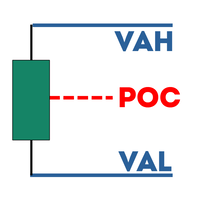
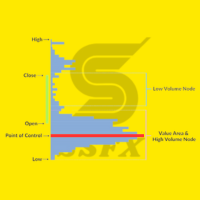
Point of Control (POC): Identifies the price row with the highest calculated total volume within the selected range.
-
Value Area High (VAH): Identifies the upper boundary of the calculated value area.
-
Value Area Low (VAL): Identifies the lower boundary of the calculated value area.
The value area percentage is fully adjustable, with a default setting of 70%.
These levels can assist traders in identifying areas of market acceptance, potential support and resistance, and significant concentrations of trading activity.
Volume Display Modes
The indicator supports three selectable volume display modes:
-
Total Volume: Displays the combined volume distribution at each price level.
-
Up/Down Volume: Separates estimated volume into upward and downward components.
-
Delta Volume: Displays the difference between estimated upward and downward volume.
Interactive Range Selection
The integrated control panel allows traders to create and manage volume profiles directly on the chart.
Simply select Draw range, click the starting candle and then click the ending candle.
Once created, both range boundaries can be selected and dragged to adjust the calculation range.
The Clear button removes the selected profile, allowing a new range to be created immediately.
Extend Right Functionality
When enabled, Extend Right automatically expands the volume profile calculation from the selected starting point to the latest candle.
The profile dynamically recalculates as new market data becomes available.
Multiple Independent Profiles
Multiple instances of the indicator can operate simultaneously on the same chart.
Each instance maintains its own independent:
-
Volume profile.
-
Range boundaries.
-
Display settings.
-
Volume calculation settings.
-
Interactive control panel.
Simply assign a different InstanceTag to each indicator instance.
Control panels automatically reposition to prevent overlapping where sufficient chart space is available.
Input Parameters
Profile Settings
-
RowsLayout: Calculate profile resolution using a specified number of rows or ticks per row.
-
RowSize: Desired number of rows or ticks per row.
-
ValueAreaPercent: Percentage of total volume used to calculate the value area.
-
VolumeDisplay: Select Total, Up/Down or Delta volume.
-
VolumeSource: Select automatic, tick or real volume data.
-
ExtendRight: Automatically extend the calculation range to the latest candle.
-
RangeStart: Optional predefined starting candle.
-
RangeEnd: Optional predefined ending candle.
Display Settings
-
ShowHistogram: Enable or disable the volume histogram.
-
ShowRowValues: Display calculated volume values.
-
Placement: Position the histogram on the left or right.
-
WidthPercent: Adjust histogram width.
-
HistogramOpacity: Adjust histogram transparency.
-
ShowProfileBox: Display the selected profile area.
-
ProfileBoxColor: Customise the profile area colour.
-
BoxOpacity: Adjust profile area transparency.
-
UpColor: Upward volume colour.
-
DownColor: Downward volume colour.
-
ValueAreaUpColor: Upward volume colour within the value area.
-
ValueAreaDownColor: Downward volume colour within the value area.
-
ShowPOC: Display the Point of Control.
-
ShowVAH: Display the Value Area High.
-
ShowVAL: Display the Value Area Low.
-
ShowLevelLabels: Display price level labels.
-
POCColor: Point of Control colour.
-
ValueAreaLineColor: Value area boundary colour.
Chart Controls
-
InstanceTag: Unique identifier for each indicator instance on the same chart.
-
ToolbarY: Vertical control panel offset.
-
ToolbarX: Horizontal control panel offset.
-
ToolbarCorner: Select the preferred chart corner.
How to Use
-
Attach the indicator to your preferred chart.
-
Configure the desired input settings.
-
Click Draw range on the control panel.
-
Select the starting and ending candles.
-
Analyse the calculated volume distribution and key price levels.
-
Drag the range boundaries or clear the profile whenever required.
Compatibility
-
Platform: MetaTrader 5.
-
Instruments: Forex, commodities, indices, cryptocurrencies and other supported instruments.
-
Timeframes: All standard chart timeframes.
-
Account types: Hedging and netting.
-
Suitable for manual technical analysis.
Important Information
Volume distribution is estimated using historical price and volume data supplied by your broker.
Up/Down and Delta volume calculations are based on candle direction and estimated volume distribution, rather than genuine bid/ask order-flow data.
Real volume availability depends on the instrument and broker.
Communication and Support
For product enquiries, configuration assistance or technical support, please contact me directly through MQL5 private messaging.
Developed by MQLXpert
Code for Traders. By Traders.