Trade Tab
- Experts
-
Arslan Tariq
 Professional Trader & Developer with nearly 10 years of experience in Forex, Crypto, Commodities, and Indices. Specialized in MetaTrader 5 Expert Advisors, custom indicators, automated trading systems, and TradingView Pine Script strategies.
 - 버전: 4.10
SMART TRADE TAB PANEL - Professional Risk & Trade Management Panel for MT5
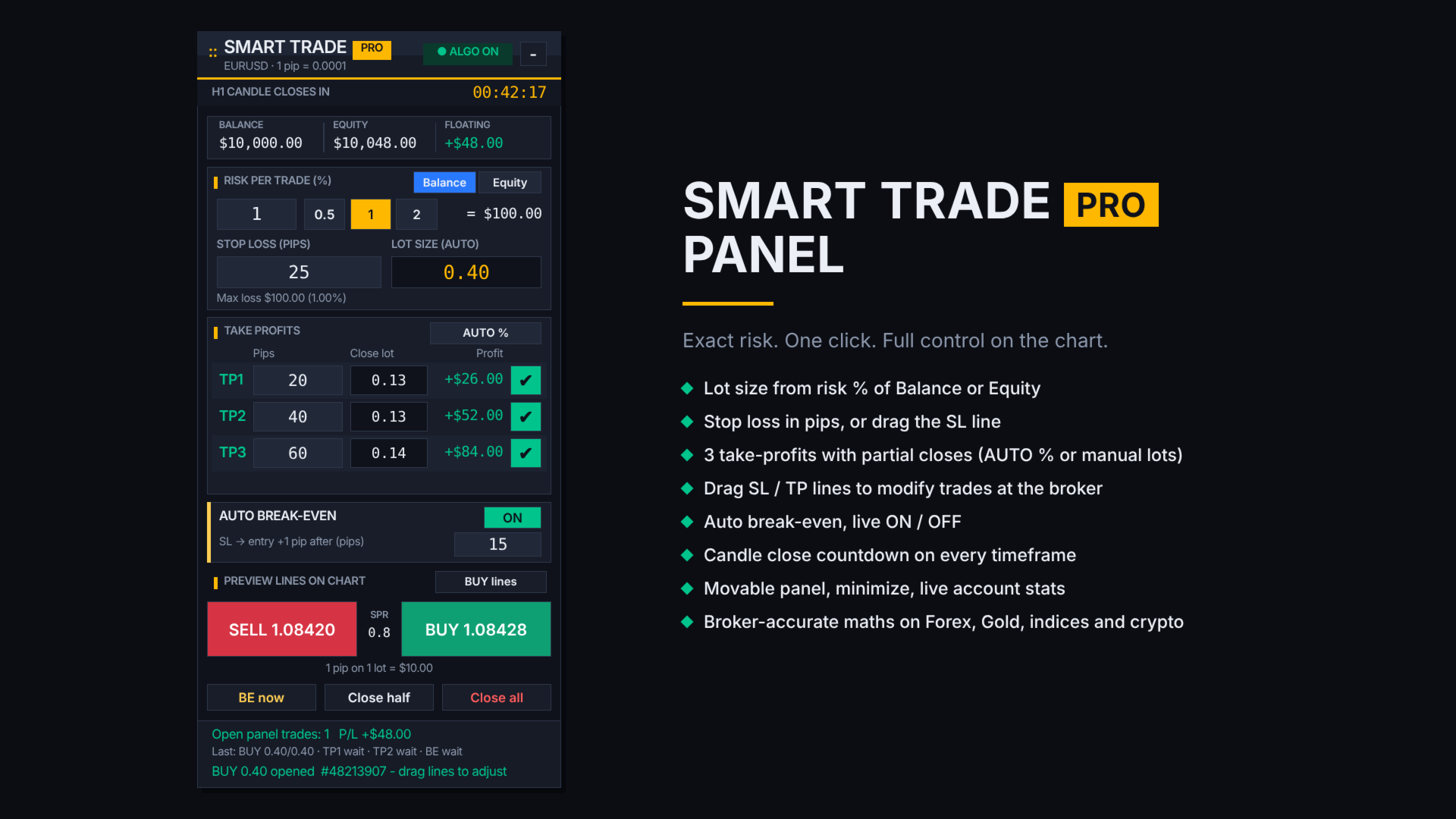
Trade with exact risk, every time. Smart Trade Pro Panel replaces the standard MT5 one-click buttons with a professional trading panel that does all the risk maths for you. You choose how much to risk and where your stop loss goes; the panel calculates the exact lot size, opens the trade, splits it across up to three take-profits and protects it with automatic break-even.
No calculator. No guesswork. No over-risking.
WHY TRADERS USE IT
- Exact position size in one click, based on your risk %
- Lock in profit step by step with 3 partial take-profits
- Protect winning trades automatically with break-even
- Plan and manage trades visually by dragging lines on the chart
- Know exactly when the candle closes with the built-in countdown
- Works on Forex, Gold, Silver, indices and crypto, with any broker
KEY FEATURES
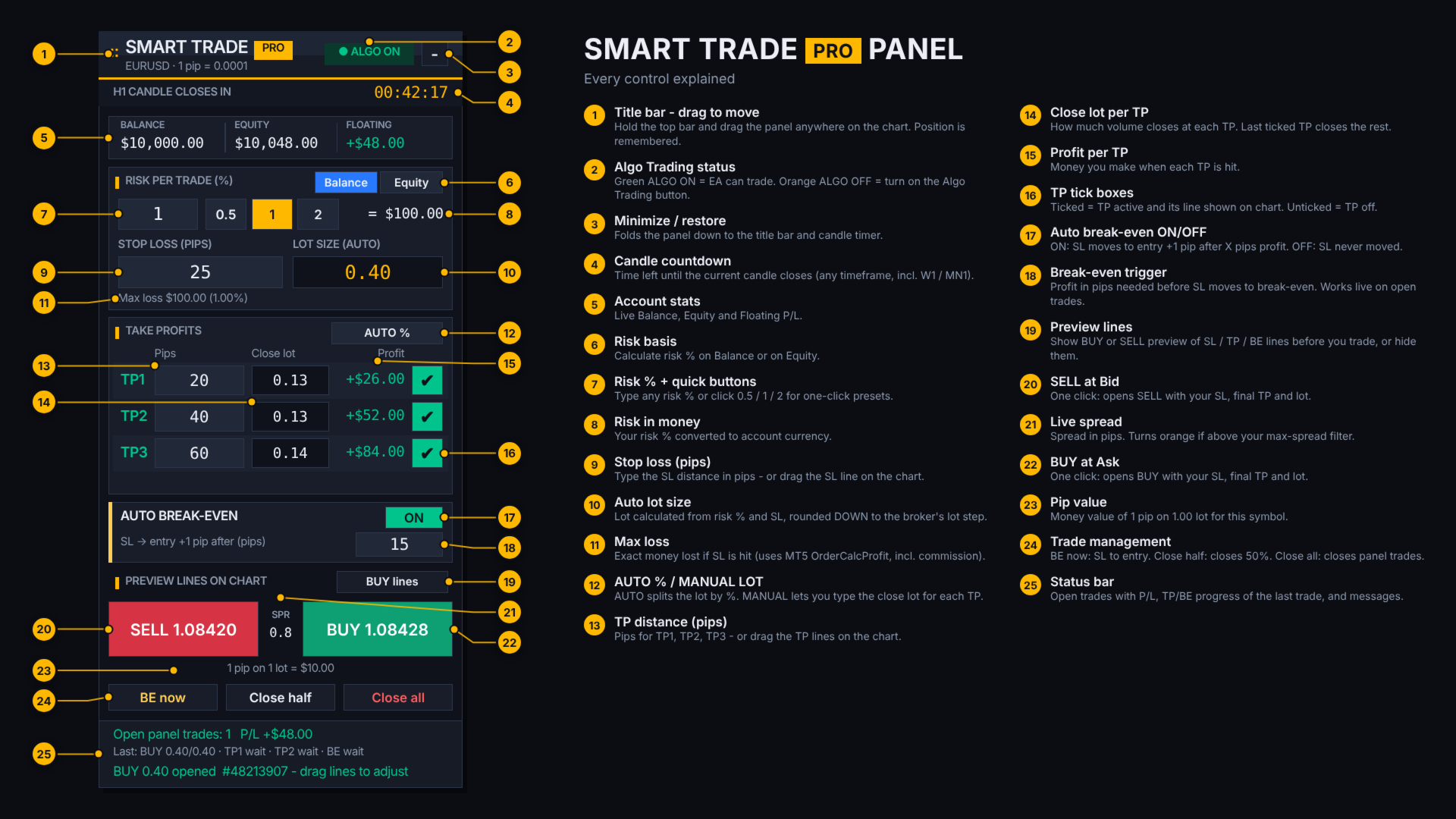
1. Risk-based lot size
- Risk per trade in % of Balance or Equity (one-click switch)
- Quick risk buttons: 0.5% / 1% / 2%
- Stop loss in pips; lot size is calculated instantly
- Lot is always rounded DOWN to the broker's lot step, so you never risk more than you chose
- Shows money at risk, max loss in money and %, and the value of 1 pip per lot
- Optional commission per lot is included in the risk calculation
- Checks broker minimum lot, maximum lot, lot step and free margin before every trade
2. Three take-profits with partial closes
- TP1, TP2 and TP3, each with its own tick box (ticked = active + line on chart)
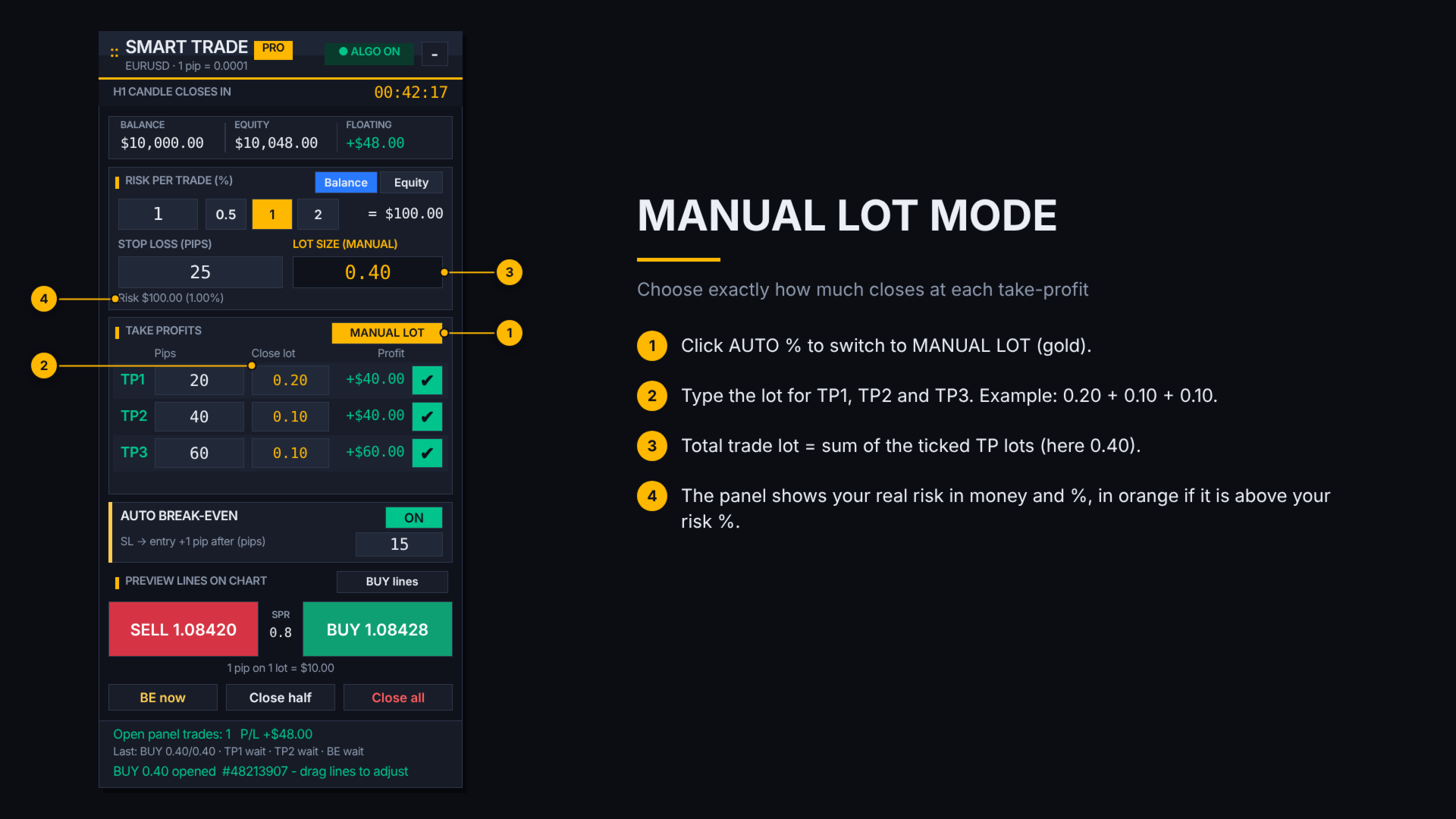
- AUTO % mode: the lot is split automatically (default: equal thirds)
- MANUAL LOT mode: type exactly how much closes at TP1, TP2 and TP3
- Profit in money is shown for every TP before you trade
- The last active TP is placed on the broker server and closes the remaining volume
- Never leaves less than the broker's minimum lot open
3. Automatic break-even
- ON/OFF switch that works live, including on trades that are already open
- Moves SL to entry +1 pip (adjustable) after your chosen profit in pips
- Optional: move to break-even as soon as TP1 is hit
- "BE now" button for instant break-even on all panel trades
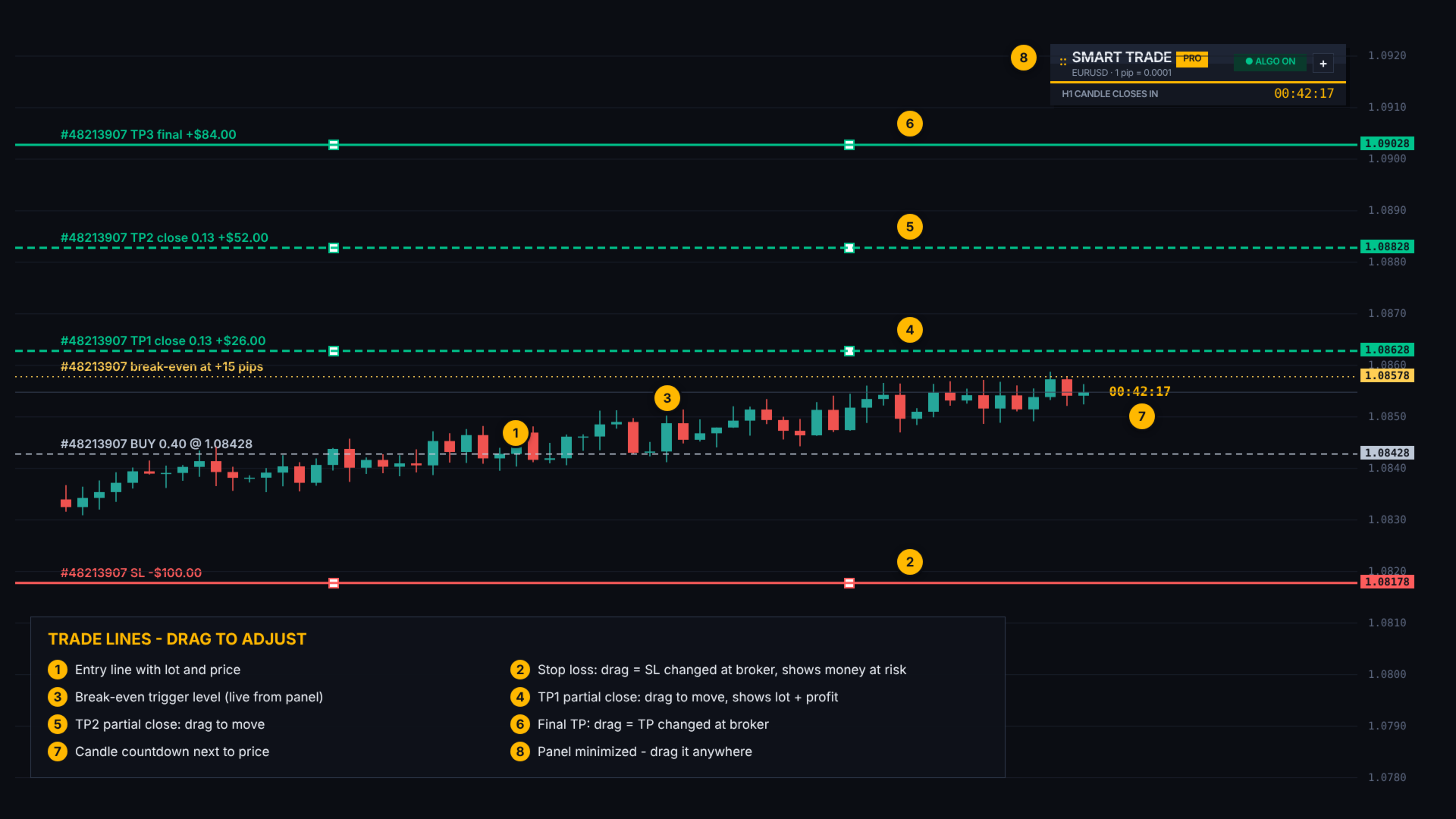
4. Drag-and-drop chart lines
- Before the trade: preview lines for Entry, SL, TP1, TP2, TP3 and Break-even (BUY or SELL)
- Drag a preview line and the pips update in the panel; the lot is recalculated instantly
- After the trade: Entry, SL, TP and partial-TP lines, each showing money at risk or profit
- Drag the SL or TP line to modify the order at your broker
- Drag TP1/TP2 lines to move the partial-close levels
- If the broker's minimum distance is not met, the line returns to its place with a clear message
5. Candle countdown timer
- Time left until the current candle closes, on the panel and next to the price
- Works on every timeframe, from M1 to MN1
6. Fast trade management
- Large SELL / BUY buttons with live Bid, Ask and spread
- Close half and Close all buttons
- Optional max-spread filter blocks trades when the spread is too high
- Optional confirmation before each trade
- SL and TP are recalculated from the real fill price, so slippage never changes your pips
7. Professional panel design
- Modern dark design that is easy to read during fast markets
- Movable panel: drag it anywhere on the chart; its position is remembered
- Minimize button folds the panel to a compact bar with the timer
- Live Balance, Equity and Floating P/L
- Status bar showing open trades, TP/break-even progress and messages
- High-DPI support and adjustable panel size
HOW IT WORKS
1. Attach the panel to any chart and turn on Algo Trading.
2. Set your risk % (or click 0.5 / 1 / 2) and choose Balance or Equity.
3. Set your stop loss in pips, or drag the red SL line on the chart.
4. Tick TP1, TP2, TP3 and set their pips, or drag the green TP lines.
5. Choose AUTO % or MANUAL LOT for the partial closes.
6. Turn Auto break-even ON and set the trigger in pips.
7. Click BUY or SELL. The trade opens with the correct lot, SL and final TP.
8. Manage the trade: drag lines, let TP1/TP2 close partially, let break-even protect you, or use BE now / Close half / Close all.
RELIABILITY AND SAFETY
- All money calculations use MetaTrader 5's built-in profit and margin functions, so results are correct on any broker and symbol
- Automatic order filling-mode detection (FOK / IOC / Return) for every broker
- Automatic retry on requotes and price changes
- Respects broker stop levels for SL, TP and break-even
- Manages only trades opened by the panel (by magic number); your other trades are not touched
- Trade plans are saved, so partial take-profits continue after an MT5 restart
- Restores your chart settings when the panel is removed
PIP SIZE
Auto mode: 5/3-digit Forex = 10 points, Gold = 0.10, Silver = 0.01.
For indices or crypto, select "1 pip = 1 point" or enter a custom pip size. The panel always shows the pip size it uses.
REQUIREMENTS
- MetaTrader 5 (hedging account recommended; netting accounts supported with one position per symbol)
- Algo Trading must be ON
- Partial closes and break-even are executed by the panel, so MT5 must stay open (a VPS is recommended). Stop loss and the final TP are placed on the broker server and work even when MT5 is closed.
SUPPORT
Questions or suggestions? Send me a private message on MQL5. Updates are free for all buyers.
Test on a demo account first to get familiar with the panel.