FVG Bang
- Experts
- 버전: 1.5
- 활성화: 8

SHORT DESCRIPTION
A push to your phone for every new Fair Value Gap on the timeframes you choose - trade FVGs without watching the chart.
FULL DESCRIPTION
FVG Bang is made for traders who trade Fair Value Gaps but cannot sit in front of the screen all day. It watches the chart for you and sends a push notification to your phone the moment a new FVG forms. When you decide to act, you place the trade from the same chart with three lines and one button.
HOW IT WORKS
1. Choose the timeframes to watch: M5, M15, M30, H1, H4, D1 - any combination.
2. FVG Bang checks every closed candle. When a new gap appears, your phone gets a message like:
EURUSD H1: bullish FVG 1.08412 - 1.08455 (43 pts), candle closed 14:00
3. You open the chart, move the Entry, Stop and Take lines, and press OK. The lot is calculated from your risk.
ALERTS YOU CAN TRUST
- Push, popup and sound - each can be switched on or off.
- Bullish, bearish or both.
- Minimum gap size to ignore small FVGs.
- Several alerts at the same moment arrive as one message, so nothing is lost to MetaTrader's push limits.
- No stale alerts: gaps that formed while the terminal was offline are not reported hours later.
ON THE CHART
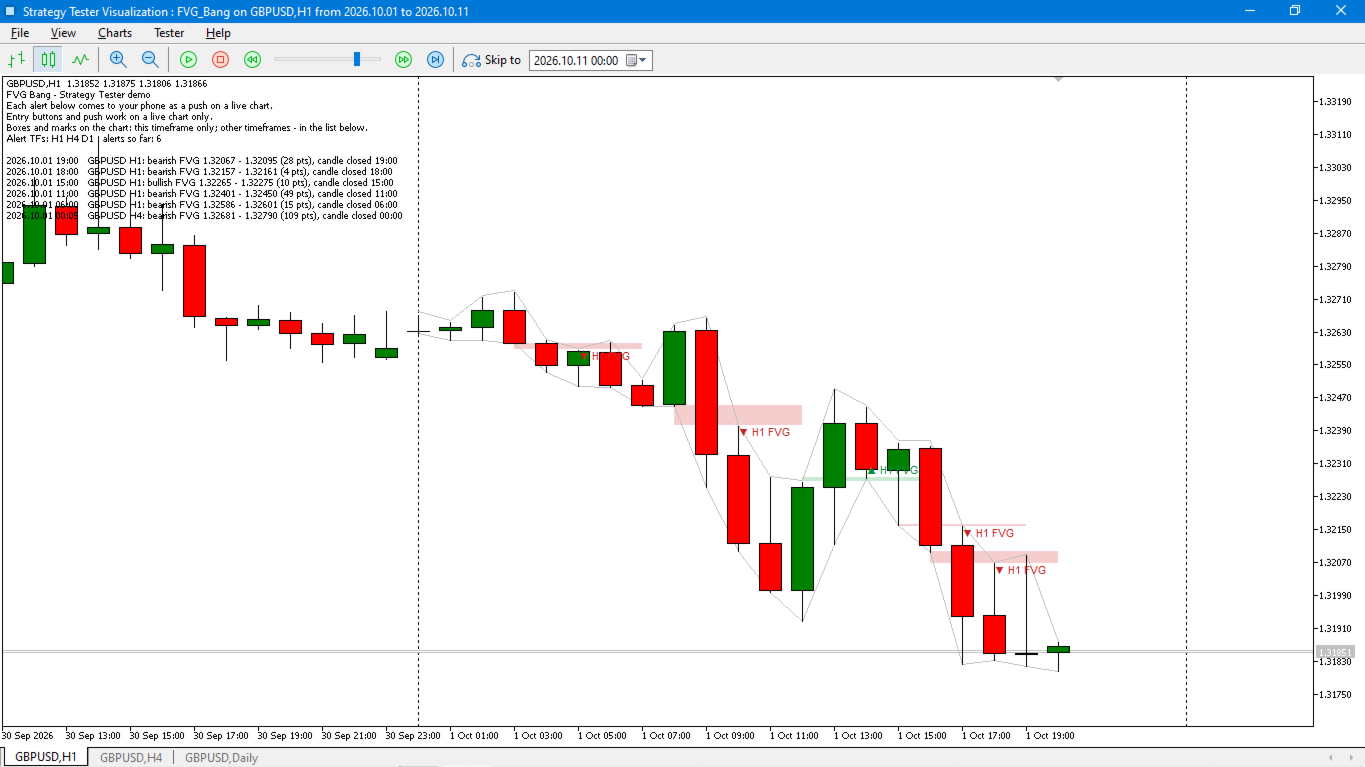
FVGs of the chart timeframe are drawn as short coloured boxes - easy to see, without covering the whole chart.
ENTRY PANEL
- LONG / SHORT + OK - market order with stop and take from the lines.
- OK without LONG/SHORT - pending order on the Entry line. Limit or Stop is chosen automatically from where the entry is relative to the price.
- STOP - removes your pending orders.
- Before you press OK, the panel shows the order type, entry, stop, take, RR, lot and risk in money.
- After OK, a line above the buttons shows the result - or the exact reason if the order could not be sent.
JOURNAL
Every alert, order and closed trade is written to a CSV file with its result in R. After a few weeks you can see which timeframes and which gaps actually worked for you.
FEATURES
- Works on any symbol; attach it to several charts to watch several symbols.
- Lot from risk in % of the balance, or a fixed lot.
- Pending order lifetime in hours.
- Interface in English or Russian (automatic by terminal language).
HOW TO TRY IT
1. Demo in the Strategy Tester, visual mode: the tester sends no push notifications and chart buttons do not work there, so every alert is shown on the chart instead - a feed of alerts at the top left (the same text that comes to your phone) and a marker at each gap. In visual mode no trades are opened.
2. On a demo account: enter your MetaQuotes ID (Tools - Options - Notifications), enable M5 and check each push against the chart.
3. Try the panel: a pending order, STOP, a market order with a small risk.
4. Trade it for 2-4 weeks on demo or minimal risk and look at the journal. The full step-by-step test is in the user guide.
IMPORTANT
FVG Bang tells you where a gap appeared; it does not predict the market and never opens trades on its own. An FVG is a place to look, not a guarantee. Test it on a demo account first and use a risk you are comfortable with. Push notifications require a MetaQuotes ID set in the terminal, and the terminal must be running.