Boom Trap
- Experts
- 버전: 1.10
- 활성화: 10

BoomTrap is an Expert Advisor for MetaTrader 5 designed for XAUUSD on the H1 timeframe.
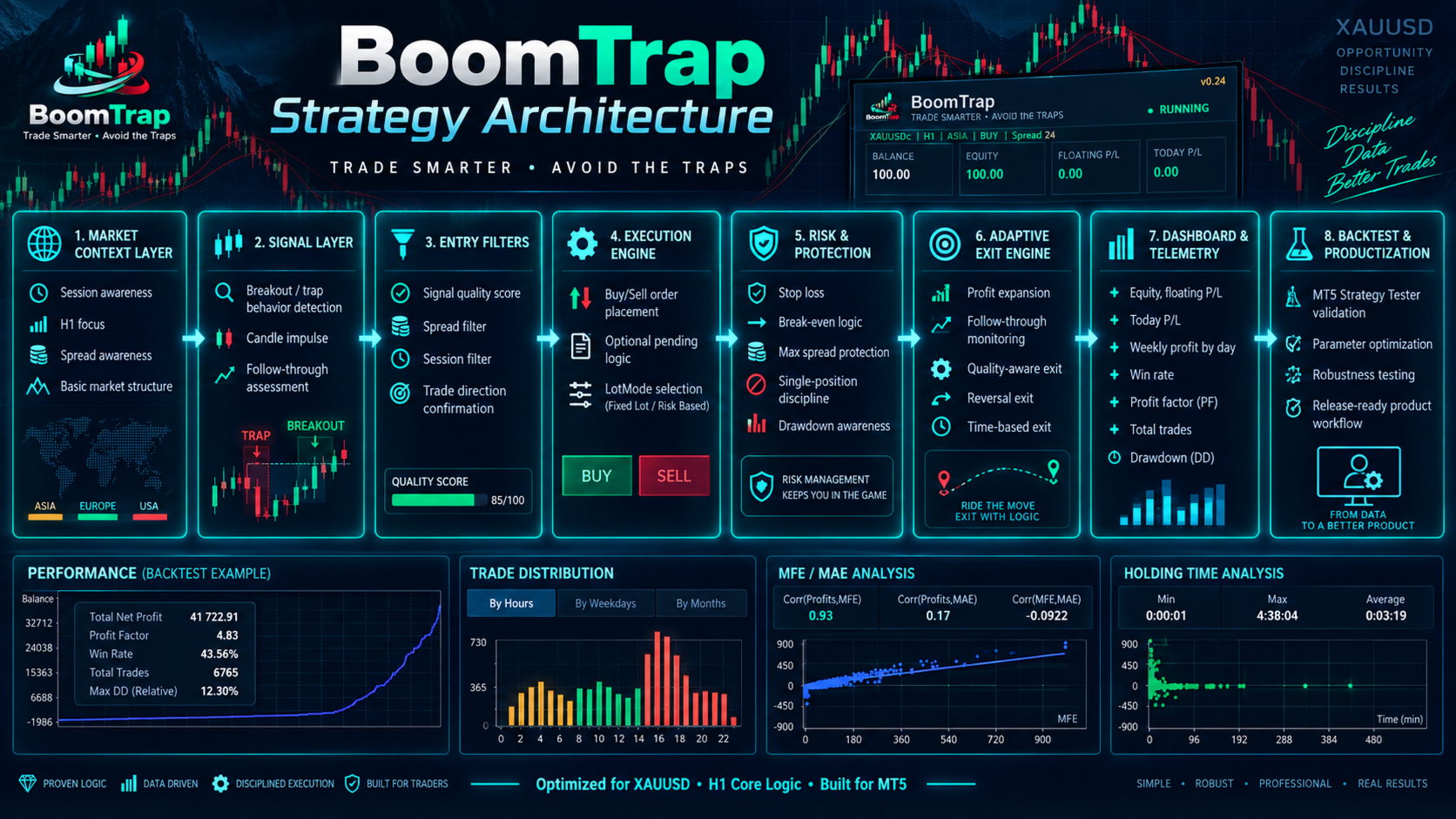
The system combines multiple breakout and momentum entry models with internal quality filtering, follow-through analysis, structured trade management and a built-in performance dashboard.
BoomTrap is designed to keep the user setup simple. Most strategy parameters are managed internally, while the user only needs to select the preferred lot mode and the related money-management value.
The EA is intended for traders who prefer a structured and automated approach to gold trading without having to configure a large number of technical parameters.
Main concept
BoomTrap analyzes the XAUUSD market using a combination of H1 market structure and lower-timeframe confirmation.
The trading engine evaluates breakout conditions, momentum quality, market direction and follow-through before deciding whether an entry is valid.
The system uses several internal strategy roles identified as A, B, C, D and S. Each role has a different purpose within the trading process.
Strategy A focuses on shorter breakout opportunities.
Strategy B represents the main breakout engine.
Strategy C is used for expansion opportunities when market conditions remain supportive.
Strategy D is a more selective expansion layer that requires stronger internal conditions.
Strategy S is a structured second-breakout module that looks for continuation after a completed profitable move, instead of entering immediately at market.
These strategy roles are managed internally and do not require manual configuration by the user.
Signal quality filtering
BoomTrap does not rely on a single indicator or a single breakout condition.
Before an order is created, the system evaluates multiple internal factors including:
- Market direction
- Breakout strength
- Momentum
- Price structure
- Follow-through behavior
- Volatility conditions
- Entry quality
- Market expansion conditions
The purpose of these filters is to reduce low-quality entries and allow the EA to react differently to different market conditions.
Trade management
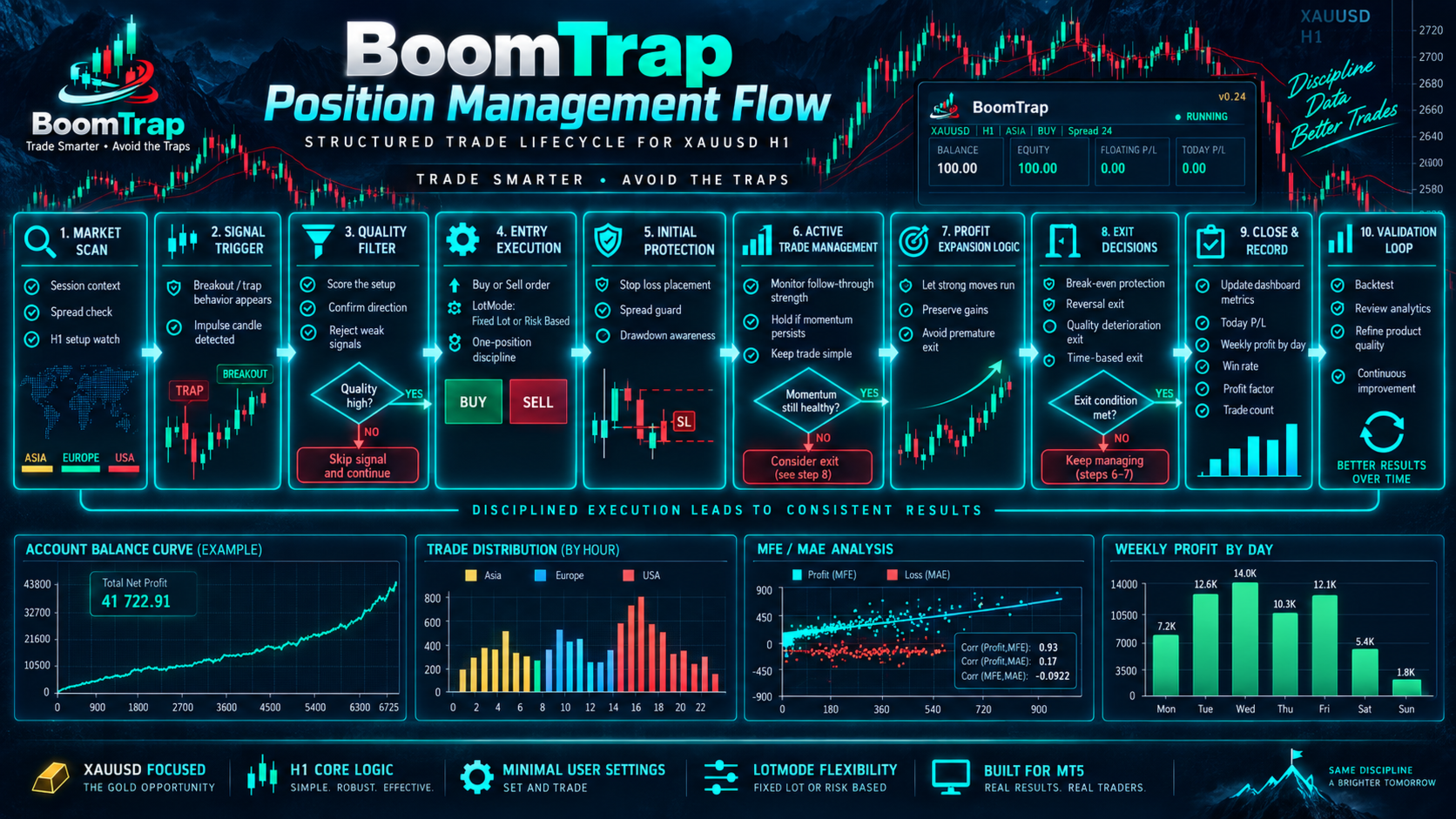
BoomTrap includes several layers of trade management after a position is opened.
The EA continuously monitors the behavior of the position and can apply different management rules depending on how the trade develops.
Main management components include:
- Early failure protection
- Secondary failure protection
- Soft protection
- Fast trailing management
- Score-based trailing logic
- Runner management
- Extended runner management
- Second-breakout continuation logic
The EA can reduce exposure when a breakout fails to follow through, while allowing stronger trades more room when market conditions remain favorable.
This approach is designed to avoid treating every trade in the same way.
Early failure protection
Some breakout trades fail shortly after entry.
BoomTrap includes an early-failure mechanism that monitors the initial behavior of a position.
If the trade shows insufficient follow-through and moves against the expected structure, the EA can close the position before the full protective stop is reached.
This feature is designed to reduce unnecessary exposure to failed breakout conditions.
Soft protection
When a trade begins to move in the expected direction, BoomTrap can gradually reduce risk.
Soft protection is used before the position reaches the stronger trailing or runner stages.
The objective is to protect trades that have already demonstrated partial market confirmation while still allowing enough room for normal price movement.
Fast trailing management
Fast trailing is one of the main profit-management components of BoomTrap.
When a position shows sufficient progress, the EA can move into a more active trailing state.
The trailing behavior is calculated internally and does not require the user to manage the position manually.
Runner management
Some market movements continue beyond the initial target area.
BoomTrap includes runner logic that can allow selected positions to remain open longer when the internal conditions remain favorable.
Runner decisions are based on factors such as movement quality, excursion, trend alignment and internal scoring.
This means stronger trades can be managed differently from weaker trades.
Second-breakout module
BoomTrap includes a structured second-breakout strategy.
After a qualified move has completed, the EA does not immediately re-enter the market.
Instead, the system waits for:
- A pullback
- Recompression
- Continued directional alignment
- A new breakout structure
Only when these conditions are satisfied can a new pending order be created.
This design avoids immediate market chasing after a completed move.
Money management
BoomTrap 1.10 includes three lot modes.
Fixed Lot
The EA uses the lot size selected by the user.
This mode is simple and suitable for users who want direct control over the trading volume.
Risk Percent
The EA calculates the lot size according to account equity and the internal protective distance.
The user specifies the percentage of account equity allocated to the trade.
Actual trade volume can vary depending on symbol specifications and protective distance.
Balance Based
The EA scales the lot size according to account balance.
The user specifies how much balance should correspond to each 0.01 lot.
This mode can be used when the user prefers gradual position-size scaling as the account balance changes.
User inputs
BoomTrap intentionally keeps the visible inputs simple.
Main user settings are:
Lot Mode
Select Fixed Lot, Risk Percent or Balance Based.
Fixed Lot
Used when Fixed Lot mode is selected.
Risk Per Trade (%)
Used when Risk Percent mode is selected.
Balance Per 0.01 Lot
Used when Balance Based mode is selected.
Show Dashboard
Displays or hides the BoomTrap dashboard.
Apply Chart Theme
Applies the BoomTrap visual theme to the chart.
Most strategy-specific parameters are managed internally to reduce configuration complexity.
Dashboard
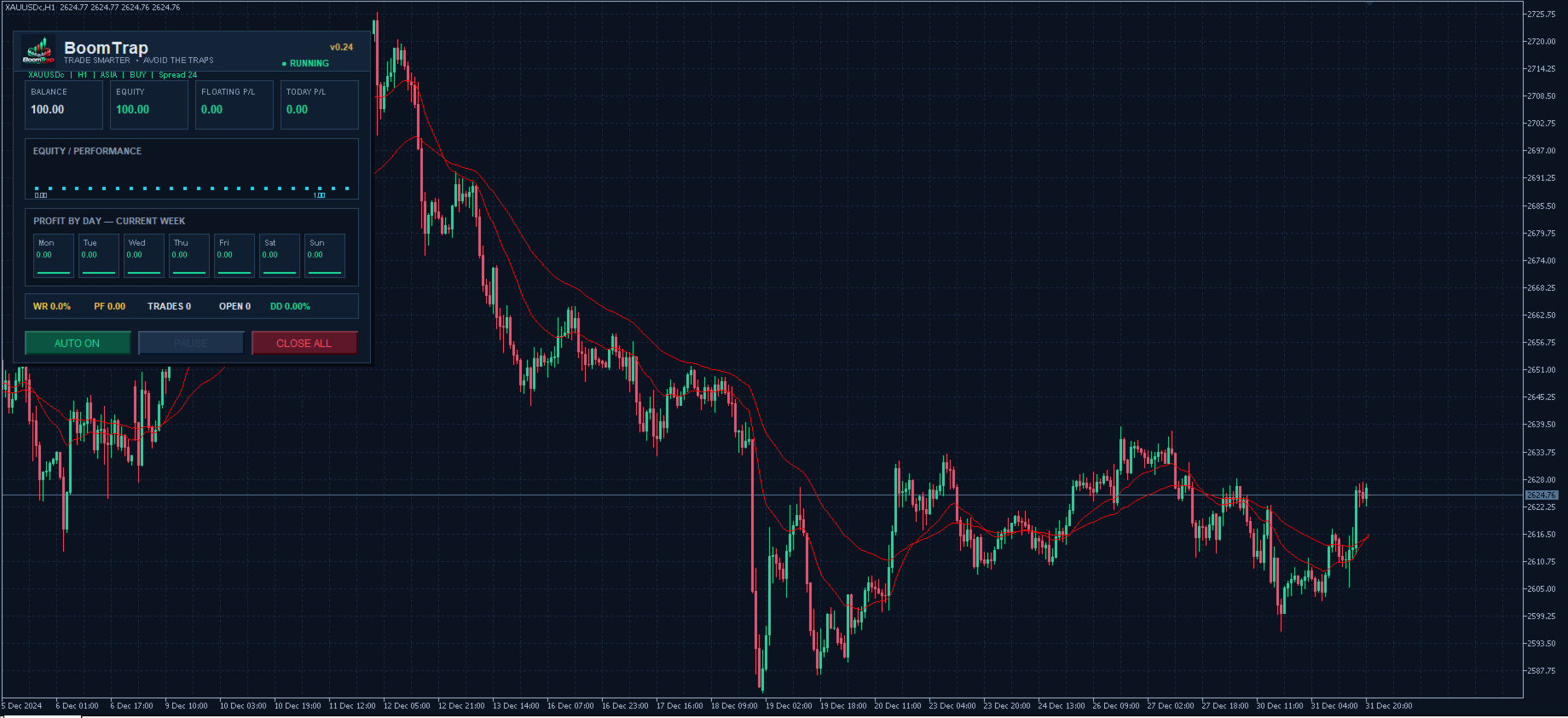
BoomTrap includes an integrated on-chart dashboard.
The dashboard provides a compact overview of the EA and account activity.
Displayed information can include:
- Balance
- Equity
- Floating profit or loss
- Current day result
- Open positions
- Spread
- Win rate
- Profit factor
- Total trades
- Equity drawdown
- Profit by weekday
- Mini equity performance view
The dashboard is designed for live monitoring and can be disabled when a lighter chart interface is preferred.
For faster Strategy Tester runs, visual dashboard updates can also be reduced or disabled.
Chart interface
BoomTrap includes an optional dark chart theme designed to improve readability.
The theme changes the chart appearance only and does not affect the trading strategy.
Users who prefer their own MetaTrader chart settings can disable this feature.
Recommended configuration
Platform: MetaTrader 5
Symbol: XAUUSD
Recommended timeframe: H1
Algo Trading: Enabled
Users should attach BoomTrap to an XAUUSD H1 chart.
The EA performs its internal analysis automatically.
No additional indicators need to be attached manually.
Broker conditions
Trading results can vary between brokers.
Important factors include:
- Spread
- Slippage
- Execution speed
- Symbol contract size
- Tick size
- Tick value
- Minimum lot
- Volume step
- Stop level
- Trading session availability
Users should test BoomTrap with the broker and account type they intend to use.
Account type
BoomTrap is designed to operate with standard MetaTrader 5 trading environments.
Broker implementation and account configuration can affect order handling.
A demo test is recommended before live deployment.
Strategy Tester
BoomTrap can be tested in the MetaTrader 5 Strategy Tester.
For more realistic testing, use the highest quality tick data available and the broker symbol that will be used for live trading.
Recommended test configuration:
Symbol: XAUUSD
Timeframe: H1
Model: Every tick based on real ticks, when available
Use realistic spread and execution assumptions.
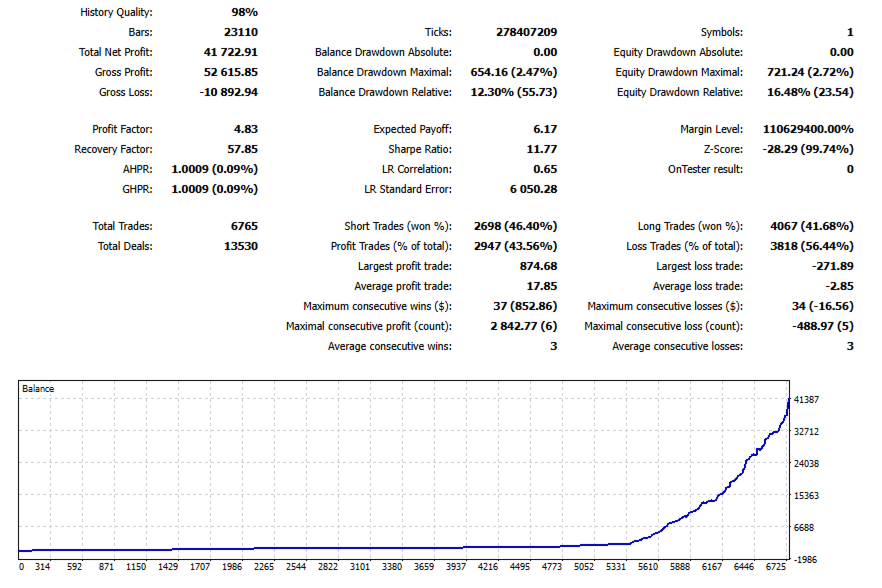
Backtest results should always be treated as historical simulation and not as a guarantee of future performance.
Recommended first use
For a new installation:
- Open an XAUUSD chart.
- Select H1 timeframe.
- Attach BoomTrap to the chart.
- Select the preferred Lot Mode.
- Configure the related money-management value.
- Enable Algo Trading.
- Monitor the EA first on a demo account.
- Move to live trading only after understanding the system behavior and risk.
Important notes
BoomTrap is designed specifically around XAUUSD market behavior.
Using the EA on other symbols or timeframes may produce different behavior from the intended configuration.
Market conditions can change over time, and no automated trading system can eliminate trading risk.
Users should select position sizing appropriate for their account size and personal risk tolerance.
Risk warning
Trading Forex and CFDs involves significant financial risk.
Historical results, Strategy Tester results and previous market behavior do not guarantee future results.
BoomTrap does not guarantee profitability.
Execution conditions, market volatility, spreads, slippage and broker specifications can affect actual results.
Users are responsible for their own trading decisions, account configuration and risk management.