Aurum Pivot Pulse
- Experts
-
Andrei-marius Mircea
 I’m a trader, EA and indicator developer focused on creating practical tools for MetaTrader 5. My goal is to help traders analyze the market more clearly, identify opportunities, and make better-informed decisions.
 - 버전: 1.0
- 활성화: 5
Aurum Pivot Pulse — Structured Gold Breakout Automation
Aurum Pivot Pulse is a MetaTrader 5 Expert Advisor designed for XAUUSD traders who want a clear, rules-based approach to breakout trading.
The EA analyzes confirmed H1 swing highs and swing lows, prepares Buy Stop and Sell Stop orders around those levels, and manages an active position automatically with a defined Stop Loss, Take Profit and optional trailing protection.
WHY TRY THE DEMO?
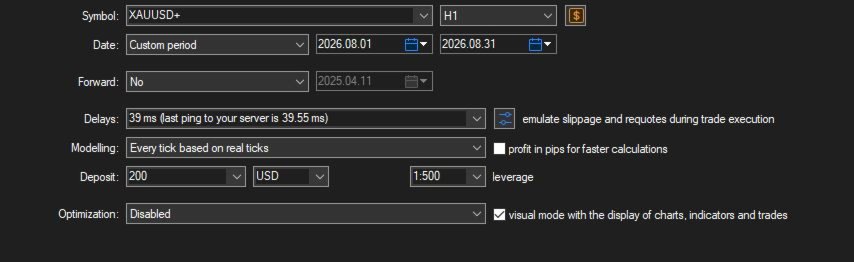
The MQL5 demo lets you test the EA in the Strategy Tester before purchasing. Use your own broker's XAUUSD history, spread, commission and symbol specifications to understand how the settings behave under your trading conditions.
MAIN FEATURES
• Fully automated Buy Stop and Sell Stop execution
• Confirmed H1 swing-high and swing-low detection
• High Frequency and High Probability operating modes
• Fixed-lot or balance-based position sizing
• Configurable Stop Loss and Take Profit
• Standard or activation-based smart trailing stop
• Configurable pending-order refresh hours
• Pending-order expiry control
• Optional single-position operation
• Duplicate pending-order distance protection
• Margin availability check before order placement
• Optional Friday pending-order cleanup
• Separate Magic Number and order comment
• Trades the current chart symbol, including broker suffixes
HOW THE STRATEGY WORKS
High Frequency mode uses the most recent confirmed swing levels. High Probability mode searches the configured H1 lookback for the highest confirmed resistance and lowest confirmed support.
At the selected refresh hours, the EA can place a Buy Stop above resistance and a Sell Stop below support, provided the configured distance, broker stop-level and margin conditions are satisfied. Orders expire after the selected number of days.
An executed position receives a fixed protective Stop Loss and Take Profit. If trailing is enabled, the EA can begin trailing immediately or only after the configured profit activation distance is reached.
INPUT PARAMETERS
Risk Control
• InpMaxSLProtection — restores the configured protective SL if a managed position has no Stop Loss.
• InpSlippageGuard — supplied execution-control option.
• InpMaxSlippagePoints — maximum trade deviation in points.
• InpCancelOnFriday — enables Friday pending-order cleanup.
• InpFridayCancelHour — broker-server hour for Friday cleanup.
• InpCancelOnInsufficientMargin — removes EA pending orders when the margin check fails.
TP / SL
• InpTPPoints — Take Profit distance in points.
• InpSLPoints — Stop Loss distance in points.
Order Size
• InpSizeMode — choose fixed-lot or balance-based sizing.
• InpFixedLots — requested fixed trading volume.
• InpBaseDepositLoadPercent — supplied deposit-load setting.
• InpMaxDepositLoadPercent — supplied maximum deposit-load setting.
• InpBalancePerMinLot — balance amount used for each minimum-lot increment in balance mode.
Trailing Stop
• InpEnableTrailing — enables or disables trailing.
• InpTrailingPoints — trailing distance in points.
• InpSmartTrailing — waits for the activation threshold before trailing.
• InpSmartActivationPoints — profit distance required before smart trailing starts.
Statistical S/R Strategy
• InpAlgorithmMode — High Frequency or High Probability level selection.
• InpLookbackBars — number of H1 candles analyzed.
• InpPivotDepth — candles required on each side of a confirmed swing.
• InpShiftExtremeActualPoints — minimum distance between the current market and a pending entry.
• InpMinimumOrderPriceGapPoints — prevents similar pending orders from being placed too close together.
• InpOrderExpiryDays — pending-order lifetime.
• InpPlaceBuyStops — enables Buy Stop orders.
• InpPlaceSellStops — enables Sell Stop orders.
• InpRefreshHours — comma-separated broker-server hours used to refresh levels and orders.
Execution
• InpMagic — unique identifier for the EA's orders and positions.
• InpComment — order comment.
• InpOnePositionAtATime — restricts operation to one managed position on the chart symbol.
• InpDeleteOppositeAfterFill — optionally removes remaining EA pending orders after a position is detected.
RECOMMENDED TESTING
Instrument: XAUUSD / Gold
Strategy data: H1 is read internally
Testing model: Every tick based on real ticks
First step: run the MQL5 demo in the Strategy Tester
Hosting: keep MetaTrader 5 running continuously or use a suitable VPS
IMPORTANT BROKER NOTE
Point values are not identical across brokers. Before using the default settings, check your broker's XAUUSD digits, spread, commission, minimum lot, lot step, stop level and contract specification. Optimize and validate all point-based settings using the same broker and trading conditions you intend to use.
RISK WARNING
No Expert Advisor can guarantee profits. Strategy Tester and historical results do not predict future performance. Spread, commission, slippage, execution latency, symbol specifications and changing market conditions can materially affect results. Test the demo carefully and use a lot size suitable for your account and risk tolerance.