QuantCore Multi Strategy EA Prop Edition
- Experts
- 버전: 3.53
- 업데이트됨: 3 9월 2026
- 활성화: 20

Professional Multi-Market Automated Trading System
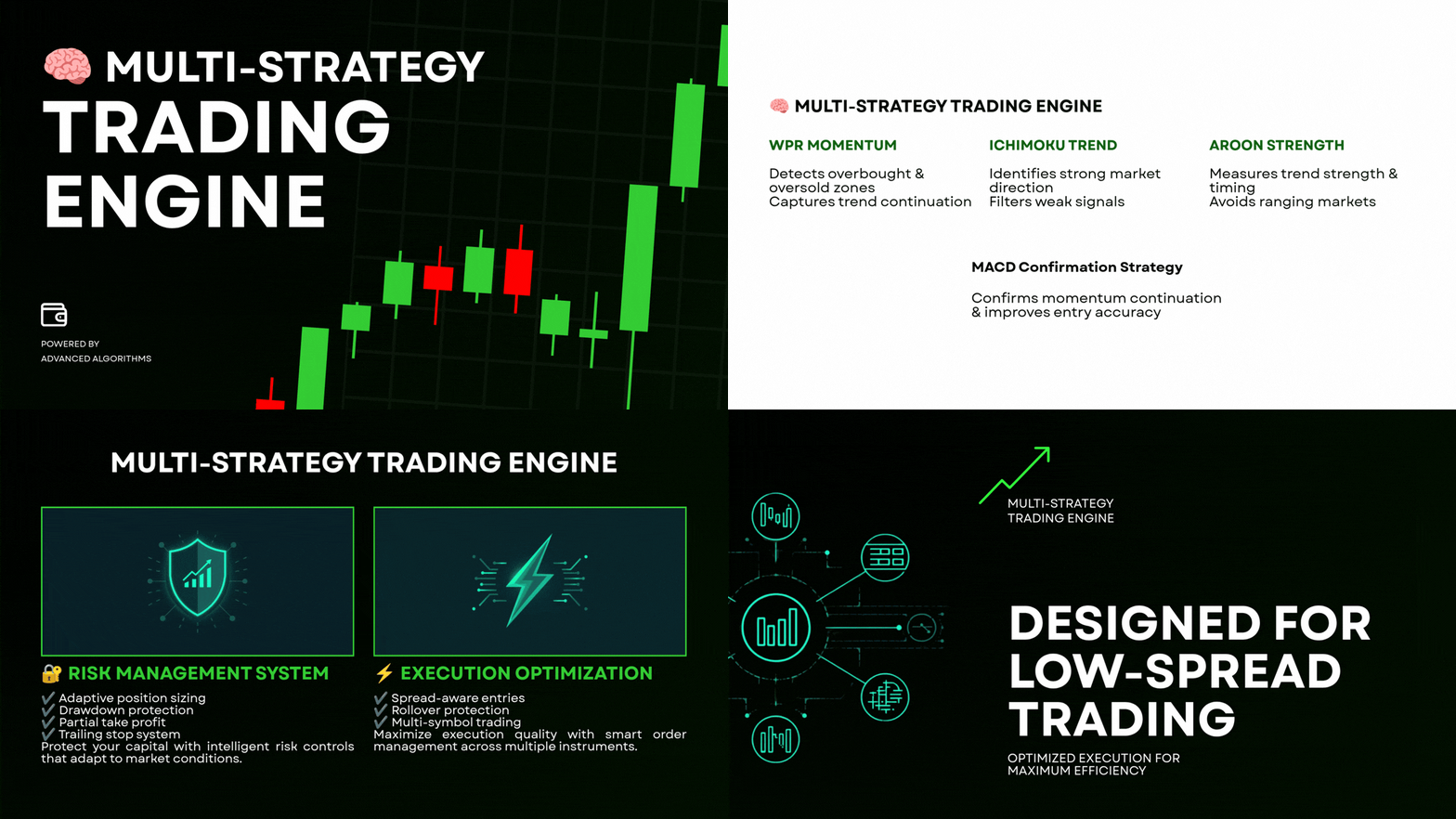
QUANTCORE PROP is a multi-strategy MetaTrader 5 Expert Advisor built for traders who want systematic portfolio trading combined with dedicated risk controls for prop-style trading environments.
The core trading architecture combines independent strategies across 7 markets, while the integrated risk engine controls individual trade risk, total portfolio exposure, currency concentration, daily drawdown and consecutive losses.
The objective is simple:
Capture major market trends while keeping portfolio risk under strict control.
- First 10 Copies: $199 USD
- 🟢 Next 10 Copies: $299 USD
- 🔒 Next Price Tier: $399 USD
- 🔒 Target Final Price: $699 USD
📢 Official User Group
⬆️ Multiple set files are available in the group link above.
Join our official MQL5 community for product updates, support, discussions, and announcements
https://www.mql5.com/en/messages/03cd202e873add01
📊 MULTI-STRATEGY PORTFOLIO
QUANTCORE PROP uses different strategies for different market characteristics rather than relying on a single indicator.
🟡 XAUUSD — Ichimoku
Designed to capture large directional gold trends.
🔵 USDJPY — MACD
Trend-following momentum strategy designed to participate in sustained USDJPY movements.
🟢 AUDJPY — Aroon
Trend-strength and directional persistence approach.
🟢 GBPJPY — Aroon
Independent Aroon-based trend strategy.
🟢 USDCAD — Aroon
Separate Aroon configuration designed for USDCAD.
🟣 EURUSD — WPR
Momentum-based WPR strategy.
🟣 GBPAUD — WPR
Independent WPR configuration for GBPAUD.
Each strategy has its own parameters and risk allocation.
🛡 ADVANCED PROP RISK ENGINEThe main difference between QUANTCORE PROP and a conventional trading EA is the portfolio-level risk architecture.
The EA does not simply calculate risk independently for every trade.
It evaluates the portfolio before allowing additional exposure.
Risk controls include:
✔ Individual position risk limits
✔ Maximum total open risk
✔ Currency-group exposure limits
✔ Daily loss protection
✔ Floating drawdown protection
✔ Hard daily protection
✔ Overall drawdown protection
✔ Consecutive-loss protection
✔ Automatic risk reduction
✔ Portfolio exposure balancing
Currency exposure is monitored at the currency level, not simply at the symbol level.
For example:
USDJPY
is counted toward both:
USD exposure + JPY exposure
Similarly:
- EURUSD → EUR + USD
- GBPJPY → GBP + JPY
- AUDJPY → AUD + JPY
- USDCAD → USD + CAD
- GBPAUD → GBP + AUD
This helps prevent excessive concentration when several correlated positions are active simultaneously.
⚙️ PORTFOLIO RISK LIMITThe EA includes a global maximum open-risk control.
Individual strategy risks can be configured separately, while the portfolio engine prevents total exposure from exceeding the defined portfolio limit.
Example configuration:
| Market | Risk / Trade |
|---|---|
| XAUUSD | 0.50% |
| GBPJPY | 0.50% |
| AUDJPY | 0.50% |
| USDCAD | 0.60% |
| USDJPY | 0.65% |
| EURUSD | 0.75% |
| GBPAUD | 0.50% |
Important: individual risks are subject to the portfolio and currency-group risk limits.
This means the theoretical sum of individual risks does not automatically become the actual simultaneous portfolio exposure.
📉 DRAWDOWN PROTECTIONQUANTCORE PROP continuously monitors account conditions.
The risk engine can react to:
- Daily losses
- Floating drawdown
- Overall drawdown
- Consecutive losing trades
- Portfolio exposure
When predefined protection levels are reached, the EA can reduce risk and restrict further exposure.
Adaptive risk reduction
The EA can automatically reduce trading risk after a drawdown event rather than continuing to trade at the original risk level.
This creates a defensive layer between normal trading and severe account deterioration.
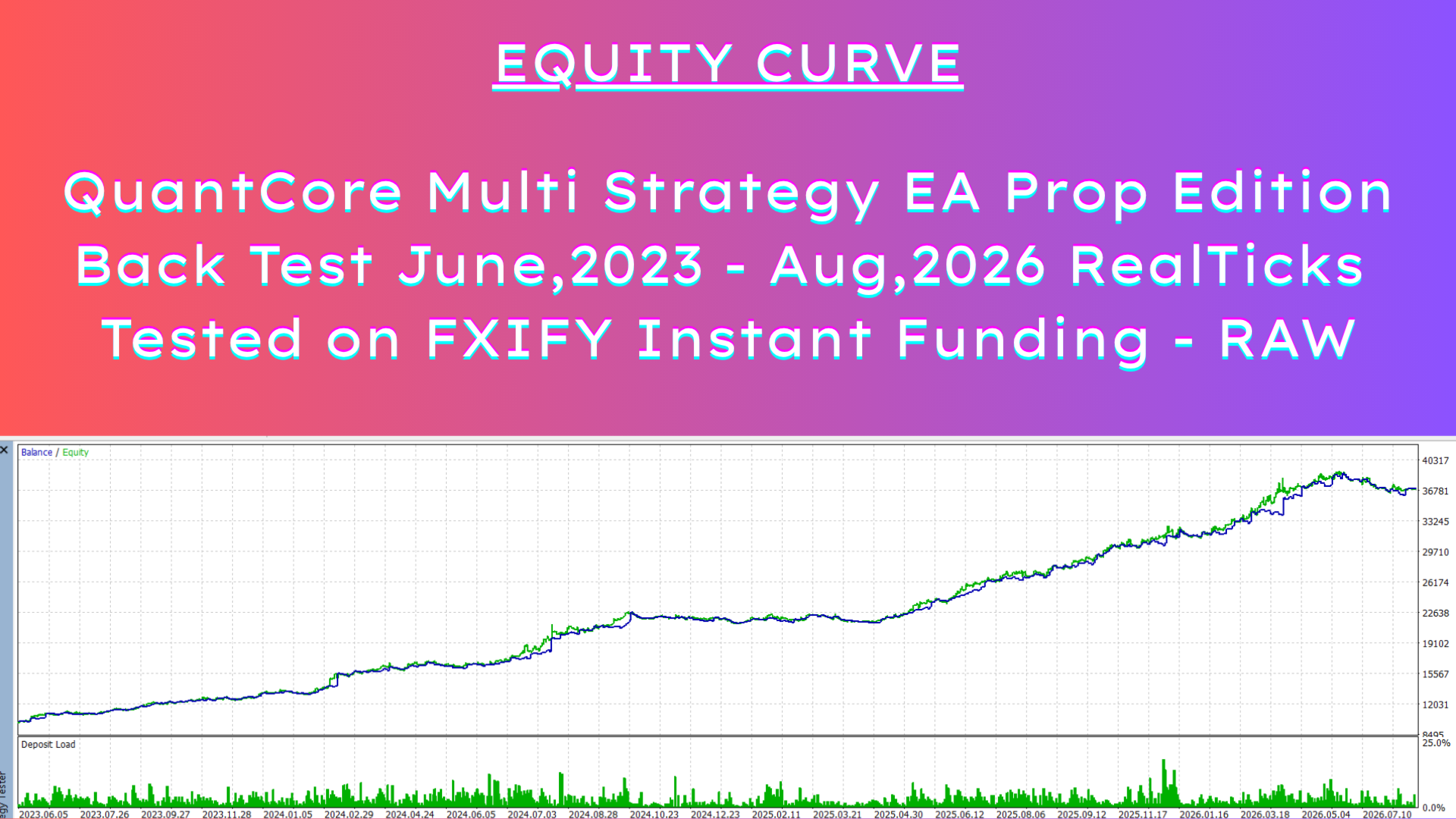
📈 BACKTEST PERFORMANCEFXIFY Raw Environment
Backtest period:
June 2023 → August 2026
Initial deposit: $10,000
Final balance: $37,008
Net profit: $27,008
Total return: +270.08%
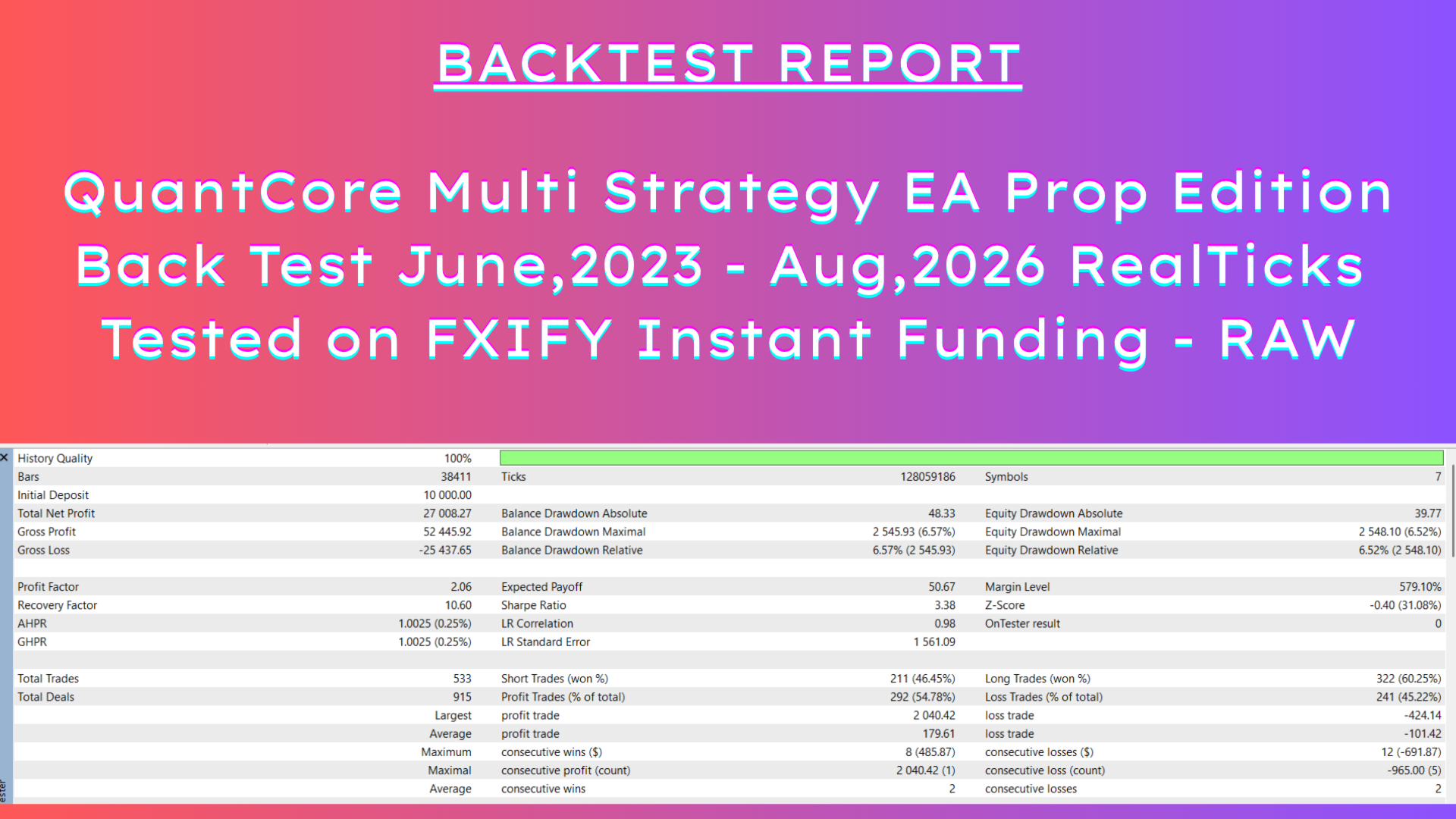
Risk & performance statistics
| Metric | Result |
|---|---|
| Profit Factor | 2.06 |
| Sharpe Ratio | 3.38 |
| Recovery Factor | 10.60 |
| Maximum Balance DD | 6.57% |
| Maximum Equity DD | 6.52% |
| Total Trades | 533 |
| Winning Trades | 54.78% |
| Average Profit Trade | $179.61 |
| Average Loss Trade | $101.42 |
| Largest Profit Trade | $2,040.42 |
| Maximum Consecutive Losses | 12 |
Testing quality: 99%
The backtest covers more than three years and multiple market conditions.
📊 TREND-CAPTURE APPROACHQUANTCORE PROP is not designed to win every trade.
The portfolio combines strategies with different characteristics.
Some strategies are designed to capture large directional movements.
For example, the XAUUSD Ichimoku component can participate in extended gold trends, while the USDJPY MACD component is designed to capture sustained momentum.
This creates a naturally asymmetric trade distribution:
Controlled losses → occasional large trend winners
Therefore, short-term losing streaks are a normal part of the system's design.
The risk engine is designed to manage these periods rather than eliminate them through excessive filtering.
🔄 TRADE MANAGEMENTThe EA includes:
✔ Dynamic position sizing
✔ Stop-loss based risk calculation
✔ Partial profit management
✔ Adaptive trailing
✔ Multi-symbol execution
✔ Spread filtering
✔ Market condition filtering
✔ Rollover protection
✔ Portfolio exposure monitoring
QUANTCORE PROP is designed with the practical requirements of evaluation and funded-account trading in mind.
The risk engine provides controls for:
Daily risk → Portfolio risk → Currency concentration → Drawdown → Consecutive losses
However, prop firms have different rules and account models.
No EA can guarantee compliance with every prop firm's rules.
Always verify the specific firm's current:
- Daily loss calculation
- Maximum drawdown
- Overnight rules
- News restrictions
- EA/automation rules
- Hedging rules
- Position-size restrictions
- Consistency requirements
before trading.
📰 Economic News Filter
The EA includes an optional economic news filter designed to avoid opening new positions around major scheduled economic events.
When enabled, the EA checks the economic calendar and can block new entries during the configured news window.
Default settings:
- News Filter: Disabled
- Before News: 20 minutes
- After News: 30 minutes
The news filter is intended to reduce exposure to periods of potentially elevated volatility, spreads and unpredictable price movements.
Note: The news filter only covers scheduled economic events available through the configured calendar source. It cannot predict unexpected news, market gaps, slippage or abnormal spread conditions.
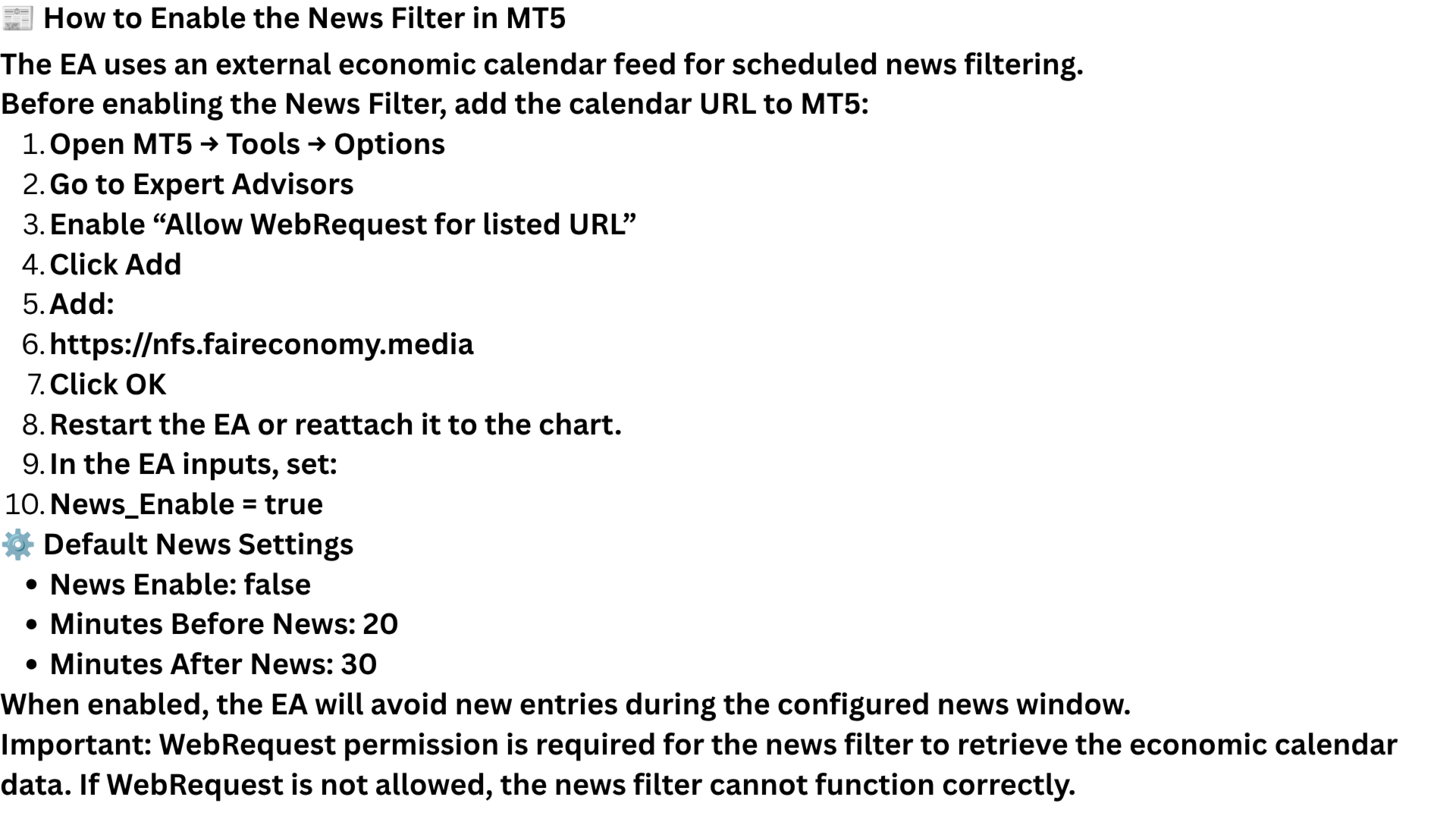
📰 How to Enable the News Filter in MT5
The EA uses an external economic calendar feed for scheduled news filtering.
Before enabling the News Filter, add the calendar URL to MT5:
- Open MT5 → Tools → Options
- Go to Expert Advisors
- Enable “Allow WebRequest for listed URL”
- Click Add
- Add:
https://nfs.faireconomy.media - Click OK
- Restart the EA or reattach it to the chart.
- In the EA inputs, set:
News_Enable = true
⚙️ Default News Settings
- News Enable: false
- Minutes Before News: 20
- Minutes After News: 30
When enabled, the EA will avoid new entries during the configured news window.
Important: WebRequest permission is required for the news filter to retrieve the economic calendar data. If WebRequest is not allowed, the news filter cannot function correctly.
📱 Telegram Notifications
The EA also provides optional Telegram notifications for monitoring important EA events.
Telegram can be used to receive notifications such as:
- Trade entries
- Trade exits
- Risk-control actions
- Drawdown protection
- Daily-loss protection
- Consecutive-loss protection
- Other important EA status/events
Telegram notifications are for account/EA monitoring only. They are not a signal service and do not require the user to manually execute trades.
Telegram is disabled by default.
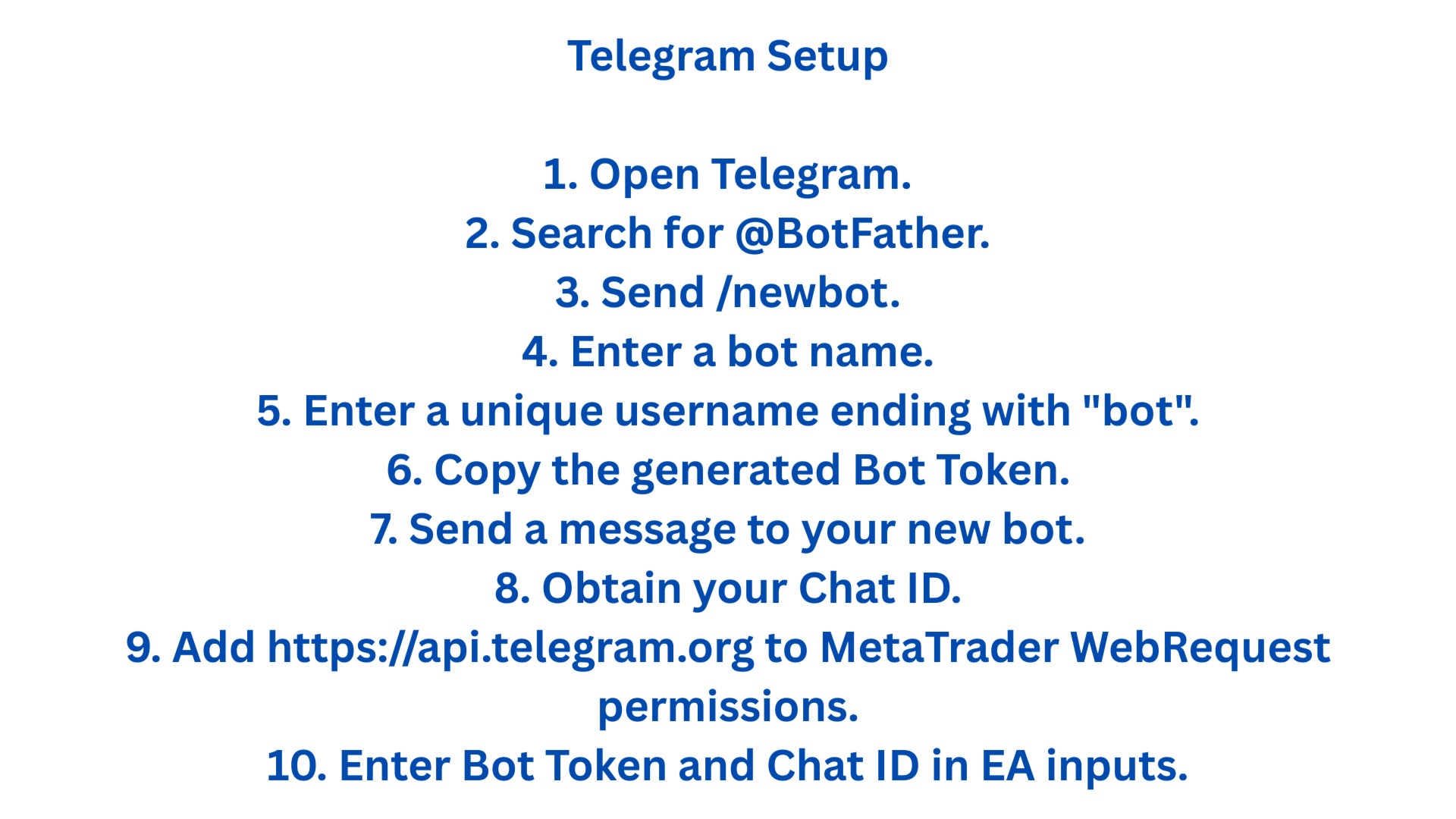
To use Telegram, the user can enter their own:
- Telegram Bot Token
- Telegram Chat ID
into the EA inputs and enable the Telegram option.
💻 MT5 REQUIREMENTSImportant: The EA does not provide investment signals through Telegram. Telegram is an optional notification and monitoring feature only.
Platform: MetaTrader 5
Recommended environment:
✔ RAW/low-spread account
✔ Stable VPS
✔ Reliable execution
✔ Correct broker symbol names
✔ Sufficient account margin
The EA is designed to operate across multiple MT5 broker environments, but actual results can vary because of spread, commission, swap, slippage and execution conditions.
⚠️ IMPORTANT RISK DISCLAIMERPast backtest performance does not guarantee future results.
Actual trading performance can differ from backtests because of:
- Spread
- Commission
- Slippage
- Swap
- Liquidity
- Broker execution
- Market volatility
- Trading conditions
- Account rules
Trading involves the risk of loss.
The EA is an automated trading software product and is not investment advice or a guarantee of profit.
🚀 QUANTCORE PROPMulti-strategy trading.
Portfolio-level risk control.
Currency exposure management.
Adaptive drawdown protection.
Designed for disciplined automated trading in prop-style environments.