Gsl Oil H4 Smart Sell System
- 지표
- 버전: 1.32
- 업데이트됨: 18 8월 2026

GSL Oil H4 Sell System
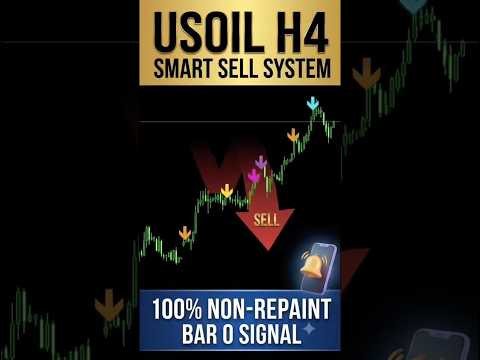
GSL Oil H4 Sell System is a technical analysis indicator designed for Crude Oil (USOIL) charts on the H4 timeframe.
The indicator analyzes price structure and selected market conditions to display sell-side setup markers directly on the chart. It is designed for traders who use H4 charts to study potential reversal areas and manage short-side trade setups manually.
Signal Detection
The indicator generates visual arrows when the defined conditions of the algorithm are met. The signals are displayed directly on the chart and are intended to assist with market analysis and trade planning.
Closed-Bar Signal Confirmation
Signals are confirmed when the corresponding candle closes. Once a signal has been confirmed on a closed candle, the indicator does not recalculate that closed bar.
This allows historical signals to remain consistent when reviewing previous market conditions.
Volume and Spread Conditions
The algorithm includes volume and spread-related conditions as part of its signal filtering process. These conditions are used to reduce signals that do not meet the defined market requirements.
Structural Target Zones
The indicator can display structural target zones on the chart. These zones can be used as reference areas when analyzing potential price movement and planning manual trade management.
Operating Parameters
Supported symbols:
USOIL / WTI / XTIUSD
Timeframe:
H4 (4-hour)
Signal type:
On-chart visual sell arrows.
The indicator is designed specifically for the supported oil symbols and H4 timeframe. Using other symbols or timeframes may produce different results from the intended algorithm design.
Installation and Usage
Install the compiled indicator in the Indicators folder of MetaTrader 4 and restart the terminal or refresh the Navigator window.
Open a supported Crude Oil symbol on the H4 timeframe and attach the indicator to the chart.
The indicator does not execute trades automatically. All trading decisions and position management remain the responsibility of the user.
For traders looking for multi-asset compatibility (Gold, Forex, Indices) and multi-timeframe flexibility (M15 to D1), please check my MQL5 Profile for full-suite systems.
🛠️ HOW TO INSTALL & USE:
-
Download the indicator directly via your MT4 Terminal -> Market Tab.
-
Open a USOIL, WTI, or XTIUSD chart on MetaTrader 4.
-
Switch the timeframe strictly to H4 (4-Hour).
-
Drag and drop the indicator onto your chart. Wait for the candle to close to confirm the signal.
⚠️ RISK DISCLAIMER:
Trading Commodities and Financial CFDs carries a high level of risk and may not be suitable for all investors. The signals generated by this software are for technical analysis and educational purposes only and do not constitute financial advice. Past performance does not guarantee future results. Always apply strict risk management and use proper stop-loss levels.