
Common SL TP Manage All Positions
- Experts
- 버전: 1.53
- 업데이트됨: 23 8월 2025

Common SL & TP EA – Manage All Positions with Shared Stop Loss and Take Profit
A simple and effective tool that allows you to manage all open positions on the same symbol with one common Stop Loss (SL) line and one common Take Profit (TP) line.
The Common SL & TP EA helps traders manage their risk and profit targets more easily by controlling all positions of the same symbol with two shared horizontal lines:
-
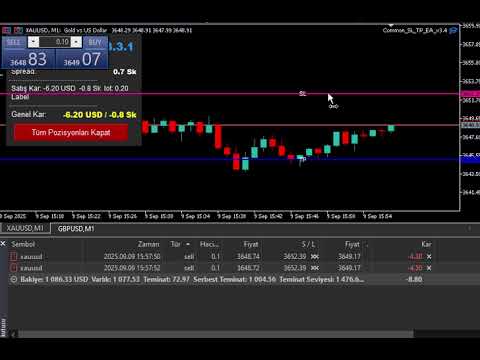
Common Stop Loss Line (Red): Drag it on the chart to instantly update the SL of all open trades.
-
Common Take Profit Line (Green): Drag it on the chart to instantly update the TP of all open trades.
-
Info Panel: Displays current positions, profit/loss, SL & TP distance in pips, and expected profit/loss at current SL/TP levels.
Key Features
-
Works on any symbol and timeframe
-
Automatically calculates pip values depending on symbol digits
-
Drag & Drop SL and TP lines directly on the chart
-
Updates all open trades in real time
-
Clear and customizable Info Panel (font, color, size, corner position)
-
Supports multiple positions per symbol
-
Lightweight and user-friendly
Parameters
-
DefaultPipsOffset – Default distance (in pips) of SL/TP lines from the market price when loaded
-
SL_Color / TP_Color – Line colors
-
LineWidth – Line thickness
-
PanelCorner / PanelXOffset / PanelYOffset – Info panel placement
-
PanelTextColor / PanelFontSize / PanelFont – Info panel customization
How to Use
-
Attach the EA to the chart of your chosen symbol.
-
SL and TP lines will appear automatically at a default offset.
-
Drag the lines to adjust. All trades on this symbol will be updated immediately.
-
Monitor current profit, expected profit, and risk in the info panel.
Note: The EA modifies only trades of the attached symbol.









































사용자가 평가에 대한 코멘트를 남기지 않았습니다