Nguyen Thanh Trieu / プロファイル
- 情報
|
1 年
経験
|
20
製品
|
11
デモバージョン
|
|
3
ジョブ
|
0
シグナル
|
0
購読者
|
市場構造、プライスアクションのロジック、リスクの可視化、カスタムインジケーターやユーティリティが専門です。
きれいなコード、安定した動作、見やすい表示を大切にしています。一つの製品で一つの課題を解決します。利益はお約束しません。
良いツールはあなたの代わりに判断しません。判断しやすくするためのものです。
開発、テスト、保守はすべて自分で行っています。アイデアがある方や個別に作りたいものがある方は、気軽にメッセージください。
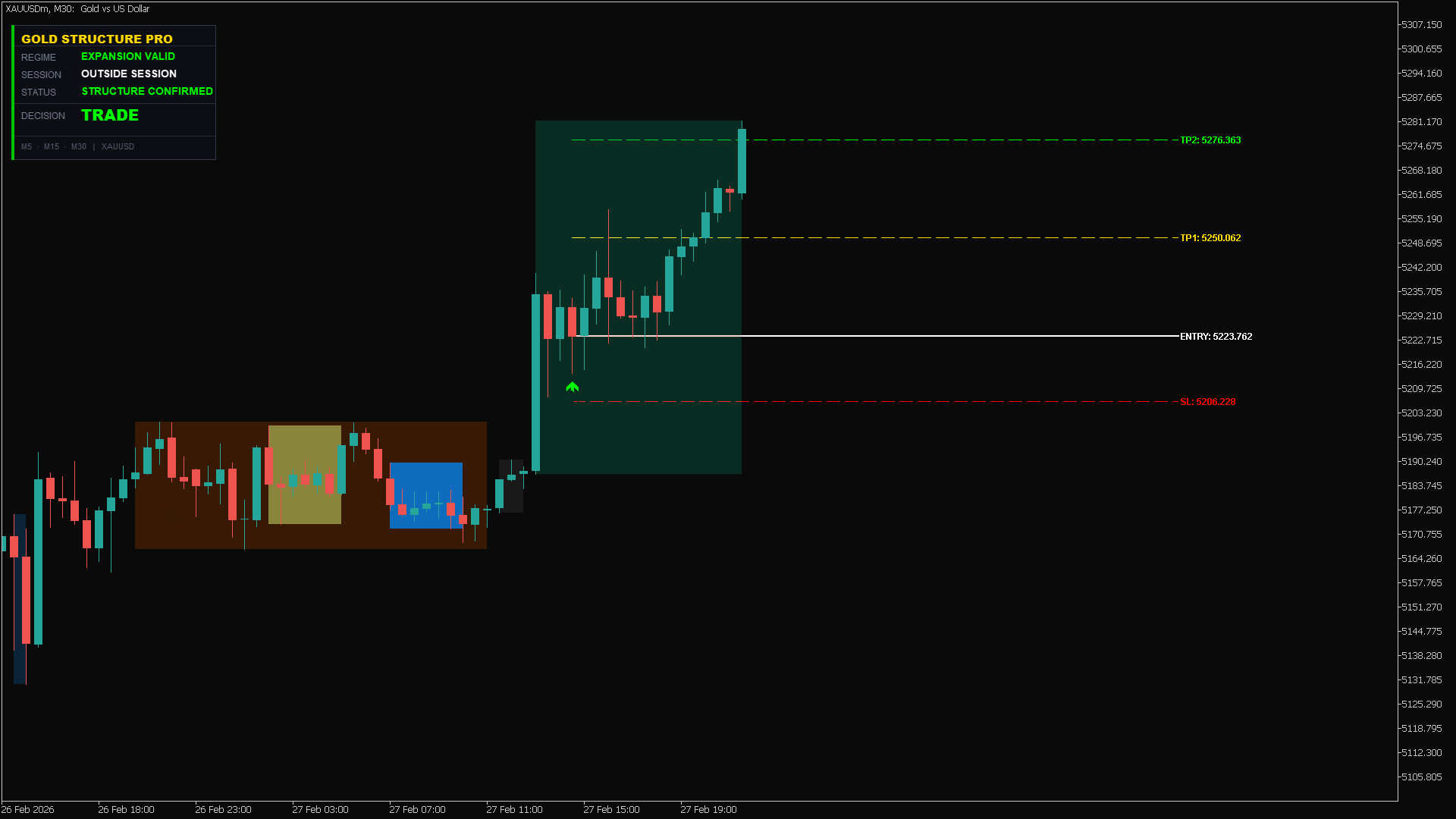
High-precision structure confirmation in action. As shown in the dashboard, the "Structure Confirmed" status gave us the green light to trade with confidence.
Asset: XAUUSD
Signal: Expansion Valid
Result: TP2 Hit perfectly 🎯
Stop guessing the trend. Let the algorithm do the heavy lifting.
👉 Try here: https://www.mql5.com/en/market/product/162441
Trade Command Center is now live on the MQL5 Market.
It is a visual trade execution and risk management panel built for manual traders who want precise control over every order.
What it does:
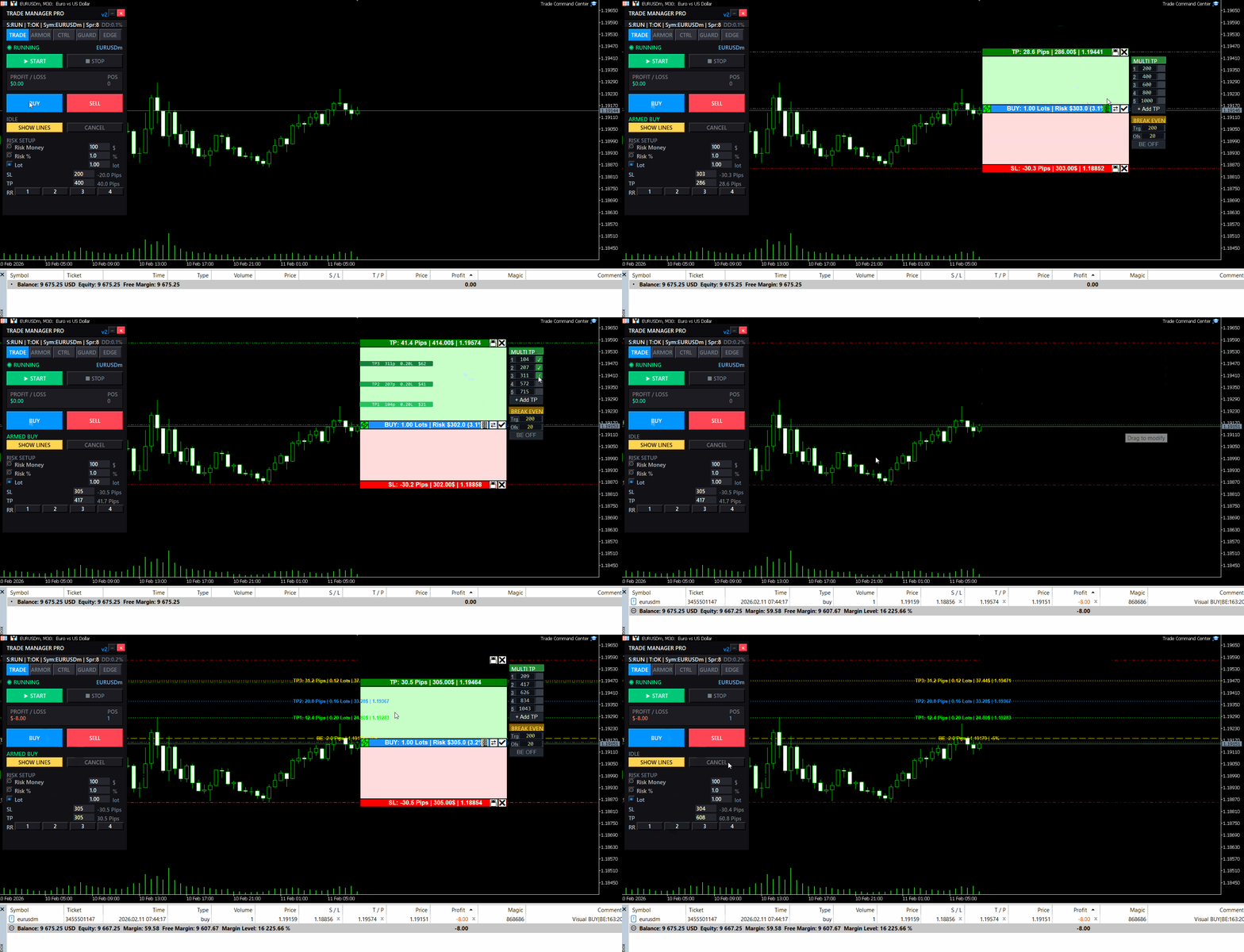
You place Entry, Stop Loss, and Take Profit directly on the chart as draggable boxes. The EA calculates your lot size automatically based on SL distance and your chosen risk mode (percent, dollar, or fixed lot). You see the exact dollar risk, pip distance, and R:R ratio before you click confirm.
Once the trade is open, automated management takes over:
- Break-even with per-trade override
- Trailing stop with step control
- Up to 5 partial take profit levels, each with its own trigger and close percentage
Risk Guard monitors your account across 6 timeframes: hourly, daily, weekly, monthly loss limits, equity drawdown percentage, and floating loss. A floating mini dashboard shows color-coded progress bars for each metric. When any limit is hit, all positions close immediately. Quick presets for FTMO and MFF rules are included.
Five tabs, one panel:
- TRADE — visual planning, risk calculator, one-click execution
- ARMOR — break-even, trailing, multi-level TP
- CTRL — position navigator, partial close, modify SL/TP, quick-close filters
- GUARD — drawdown limits, daily auto-close, advanced monitor
- EDGE — session stats, win rate, streaks, trade quality metrics
The panel uses chart objects.
It does not generate signals. It does not trade for you. It gives you the tools to execute and manage your own trades with precision.
Full feature demonstration available on the product page. Questions or feedback — use the Comments section.
Trade Command Center
👉 https://www.mql5.com/en/market/product/164935
追加のリソースと説明書 インストール手順 - デモアカウント用試用版ダウンロード ; 公式情報 公式チャンネル 開発者プロフィール ロット計算の迷いをゼロに。すべてのエントリーを完全掌握。 外部のロット計算サイトで15秒も時間を浪費し、絶好のエントリーチャンスを逃したことはありませんか?あるいはゴールド(XAUUSD)でロット数を入力ミスし、たった一度の操作ミスで何週間もの利益を一瞬で吹き飛ばしたことはありませんか? Trade Command Center (TCC) は、あなたのMetaTrader 5チャートをプロ仕様の取引コックピットへと変貌させます。面倒な暗算や外部ツールを一切不要にし、厳格なリスク管理ルールで資金を守りながら、チャート上から直感的な1クリック発注を可能にします。 秒速のスキャルピングから、複数通貨ペアのスイングトレード、あるいは厳格なドローダウン制限が課される プロップファーム(資金提供型口座) のチャレンジまで、TCC は注文ボタンを押す前に、設定したリスクリミットを100%遵守させます。 裁量トレーダーが Trade Command Center
You know that feeling when you enter a clean setup, only to watch it reverse 30 seconds later?
Not because your analysis was wrong.
Because the spread spiked. Or news dropped. Or the session died. Or volatility exploded while you weren't looking.
The chart showed movement. But movement without the right conditions is just noise.
I built something for that.
Market Bias Monitor MT5 — a real-time regime classifier that reads the market environment and tells you when conditions are actually favorable.
Four regime states: TREND, RANGE, TRANSITION, HIGH RISK.
A composite quality score from 0-100.
When conditions turn hostile, it shows you exactly why — spread, news, volatility, session, regime shift.
Multi-timeframe bias panel (M5 to W1). You see when lower timeframes conflict with higher ones before you enter.
Visual structure layer: swing zones, compression detection, ATR corridors.
Post-volatility stabilization logic — it won't let conditions flip back to "favorable" immediately after a spike. Forces you to wait.
Execution history strip — shows the last 5 bars as green (favorable) or red (unfavorable). Most traders are surprised how rarely conditions actually align.
This doesn't generate signals. It doesn't predict direction. It doesn't place trades.
It classifies the environment. You decide what to do with that information.
Demo available for testing. Works in Strategy Tester visual mode.
👉 Link: https://www.mql5.com/en/market/product/163815
Questions welcome in the comments.
良いセットアップ。間違った市場状態。トレードは実行される前に無効になる。 広いスプレッド、セッション外の時間帯、ボラティリティの急騰、高インパクトニュースへの近接——すべてが実行前にエッジを破壊する。 Market Bias Monitor はライブ環境を分類し、実行品質を0から100でスコアリングし、条件が変化した瞬間に通知します。 ゴールド(XAUUSD)、Forex通貨ペア、インデックスをM5からW1のタイムフレームで分析する裁量および半自動トレーダー向けに設計されています。レジーム、セッション、スプレッド、ニュースリスク、マルチタイムフレームバイアスのアラインメントをリアルタイムで監視します。 何を表示するか: 市場レジーム分類: ATRボラティリティと移動平均からの価格偏差を使用してTREND、RANGE、TRANSITION、またはHIGH RISKを識別——不安定なレジーム中の実行を回避するために。 Market Quality Score(0-100):
| 仕様品質 | 5.0 | |
| 結果チェックの品質 | 5.0 | |
| 可用性とコミュニケーションスキル | 5.0 |
Volume Pressure Meter MT5 ローソク足は強く見えた。出来高は高く見えた。ブレイクアウトでエントリーした。 数分で価格が反転した。その動きには真の参加がなかった。 Volume Pressure Meterは機関投資家が見ているものを明らかにする:価格の動きの背後に実際の買い圧力または売り圧力が存在するか、それとも空虚な出来高に対してトレードしているか。 M5からH4のタイムフレームでゴールド(XAUUSD)、インデックス、主要外国為替ペアを分析するイントラデイおよびスイングトレーダー向けに設計されています。8つの機関レベルの出来高分析ツールを、AIパターン認識とリアルタイム確率計算を備えた1つの統合システムに融合しています。 表示内容 HUD(ヘッドアップディスプレイ)インターフェース: シグナルステータス: 現在の市場推奨(BUY、SELL、WAIT、AVOID)をリアルタイムで更新 圧力バランスゲージ: 買い手と売り手の参加を色分けされた強度で視覚的に表現 シグナルスコア: 複数の出来高確認要素に基づく0から10までの強度評価 勝率確率
リソースとクイックリンク デモ版をダウンロード PropFirm Risk Guard は、取引口座に厳格なリスク管理と資金保護プロトコルを適用するために設計された高度なユーティリティです。自動化されたコンプライアンスレイヤーとして機能し、評価額(エクイティ)があらかじめ定義された日次および全体のドローダウン制限内に維持されるようにします。ドローダウンに関する厳格なガイドラインがある口座、資金提供チャレンジ評価(プロップファームのチャレンジ)、およびプロフェッショナルな資金管理要件に最適です。 このユーティリティは、チャートや通貨ペアに関係なく、アカウント全体のすべてのポジションをリアルタイム(100ミリ秒ごと)で監視します。バックグラウンドで静かに動作し、しきい値に近づくかそれを超えたときに資金保護アクションを実行します。 --- 主な機能表 機能カテゴリ 技術仕様 / メカニズム 運用上のメリット ドローダウンガード 日次および全体の含み損をリアルタイムで追跡(USDまたは%) 制限に達したときにすべての取引を決済し、口座のルール違反を防ぎます。 エクイティ追従ロック
Hello traders, a friendly update is now available:
- Compact dialog UI docked to the right, stable on chart resizes
- Two-page Settings (Prev/Next) so the panel stays the same height
- Configure on the panel: Break-even (enable, trigger, offset), Trailing (enable, distance, step), Partial (enable, trigger, percent), default SL/TP,
- Your choices persist across timeframe/symbol changes and chart reloads
- Layout polish: cleaner spacing/alignment; lot block and Settings button slightly lower; dialog a bit wider
- Cleanup under the hood to keep things smooth and compliant
Tip: To keep only default SL/TP, leave Break-even, Trailing, and Partial all OFF.
Backwards compatible with previous behavior when features are enabled. Please test in the Strategy Tester or on a demo first. Thanks for your feedback and support!
👉 https://www.mql5.com/en/market/product/152607
Hello traders, a small update is now available:
- New toggles: Enable_BreakEven and Enable_Trailing
- Partial Close is off by default to avoid unintended closes
- Break-even and trailing only run when enabled (no auto SL move if disabled)
- Inputs are grouped for faster, cleaner setup
Tip: To keep only default SL/TP, set Enable_BreakEven = false, Enable_Trailing = false, Enable_Partial_Close = false.
Backwards compatible with previous behavior when features are enabled. Please test settings in the Strategy Tester or on a demo first. Thanks for your feedback and support!
👉 https://www.mql5.com/en/market/product/152607
Hello traders,
I’m excited to share the latest improvements to TradeManagerLite for MetaTrader 5. This update focuses on usability and clarity, making position management even more efficient.
What’s new:
- Added four quick lot adjustment buttons (+0.01, +0.1, -0.01, -0.1) for faster trade sizing.
- The lot adjustment buttons are now neatly aligned and sized for a cleaner panel layout.
- Font size for these buttons is reduced for a more compact appearance.
- Improved panel and button placement for better visibility and workflow.
- Enhanced break-even logic to help minimize loss from slippage when moving stops.
- Fixed all known compilation and UI errors for smoother operation.
Thank you for your feedback and support!
Updated version of the Volume Pressure Meter with additional features:
New Features:
- Visual Gauge Bar - Displays buy/sell pressure with a horizontal bar that changes color and size based on market pressure.
- Simplified Alerts - Alert system provides notifications when pressure crosses the 70% threshold.
- Performance Optimization - Code has been optimized for better performance when running on multiple charts.
- Smart Caching - Caching system reduces CPU usage for traders monitoring multiple timeframes.
The visual gauge displays market pressure with a green bar for buying pressure and red bar for selling pressure.
The indicator works with all symbols and timeframes. No repainting, no DLL dependencies.
Please provide feedback on the new visual gauge and any improvements you would like to see.
The update is available for download.
Smart Session Box シドニー、東京、ロンドン、ニューヨークの取引セッションをチャート上にボックス表示し、市場時間とカウントダウンのライブパネルを備えています。 市場時間とカウントダウン ダッシュボードには各セッションの時間をUTCとブローカー時間で表示します。開催中のセッションは終了までの残り時間を表示し、次に開始するセッションと開始までの時間をハイライト表示します。参考として東京・ロンドン・ニューヨーク・シドニーの証券取引所時間も掲載しています。 セッションボックス 各セッションは高値・安値ライン付きのボックスを描画し、日中のサポート・レジスタンスとして利用できます。セッションの重なりは網掛け表示され、1日の流動性が高い時間帯を示します。終了したセッションの高値・安値を価格が抜けるとブレイクアウトラインが描画されます。ボックスは塗りつぶし、枠線のみのどちらでも表示できます。 取引セッション セッション 冬季UTC(デフォルト) 重なり シドニー 21:00 - 06:00 東京 00:00 - 06:00 東京 00:00 - 09:00 ロンドン 08:00 -
裁量トレードにおけるポジション管理の手動操作は、決済の遅れ、感情的な判断ミス、そしてストップロスの未設定による予期せぬリスクを招きがちです。 Trade Manager Lite は、MetaTrader 5 上で保有中のすべてのポジションに対して、ストップロス(Stop Loss)、テイクプロフィット(Take Profit)、ブレークイーブン(建値移動)、トレーリングストップ、および部分決済(Partial Close)を自動で執行・管理する軽量高機能ユーティリティです。 PCからの手動注文、MT5モバイルアプリからの発注、インジケーターからのシグナルエントリーを問わず、本ツールがストップロスの設定されていないポジションを即座に検知し、あらかじめ設定したリスクパラメータを自動適用します。 主な機能(無料版) SL / TP の自動設定: ストップロスやテイクプロフィットが未設定のポジションを検知し、指定したポイント幅で瞬時に自動発注します。 スマート建値移動(Break-Even):
Volume Pressure Meter breakdown tick volume to reveal the buying and selling pressure inside every candle. Unlike standard volume which only shows total activity, this indicator splits volume to show who is actually in control of the market. It helps you identify trend strength and spot potential reversals through volume divergence. Key Features: Pressure Gauge: Visual bar showing real-time Buy vs Sell percentages. Trend Bias: Automatically identifies if the market is dominated by Buyers or