Nguyen Thanh Trieu / Profilo
- Informazioni
|
no
esperienza
|
11
prodotti
|
3
versioni demo
|
|
3
lavori
|
0
segnali
|
0
iscritti
|
My work is centered on:
- Market structure analysis
- Price action logic
- Risk visualization
- Custom indicators and utilities
I prioritize code quality, execution stability, and clear visual presentation.
Each product is designed to solve a specific trading problem, not to promise results.
I believe trading tools should support decision-making, not replace it.
All products are developed, tested, and maintained personally.
I am also available for freelance custom projects. If you have a specific trading idea or need a tailored solution, feel free to message me to discuss how we can work together.
SMC Liquidity Channel Guard Prices reverse just as your breakout trade triggers. Account suffers unexpected drawdown. Because standard channels ignore institutional liquidity sweeps and trap retail stop-loss orders. This utility automatically monitors highest buy-side and lowest sell-side liquidity pools to flag false breakouts. Key Features: Dynamic Liquidity Tracking: Maps Buy-Side (BSL) and Sell-Side (SSL) boundaries without lagging moving averages. Sweep Identification: Prints precise
| Qualità delle specifiche | 5.0 | |
| Qualità del controllo dei risultati | 5.0 | |
| Disponibilità e capacità di comunicazione | 5.0 |
Keltner Breakout Caught in market chop. Fake breakouts trigger unwanted trades. Because standard indicators lack dynamic volatility context. This utility automatically combines a Dynamic Volatility Channel, Dual MA trend detection, and RSI momentum filtering into one visual system. Key Features: Trend Cloud: Visually fills the trend zone with a dynamic Keltner-style volatility channel. Multi-Factor Breakout: Only issues a signal when price breaks the volatility channel AND trend/momentum confirm
| Qualità delle specifiche | 5.0 | |
| Qualità del controllo dei risultati | 5.0 | |
| Disponibilità e capacità di comunicazione | 5.0 |
High-precision structure confirmation in action. As shown in the dashboard, the "Structure Confirmed" status gave us the green light to trade with confidence.
Asset: XAUUSD
Signal: Expansion Valid
Result: TP2 Hit perfectly 🎯
Stop guessing the trend. Let the algorithm do the heavy lifting.
👉 Try here: https://www.mql5.com/en/market/product/162441
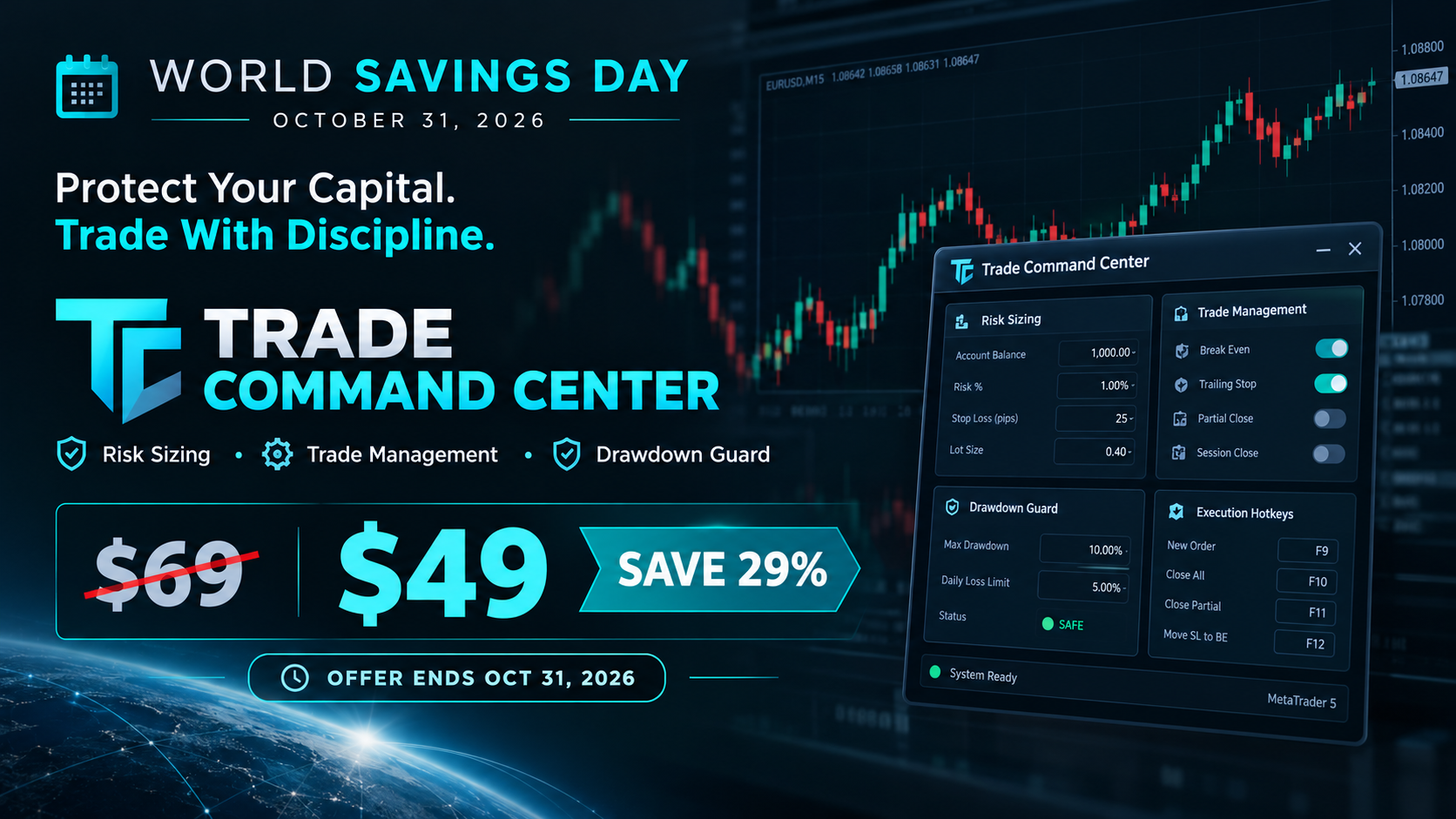
Trade Command Center is now live on the MQL5 Market.
It is a visual trade execution and risk management panel built for manual traders who want precise control over every order.
What it does:
You place Entry, Stop Loss, and Take Profit directly on the chart as draggable boxes. The EA calculates your lot size automatically based on SL distance and your chosen risk mode (percent, dollar, or fixed lot). You see the exact dollar risk, pip distance, and R:R ratio before you click confirm.
Once the trade is open, automated management takes over:
- Break-even with per-trade override
- Trailing stop with step control
- Up to 5 partial take profit levels, each with its own trigger and close percentage
Risk Guard monitors your account across 6 timeframes: hourly, daily, weekly, monthly loss limits, equity drawdown percentage, and floating loss. A floating mini dashboard shows color-coded progress bars for each metric. When any limit is hit, all positions close immediately. Quick presets for FTMO and MFF rules are included.
Five tabs, one panel:
- TRADE — visual planning, risk calculator, one-click execution
- ARMOR — break-even, trailing, multi-level TP
- CTRL — position navigator, partial close, modify SL/TP, quick-close filters
- GUARD — drawdown limits, daily auto-close, advanced monitor
- EDGE — session stats, win rate, streaks, trade quality metrics
The panel uses chart objects.
It does not generate signals. It does not trade for you. It gives you the tools to execute and manage your own trades with precision.
Full feature demonstration available on the product page. Questions or feedback — use the Comments section.
Trade Command Center
👉 https://www.mql5.com/en/market/product/164935
Trade Command Center Conto funded. Un lotto calcolato male. Limite di drawdown giornaliero superato. Conto chiuso. Non perche la strategia fosse sbagliata. Perche il rischio non e stato controllato nel momento dell'esecuzione. Il trading manuale richiede un dimensionamento preciso della posizione, uno stop loss coerente e il monitoraggio del drawdown in tempo reale. Trascurare anche uno solo di questi aspetti durante l'operativita cambia il rischio effettivo rispetto a quello previsto. Applica
You know that feeling when you enter a clean setup, only to watch it reverse 30 seconds later?
Not because your analysis was wrong.
Because the spread spiked. Or news dropped. Or the session died. Or volatility exploded while you weren't looking.
The chart showed movement. But movement without the right conditions is just noise.
I built something for that.
Market Bias Monitor MT5 — a real-time regime classifier that reads the market environment and tells you when conditions are actually favorable.
Four regime states: TREND, RANGE, TRANSITION, HIGH RISK.
A composite quality score from 0-100.
When conditions turn hostile, it shows you exactly why — spread, news, volatility, session, regime shift.
Multi-timeframe bias panel (M5 to W1). You see when lower timeframes conflict with higher ones before you enter.
Visual structure layer: swing zones, compression detection, ATR corridors.
Post-volatility stabilization logic — it won't let conditions flip back to "favorable" immediately after a spike. Forces you to wait.
Execution history strip — shows the last 5 bars as green (favorable) or red (unfavorable). Most traders are surprised how rarely conditions actually align.
This doesn't generate signals. It doesn't predict direction. It doesn't place trades.
It classifies the environment. You decide what to do with that information.
Demo available for testing. Works in Strategy Tester visual mode.
👉 Link: https://www.mql5.com/en/market/product/163815
Questions welcome in the comments.
La maggior parte delle perdite nel trading non nasce da analisi errate, ma da esecuzioni in condizioni di mercato sbagliate. Spread ampi, orari fuori sessione, picchi di volatilità e notizie ad alto impatto possono invalidare i setup. Market Bias Monitor rende queste condizioni visibili prima dell'ingresso e ora avvisa anche quando il contesto torna favorevole. L'indicatore classifica il mercato in 4 regimi, calcola un punteggio qualità da 0 a 100 e può inviare alert su due eventi principali
| Qualità delle specifiche | 5.0 | |
| Qualità del controllo dei risultati | 5.0 | |
| Disponibilità e capacità di comunicazione | 5.0 |
Volume Pressure Meter MT5 The candle looked strong. The breakout looked real. You entered. It reversed. And you are still not sure what you missed. Price can travel far on nothing. When there is no participation behind the move, you are the liquidity. This indicator shows what institutions see: whether real pressure exists, or if you are trading empty candles. What You See A thin HUD strip at the top of your chart displaying all critical signals in one glance. Signal status, pressure balance
GoldStructure Pro is a market structure and volatility analysis indicator designed specifically for XAUUSD. It identifies high-probability breakout signals by combining a multi-state volatility engine, swing-based fake-breakout filtering, and automatic stop-loss and take-profit level calculation. All signals are based on closed bar logic to remain stable and consistent across all timeframes from M5 to M30. How it works The indicator continuously measures the relationship between the current ATR
PropFirm Risk Guard is an advanced risk management and compliance utility designed specifically for funded account traders. It automatically monitors your equity, enforces prop firm rules, and protects your capital in real-time, allowing you to focus entirely on your trading strategy without the stress of manual calculation. Important note: Attach this utility to one chart only. It will globally monitor all open positions and pending orders on your account. This utility does not generate trades;
Hello traders, a friendly update is now available:
- Compact dialog UI docked to the right, stable on chart resizes
- Two-page Settings (Prev/Next) so the panel stays the same height
- Configure on the panel: Break-even (enable, trigger, offset), Trailing (enable, distance, step), Partial (enable, trigger, percent), default SL/TP,
- Your choices persist across timeframe/symbol changes and chart reloads
- Layout polish: cleaner spacing/alignment; lot block and Settings button slightly lower; dialog a bit wider
- Cleanup under the hood to keep things smooth and compliant
Tip: To keep only default SL/TP, leave Break-even, Trailing, and Partial all OFF.
Backwards compatible with previous behavior when features are enabled. Please test in the Strategy Tester or on a demo first. Thanks for your feedback and support!
👉 https://www.mql5.com/en/market/product/152607
Hello traders, a small update is now available:
- New toggles: Enable_BreakEven and Enable_Trailing
- Partial Close is off by default to avoid unintended closes
- Break-even and trailing only run when enabled (no auto SL move if disabled)
- Inputs are grouped for faster, cleaner setup
Tip: To keep only default SL/TP, set Enable_BreakEven = false, Enable_Trailing = false, Enable_Partial_Close = false.
Backwards compatible with previous behavior when features are enabled. Please test settings in the Strategy Tester or on a demo first. Thanks for your feedback and support!
👉 https://www.mql5.com/en/market/product/152607
Hello traders,
I’m excited to share the latest improvements to TradeManagerLite for MetaTrader 5. This update focuses on usability and clarity, making position management even more efficient.
What’s new:
- Added four quick lot adjustment buttons (+0.01, +0.1, -0.01, -0.1) for faster trade sizing.
- The lot adjustment buttons are now neatly aligned and sized for a cleaner panel layout.
- Font size for these buttons is reduced for a more compact appearance.
- Improved panel and button placement for better visibility and workflow.
- Enhanced break-even logic to help minimize loss from slippage when moving stops.
- Fixed all known compilation and UI errors for smoother operation.
Thank you for your feedback and support!
Updated version of the Volume Pressure Meter with additional features:
New Features:
- Visual Gauge Bar - Displays buy/sell pressure with a horizontal bar that changes color and size based on market pressure.
- Simplified Alerts - Alert system provides notifications when pressure crosses the 70% threshold.
- Performance Optimization - Code has been optimized for better performance when running on multiple charts.
- Smart Caching - Caching system reduces CPU usage for traders monitoring multiple timeframes.
The visual gauge displays market pressure with a green bar for buying pressure and red bar for selling pressure.
The indicator works with all symbols and timeframes. No repainting, no DLL dependencies.
Please provide feedback on the new visual gauge and any improvements you would like to see.
The update is available for download.
Smart Session Box Displays Asia, London, and New York trading sessions with automatic timezone adjustment and session overlap highlighting. Main Features Complete session analysis with no limitations. Key Features The indicator draws session boxes with high and low lines for each trading session. Session overlaps are highlighted with distinct colors to identify high liquidity periods. Breakout alerts notify when price crosses previous session levels. A control panel provides quick toggles for
Trade Manager is a position management utility designed to automate stop loss, take profit, trailing stops, and break-even operations for manual and automated trades. This utility monitors open positions and applies missing stop loss and take profit levels according to your configured parameters. It features a trailing stop mechanism that adjusts the stop loss as price moves favorably, and a break-even function that secures positions once a defined profit target is reached. Features The utility