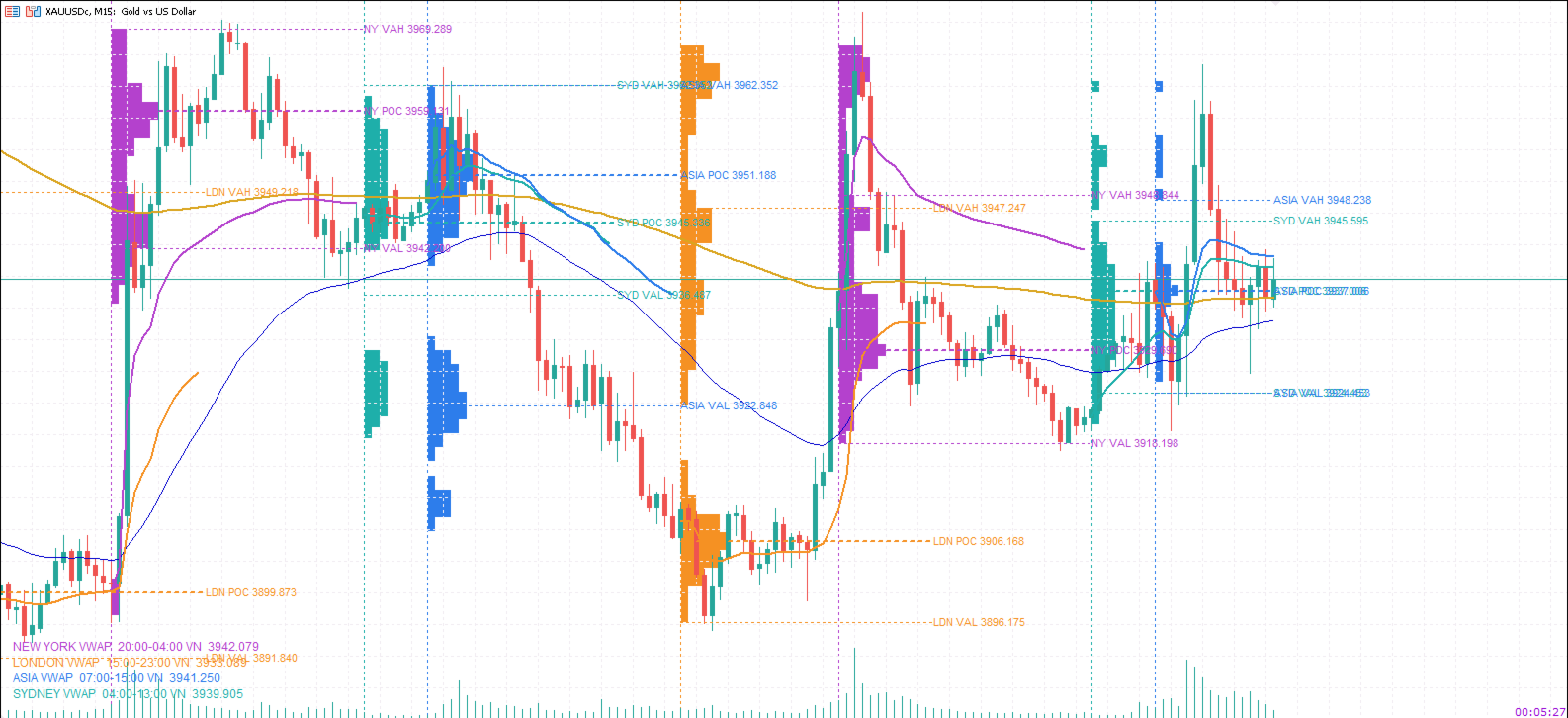
PhuongJ SessionVWAP
- インディケータ
- バージョン: 1.0

Full description
PhuongJ-SessionVWAP is a standalone MetaTrader 5 indicator that turns the session-VWAP and session-volume-profile overlay of the FVG_AutoBot into a reusable tool. It tracks the four reference sessions used by the bot — Sydney, Asia, London and New York — on the Vietnam clock (UTC+7) and follows the DST rules of Sydney, London and New York automatically.
For every session the indicator draws a cumulative VWAP line in the session colour and, when enabled, a volume profile built from M1 bars: the Point of Control (POC), the Value Area High and Low (VAH / VAL at 70% of session volume) and an optional volume-at-price histogram anchored at the session open.
The indicator is independent of any EA: it does not send orders, does not read or write files, and does not need FVG_AutoBot on the chart. Display is limited by one input — the session lookback — so the chart can show only the current sessions or dozens of past sessions without touching anything else.
Features
- Four independent session VWAP lines (Sydney, Asia, London, New York), one colour each, reset at the start of every session.
- Session volume profile from M1 data: smoothed POC, VAH / VAL at 70% value area, optional histogram.
- On/off switches for session VWAP, volume profile, session-start lines and the on-chart legend.
- InpSessionLookback : number of most recent sessions to display, counted across all four sessions (8 ≈ two trading days).
- Automatic DST for Sydney, London and New York; weekend sessions can be skipped.
- Legend with each session's Vietnam hours and its latest VWAP value.
- Intraday timeframes M1–H4; no trading logic and no file access.
Inputs
| Input | Default | Meaning |
|---|---|---|
| InpShowVWAP | true | Show the four session VWAP lines |
| InpShowVolumeProfile | true | Show the session volume profile |
| InpShowBoundaries | true | Show the vertical session-start lines |
| InpShowLegend | true | Show the VWAP legend |
| InpSessionLookback | 8 | Number of most recent sessions to display |
| InpSkipWeekends | true | Skip sessions that start on Saturday / Sunday |
| InpSydneyAutoDST | true | Automatic Sydney DST |
| InpSydneyStartVN / InpSydneyEndVN | 5 / 14 | Sydney hours when auto DST is off |
| InpAsiaStartVN / InpAsiaEndVN | 7 / 15 | Asia hours |
| InpLondonAutoDST | true | Automatic London DST |
| InpLondonStartVN / InpLondonEndVN | 15 / 23 | London hours when auto DST is off |
| InpNewYorkAutoDST | true | Automatic New York DST |
| InpNewYorkStartVN / InpNewYorkEndVN | 20 / 4 | New York hours when auto DST is off |
| InpServerUtcOffset | 0 | Server UTC offset override (0 = auto) |
| InpSydneyColor … InpNewYorkColor | 4 colours | Session colours |
| InpVpShowLevels | true | Draw POC / VAH / VAL |
| InpVpShowHistogram | true | Draw the volume-at-price histogram |
| InpVpBins | 32 | Price bins per profile (8–120) |
| InpVpHistogramWidthPct | 20 | Maximum histogram width, % of session duration |
| InpVpShowLabels | false | Show POC / VAH / VAL tags |
| InpRefreshSeconds | 5 | Overlay refresh interval in seconds |
How it works
- VWAP: Σ(typical × volume) / Σ(volume) , where typical = (High + Low + Close) / 3 ; the sum starts at the session open and resets at the next session. Real volume is used when the broker provides it, otherwise tick volume.
- Volume profile: every M1 bar of the session is assigned to one of InpVpBins price bins by its typical price. The POC is the peak of a lightly smoothed histogram (0.25 / 0.50 / 0.25), and the value area expands from the POC until it covers 70% of the session volume, giving VAH and VAL.
- Sessions: times are Vietnam time (UTC+7). London and New York open one hour earlier on the Vietnam clock during their summer time; Sydney follows the same rule. Sessions may overlap (Sydney/Asia, London/New York) and are calculated independently.
- Lookback: the start of the N-th most recent session is used as the display cut-off; everything older is not drawn.
Notes
- Intraday charts only. On D1 and higher the indicator prints a short message instead of drawing.
- The profile needs M1 history for the session. If the broker has no M1 data, VWAP is still drawn but POC / VAH / VAL are skipped.
- If session times are shifted on your server, set InpServerUtcOffset manually (0 = auto-detect).
- A large lookback with the histogram creates many chart objects; keep the lookback at 20 or less and bins at 48 or less when the histogram is on.
- VWAP is calculated from the bars of the current chart timeframe (as in the original EA), so the line gets smoother on lower timeframes. M1–M15 are recommended.