Dorothy
- エキスパート
-
Ratchatapong Kamonchaet
 This system was created with a clear purpose: to bring stability to your financial life. We believe in building a system that allows everyone to enjoy a more comfortable lifestyle, backed by reliable consistency and security. Let this EA work for you and transform your trading into a sustainable
- バージョン: 1.0
- アクティベーション: 10
⭐ Overview
Are you looking for a powerful automated trading solution that eliminates the common pitfalls of Forex trading?
-
Tired of high-impact economic news violently pulling your positions into heavy losses?
-
Frustrated by inaccurate Price Action interpretations that lead to frequent false breakouts?
-
Looking for a versatile strategy that can either combine multiple indicators simultaneously or trigger independently based on your exact preference?
-
Searching for a system that delivers impressive growth without exposing your capital to dangerous, nerve-wracking drawdowns?
This is precisely why we developed Dorothy EA—built from the ground up to solve these exact problems across any symbol and timeframe of your choice.
🚀 LAUNCH PROMOTION: Get Dorothy EA for only $199.99 (Save $100 off regular price $299.99)! Limited to the first 10 buyers only. Price will increase automatically once sold out!
Why Dorothy EA Stands Out for Serious Traders
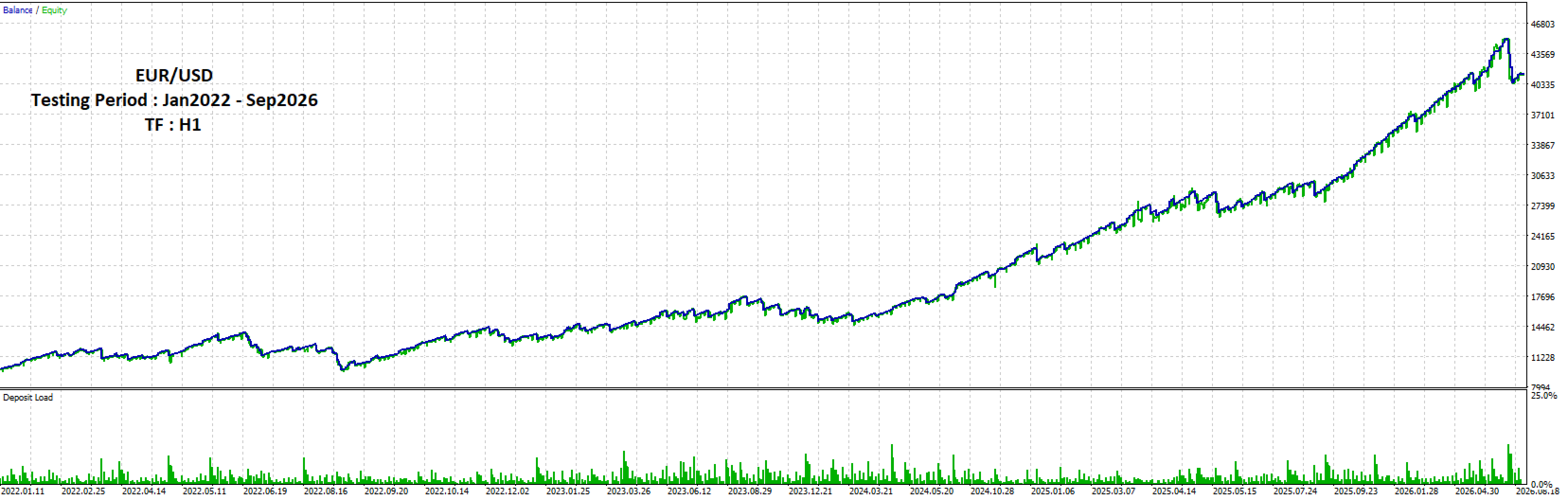
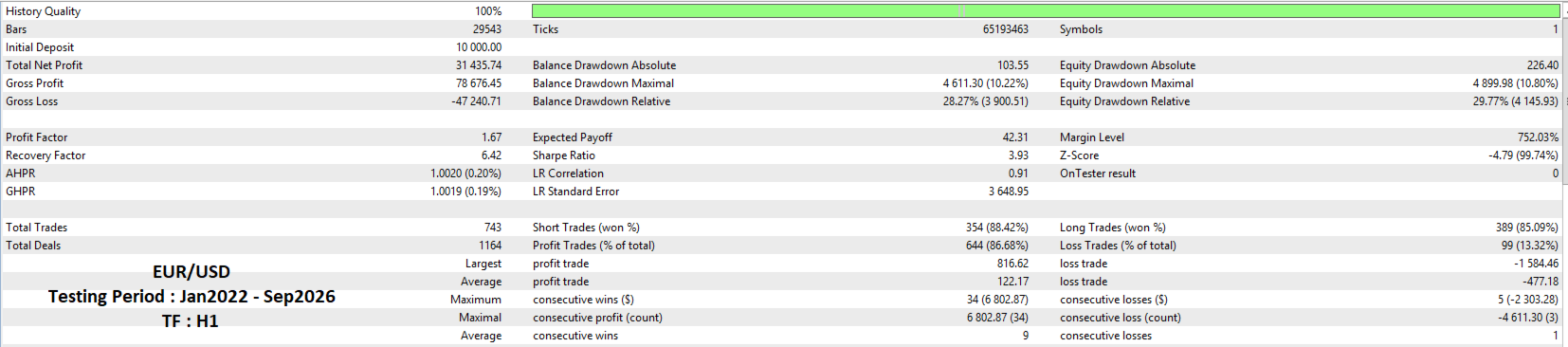
Dorothy EA is not a high-risk gamble or a reckless "grid/martingale" system. It is engineered around the core principle of "High Profit with Low Drawdown," thoroughly validated through rigorous 5-year backtesting (2022–2026) using 100% tick-data quality to achieve a robust and reliable architecture.
🛡️ Core Features & Built-in Protection
-
Multi-Strategy Integration:
-
Combines three powerhouse indicators: Donchian Breakout, EMA Cross, and Supertrend.
-
Flexible configuration modes: Choose Strict Mode (AND) where all active indicators must agree, or Flexible Mode (OR) to capture momentum from any single triggering module.
-
-
Price Action Bar Confirmation:
-
Filters out market noise and false breakouts by requiring structural confirmation from completed candle closes.
-
-
Advanced Pending Limit Order Execution:
-
Utilizes strategic Retracement Limit orders combined with dynamic candle-based expiration rules to secure superior entry prices and minimize exposure.
-
-
Professional Risk & Drawdown Management:
-
Max Floating DD Hard Cut: Emergency circuit-breaker that immediately cuts all EA positions if floating drawdown reaches your safety threshold.
-
Consecutive Loss Pause: Automatically pauses trading after a streak of consecutive losses to prevent emotional revenge trading during unfavorable market regimes.
-
Dynamic Lot Sizing: Automatically calculates lot size based on a fixed percentage risk per trade relative to the exact Stop Loss distance.
-
-
Advanced Profit Management:
-
Partial TP: Locks in partial profits mid-way through the move and automatically moves the Stop Loss to Break-Even.
-
Flexible Trailing Stops: Supports Fixed Points, ATR-based volatility trailing, and Candle High/Low structural trailing.
-
-
Built-in Economic News Filter:
-
Integrates native economic calendar data to automatically suspend new entries and cancel pending orders before and after high-impact news events.
-
Proven Performance Benchmark:
-
Extensively optimized over a 5-year testing window, Dorothy generates steady net profits while maintaining a clean, upward-sloping step-by-step equity curve.
-
Features a remarkably low Max Drawdown of just 10.80% paired with an exceptional Sharpe Ratio of 3.93, proving its long-term stability and resilience.
Equip your portfolio with Dorothy EA today and trade with professional-grade discipline, consistency, and peace of mind!
⚙️ User Manual & Parameter Guide
1. Execution Mode
-
Entry Order Type: Choose how trades are executed:
-
Market Order (Immediate) : Opens positions immediately at the current market price upon signal confirmation.
-
Pending Limit Order (Retracement) : Places Buy Limit or Sell Limit orders at a specified offset to catch price retracements for better entry pricing.
-
-
Pending Limit Offset (Points): The distance in points from the current price where the pending limit order will be set.
-
Cancel Pending Order after N Bars: Automatically cancels unfilled pending limit orders if they remain open for the specified number of bars.
-
Max Slippage / Deviation (Points): Maximum allowable price slippage in points when executing trade requests.
-
Magic Number: Unique identifier for Dorothy EA to track and manage its own open positions and orders independently.
-
Comment: Order comment string attached to all executed trades.
2. Risk & Money Management
-
Lot Sizing Type: Select the position sizing method:
-
Fixed Lot Size : Uses a static lot size for every trade.
-
Dynamic Risk Percent (%) : Automatically calculates lot size based on a fixed percentage of account equity relative to the Stop Loss distance.
-
-
Fixed Lot Size: The exact lot volume used when Fixed Lot mode is selected.
-
Risk Percent per Trade (%): The percentage of account balance risked on each trade (e.g., 2.0 risks 2% per trade).
-
Max Open Positions Allowed: Maximum number of active positions allowed simultaneously. (Note: On Netting accounts, this setting is automatically locked to 1 position to prevent position merging).
-
Trade Direction: Select trade permissions ( Both , Only Buy , or Only Sell ).
3. Drawdown & Floating Loss Protection
-
Max Floating DD Limit (%): Hard protection limit for account floating drawdown. If floating loss exceeds this percentage, the EA executes an immediate Hard Cut by closing all its active positions and canceling pending orders (Set to 0 to disable).
-
Pause Trading Duration after DD Cut (Hours): Cool-down period in hours during which trading is suspended following a Hard Cut event.
-
Max Consecutive Losses before Pause: Maximum allowed consecutive losing positions before temporary trading suspension (Set to 0 to disable).
-
Pause Trading Duration after Losses (Hours): Cool-down period in hours during which new entries are paused after reaching the consecutive loss limit.
4. Partial Take Profit Settings
-
Enable Partial TP: Enables partial position closing when price reaches an intermediate profit target.
-
Partial TP Target (% of Total TP Distance): The percentage of the full Take Profit distance required to trigger partial closing (e.g., 50% triggers halfway to final TP).
-
Volume to Close (%): The percentage of the total position volume to close upon reaching the partial target (e.g., 50% closes half the trade size).
-
Move SL to Break-Even on Partial TP: Automatically shifts the Stop Loss to the Break-Even price once a partial close is successfully executed.
-
Break-Even Buffer (Points): Additional buffer points added to the entry price when moving Stop Loss to Break-Even to cover spreads or commission costs.
5. SL & TP Dynamic Settings
-
Stop Loss Mode: Choose the Stop Loss calculation logic:
-
Fixed Points (Classic) : Sets static SL and TP values based on a fixed point distance.
-
Highest High / Lowest Low : Dynamically places Stop Loss behind recent structural high or low bars plus a buffer distance.
-
-
Fixed Stop Loss in Points: Static Stop Loss distance in points for Fixed Mode.
-
Fixed Take Profit in Points: Static Take Profit distance in points for Fixed Mode.
-
Lookback Bars for High/Low SL: Number of previous bars scanned to determine structural High/Low levels for SL placement.
-
Candle SL Buffer in Points: Safety buffer in points added beyond structural Highs/Lows to prevent stop-outs from market noise.
-
Risk Reward Ratio (TP = SL * RR): Multiplier applied to the calculated Stop Loss distance to establish the dynamic Take Profit target (e.g., RR = 2.5).
6. Trailing Stop Settings
-
Enable Trailing Stop: Turns the dynamic trailing stop system on or off.
-
Trailing Stop Mode Choice: Select the trailing methodology:
-
Fixed Points/Pips : Trails Stop Loss by a fixed point distance.
-
ATR Based Dynamic : Adjusts Stop Loss according to market volatility measured by ATR.
-
Candle High/Low Bar Offset : Trails Stop Loss behind structural candlestick extremes.
-
-
Fixed Mode Settings: Configure initial activation distance ( Start Distance ), trailing gap ( SL Distance ), and minimum update step ( Minimum Step ).
-
ATR Mode Settings: Configure ATR Period and ATR Multiplier .
-
Candle Mode Settings: Configure reference bar offset ( Shift Bar ) and extra buffer distance ( Buffer Distance ).
7. News Filter Settings
-
Enable News Filter: Enables news filtering using the native Economic Calendar.
-
Minimum News Importance to Filter: Select the impact threshold ( High Impact Only , Moderate Impact & Above , Low Impact & Above , All Events ).
-
Pause Trading BEFORE News (Mins): Time window in minutes before scheduled news events during which new entries are blocked.
-
Pause Trading AFTER News (Mins): Time window in minutes after news releases before trading resumes.
-
Cancel Active Pending Orders during News: Automatically removes active pending orders prior to high-impact news releases.
8. Price Action Bar Confirmation
-
Enable Price Action Bar Confirmation: Requires confirmation from the closing bar structure before placing orders (e.g., a Buy signal requires the latest completed bar to close higher to filter out fake breakouts).
9. Strategy Mode & Combination
-
Strategy Combination Mode: Defines how multiple strategy triggers are combined:
-
Strict (All Enabled Must Agree) : Requires all active strategy modules to align in the same direction before generating an entry signal.
-
Flexible (Any Single Trigger) : Allows any active strategy module to independently trigger an entry signal when its conditions are met.
-
10. Trend Strategy Selection & Settings
-
Enable Donchian Breakout: Enables price breakout entry logic based on Donchian Channels ( Lookback Period ).
-
Enable EMA Cross: Enables trend entry logic based on Exponential Moving Average crossovers ( Fast EMA & Slow EMA ).
-
Enable Supertrend: Enables trend flip entry logic based on the Supertrend indicator ( ATR Period & Multiplier ).
11. Global Trend Filter (ADX)
-
Enable Global ADX Filter: Activates average directional index filtering to measure trend strength.
-
ADX Period & Min ADX for Strong Trend: Prevents new trades when the ADX line falls below the minimum threshold (e.g., below 25.0), effectively filtering out weak or ranging market conditions.
💡 Recommended Settings
-
Recommended Symbol: Compatible with any major currency pairs or Gold (XAUUSD).
-
Timeframe: H1 (or optimized timeframe based on your backtest results).
-
Account Type: Works seamlessly on both Hedging and Netting accounts (Max Trades is automatically forced to 1 on Netting accounts for risk protection).
-
Minimum Deposit: $100–$500 (Depending on your risk settings and Lot Sizing preference).
⚠️ Important Tips for Optimal Performance
-
Low Spread Broker: Use a low-spread ECN / Raw Spread broker to ensure optimal execution for Pending Limit orders and Trailing Stops.
-
VPS Recommended: We strongly advise running Dorothy EA on a low-latency Windows VPS to ensure 24/7 uninterrupted trading and precise bar-close executions.
-
Multi-Chart Setup: If running Dorothy EA on multiple charts/symbols simultaneously, make sure to assign a unique Magic Number for each chart to avoid position overlaps.
-
Backtesting Data: When testing in the Strategy Tester, always use "Every tick based on real ticks" for maximum accuracy.
📖 Support & Contact
If you have any questions or require assistance, please feel free to contact us via MQL5 message or email: ratchata.sys@gmail.com