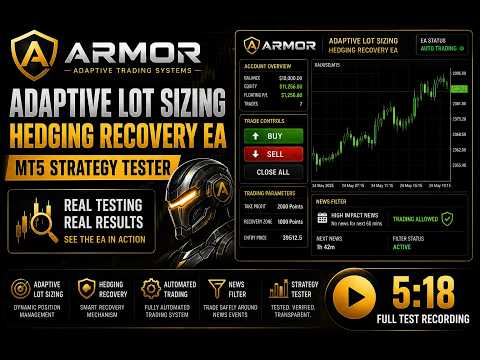
Adaptive Lot Sizing Hedging Recovery EA
- エキスパート
- バージョン: 2.0
- アップデート済み: 10 9月 2026
- アクティベーション: 10

Hedging Recovery EA
Smarter Recovery. Adaptive Position Sizing. Total Control.
Meet ARMOR Adaptive Lot Sizing, an advanced MetaTrader 5 Expert Advisor engineered for traders who want a more flexible approach to hedging, recovery, position sizing, and risk management.
Instead of relying on a single fixed recovery method, ARMOR gives traders the ability to configure how the recovery engine behaves — from adaptive lot progression and custom lot sequences to volatility-based recovery zones and basket profit management.
ARMOR is built for traders who want CONTROL — not complexity.
⚡ ADAPTIVE RECOVERY INTELLIGENCE
ARMOR can dynamically adjust recovery position sizing as the recovery sequence progresses.
Configure:
🔹 Adaptive Start Level
🔹 Adaptive Multiplier
🔹 Lot Multiplier
🔹 Lot Additions
This allows traders to build a recovery model that matches their own risk tolerance and trading style.
🎯 10-LEVEL CUSTOM LOT SIZING
Want complete control over every recovery level?
ARMOR supports up to 10 individually configurable lot sizes.
Create your own sequence instead of being locked into a single progression model.
Your strategy. Your lot sequence. Your control.
📊 VOLATILITY-ADAPTIVE RECOVERY
Markets don't always move the same way.
With optional ATR Dynamic Recovery, ARMOR can adapt:
• Recovery Zone
• Take Profit
• Position sizing behavior
This provides traders with the ability to configure recovery parameters around changing market volatility.
💰 SMART BASKET PROFIT MANAGEMENT
ARMOR doesn't simply rely on the current market price.
The EA calculates the basket's weighted-average entry and determines the active profit target based on the position structure.
This allows the profit target to dynamically reflect the overall basket.
One basket. One calculated objective.
🛡️ ECONOMIC EVENT GUARD
Protect new entries around important economic events.
Configure:
🔹 Event Importance
🔹 Currencies
🔹 Minutes Before News
🔹 Minutes After News
🔹 Look-Ahead Period
🔹 Manual Trade Protection
ARMOR uses the MetaTrader economic calendar to help traders avoid entering during selected high-impact event windows.
🔥 DAILY RISK MANAGER
Define your daily trading boundaries.
Set:
Daily Profit Target
Daily Loss Limit
ARMOR can optionally close the active basket when your configured daily threshold is reached.
🧯 FLOATING BASKET PROTECTION
Additional account-level control for the active basket.
Configure:
🟢 Floating Profit Target
🔴 Floating Loss Limit
When enabled, ARMOR can automatically manage the basket when the configured floating threshold is reached.
🎛️ MANUAL MODE — TOTAL CONTROL
ARMOR isn't only about automation.
Manual traders can control their recovery setup directly from the dashboard:
LOT SIZE
Choose your desired starting lot.
TAKE PROFIT
Set your preferred target.
RECOVERY ZONE
Define the distance between recovery levels.
ENTRY PRICE
Specify your desired pending/entry price.
Then simply use:
BUY | SELL | CLOSE ALL
🧪 ENHANCED STRATEGY TESTER
ARMOR is designed with visual testing in mind.
The integrated tester controls allow traders to interact with important Manual Mode parameters directly inside the Strategy Tester.
✔ Editable Lot Size
✔ Editable Take Profit
✔ Editable Recovery Zone
✔ Editable Entry Price
✔ On-Screen Input Keyboard
✔ Tester-Compatible Dashboard Controls
Test. Adjust. Optimize. Repeat.
🧠 BUILT FOR FLEXIBILITYARMOR combines multiple configurable engines into one MT5 Expert Advisor:
Adaptive Recovery
↓
Custom Lot Progression
↓
Hedging Recovery
↓
ATR Volatility Adaptation
↓
Basket Profit Management
↓
Economic Event Protection
↓
Daily Risk Controls
All working together while remaining configurable by the trader.
🚀 WHY ARMOR?Most recovery EAs force traders into one predefined configuration.
ARMOR takes a different approach.
You decide:
✔ How much to start with
✔ How recovery lots progress
✔ When adaptive sizing begins
✔ How aggressive the multiplier becomes
✔ How large the recovery zone should be
✔ How much profit the basket targets
✔ Whether ATR adaptation is enabled
✔ Whether news protection is enabled
✔ How much daily risk is acceptable
ARMOR adapts to YOUR configuration.
⚠️ RISK DISCLOSURE
Trading foreign exchange and leveraged financial instruments involves substantial risk and may result in significant losses. Hedging and recovery strategies can increase exposure during adverse market conditions. Past performance and backtesting results do not guarantee future results.
ARMOR is a trading tool, not a guarantee of profit. Always test on a demo account and use appropriate risk management.
🛡️ ARMOR
Adaptive. Intelligent. Configurable.
Built for traders who demand more control from their trading technology.
#ArmorEA
#ArmorTrading
#AdaptiveLotSizing
#HedgingEA
#RecoveryEA
#HedgingRecovery
#AdaptiveRecovery
#LotSizing
#SmartTradingEA
#ForexEA
#ForexRobot
#TradingRobot
#MT5
#MetaTrader5
#MQL5
#ExpertAdvisor
#ForexTrading
#AutomatedTrading
#AlgorithmicTrading
#AlgoTrading
#TradingAutomation
#ForexStrategy
#TradingStrategy
#RiskManagement
#MoneyManagement
#ATRTrading
#NewsFilter
#EconomicEventGuard
#BasketTrading
#BasketProfit
#CustomLotSizing
#StrategyTester
#ForexTrader
#ForexCommunity
#TradingTechnology
#SmartTrading
#AutomatedForex
#ProfessionalTrading
#TradingTools