Trade Assistant Standard
- ユーティリティ
-
Andrei Strashko
 私の名前はアンドレイです。私はプロのトレーダーであり、MetaTrader 4 および MetaTrader 5 向けの取引ソリューション開発者です。10年以上にわたり、取引ロボット、インジケーター、スクリプト、戦略を開発し、実際の取引経験と深いプログラミング知識を組み合わせてきました。
 - バージョン: 2.0
- アクティベーション: 5
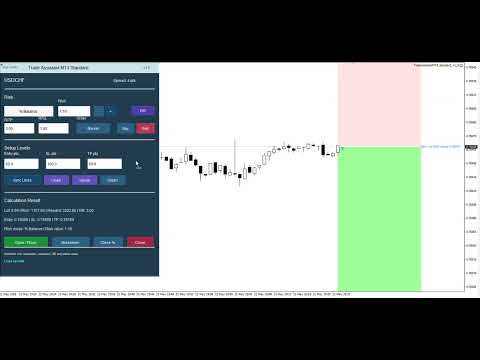
Trade Assistant MT4 Standard is a trading panel for MetaTrader 4, created for manual traders who need fast risk calculation, lot size calculation, visual trade planning and basic order execution directly from the chart.
It is an intermediate version between the free risk calculator Risk Calculator Panel MT4 and the full version Trade Assistant MT4 PRO.
The Standard version is suitable for traders who need the main tools for preparing and opening trades, but do not require advanced automatic position management.
The panel helps calculate position size in advance based on risk, build Entry / Stop Loss / Take Profit levels, check the risk/reward ratio, open a trade and perform basic position management.
User guide: Trade Assistant MT4/MT5 Standard User Guide
Main Features
Risk Calculation
Trade Assistant MT4 Standard allows you to calculate risk before opening a trade.
Available risk calculation modes:
fixed amount in the deposit currency;
percentage of Balance;
percentage of Equity;
percentage of Free Margin;
percentage of Custom base amount.
This helps the trader understand the potential loss in advance and follow money management rules.
Lot Size Calculation
The panel calculates position volume based on:
selected risk;
entry price;
distance to Stop Loss;
trading instrument specification;
tick size;
tick value;
minimum and maximum volume;
lot step;
commission, if specified in the settings.
The calculated lot is displayed in the panel together with the expected risk, potential profit and risk/reward ratio.
Entry / Stop Loss / Take Profit Lines
The panel displays key trade levels on the chart:
Entry;
Stop Loss;
Take Profit.
The lines help visually prepare the trading scenario before opening a position.
You can change values in the panel or move the lines directly on the chart.
Risk / Reward Mode
RR mode allows Take Profit to be calculated automatically relative to Stop Loss.
Example:
R/TP = 3;
R/SL = 1.
This means that Take Profit will be calculated three times farther than Stop Loss.
This function is useful for traders who use a fixed risk/reward ratio.
Visual Trade Map
Trade Assistant MT4 Standard can display the visual structure of a trade on the chart:
risk zone;
potential profit zone;
Entry;
Stop Loss;
Take Profit;
calculated lot;
risk;
potential profit;
risk/reward ratio.
This allows you to evaluate the trade faster before entering the market.
Trade Execution
Unlike the free Risk Calculator Panel MT4, the Standard version supports basic order execution.
The panel can be used for:
Market Buy;
Market Sell;
Buy Stop;
Sell Stop;
Buy Limit;
Sell Limit.
Before sending an order, the panel calculates the position volume and checks the basic trade parameters.
Basic Position Management
Trade Assistant MT4 Standard includes several functions for managing an open position.
Breakeven
The Breakeven button moves the Stop Loss of an open position to the entry level.
This helps lock the trade in the breakeven zone after the trader decides to reduce the initial risk.
Partial Close
The Close % button closes part of the position according to the specified percentage.
This function can be used for:
partial profit taking;
reducing position volume;
gradual exit from the trade.
Close
The Close button closes open positions for the current symbol and Magic Number.
Who Trade Assistant MT4 Standard Is For
The panel is suitable for:
manual traders;
beginner traders learning risk management;
intraday traders;
scalpers;
swing traders;
traders who use Stop Loss and Take Profit;
traders who need lot calculation before entry;
traders who need a simple panel for opening trades without an overloaded interface.
How Standard Differs from the Free Version
Risk Calculator Panel MT4 is a free tool only for calculation and visualization.
It does not open trades.
Trade Assistant MT4 Standard adds:
Market order execution;
Stop order placement;
Limit order placement;
Breakeven;
Partial Close;
Close;
Magic Number;
Deviation;
basic open position management.
How Standard Differs from PRO
The Standard version contains only the main functions for calculation, opening a trade and basic management.
The full Trade Assistant MT4 PRO version includes advanced features such as:
automatic trailing stop;
MA trailing;
ATR trailing;
Parabolic SAR trailing;
Fractal trailing;
visualization of trailing methods;
OCO;
virtual pending orders;
hidden SL/TP;
advanced order management;
additional tools for position management.
If you need a simple working tool for risk calculation and trade execution, the Standard version is suitable.
If you need full position management after entry, it is better to use Trade Assistant MT4 PRO.
Typical Workflow
Install the panel on the chart.
Select the risk calculation mode.
Enter the risk value.
Select Buy or Sell.
Choose the scenario type: Market, Stop or Limit.
Set Entry, Stop Loss and Take Profit.
Enable RR mode if needed.
Click Sync Lines to update the levels on the chart.
Check the calculated lot, risk, potential profit and RR.
Click Open / Place to open a trade or place a pending order.
After opening the position, use Breakeven, Close % or Close if needed.
Important Notes
Trade Assistant MT4 Standard is not a signal system and does not forecast market direction.
The panel does not make trading decisions for the user.
It helps calculate trade parameters, prepare levels and perform basic trading actions.
The final decision about entry, exit and position management is always made by the trader.
Before using the panel on a real account, it is recommended to test it on a demo account and check the broker’s trading conditions: spread, commission, minimum lot, lot step, leverage and Stop Level restrictions.
Conclusion
Trade Assistant MT4 Standard is a practical trading panel for MetaTrader 4 that combines risk calculation, lot size calculation, Entry / SL / TP lines, visual trade map, Market / Stop / Limit execution, Breakeven, Partial Close and basic position closing.
It is a convenient intermediate option for traders for whom the free calculator is no longer enough, but who do not yet need the full set of PRO functions.