Gold Future Engine EA
- エキスパート
- バージョン: 1.0
- アクティベーション: 6

Gold Future Engine EA MT5
Overview
Gold Future Engine EA is an Expert Advisor for MetaTrader 5 designed for automated trading on Gold symbols such as XAUUSD and common broker suffix variants.
The EA uses a structured rule-based trading engine with market condition checks, volatility filters, spread control, lot management, and configurable trade protection settings. It is developed mainly for Gold trading on the H4 timeframe.
The system is intended for users who want an automated Gold trading tool with controlled execution settings and clear input options.
Important Trading Lock
The EA includes a safety lock input:
LOCKED_MODE_SetFALSE_ToEnableTrading
By default, this protection lock may be enabled. To allow trading, the user must check the input settings and set the lock according to the instructions inside the EA inputs.
This feature is included to prevent accidental live trading before the user reviews the settings.
Main Features
Automated trading on MetaTrader 5
Designed mainly for XAUUSD and Gold suffix variants
Recommended timeframe: H4
Rule-based market condition analysis
Regime and volatility checks
Spread and execution filters
Configurable fixed lot mode
Optional auto-risk lot mode
Optional quality-based lot adjustment
Stop Loss and Take Profit management
Break-even and profit protection options
Optional ATR-based trailing
Partial close and trade management options, if enabled
Magic Number support
Suitable for Strategy Tester and demo testing before live use
Recommended Use
Symbol: XAUUSD or broker Gold suffix variants
Timeframe: H4
Platform: MetaTrader 5
Recommended testing: Strategy Tester and demo account before live use
Recommended start: fixed lot with conservative risk settings
For normal use, attach the EA to one Gold chart and check all input settings before enabling trading.
How the EA Works
Gold Future Engine EA checks market conditions before opening a trade. The EA does not force continuous entries. If the required conditions are not available, it will wait for the next valid setup.
Before opening a trade, the EA may check:
Market direction
Recent volatility
Spread conditions
Execution conditions
Entry quality
Lot and risk settings
Open trade status
Safety lock status
When the required conditions are met, the EA can open and manage trades according to the selected input parameters.
Lot Management
The EA includes different lot management options.
Fixed Lot Mode
The user selects a fixed trading volume, such as the broker minimum lot.
Auto Risk Mode
The EA calculates lot size according to the selected risk settings.
Auto Risk With Quality Adjustment
If this option is available, lot calculation may be adjusted according to internal setup quality settings.
Users should test all lot modes in the Strategy Tester before live use. Conservative settings are recommended when starting.
Trade Management
Gold Future Engine EA can manage trades using its Stop Loss, Take Profit, break-even, trailing, and profit protection settings.
The final trade behavior depends on the selected inputs, broker conditions, spread, slippage, account leverage, symbol specification, and market volatility.
Input Parameters
LOCKED_MODE_SetFALSE_ToEnableTrading
Safety lock used to prevent accidental trading before the user reviews the inputs.
Magic
Unique identifier used to separate this EA's trades from other EAs or manual trades.
LotMode
Selects the lot calculation method.
FixedLot
Manual lot size used when fixed lot mode is selected.
RiskPercent
Risk reference used when auto-risk lot mode is selected.
UseRiskMoneyCap
Allows a risk amount limit when available in the settings.
RiskMoneyCapUSD
Maximum risk amount reference used by the risk cap feature.
Spread Settings
Prevent new trades when spread is above the selected limit.
Volatility Settings
Control how the EA reacts to changing Gold volatility.
Stop Loss and Take Profit Settings
Define the planned protection and target levels.
Break-even Settings
Allow the EA to protect a trade after price moves in the selected direction.
Trailing Settings
Control the optional trailing stop behavior.
Partial Close Settings
Control partial position management, if enabled.
Execution Settings
Control order handling and execution tolerance.
How to Use
1. Open MetaTrader 5.
2. Open an XAUUSD or Gold chart.
3. Select the H4 timeframe.
4. Attach Gold Future Engine EA from Navigator > Expert Advisors.
5. Open the input settings.
6. Review the safety lock input.
7. Enable Algo Trading.
8. Run a Strategy Tester backtest.
9. Test on a demo account before live trading.
10. Use conservative lot and risk settings when starting.
Testing Recommendations
Before live use, test the EA with realistic conditions:
Use XAUUSD H4
Use real ticks or high-quality testing data
Use realistic spread
Include broker commission if applicable
Use the same broker symbol you plan to trade
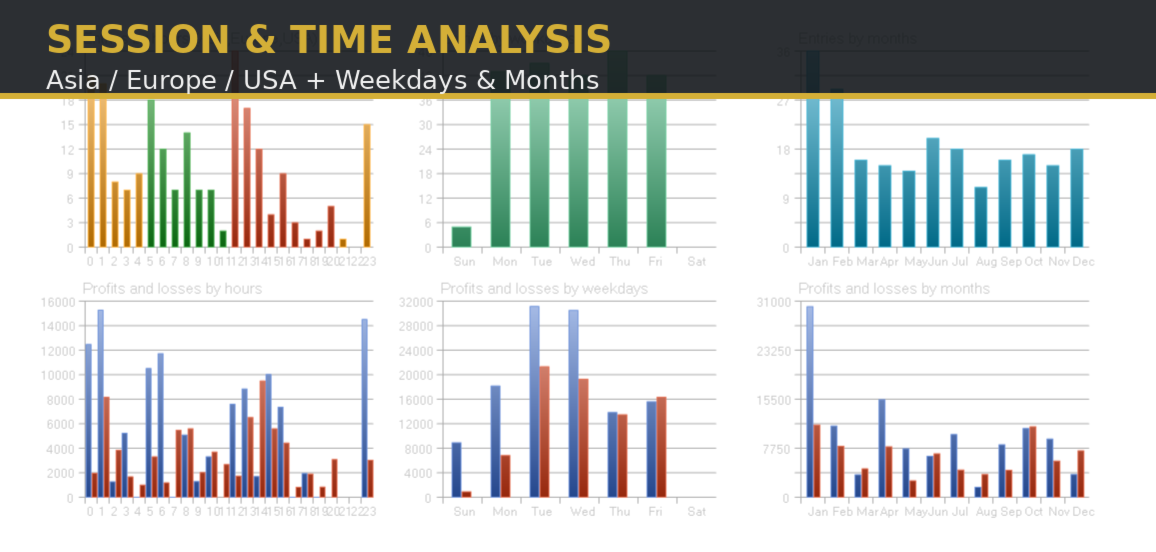
Test different market conditions
Start with fixed lot and conservative risk
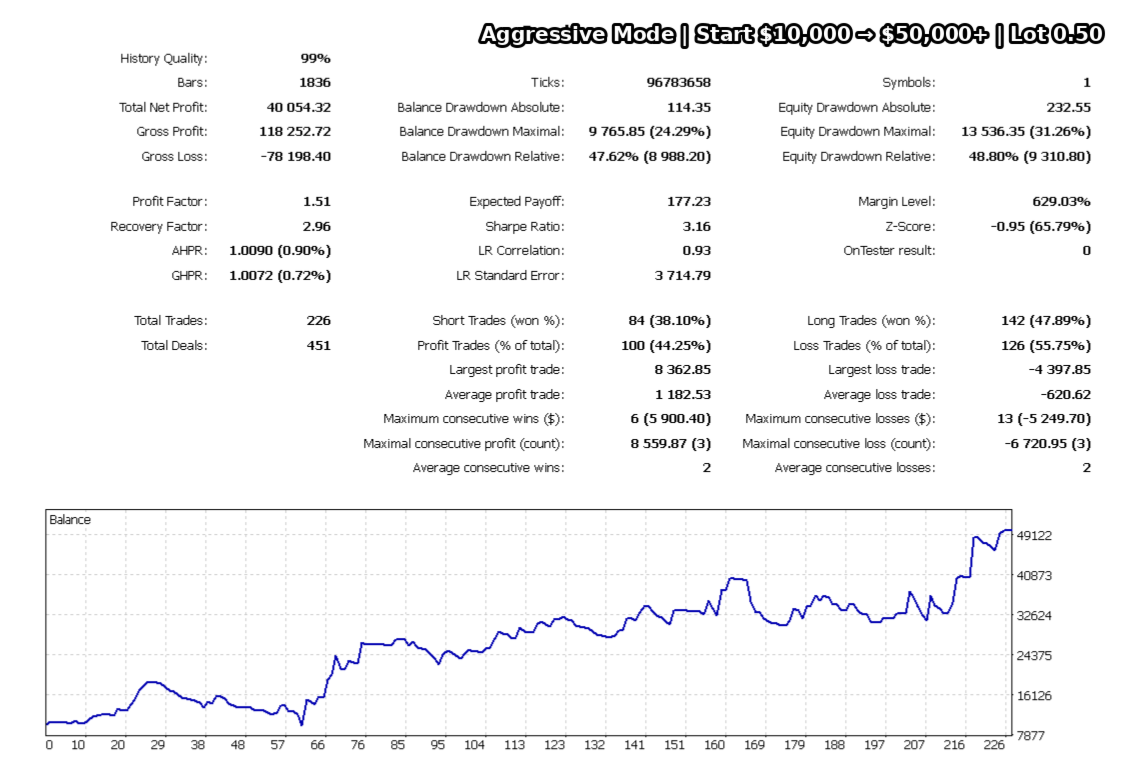
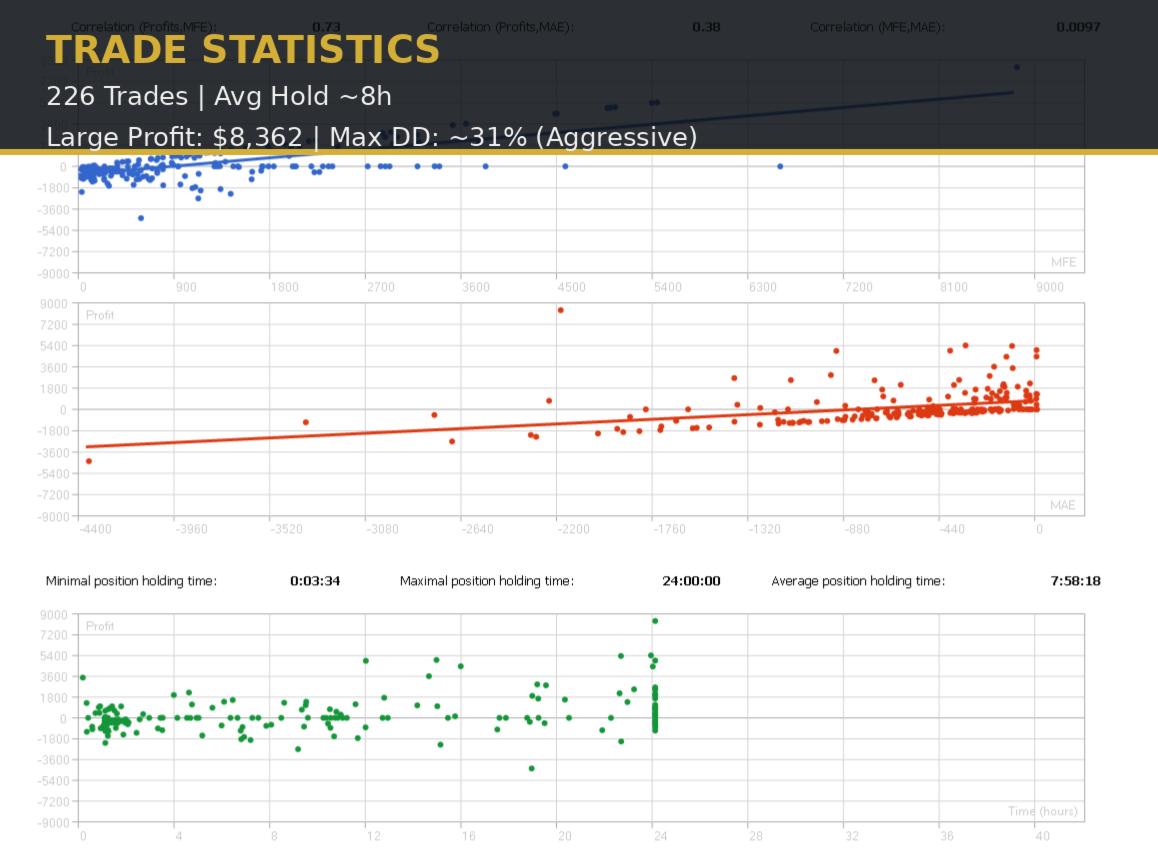
Check drawdown, trade frequency, and execution behavior
Important Notes
This EA is designed mainly for Gold trading. Using it on other symbols or unsupported timeframes can produce different results.
Do not use high lot sizes without understanding the risk. Gold can move quickly, and aggressive settings can increase drawdown.
Risk Warning
Trading involves risk. This Expert Advisor does not guarantee profit and does not remove market risk. Results may vary depending on market conditions, broker execution, spread, slippage, commission, leverage, account size, symbol specification, and selected settings.
Always test the EA before live trading and use risk settings that match your own account and trading plan.