This article contains step-by-step instructions for creating bots for Telegram in MQL5. This information may prove useful for users who wish to synchronize their trading robot with a mobile device. There are samples of bots in the article that provide trading signals, search for information on websites, send information about the account balance, quotes and screenshots of charts to you smart phone.

アンドレイ、記事の添付コードを置き換える必要がありますか?そのような場合はモデレーターにお願いします。
そうだよ、ラシッド、アーカイブのコードを更新する必要がある。私は数日前にモデレーターにそのことを書きました。
良い一日Andrey Voytenko!記事をありがとうございます。しかし、私は以下の方法でTelegramからアラートメッセージを受信して出力することができません(毎回空のアラートを返す、つまり、新しいメッセージの事実は検出されますが、空の変数を返します):
{
for(int i=0; i<m_chats.Total(); i++)
{
CCustomChat *chat=m_chats.GetNodeAtIndex(i);
//--- メッセージが処理されなかった場合
if(!chat.m_new_one.done)
{
chat.m_new_one.done=true;
string text=chat.m_new_one.message_text;
Alert(text);
//--- スタート
if(text=="/start")
SendMessage(chat.m_id,"Hello, world! I am bot. \xF680");
//--- ヘルプ
if(text=="/help")
SendMessage(chat.m_id,"My commands list: \n/start-start chatting with me \n/help-get help");
}
}
}
取引が表示されたらテレグラムにスクリーンショットを送信するボットを自分用に作ってみました。
なぜかたまに送信されてしまうのですが、何が問題なのかわかりますか?
添付ファイルのこのファイルだけです。
Roman、スクリーンショットを送信するためだけにボットが必要な場合は、以下の方法があります:
1.MyTelegramID_botにチャット番号を尋ねてください。
2.新しいアイテムをチェックし、指定されたIDのチャットに写真を送信する簡単なボットを作成します。例
//+------------------------------------------------------------------+
//| 入力パラメータ|
//+------------------------------------------------------------------+
input ENUM_LANGUAGES InpLanguage=LANGUAGE_EN;//言語
input string InpToken="";//トークン
input long ChatId=0; //チャットID
//---
CCustomBot bot;
int pos_count;
//+------------------------------------------------------------------+
int OnInit()
{
bot.Token(InpToken);
int res=bot.GetMe();
if(res!=0)
{
Print(GetErrorDescription(res));
}
pos_count=PositionCount(_Symbol);
return(INIT_SUCCEEDED);
}
//+------------------------------------------------------------------+
void OnTick()
{
int pos_count_new=PositionCount(_Symbol);
if(pos_count_new>pos_count)
{
pos_count=pos_count_new;
int result=SendScreenShot(ChatId,_Symbol,0,NULL);
if(result!=0)
Print(GetErrorDescription(result,InpLanguage));
}
}
//+------------------------------------------------------------------+
int PositionCount(const string _symbol)
{
int count=0;
int orders_total=OrdersTotal();
for(int i=0; i<orders_total; i++)
{
if(!OrderSelect(i,SELECT_BY_POS,MODE_TRADES))
{
PrintError(ERR_ORDER_SELECT);
return(-1);
}
//---
if(_symbol==NULL || OrderSymbol()==_symbol)
count++;
}
//---
return(count);
}
//+------------------------------------------------------------------+
int SendScreenShot(const long _chat_id,
const string _symbol,
const ENUM_TIMEFRAMES _period,
const string _template=NULL)
{
int result=0;
long chart_id=ChartOpen(_symbol,_period);
if(chart_id==0)
return(ERR_CHART_NOT_FOUND);
ChartSetInteger(ChartID(),CHART_BRING_TO_TOP,true);
//--- チャートの更新
int wait=60;
while(--wait>0)
{
if(SeriesInfoInteger(_symbol,_period,SERIES_SYNCHRONIZED))
break;
Sleep(500);
}
if(_template!=NULL)
if(!ChartApplyTemplate(chart_id,_template))
PrintError(_LastError,InpLanguage);
ChartRedraw(chart_id);
Sleep(500);
ChartSetInteger(chart_id,CHART_SHOW_GRID,false);
ChartSetInteger(chart_id,CHART_SHOW_PERIOD_SEP,false);
string filename=StringFormat("%s%d.gif",_symbol,_period);
if(FileIsExist(filename))
FileDelete(filename);
ChartRedraw(chart_id);
Sleep(100);
// if(ChartScreenShot(chart_id,filename,800,600,ALIGN_RIGHT))
if(ChartScreenShot(chart_id,filename,1024,768,ALIGN_RIGHT))
{
Sleep(100);
bot.SendChatAction(_chat_id,ACTION_UPLOAD_PHOTO);
//--- スクリーンショットを保存するために30秒待つ
wait=60;
while(!FileIsExist(filename) && --wait>0)
Sleep(500);
//---
string screen_id;
result=bot.SendPhoto(_chat_id,filename,screen_id,_symbol+"_"+StringSubstr(EnumToString(_period),7));
}
ChartClose(chart_id);
return(result);
}
//+------------------------------------------------------------------+
このチュートリアルをありがとう、
mt4用の電報ボットを 作りたいのですが、チュートリアルがあれば教えてください。
ありがとうございます。
https:// www.mql5.com/en/articles/2355
ステップ・バイ・ステップの説明があります。
もしうまくいかなかったら、ここに投稿してください。
こんにちは、
まず最初に、詳細な説明をありがとうございました。
ばかげているように聞こえるかもしれませんが、Telegram_signal_EAを試してみたかったので、Telegramチャンネルに送信されるインジケータによってアラートが発生することを期待していました。
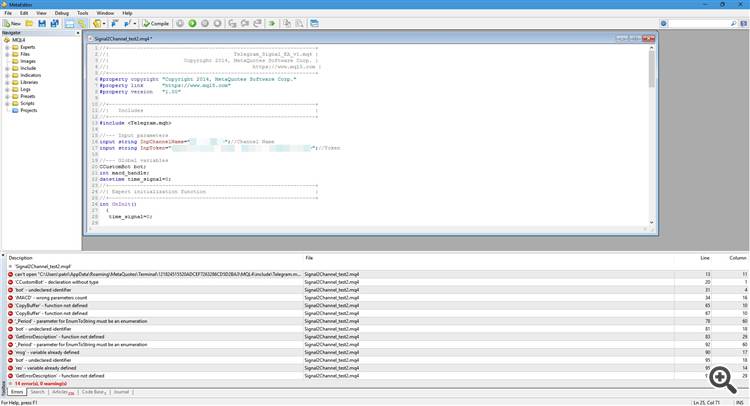
MetaEditorの新しいファイルにコードをコピー&ペーストしてコンパイルすると、エラーがたくさん出て、それが何を意味するのかさっぱりわかりません。確かに、時間をかけてすべてを解明すべきですが、あなたのコードを使えば、私が望むことを実現するのはそれほど難しくないはずですよね?
もしどなたか、私を助けてくださるか、正しい方向を示してくださる方がいれば、本当に感謝します。
よろしくお願いします、
Patrick。