TheXpert / News Feed
https://exchange.currency.com/trading/signup?c=ifrr2ra4&pid=referral
Set of instruments for OANDA's data analysis
http://www.trend-lab.ru/2016/08/oandax-full-review.html
Futures volumes for Metatrader 5
http://www.trend-lab.ru/2013/07/clusterx-for-mql5.html
Nice marketdepth for most common cryptoexchanges for MT4
http://www.trend-lab.ru/2014/11/marketdepth-mt4-exchanges-support.html
A trading terminal is the program through which a trader works with the financial market. It is in the terminal that charts, quotes, the order book and open positions are displayed, and all trading commands — buying, selling, modifying a deal — pass through it. A trading terminal can be called the trader's workplace: without it, you can neither see the market nor influence it. The best-known example is MetaTrader 5, which provides chart analysis, trading orders, quotes and the ability to automate trading.
What does a trading terminal consist of? The core of the system is the price chart, where candlesticks are built, indicators are applied and support and resistance levels are drawn. Around the chart there are the quote window with Bid and Ask prices, the open positions tab, the trade journal and the orders window. A modern terminal lets you place pending orders, open positions instantly with one click, manage Stop Loss and Take Profit, and launch trading robots — Expert Advisors that analyze the market and trade automatically.
A trading terminal is not just a "window with charts" but a full-fledged tool for managing capital and risk. It is important for a beginner to choose a terminal that is clear and convenient, and to master it on a demo account: this way you can learn the mechanics — from opening a chart to closing a position — without risking real money. A deep knowledge of your terminal saves time, reduces mistakes and makes trading truly conscious.
In my profile you will find a lot of useful educational information (don't forget to add me as a friend) Profile: https://www.mql5.com/en/users/voldemar
Что такое торговый терминал?
Торговый терминал — это программа, через которую трейдер работает с финансовым рынком. Именно в терминале отображаются графики, котировки, стакан заявок и открытые позиции, а все торговые команды — покупка, продажа, модификация сделки — проходят именно через него. Терминал можно назвать рабочим местом трейдера: без него невозможно ни увидеть рынок, ни повлиять на него. Самый известный пример — MetaTrader 5, который предоставляет графический анализ, торговые ордера, котировки и возможность автоматизации торговли.
Из чего состоит торговый терминал? Ядро системы — график цены, на котором строятся японские свечи, наносятся индикаторы и рисуются уровни поддержки и сопротивления. Вокруг графика располагаются окно котировок с ценами Bid и Ask, вкладка открытых позиций, журнал сделок и окно ордеров. Современный терминал позволяет выставлять отложенные заявки, мгновенно открывать позиции в один клик, управлять Stop Loss и Take Profit, а также запускать торговых роботов — советников Expert Advisor, которые анализируют рынок и торгуют автоматически.
Торговый терминал — это не просто «окно с графиками», а полноценный инструмент для управления капиталом и риском. Новичку важно выбирать терминал, который понятен и удобен, и осваивать его на демо-счёте: так получится изучить механику — от открытия графика до закрытия позиции — без риска для реальных денег. Глубокое знание своего терминала экономит время, уменьшает количество ошибок и делает торговлю по-настоящему осознанной.
В моём профиле Вы найдете много полезной обучающей информации, (не забудь добавить в друзья) Профиль: https://www.mql5.com/ru/users/voldemar
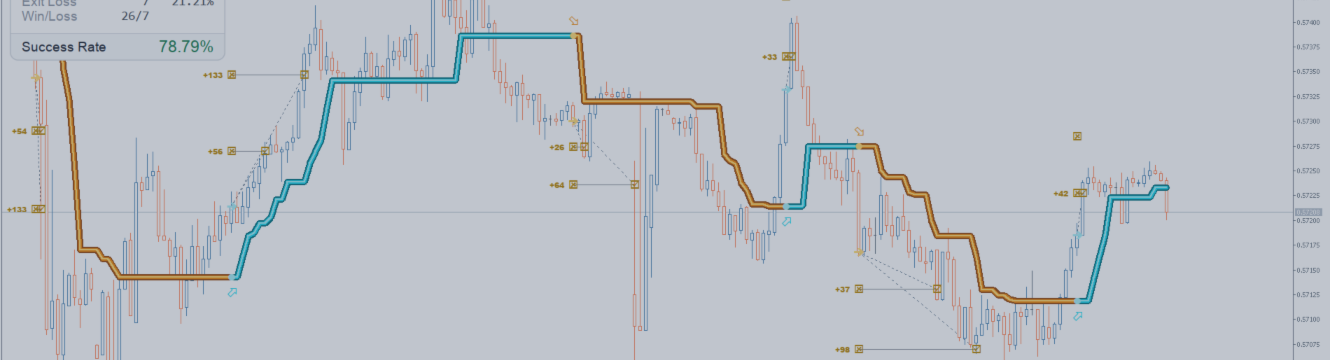
AW Prime Oscillator EA è un Expert Advisor che opera sui segnali dell'indicatore AW Prime Oscillator. La linea veloce dell'oscillatore fornisce i punti di ingresso sui livelli di ipercomprato e ipervenduto, quella lenta definisce il trend e scarta i segnali in controtendenza. Il segnale viene letto dalla barra chiusa una volta per barra e non viene ridisegnato, l'ordine si apre sulla barra successiva. Il TakeProfit è virtuale e si calcola dal breakeven dell'intero basket del lato, non dal prezzo
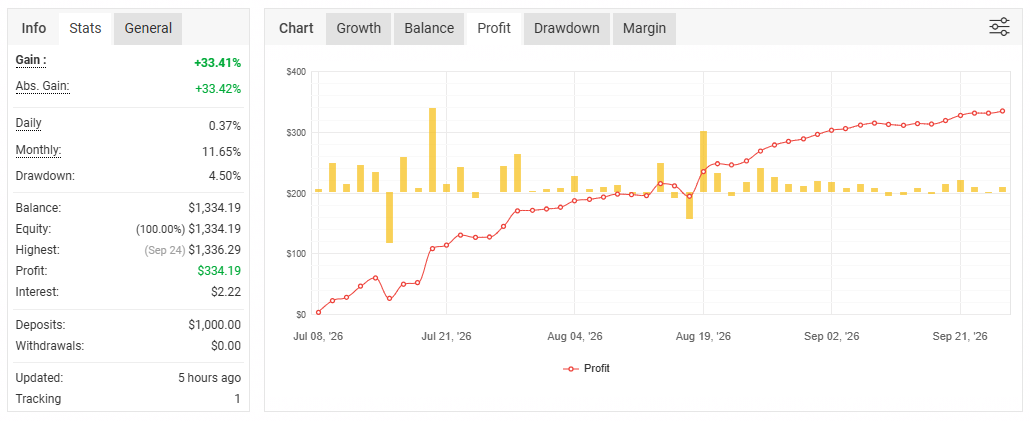
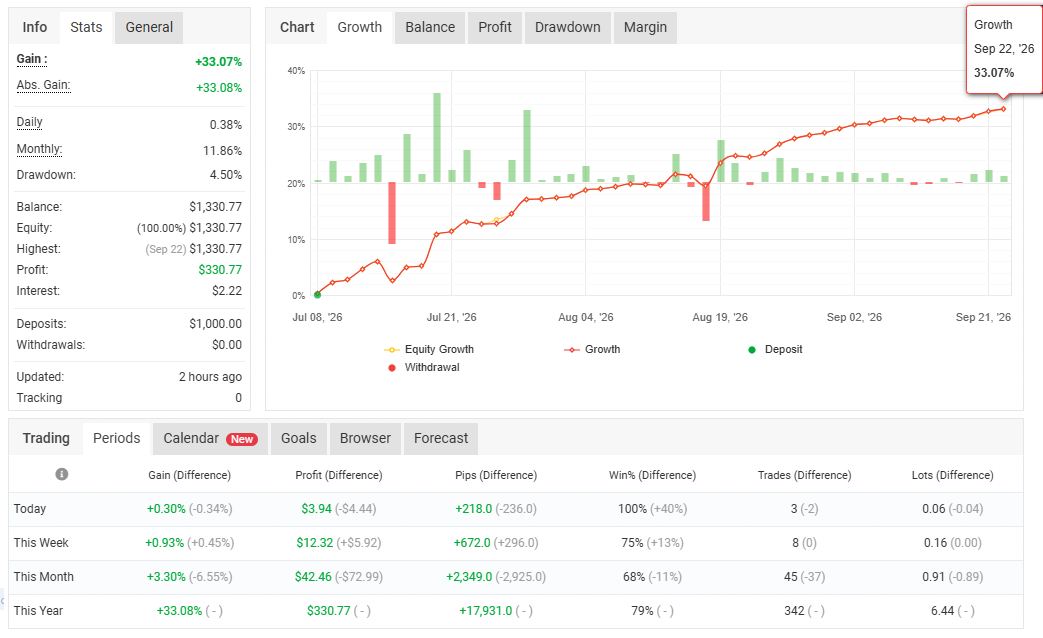
Relults: profit 33.4%, DD4.5%.
https://www.mql5.com/en/market/product/185178
https://www.mql5.com/en/blogs/post/773358
I am create it and still impressed how it trade.
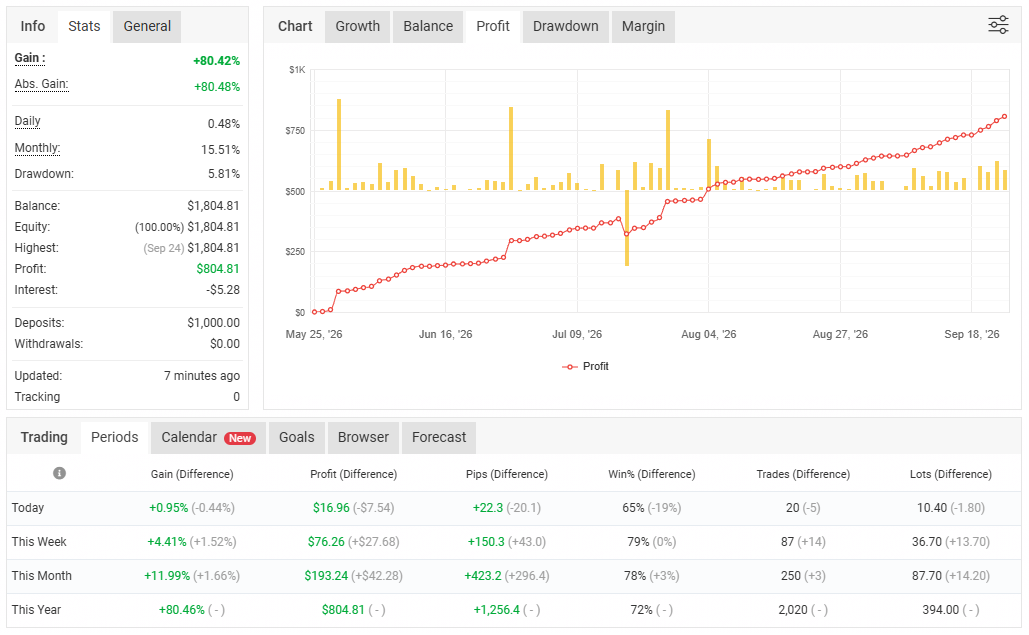
You can check its results is great:
Distance: 5 month (since May)
Profit: 80%
Monthly: 15%
DD: 5.8%!!!
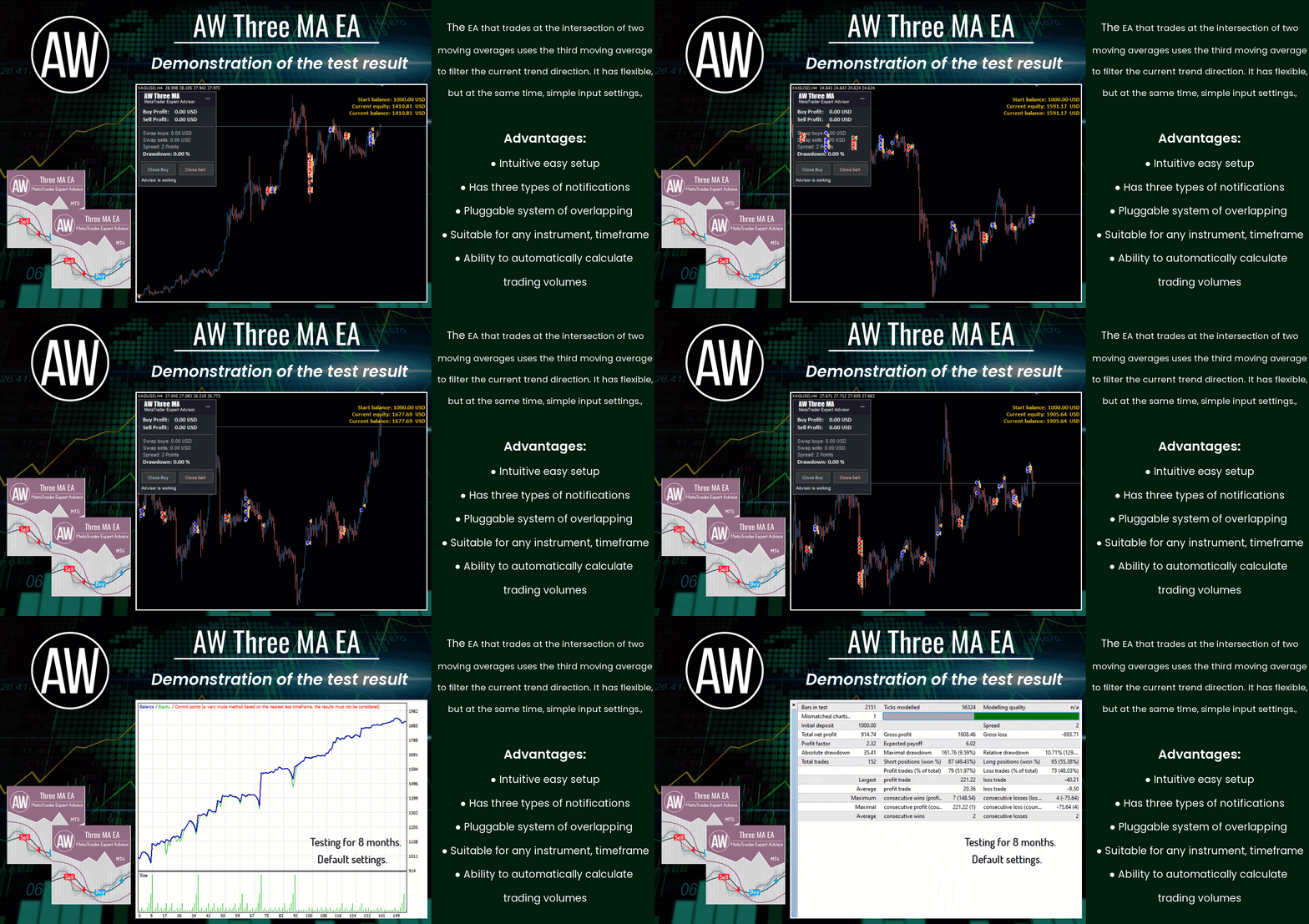
🔹 An Expert Advisor that trades at the intersection of two moving averages uses the third moving average to filter the current trend direction. 🔹
✅Benefits:
Intuitive easy setup
Suitable for any type of instrument and any timeframe
Has three types of notifications
Pluggable system of overlapping the first order by the last
Ability to automatically calculate trading volumes
✅Expert Advisor strategy.
The EA uses three moving averages to open positions. The main ones are two moving ones, fast and slow. The third is a slide to filter out market noise.
If the fast-moving one crosses the slow one from the bottom up, then this is a buy signal.
If the fast-moving one crosses the slow one from top to bottom, then this is a sell signal.
When using the third sliding:
When the fast and slow moving averages are below the filtered moving average (downward trend), only sell signals work.
When the filtering moving average is lower (uptrend) than the fast and slow ones, only buy signals work.
The fastest period is the smallest, the slowest period is longer, and the filter sliding period is the largest.
If filtering is disabled then:
At each intersection of the fast and slow moving averages, the EA will open trades
It should be noted that new order is opened only after the previous one is closed. In this Expert Advisor, there is only one open position in the market at a time.
Get MT4 Version
👉 https://www.mql5.com/en/market/product/63484
Get MT5 Version
👉 https://www.mql5.com/en/market/product/64339
Key Features:
• Trading exclusively during the nighttime Asian session - minimal market volatility
• Two proprietary built-in volatility filters with separate adjustments;
• AW Trend Predictor trend filter with timeframe selection;
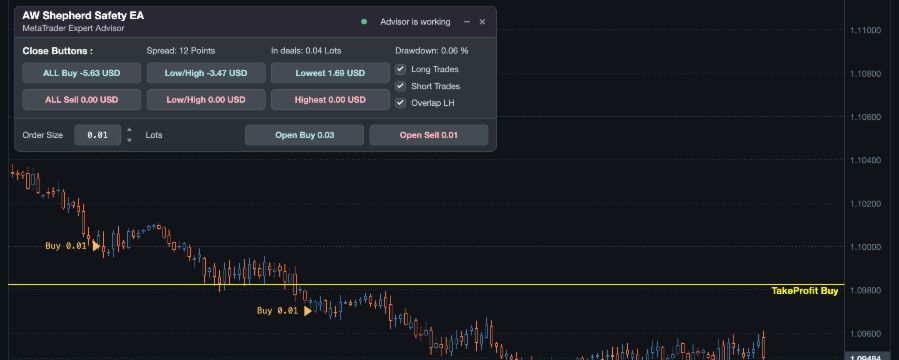
• Virtual TakeProfit level;
• Virtual StopLoss (at breakeven price);
• Averaging mode with adjustable step and multiplier;
• Limits on maximum spread and slippage;
• Filtering to limit one order per bar;
• Flexible setting of working hours according to the broker’s time;
• Information panel on the chart with color and font customization;
• Limit on total volume and number of positions;
• Automatic lot calculation depending on the deposit volume.
✅ MT4 version
👉 https://www.mql5.com/en/market/product/167708
✅ MT5 version
👉 https://www.mql5.com/en/market/product/167707
👑 Royal Advanced EA – Precision Scalping & Grid Terminal Royal Advanced is a highly versatile, automated algorithmic trading terminal built for MetaTrader 4. By combining precision momentum filters with a sophisticated grid hedging framework, the EA is engineered to turn market volatility into consistent growth. Live Account | MT5 Version Before using the Royal Advanced robot, the file must be set up first. Setup File: Download Here Deposit: $500 Leverage: 1:500 Recommended
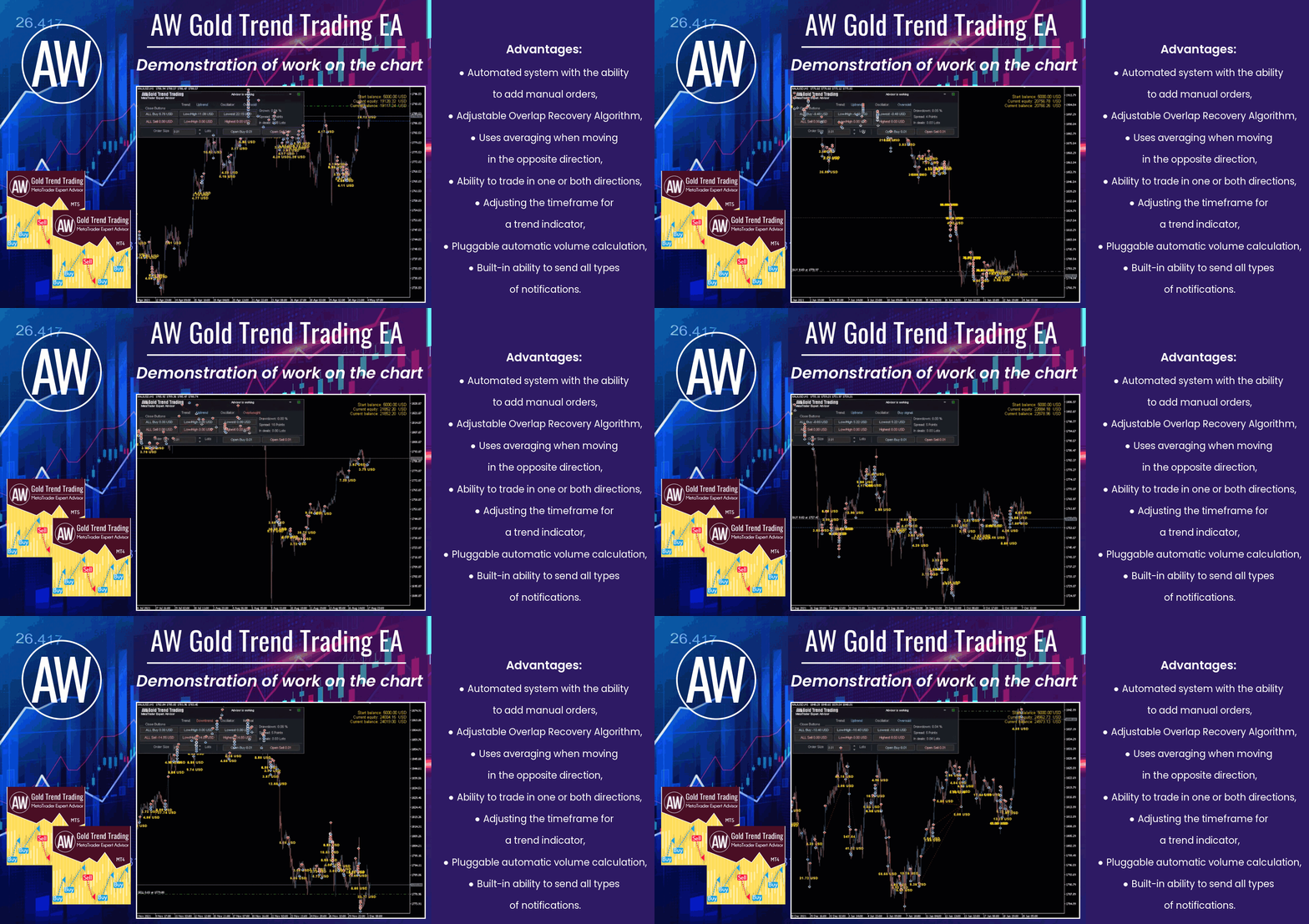
🔹 Trend advisor with an advanced averaging system 🔹
✅ MT4 version
👉 https://www.mql5.com/en/market/product/56647
✅ MT5 version
👉 https://www.mql5.com/en/market/product/27081
📢 Our Telegram
👉 https://t.me/AWSoftware
👑 Royal Advanced EA – Precision Scalping & Grid Terminal Royal Advanced is a highly versatile, automated algorithmic trading terminal built for MetaTrader 5. By combining precision momentum filters with a sophisticated grid hedging framework, the EA is engineered to turn market volatility into consistent growth. Live Account | MT4 Version Before using the Royal Advanced robot, the file must be set up first. Setup File: Download Here Deposit: $500 Leverage: 1:500 Recommended
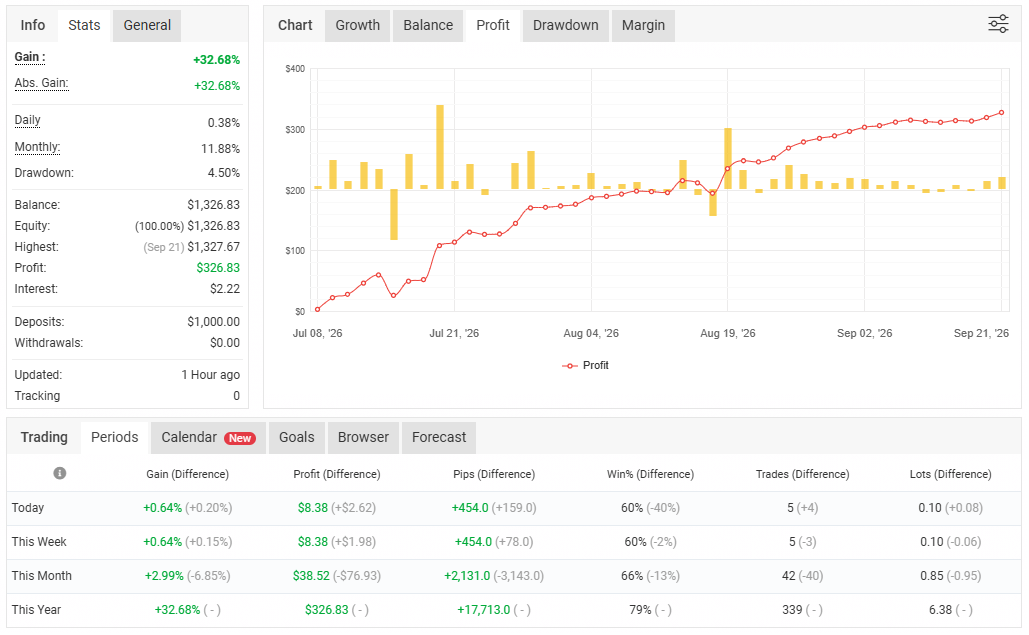
Relults: profit 32.68%, DD4.5%.
https://www.mql5.com/en/market/product/185178
https://www.mql5.com/en/blogs/post/773358
https://www.mql5.com/en/market/product/185178
https://www.mql5.com/en/blogs/post/773358