Trade Manager MT4 DaneTrades

80 USD
Versione demo scaricata:
482
Pubblicato:
17 aprile 2023
Versione attuale:
6.42
Non hai trovato un robot adatto?
Ordina il tuo
su Freelance
Vai alla sezione Freelance
Ordina il tuo
su Freelance
Come acquistare un Robot di Trading o un indicatore
Esegui il tuo EA
hosting virtuale
hosting virtuale
Prova un indicatore/robot di trading prima di acquistarlo
Vuoi guadagnare nel Market?
Come presentare un prodotto per venderlo con successo

Ti stai perdendo delle opportunità di trading:
- App di trading gratuite
- Oltre 8.000 segnali per il copy trading
- Notizie economiche per esplorare i mercati finanziari
Registrazione
Accedi
Accetti la politica del sito e le condizioni d’uso
Se non hai un account, registrati
Trade Manager Major Feature Update to V4.00
For this Update I wanted to focus on helping you with your trading Psychology and Discipline.
Trade Restrictions Feature
This allows you to stop overtrading and revenge trading by setting a limit on how many trades you can take per Month, Week, Day, Hour, Minutes. See how close you are to a restriction and what time you can start trading again!
Send Notifications Send notifications to your phone, email or alert Metatrader on key management features such as when a trade goes to Breakeven, Partial Closes and if your account gets a trading restrictions
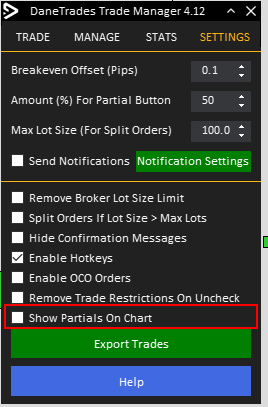
New Settings Tab Modify more settings from inside the Trade Manager without having it restart. Great for uninterrupted trading More has been added.
Check the official store page > Whats New for full change log.
New Update Released
- Fixed trade restrictions affecting all pairs when only current symbol selected
- Fixed being able to use AutoBreakeven and Partials by RR. Trades should no longer close when going to Breakeven
- Fixed a bug that stopped the EA crashing on specific exotic currencies or if your account had different base currencies
- Fixed a bug that stopped split lots from working
New update v4.20 - Trailing stop has been updated
1. First box is now the amount of Pips price has to move in profit before trailing stop is activated
2. The amount of pips your SL will trail behind current price
v4.21 introduced a bug that caused the EA to crash. This has been resolved in v4.22 sorry for the problems caused
Update V2.34
- Fixed RR tool being removed when switching timeframes
- Fixed Values being reset when chart changed
- Added option to increase thickness of the RR tool lines
v4.40 - New feature to more easily manage open trades and pending orders.
Hello Dane,
It is possible to have fixed stop loss and TP unchecked permanently? because every time i move the RR tool, the TP box check reactivates.
Every time i launch mt4 everything is reset even if i save and load settings. Risk($) reset, SL reset, TP reset, nothing save.
I just want for fast execution fixed SL, TP always desactivated and the same risk ($) everytime i launch my mt4.
Regards
Hello Dane,
It is possible to have fixed stop loss and TP unchecked permanently? because every time i move the RR tool, the TP box check reactivates.
Every time i launch mt4 everything is reset even if i save and load settings. Risk($) reset, SL reset, TP reset, nothing save.
I just want for fast execution fixed SL, TP always desactivated and the same risk ($) everytime i launch my mt4.
Regards
Hi, what do you mean sorry?
Of course everytime you move the RR tool tp and SL will be checked. Because it assumes you want a TP and SL.
What is it that you are trying to do?
Can turn on Mobile Trades and select either just 'Pending Orders' or 'Market Orders and Pending Orders'.
When enabled, if you enter a trade at the minimum lot size (Normally 0.01 lots) the trade will be replaced with an identical one with the risk calculated automatically enabling you to quickly enter from your phone.
The Trade Manager must be running for this to work!
For Market Orders you will have to pay the commission for entering a 0.01 lot trade. Pending Orders don't cost anything.
Hello Dane,
just a few quick issues.. maybe you can solve that in one of your next updates...
1) Saving function:
Can you make the saving function more precisely? The problem, if I save a setting on Slot 1 and I reload it afterwards, I loose the setting
for my "fixed Lot size", and I loose the settings for TP and SL and the AutoBreakEven-Setting of 4.1 pip will be 4 pips after reloading....
2) Loosing SL and TP settings
Next annoying issue, is the loosing of the TP and SL setting, when changing from BUY to SELL and vice versa...
I entered my fixed setting for SL and TP in the main setting AND saved in one of the three slots...
3) Speed issue
ok, sometime the trader is really slow... the initial loading is slow... and its sometimes very slow in reacting...
But this might be a problem with my system (Win10 on Laptop with only 8GB RAM...)... at home it is faster,
but thats a big working station...
Thanks!
BG Tobias
Hello Dane,
just a few quick issues.. maybe you can solve that in one of your next updates...
1) Saving function:
Can you make the saving function more precisely? The problem, if I save a setting on Slot 1 and I reload it afterwards, I loose the setting
for my "fixed Lot size", and I loose the settings for TP and SL and the AutoBreakEven-Setting of 4.1 pip will be 4 pips after reloading....
2) Loosing SL and TP settings
Next annoying issue, is the loosing of the TP and SL setting, when changing from BUY to SELL and vice versa...
I entered my fixed setting for SL and TP in the main setting AND saved in one of the three slots...
3) Speed issue
ok, sometime the trader is really slow... the initial loading is slow... and its sometimes very slow in reacting...
But this might be a problem with my system (Win10 on Laptop with only 8GB RAM...)... at home it is faster,
but thats a big working station...
Thanks!
BG Tobias
Hi,
Thanks for the feedback. I will take a look at the save and load functions and fix any errors
SL and TP are not saved in the save manage function. What is it that you want to achieve here?
I'm not experience speed issues on my computer or vps. If I find a way to optimise the code further then I will to improve performance across more systems
Hi,
Thanks for the feedback. I will take a look at the save and load functions and fix any errors
SL and TP are not saved in the save manage function. What is it that you want to achieve here?
I'm not experience speed issues on my computer or vps. If I find a way to optimise the code further then I will to improve performance across more systems
hi,
Thanks!
Saving SL and TP is good, if you work always with same strategy... and it's really annoying, when you have to set TP and SL every time you change between SELL and BUY...
speed is not the major issue... it's nice, if it would be faster also on a slow computer... ;-)
Hi Levi,
Thanks for the fast update... It seems to be more stabe now...
But two issues are left....
1) you are still loosing the settings of TP and SL when you switch between BUY/SELL
2) another annoying effekt is, that you suddenly loose the setting of TP
It suddenly changes to 1.0!!! I don't know why... but it should not have this behaviour....
I love your manager... it is really helpful and make quick and safe trading very easy...
Thanks.
Hi Levi,
this one sucks most...I even can't change the pip-size at TP... it will automatically changed to 1.0... ALWAYS....
Maybe it has something to do with the fixed Lot-size?!?
The only thing I need, is fixed TP and SL and fixed Lot-size... this is the basic for a fast entry in the market....
Please, try to find that bug...
THANKS!