
99 USD
Versione demo scaricata:
11 593
Pubblicato:
31 maggio 2019
Versione attuale:
3.61
Non hai trovato un robot adatto?
Ordina il tuo
su Freelance
Vai alla sezione Freelance
Ordina il tuo
su Freelance
Come acquistare un Robot di Trading o un indicatore
Esegui il tuo EA
hosting virtuale
hosting virtuale
Prova un indicatore/robot di trading prima di acquistarlo
Vuoi guadagnare nel Market?
Come presentare un prodotto per venderlo con successo

Ti stai perdendo delle opportunità di trading:
- App di trading gratuite
- Oltre 8.000 segnali per il copy trading
- Notizie economiche per esplorare i mercati finanziari
Registrazione
Accedi
Accetti la politica del sito e le condizioni d’uso
Se non hai un account, registrati
is it possible to set hotkeys on the keyboard?
is it possible to set hotkeys on the keyboard?
Hello. Not yet, but it will be available soon and you can freely assign hotkeys to the program functions.
We just released the latest version of EA Trade Manager ver. 3.34
What's New in Version 3.34:
If you have any questions, please contact us directly via mql5.com chat or via https://www.investsoft.eu/contact
Hi I just downloaded to MT5. I can't figure out how to just Market execute with my SL/TP lines. I am hitting the sell/buy button but nothing happens. The video's I'm finding online aren't very thorough tutorials. They only show a few functions with to explanation just music. Do you happen to have more thorough tutorial's? I'm really not getting it.
Hello,
Please find detailed User Manual here: https://investsoft.eu/blog/index.php/2021/11/30/trade-manager-user-manual/
Hello,
Please find detailed User Manual here: https://investsoft.eu/blog/index.php/2021/11/30/trade-manager-user-manual/
Thank you!!
Hello,
Please find detailed User Manual here: https://investsoft.eu/blog/index.php/2021/11/30/trade-manager-user-manual/
Hi Janusz, When I hit Sell or Buy button, nothing is happening. I did fill out the lot size and SL/TP panel as mentioned in the instructions but still nothing. How can I fix this?
Hi Janusz, When I hit Sell or Buy button, nothing is happening. I did fill out the lot size and SL/TP panel as mentioned in the instructions but still nothing. How can I fix this?
Hi Janusz, When I hit Sell or Buy button, nothing is happening. I did fill out the lot size and SL/TP panel as mentioned in the instructions but still nothing. How can I fix this? It seems like the function is not active.
I sent a private message. Please check and answer.
Was wondering if I am missing something but I can't seem to get the partial close to enter a .01 on the lots option
You can but please make sure you have set unit to lot:
And Fyi it is currently impossible to draw up a SELL with Zero TP. As soon as you clear the TP it defaults to buy :(
In the next update, it will be possible to deactivate TP (placing orders without TP). I didn't have time to add it to version 3.34 so as not to delay the release of the update any longer.
At the moment, you can either set TP very far so that its hit is unlikely, or after placing the order, simply remove TP from the order.
::prrr – shows the current RR ratio. It calculates the ratio between current price distance (to order open price) and SL distance (this is something like a current profit but as RR). Apply only for market orders.
Could you add this text function but using the initial Stop Loss?
::prrr – shows the current RR ratio. It calculates the ratio between current price distance (to order open price) and SL distance (this is something like a current profit but as RR). Apply only for market orders.
Could you add this text function but using the initial Stop Loss?
Yes, it is already on the to-do list and will definitely be in the next version of Trade Manager.
hi, Is there a video on how to install? im not clued up with meta trader on desktop.
Hi,
Below are the steps to install the Trade Manager purchased in mql5.com market.
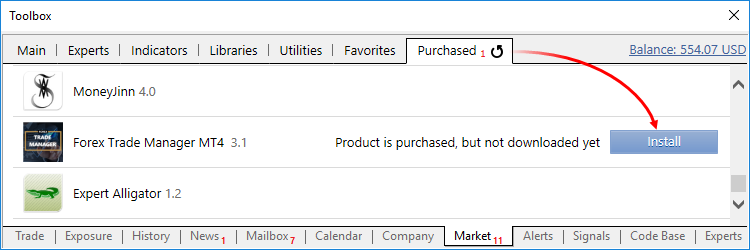
Trade Manager is automatically activated and installed to the Market folder in the Navigator of the MetaTrader terminal. A notification of successful purchase and activation is sent to your email, as well as to the MetaTrader terminal and as a private message to your MQL5 account.hi
I got a message "array out of range in"
I try to add the RRR_pendenting order but It does not work
hi
I got a message "array out of range in"
I try to add the RRR_pendenting order but It does not work
Hi, Please provide a details of this error message (can be a screenshot).
Hi
My screen panel looks quite weird, any idea?