
99 USD
Versione demo scaricata:
11 581
Pubblicato:
31 maggio 2019
Versione attuale:
3.61
Non hai trovato un robot adatto?
Ordina il tuo
su Freelance
Vai alla sezione Freelance
Ordina il tuo
su Freelance
Come acquistare un Robot di Trading o un indicatore
Esegui il tuo EA
hosting virtuale
hosting virtuale
Prova un indicatore/robot di trading prima di acquistarlo
Vuoi guadagnare nel Market?
Come presentare un prodotto per venderlo con successo

Ti stai perdendo delle opportunità di trading:
- App di trading gratuite
- Oltre 8.000 segnali per il copy trading
- Notizie economiche per esplorare i mercati finanziari
Registrazione
Accedi
Accetti la politica del sito e le condizioni d’uso
Se non hai un account, registrati
AMIGO HOLA MUY BUENAS COMO HAGO PARA INSTALAR EL PROGRAMA A MI MT4 POR AYUDA. YA COMPRE SU PRODUCTO Y NO PUEDO INSTALARLO EN MI MT4. GRACIAS
Hola, Compró la versión incorrecta del producto, pero por lo que puedo ver, probablemente canceló el pedido de la versión MT5 y compró la versión MT4. Avíseme si ha instalado correctamente el programa.
Hi,
Just bought the widget which is really nice - however I'm using Mac and the Meta Trader icons etc. are all not showing, can you fix please? .... it's not usable to me like this...
Hi,
Just bought the widget which is really nice - however I'm using Mac and the Meta Trader icons etc. are all not showing, can you fix please? .... it's not usable to me like this...
Hi,
Sure, no problem. I sent you a private message. Please reply.
Hello,
I have purchased the 3 month rent deal for MT5 - Can it be transferred for MT4?
I generally don't use MT5.
Thanks!
Hello,
I have purchased the 3 month rent deal for MT5 - Can it be transferred for MT4?
I generally don't use MT5.
Thanks!
Hello,
If you have purchased the wrong version of the program (MT4 instead of MT5 or vice versa) and you have not installed it yet, you can cancel the order. To do this, go to the "Purchases" tab on the mql5.com website and click "Cancel Order" next to the product.
Your money will be returned to your account and you can order the correct version of the program again.
Hello Janusz, I bought your Trade Manager and I am working with it since some months. One thing would be very great - a trailing stop based on zigzag or a 123 strategy. Is this something you can provide within the next releases?
I think this would push your sales figures. Thanks and best regards, Andy
Hello Janusz, I bought your Trade Manager and I am working with it since some months. One thing would be very great - a trailing stop based on zigzag or a 123 strategy. Is this something you can provide within the next releases?
I think this would push your sales figures. Thanks and best regards, Andy
Hello,
We have planned to add various trailing stop variants in Trade Manager. We have some interesting options listed.
At the moment, we are working on extending the function of managing open transactions (we will add, among others, the ability to set separate trailning stop, break even or partial closing settings for each order).
Next, we plan to add the so-called "stealth mode", ie invisible to the SL and TP broker, and then we will move on to extending the Trailing stop function.
Hi Janusz,
I have just bought Forex Trade Manager MT5 3.20 and am having an issue with sending Pending orders, (both buy and sell stop and/or limit).
At present I have the following settings:
On MT5 Algo Trading is active
Forex Trade Manager MT5 3.20 common properties set to ensure Allow Algo Trading is active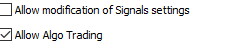
I have also tried Reset with no luck
Any help would be greatly appreciated.
Thank you
Paul B
Hi Janusz,
I have just bought Forex Trade Manager MT5 3.20 and am having an issue with sending Pending orders, (both buy and sell stop and/or limit).
At present I have the following settings:
On MT5 Algo Trading is active
Forex Trade Manager MT5 3.20 common properties set to ensure Allow Algo Trading is active
I have also tried Reset with no luck
Any help would be greatly appreciated.
Thank you
Paul B
Hello Paul,
Trading may still be disabled on the side of the broker, but to be sure what the exact reason is, please find the information in the "Experts" log
Hello Paul,
Trading may still be disabled on the side of the broker, but to be sure what the exact reason is, please find the information in the "Experts" log
Hi Janusz,
Thanks for the fast response, the expert information showed this.
2021.07.08 18:01:35.198 Forex Trade Manager MT5 (AUDUSD,D1) Trade::SendPendingOrder PositionOpen Error: code=10017
I assume the problem was from my end ?
Could you please confirm.
Thank you
Paul
Hi Janusz,
Thanks for the fast response, the expert information showed this.
2021.07.08 18:01:35.198 Forex Trade Manager MT5 (AUDUSD,D1) Trade::SendPendingOrder PositionOpen Error: code=10017
I assume the problem was from my end ?
Could you please confirm.
Thank you
Paul
In the documentation, the return code description is as follows:
10017 TRADE_RETCODE_TRADE_DISABLED Trade is disabled
what means that if you have autotrading enabled on your side, it is disabled on the broker's side.
Also check that you can place an order outside of Trade Manager for this symbol. Sometimes it is the case that the broker provides two of the same symbols, but some are suffixed e.g. with a dot. So you have symbols like EURUSD and EURUSD. (with dot) and depending on the type of account, you can place orders either only for the symbol EURUSD. (symbol with a dot in the name) or only for EURUSD
In the documentation, the return code description is as follows:
10017 TRADE_RETCODE_TRADE_DISABLED Trade is disabled
what means that if you have autotrading enabled on your side, it is disabled on the broker's side.
Also check that you can place an order outside of Trade Manager for this symbol. Sometimes it is the case that the broker provides two of the same symbols, but some are suffixed e.g. with a dot. So you have symbols like EURUSD and EURUSD. (with dot) and depending on the type of account, you can place orders either only for the symbol EURUSD. (symbol with a dot in the name) or only for EURUSD
Hi Janusz,
Problem sorted; it was the Symbol suffix problem as you indicated.
Thank You
Paul
Hi Janusz,
Problem sorted; it was the Symbol suffix problem as you indicated.
Thank You
Paul
ok, glad you found the reason.
Hi,
I had the same issue with recent report, I'm using mac, the icon images are missing
Hi,
I had the same issue with recent report, I'm using mac, the icon images are missing
Hi,
I had the same issue with recent report, I'm using mac, the icon images are missing
I sent the information in a private message. Please check and reply.
Greetings,
Is there any chance you would be able to add multiple "break even" functions? I don't want to use a trailing stop because I try to let my trades run but I have 2 points in which I initially move my stop but I have a day job and I am not always at my computer when I need to move them. I move one to break even after it moves 2pips and the next one to 2 pips in profit after it moves up 5 pips so having multiple "break even (or move stop)" points would be very helpful!
Greetings,
Is there any chance you would be able to add multiple "break even" functions? I don't want to use a trailing stop because I try to let my trades run but I have 2 points in which I initially move my stop but I have a day job and I am not always at my computer when I need to move them. I move one to break even after it moves 2pips and the next one to 2 pips in profit after it moves up 5 pips so having multiple "break even (or move stop)" points would be very helpful!
If you only need break even to move stop twice, you can use a trailing stop to works like break even.
To do this, simply set the Step parameter in TS to a sufficiently large value (greater than the Take Profit distance or target). Then the trailing stop will only work once.
For the example you presented, the settings should be as follows:
that is, after 2 profit pips, the BE will be activated and the stop will be moved to the opening price of the order.
After 5 pips of profit, the Trailing Stop will be activated and move the stop to 2 pips of profit (Trailing = 3 pips, which means a distance of 3 pips from the current price, which is at the moment of activation at 5 pips distance from the opening price).
If the value of the Step parameter is high enough, the order will probably be closed sooner than the conditions for the next Stop move are met.
If you only need break even to move stop twice, you can use a trailing stop to works like break even.
To do this, simply set the Step parameter in TS to a sufficiently large value (greater than the Take Profit distance or target). Then the trailing stop will only work once.
For the example you presented, the settings should be as follows:
that is, after 2 profit pips, the BE will be activated and the stop will be moved to the opening price of the order.
After 5 pips of profit, the Trailing Stop will be activated and move the stop to 2 pips of profit (Trailing = 3 pips, which means a distance of 3 pips from the current price, which is at the moment of activation at 5 pips distance from the opening price).
If the value of the Step parameter is high enough, the order will probably be closed sooner than the conditions for the next Stop move are met.