Edge Matrix Panel EA

Pianifica il trade, conosci il rischio, gestisci ogni uscita, da un unico pannello di controllo pulito direttamente sul grafico.

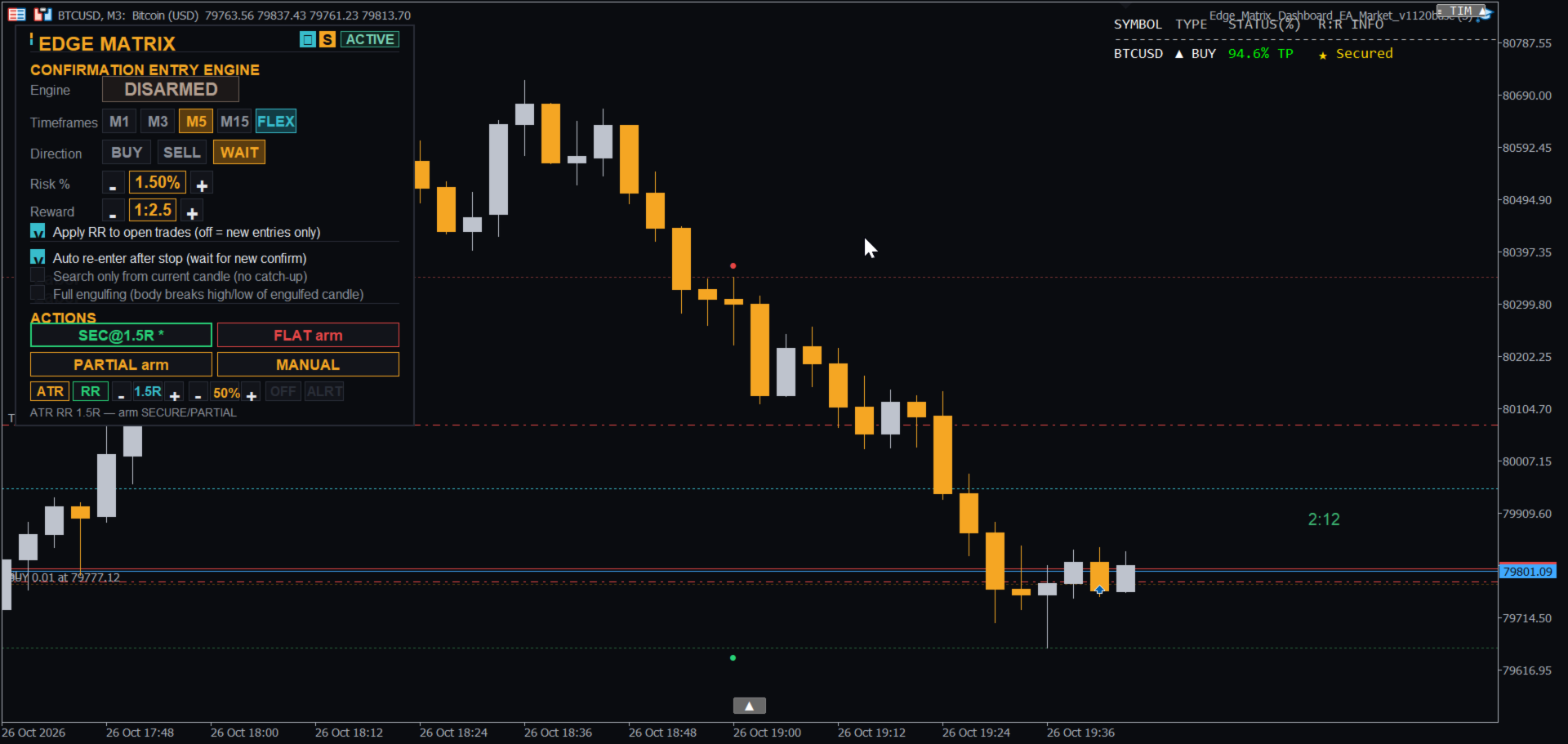
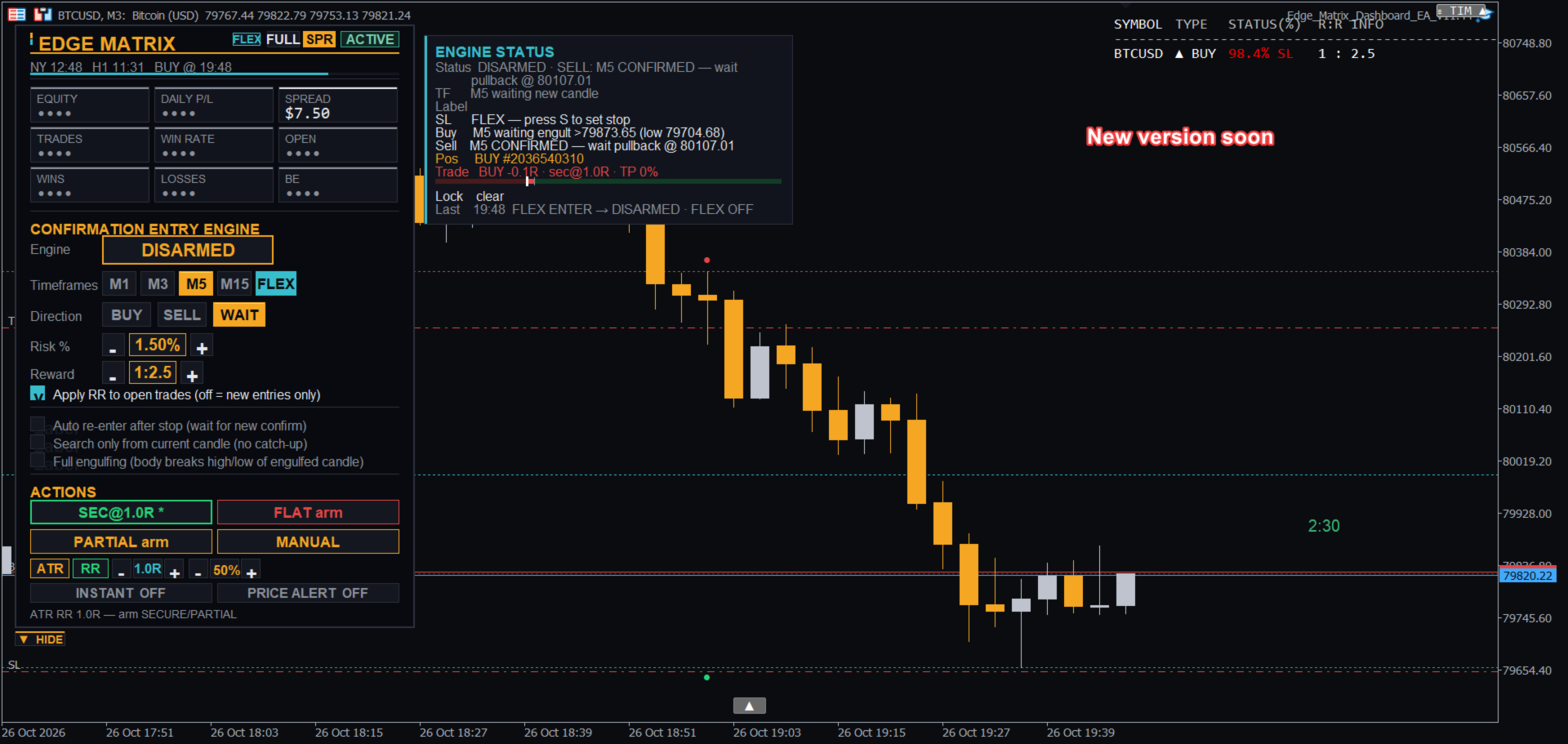
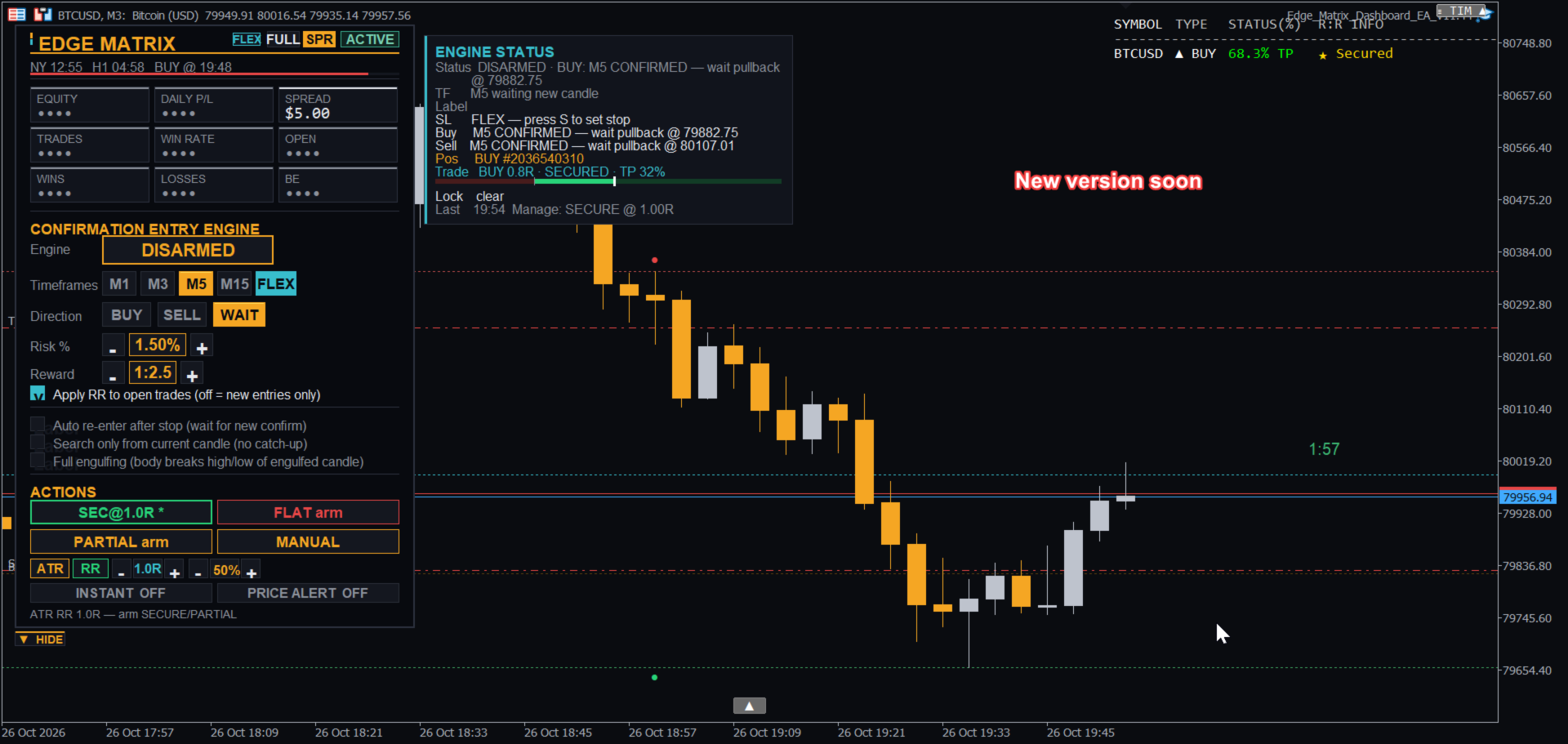
Edge Matrix è un assistente di trading per MetaTrader 5. Trasforma la tua idea in un trade pianificato: dimensione del lotto basata sul tuo % di rischio, stop e target tracciati sul grafico prima di entrare, e strumenti chiari per gestire il trade dopo l'apertura. Mantieni il controllo; il pannello elimina i tentativi e i calcoli manuali. PERCHÉ I TRADER LO USANO

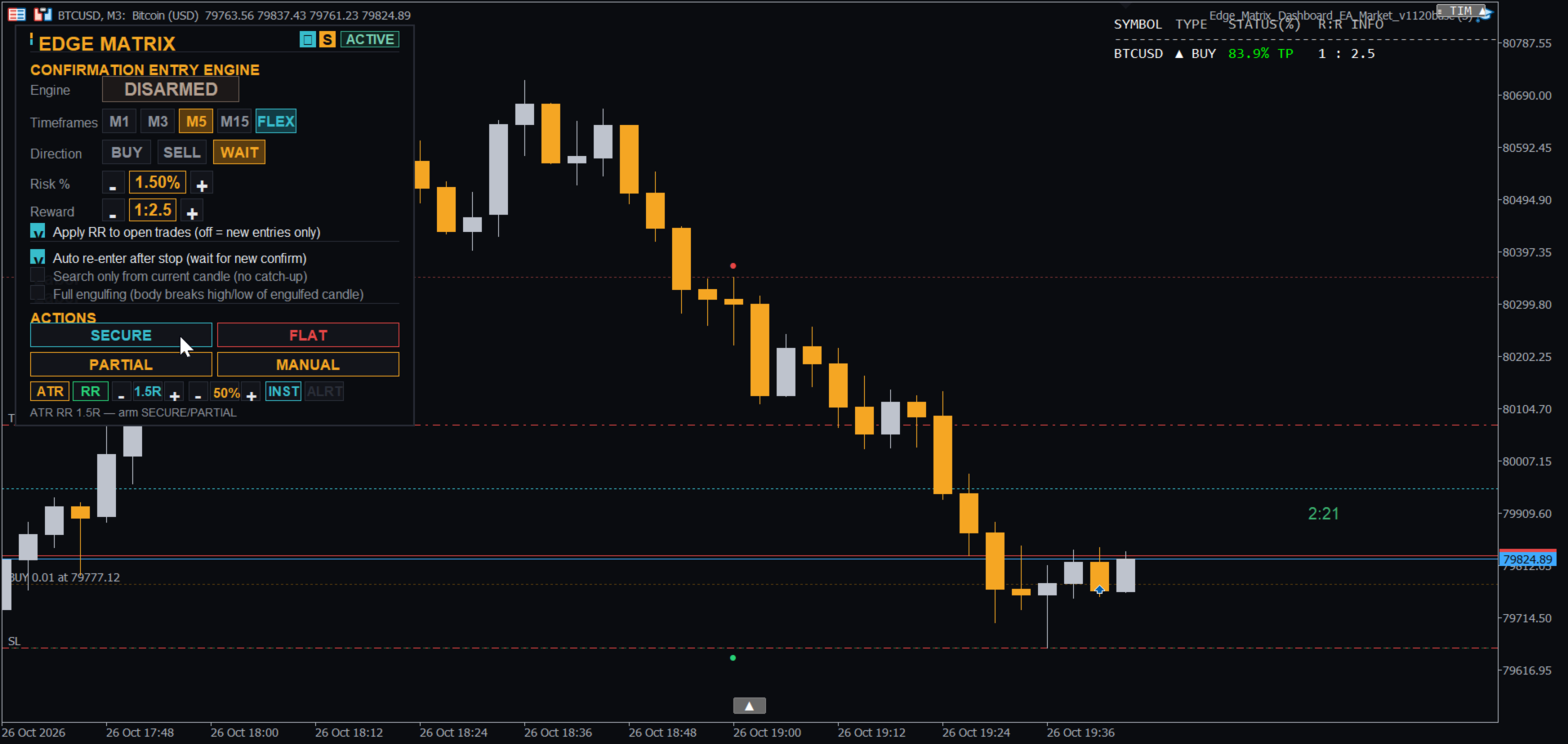
  • Conosci il tuo rischio prima di cliccare. La dimensione del lotto viene calcolata in base al tuo % di rischio e al tuo stop. La linea di stop, la linea di target e l'etichetta RR vengono mostrate sul grafico prima che l'ordine venga inviato.

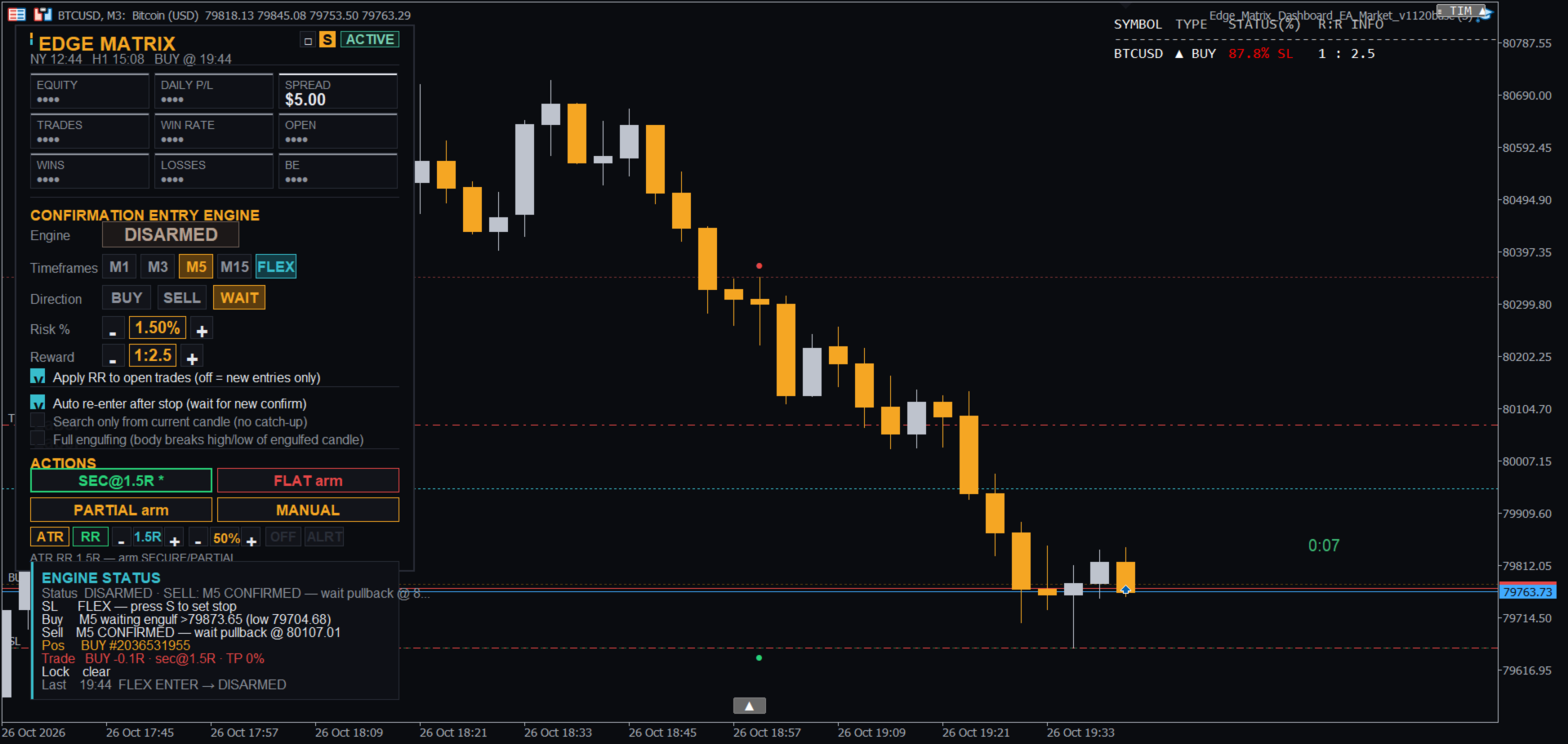
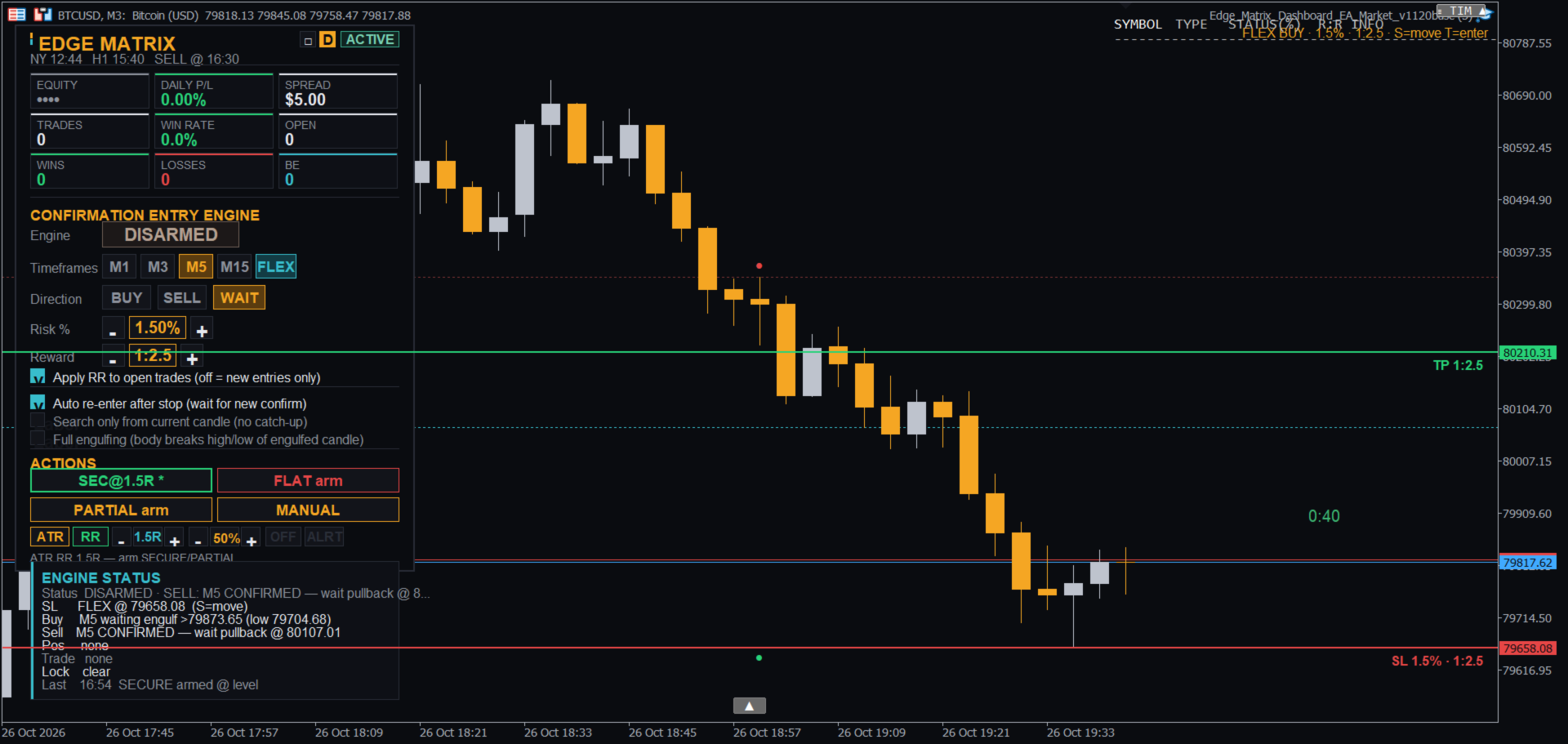
  • Entrate basate su conferme, non su supposizioni. Il motore integrato monitora M1, M3, M5 e M15 alla ricerca della candela estrema dell'ora ed entra solo dopo una conferma di engulfing (candela di "avvolgimento"). Una riga di stato in tempo reale indica cosa sta aspettando.

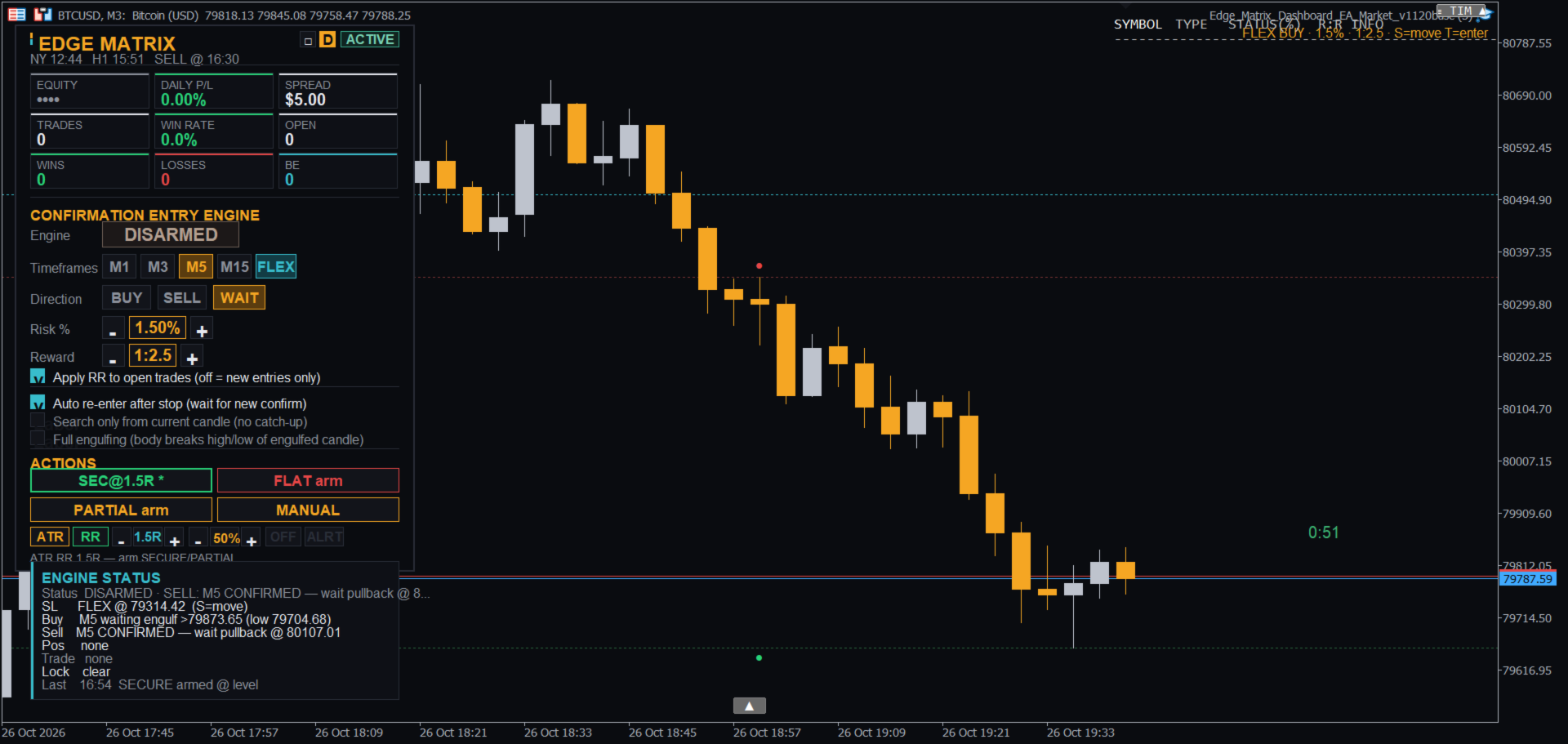
  • Controllo manuale completo quando lo desideri (modalità FLEX). Posiziona il tuo stop con un tasto, entra con un altro, e il target seguirà automaticamente il tuo RR.

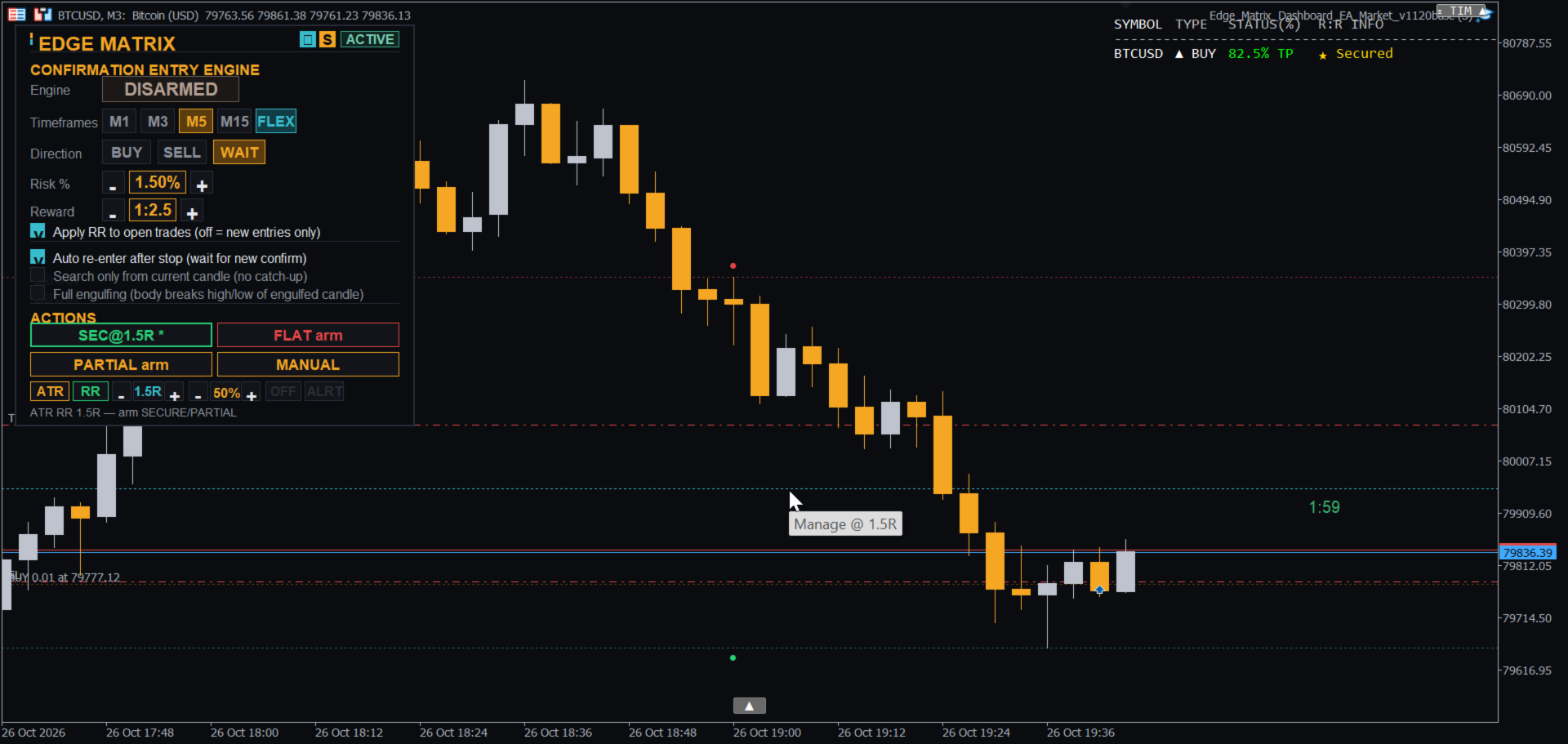
  • Gestisci i trade a modo tuo. SECURE (spostare a breakeven), PARTIAL e FLAT possono attivarsi a un livello RR, a un livello ATR (H1 / M30) o sulla tua linea M mobile.

  • Disciplina integrata. Limite di perdita giornaliera, avviso di target giornaliero, massimo di posizioni aperte, filtro di spread opzionale e protezione per la chiusura settimanale.

  • Avvisi. Linea di avviso prezzo con suono o notifica push, oltre a suoni per entrata, secure, take-profit e stop-loss.

  • Dashboard pulita in tema scuro o chiaro. CÓSA LO RENDE DIVERSO

  • Un unico pannello per l'intero trade: pianifica, entra, proteggi, prendi profitti parziali e chiudi dalla stessa dashboard, invece di passare da un calcolatore di lotti a uno strumento di entrata e a un gestore di trade.

  • Piani di uscita adatti al tuo stile: attiva SECURE / PARTIAL / FLAT a un livello RR, a un livello ATR H1 / M30, o su una linea che trascini tu stesso.

  • Entrate FLEX basate sulla tastiera: un tasto per lo stop (S), uno per l'entrata (T), con dimensione del lotto e target RR calcolati all'istante.

  • Dimensionamento degli ordini consapevole del broker: gli stop rispettano la distanza minima del broker e il lotto viene ridotto automaticamente quando il margine o il limite di volume del broker non lo consentono. Periodo di lancio: prezzo introduttivo per i primi utenti. Il prezzo potrebbe aumentare nei futuri aggiornamenti. IN ARRIVO - AGGIORNAMENTO GRATUITO PER TUTTI GLI ACQUIRENTI Un aggiornamento più corposo è già pronto e verrà rilasciato come aggiornamento gratuito per tutti i possessori del prodotto, poco dopo il periodo di lancio. Aggiunge:

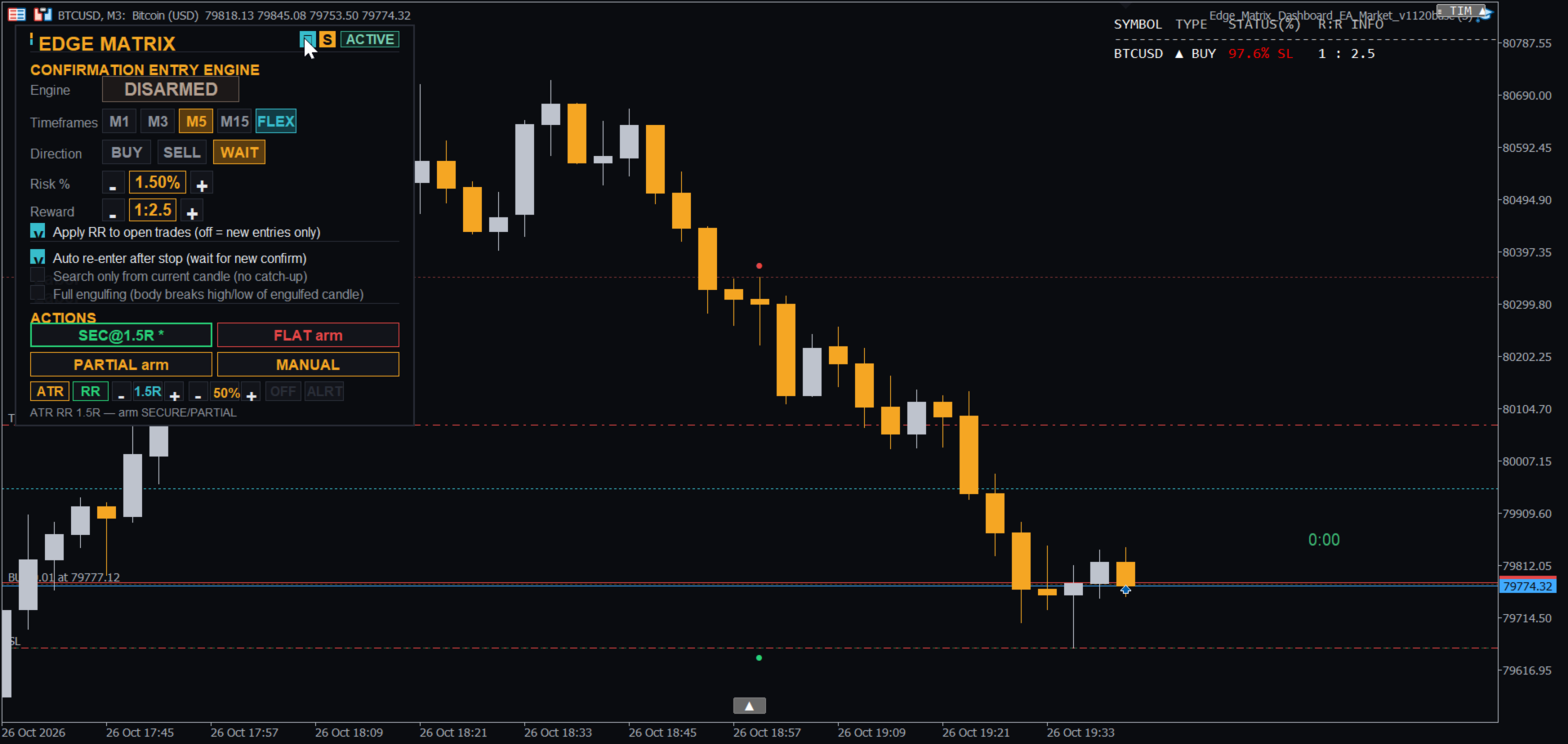
  • Una dashboard comprimibile: un clic la riduce a un piccolo badge "EDGE MATRIX", un clic la fa tornare normale.

  • Una scheda "OTHER SYMBOLS" che elenca i tuoi trade aperti su altri simboli.

  • Piani di gestione separati per simbolo (SECURE / PARTIAL / FLAT, livelli e blocchi), in modo che un piano su un simbolo continui a girare quando passi a un altro.

  • Una vista per timeframe nello stato del motore: cosa sta osservando ciascuno tra M1, M3, M5, M15 e perché sta aspettando.

  • Entrate più intelligenti: prima il timeframe abilitato più piccolo e un'entrata immediata quando l'engulfing si è già formato.

  • Avvisi di prezzo che funzionano anche su altri simboli. Le immagini di anteprima contrassegnate con "COMING IN THE NEXT UPDATE" si trovano nella sezione degli screenshot. Le caratteristiche e le tempistiche potrebbero cambiare. COME INIZIARE

  1. Collega l'EA a un grafico. Imposta il Risk % e il RR (multiplo di ricompensa) sulla dashboard.

  2. Scegli BUY o SELL e premi ARM per consentire al motore di attendere una conferma, oppure usa FLEX per un'entrata manuale (sotto).

  3. Dopo l'entrata, usa SECURE / PARTIAL / FLAT o la linea M per gestire il trade. MODALITÀ FLEX - COME FUNZIONA

  4. Attiva FLEX (pulsante della dashboard o premi F con il grafico selezionato).

  5. Sposta il mouse sul prezzo in cui desideri lo stop e premi S. Compaiono la linea di stop, la linea di target e l'etichetta RR. Questa è solo un'anteprima: non viene inviato nulla e i trade aperti non vengono toccati.

  6. Il lato viene rilevato automaticamente: stop sotto il prezzo = piano BUY, stop sopra il prezzo = piano SELL.

  7. La dimensione del lotto deriva dal tuo % di rischio e il target viene posizionato al tuo RR (RR 2 = target al doppio della distanza dello stop). Premi di nuovo S per spostare lo stop o modifica RR / Risk % sulla dashboard.

  8. Premi T per entrare. Dopo l'entrata il motore si disarma (disarm), quindi nulla si concatena automaticamente. SCORCIAGTOIE DA TASTIERA (clicca prima sul grafico) S - posiziona / sposta la linea di stop al prezzo del mouse T - entra ora con lo stop pianificato (dopo S) M - posiziona / sposta la linea di gestione (esegue il SECURE / PARTIAL armato quando viene toccata) A - posiziona / sposta la linea di avviso prezzo (solo suono / push) F - attiva / disattiva la modalità FLEX TESTER DI STRATEGIE Mantieni abilitata l'opzione "Auto-arm the engine in the Strategy Tester" (predefinita) per eseguire il motore senza cliccare. Riguarda solo il Tester e non influisce sui grafici live. INPUT CHIAVE (KEY INPUTS) Magic Number, modalità lotto (% di rischio o fisso), Risk %, multiplo di ricompensa, limite di perdita giornaliera, target giornaliero, massimo di posizioni aperte, spread massimo (0 = disattivato), timeframe monitorati, direzione predefinita, predefinito FLEX, opzioni di suono e push, posizione della dashboard e tema. NOTE Funziona su qualsiasi simbolo. Si prega di testare prima su un account demo e iniziare con un piccolo Risk %. Il trading comporta rischi e i risultati passati o testati non garantiscono risultati futuri. Questo strumento è un assistente di trading e non promette prof利润 (profitti).
Altri dall’autore
Edge Matrix Trade Manager Panel
Muhammad Hassan Muhammad Ahmad Atiyah
Pianifica il trade, conosci il rischio, gestisci ogni uscita, da un unico pannello di controllo pulito direttamente sul grafico. Edge Matrix è un assistente di trading per MetaTrader 5. Trasforma la tua idea in un trade pianificato: dimensione del lotto basata sul tuo % di rischio, stop e target tracciati sul grafico prima di entrare, e strumenti chiari per gestire il trade dopo l'apertura. Mantieni il controllo; il pannello elimina i tentativi e i calcoli manuali. PERCHÉ I TRADER LO USANO Cono
FREE
Smart Bulk SL Setter
Muhammad Hassan Muhammad Ahmad Atiyah
Smart Bulk SL Setter MT5 Script – Bulk Stop Loss Management Overview Smart Bulk SL Setter is a trade management script for MetaTrader 5 designed to modify the Stop Loss level of multiple existing open positions at once. The script executes once per attachment and applies a user-defined Stop Loss price based on selected filters. It does not run in the background, does not open trades, and does not generate signals. Core Functionality The script allows setting a unified Stop Loss level for multip
Time and Spread
Muhammad Hassan Muhammad Ahmad Atiyah
Two numbers define whether your entry is clean or expensive: the spread, and the time left on the current candle. Candle Timer & Spread Monitor tracks both in real time, displayed as a single compact label directly on your chart. See the current spread widen during session transitions. Know when you're entering in the last seconds of a candle. Place it in any corner of your chart. FEATURES: — Live spread display (in points) — Countdown timer to next candle close (MM:SS) — Updates every secon
FREE
Equity and Balance
Muhammad Hassan Muhammad Ahmad Atiyah
Your account health deserves a live dashboard — not a number buried in the terminal corner. Equity & Balance Monitor displays your real-time equity, balance, margin usage, drawdown, and growth metrics directly inside your chart window. No extra windows. No switching screens. FEATURES: — Live equity and balance display on chart — Real-time margin and free margin tracking — Drawdown monitoring — Historical growth indicators — Always visible — updates on every tick — Clean dashboard layout — Cus
FREE
SL Based TP Multiplier
Muhammad Hassan Muhammad Ahmad Atiyah
Smart TP by Risk Ratio MT5 Script – Take Profit Calculation Based on Stop Loss Overview Smart TP by Risk Ratio is a script for MetaTrader 5 that calculates Take Profit levels using the distance between the Open Price and Stop Loss, multiplied by a user-defined ratio (R-Multiple). The script can be applied once per execution to the current chart symbol or to all open positions. It does not open trades and requires a Stop Loss to be set for the calculation. Functionality TP Calculation: Take Prof
Lock and Peel Pro Advanced Risk Manager
Muhammad Hassan Muhammad Ahmad Atiyah
Advanced Breakeven & Partial Close Manager MT5 Script – One-Click Trade Management Overview Advanced Breakeven & Partial Close Manager is a trade management script for MetaTrader 5. It works only on existing open positions and applies actions strictly based on user-defined rules. The script runs once per attachment and performs only the actions explicitly enabled in the inputs. It does not run in the background, does not trade automatically, and does not generate signals. Core Functionality The
Smart Bulk TP Setter
Muhammad Hassan Muhammad Ahmad Atiyah
Smart Bulk TP Setter MT5 Script – Bulk Take Profit Management Overview Smart Bulk TP Setter is a trade management script for MetaTrader 5 designed to modify the Take Profit level of multiple existing open positions at once. The script executes once per attachment and applies a user-defined Take Profit price based on selected filters. It does not run in the background, does not open trades, and does not generate signals. Core Functionality The script allows setting a unified Take Profit level fo
Smart Bulk Order Closer
Muhammad Hassan Muhammad Ahmad Atiyah
Smart Bulk Order Closer MT5 Script – PnL-Based Trade Closer Overview Smart Bulk Order Closer is a script for MetaTrader 5 that closes open positions based on their current floating profit or loss in account currency. The script executes once per attachment and only closes trades that meet the user-defined PnL conditions. It does not run in the background, does not modify Stop Loss or Take Profit, and does not open trades. Core Functionality The script evaluates each position individually and ap
Apex StopLoss Manager
Muhammad Hassan Muhammad Ahmad Atiyah
Apex StopLoss Manager MT5 Script – Stop Loss Control Utility Overview Apex StopLoss Manager is a trade management script for MetaTrader 5 designed to provide precise, rule-based control over Stop Loss behavior on existing open positions . The script focuses on manual execution and accuracy. It does not use automated trading logic, does not open trades, and runs once per attachment . Core Functionality The script provides two independent Stop Loss control functions, both enabled only through exp
Active Trade Monitor
Muhammad Hassan Muhammad Ahmad Atiyah
Stop switching to the terminal tab while price is moving. Active Trade Monitor places a clean, real-time dashboard directly on your chart showing all open positions at once — symbol, direction, lot size, profit in dollars, profit in pips, and current R:R ratio. Everything you need to manage your trades is visible without leaving the chart. FEATURES: — Displays all open positions directly on the chart — Shows: symbol, type (BUY/SELL), lot size — Live profit in dollars and pips — Current R:R r
One Click Symbol Hub
Muhammad Hassan Muhammad Ahmad Atiyah
Twenty open chart tabs is not a workspace — it's noise. One-Click Symbol Hub replaces all of that with a single small button on your chart. Press it and a clean symbol panel appears, centered on your screen. Tap any pair and the chart switches instantly — preserving your current timeframe. Press the button again and everything disappears. FEATURES: — Switch between symbols with a single click — Preserves current timeframe on every switch — Clean pop-up panel — appears and disappears on deman
Session Clock Advanced
Muhammad Hassan Muhammad Ahmad Atiyah
Know exactly where you are in the trading day — at a glance. Session Clock Advanced displays two live clocks directly on your chart: your local time (auto-detected from your PC) and New York time. No manual offset needed. But it goes further than a simple clock. The indicator detects the active trading session in real time — Asia, London, New York, or any overlap — and changes color automatically so you always know the market context without reading the time. A live countdown shows exactly
Ultimate Trade Manager Panel EA
Muhammad Hassan Muhammad Ahmad Atiyah
Stop managing trades manually under pressure. Ultimate Trade Manager (UTM) Pro is a professional trade-management panel for MetaTrader 5. Set your exit rules once, arm the trigger, and let the panel execute them the instant price reaches your level — partial closes, breakeven, profit booking, or full exits, with zero manual clicking and zero emotional decisions. HOW IT WORKS Attach the EA, configure your rules in the panel, and drop a trigger line on the chart (press X , or click "Create Lines"
Filtro:
Nessuna recensione
Rispondi alla recensione