Orders2

What Orders2 is

Orders2 is one MT5 indicator that shows your whole position on a symbol, guards your loss limit, and marks the levels and times where price tends to react. It does not place trades: it shows you what is happening so you decide.

It does four jobs:

  1. Your position at a glance. Average buy and sell prices, breakevens with swap and commission counted, grouped stops and targets.
  2. Your risk. A daily loss limit like a prop firm uses, the price where you would hit it, and the lot size for a chosen risk per trade.
  3. Where price may react. Support and resistance, pivots, Fibonacci levels, and grey zones where several of them line up.
  4. When price may react. Session boxes, reversal windows and a candle timer.

It is built for manual traders who average into positions, hedge, or trade under prop-firm rules such as FTMO's daily loss limit. A trader with one simple trade gets value from it too: the size helper and the loss limit work with no position open.

Quick start

Compile once, drop it on a chart, and the defaults are ready to use.

  1. Copy Orders2_v1_00.mq5 into your MQL5\Indicators folder (in MT5: File → Open Data Folder).
  2. Open it in MetaEditor and press F7 to compile.
  3. In MT5, drag Orders2 from the Navigator onto a chart. Allow push notifications if you want alerts on your phone (Tools → Options → Notifications, with your MetaQuotes ID).
  4. Move the panel by dragging its title. Double-click the title to fold it. Both are remembered for that chart.
  5. Change line colours, widths and styles in the indicator's Colors tab, not in the settings.

The settings window shows groups 1–9: the everyday choices. To see the fine-tuning (groups 10–17: periods, which timeframes, window times), remove the // in front of #define OP_ADVANCED near the top of the file and compile again.

Position lines

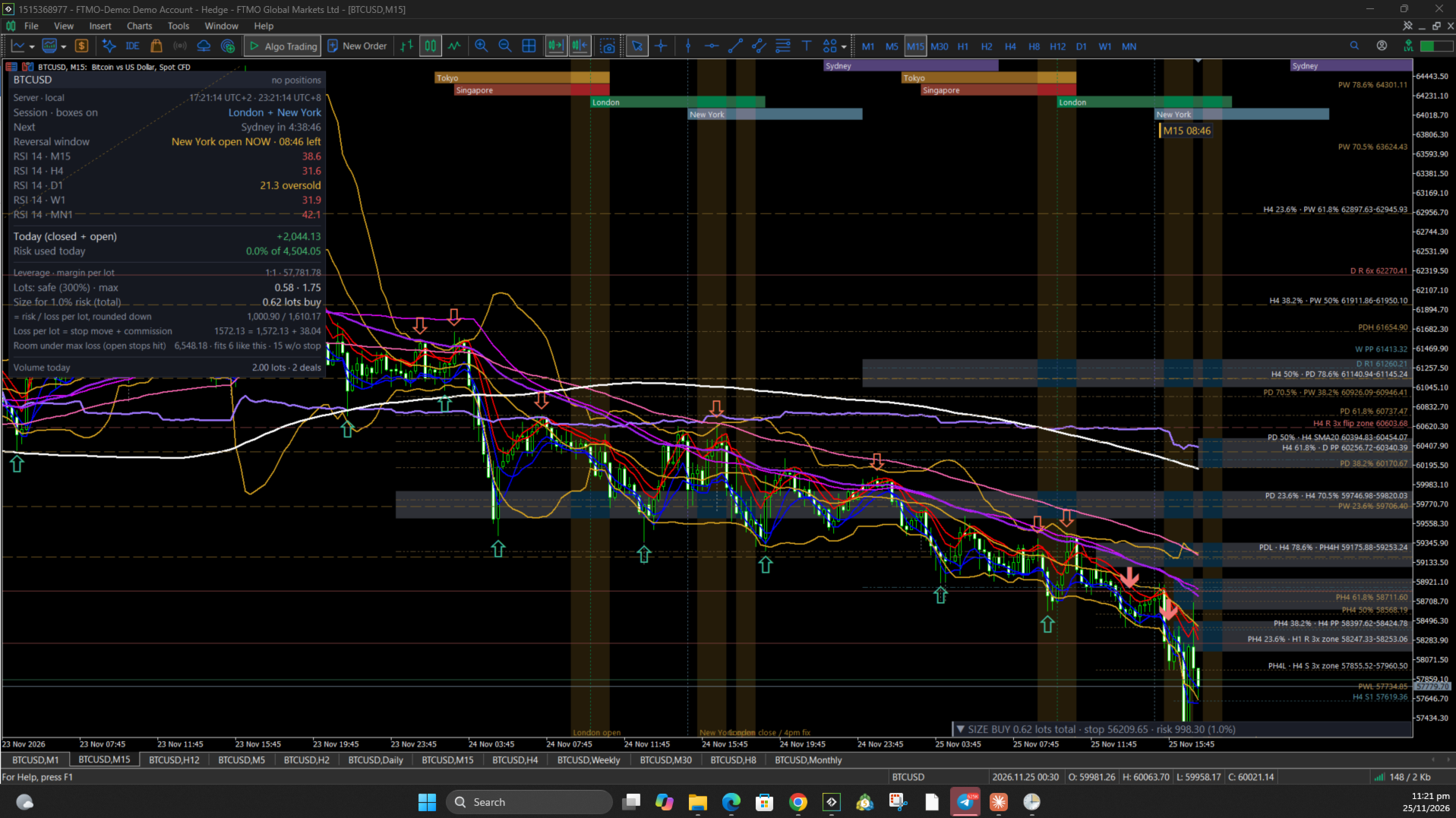
One line per group of trades replaces MT5's line per trade, so ten averaging entries show as one clear average. Every label shows price, lots and number of positions; hover any line for the full detail.

  • BUY / SELL (solid blue / red): average open price of all buys or all sells, with lots and count; their profit too with "P&L on those lines" on. Use: you added five buys on the way down, and see the one price that matters.
  • BE BUY / BE SELL (dotted amber): where that side is at zero after swap and commission (closing commission counted by default). Shown with one side open, when costs move it more than the spread. Use: after two weeks of negative swap, see how far above your average price now needs to be.
  • NET BE (dash-dot amber): where all buys and sells together are at zero, costs included; shown when both sides are open and not fully hedged. Use: hedged 1.0 lot buy with 0.6 lot sell, see the single exit price.
  • SL / TP (dashed, off by default): stops or targets grouped by price, with lots and what those trades make or lose there. Use: six trades share one target, and one line says what you bank there.
  • BE TARGET (dotted, drag it): drag it to a price; the panel shows the lots to add now so the whole position breaks even there. Warns when not reachable, above the max lot, short of margin, or past your max loss. Use: see whether one more entry can bring breakeven back within reach, and what it costs.

Lines off the screen are pinned to the top or bottom edge with an arrow and the distance (pips on FX), so you always see both your buy and sell averages. "Hide MT5's own trade lines" turns off MT5's per-trade lines when they get crowded; they come back when the indicator is removed.

Risk tools

Orders2 counts your loss the way a prop firm does and shows the price where you would hit the limit, before you get there.

Loss limit. Default 4.5% a day. "Daily" counts today's closed trades plus everything open, from the day's starting balance, which is how FTMO counts it. "Open positions only" counts open P&L alone. The base can be balance, equity or a fixed amount (200,000, for a prop account's starting size). The day resets at Prague midnight when the account is an FTMO one (detected automatically), otherwise at the broker's midnight; New York 5pm and UTC midnight are also offered.

  • MAX LOSS line (dashed orange): the price where this symbol's trades would hit the limit, allowing for your stops closing trades on the way. Use: before adding to a losing gold position, see how close the limit already is.
  • ACCOUNT MAX line (dashed pink): the same for the whole account, other symbols held where they are; one line when both land at the same price. Use: losses on EURUSD shrink the room left on gold.
  • SIZE line (drag it to your stop): lots for your risk per trade (default 1%), rounded down. Commission is learned from your last 20 trades on that symbol; min and max lot and free margin are checked. Use: drag the line under a swing low and read the lot size.
  • Room under max loss (panel): money still free under the limit if every open stop is hit, and how many trades of this size fit; the size is cut to fit when room runs short. Use: the size is a total, not per order, so this row shows whether you can afford a second one.
  • MARGIN CLOSE-OUT line: estimated price where the broker's stop-out would start closing trades. Use: on a large hedged or averaged position, see how far price can go before the broker acts.

Alerts fire when risk used passes 50%, 80% and 100% of the limit, and when price comes within a quarter of a daily ATR of the max-loss line. A "~" before a price means it is an estimate: the symbol's profit is in another currency, so the conversion moves with price.

The panel

The panel is the summary you read first; Full is the default, Compact keeps only what you act on. Hover any row for what it means. Arrows never cover it.

  • Title: symbol and number of positions.
  • Server · local: broker time and your computer's time, with UTC offsets. Use: candles follow the broker's clock, not yours.
  • Session (click it): markets open now; a click shows or hides the session boxes. Use: the London and New York overlap is the busiest time.
  • Next: next market to open and the countdown. Use: waiting for London before entering.
  • Reversal window: the window open now with time left, or the next one. Use: a move into the New York open may stall.
  • RSI 14: chart timeframe plus H4, D1, W1, MN1; green above 50, red below, amber under 30 or over 70. Use: daily oversold while H4 is red means a bounce is likely, not yet a trend change.
  • Buy / Sell / Net: lots and average price per side; net lots long, short or flat. Use: how much of a hedge is left.
  • Net breakeven: the exit price for everything together, or "hedged" when flat. Use: one take-profit for the whole position.
  • To break even at: lots to add at the BE TARGET line's price. Use: is one more entry worth it.
  • P&L and its split: open profit, then floating, swap and commission. Use: how much swap is eating a long hold.
  • Max loss, Other symbols, Account open P&L: the limit in money, and P&L elsewhere. Use: losses on another pair reduce your room here.
  • Today (closed + open), Risk used today: what the daily limit counts, as money and as a %. Use: stop for the day at 80% used.
  • Swap per night: per night on your trades here, and the triple-swap day. Use: avoid a Wednesday triple charge on a large negative-swap position.
  • Leverage, Lots safe · max: real leverage, margin per lot, lots you can still open (safe keeps margin level above 300%). Use: check room before an averaging entry.
  • Size for 1% risk, and its working: total lots for the SIZE line, the sum behind it, room left. Use: size a new trade at a glance.
  • Volume today: lots and deals traded on this symbol today.

With no position open the panel still shows sessions, today's loss used, margin and the trade size, so you can plan the first entry.

Time tools

Price moves most when big markets open, so Orders2 draws when they are open and when moves often turn. All times follow each market's daylight saving.

  • Session boxes: a coloured row per market along the top (Sydney, Tokyo, Singapore, London, New York) for the last 2 days and today's later sessions, with a dotted line at the London and New York opens; H1 and below. Use: see that a breakout came at the London open, not in the quiet Asian hours.
  • Reversal windows: faint shaded bands at three times a move often stalls or turns: London open (07:00 London, 2 hours), New York open (08:30 New York, 2 hours), London close and 4pm fix (15:00 London, 90 minutes). Countdown in the panel; alert 5 minutes before. Use: after a strong move into the New York open, tighten your stop or take part profit rather than add.
  • Candle timer: time left in the current candle; at the weekend, when the market reopens. Use: wait for an H4 candle to close before acting on a break.

Reversal windows are a habit of the market, not a signal: price often turns there, not always.

Levels and zones

The strongest levels are where several tools agree, so Orders2 draws each tool's levels and shades a grey zone where three or more different ones meet.

  • Support / resistance: confirmed swing highs and lows (they never repaint) on H1, H4, daily and weekly. Close swings merge; a level needs 3 touches; the 2 nearest each side are shown per timeframe. Label: "H4 R 4x strong retest flip 1.09520". Use: a buy limit at daily support rather than at a random round number.
  • Strong, retest, flip: strong = H4 level with 4+ touches; retest = first return after price closed through it (H4 and daily); flip = it was both support and resistance. Use: old resistance retested as support after a break is a classic entry spot.
  • Break arrows: a big arrow on the candle that closed through a level (last 100 candles). Use: spot a fresh break to trade the retest.
  • Pivots: classic floor pivots from the previous H4 bar, day, week and month: PP, R1, S1. Label: "W R1 1.09715". Use: daily pivot as an intraday target, weekly R1 to take profit.
  • Range Fibonacci: 23.6, 38.2, 50, 61.8, 70.5 and 78.6% of the previous H4 bar, day, week and month, plus that period's high and low (PDH, PDL, PWH…). Label: "PD 61.8% 1.09283". Use: yesterday's 61.8% as a pullback entry in today's trend.
  • Swing Fibonacci: the same ratios on the last H4 swing, with a dotted line showing which move is measured. Use: enter the pullback of the latest impulse at 50–61.8%.
  • Zones (grey bands): three or more different tools within 5% of a daily ATR; an S/R level inside one gets "zone" added to its label. Label: "W PP · PW 38.2% 1.09828-1.09830". Use: enter only where several reasons stack up.

Labels sit in a column at the right edge, merged when lines are close, and kept 3 candles clear of the current price. A label with no room is left out; hover the line to read it. Drag the chart-shift triangle at the top of the chart to give labels more space. The "Zones" switch brings all pivots and Fibonacci levels with it.

Moving averages, arrows and ATR

These show trend and where the last swings were; all of them can be switched off.

  • Moving averages: EMA 50 (purple), SMA 50 (purple dashed), EMA 100 (pink), SMA 200 (white), and the H4 SMA 20 on H4 and lower charts; SMA 100 available but off. Use: price above a rising SMA 200 favours buys; the H4 SMA 20 on M15 shows the bigger trend.
  • BBMA (off by default): LWMA 5 and 10 of highs (red) and lows (blue), Bollinger Bands 20, 2 (gold), EMA 50; optional shading between the LWMAs. Use: for the BBMA method, a close outside the band, then re-entry.
  • Swing arrows: down arrow over each swing high, up arrow under each swing low, last 400 candles. "Stable" (default) marks a swing only once confirmed, so arrows never move; "Fast" marks sooner but can redraw. Use: stops beyond the last swing; counting higher highs and higher lows.
  • Long-wick marks: a faint dotted line past the tip of a big candle's long wick (at least 3 times the body and half an ATR). By default only when the wick pierced the EMA 50 or a Bollinger band; below M15 only at support or resistance. Use: a long lower wick through the EMA 50 at support shows buyers rejected that price.
  • ATR lines (off by default): lines 1 to 5 ATR steps away; with no trade, above and below the last close; with trades, from your last buy and last sell on the losing side, where you would add. Use: space averaging entries one ATR apart instead of guessing.

Alerts, layer buttons and look

Alerts go to your phone through the MT5 app by default; pop-up and sound are optional. Each fires once per event, and one chart sends it even when several charts of the symbol are open. Level and break alerts are held back while the market is closed.

  • Loss limit: risk used passes 50%, 80%, 100%; price nears the max-loss line.
  • Price at a key level: price enters a strong H4 level or a first retest after a break.
  • Close through a level: a candle closes through support or resistance.
  • Wick mark: the candle that just closed has a long wick (as marked on the chart).
  • Reversal window: 5 minutes before a window opens.

Layer buttons (off by default) put a row of small buttons at the bottom right: S/R, Pivots, Fibs, Zones, MAs, BBMA, Wicks, Swings, ATR, Sessions. One tap hides or shows that layer without changing any setting; alerts keep running. Use case: a clean chart to read price, then the levels back with one tap.

Look. The theme follows your chart background (dark or light) unless you pick one. Font size defaults to 10. Level labels can be compact text (default), boxed, or none.

Settings and defaults

  • 1. Loss Limit: max loss 4.5% · count daily, closed + open · measured on balance · fixed amount 200,000 · day starts from day-start balance · day resets Auto (FTMO: Prague midnight) · max-loss lines on.
  • 2. Position Lines: average and breakeven lines on · count closing commission on · stop / target lines off · P&L on those lines off · hide MT5's own trade lines off.
  • 3. Planning Tools: size helper on, 1.0% risk · breakeven target line on · swap, leverage, margin on · safe margin level 300%.
  • 4. Panel and Time: panel on, Full · session boxes on (Singapore always included) · candle timer on · reversal windows on, alert 5 min before on.
  • 5. Levels: support / resistance on · zones (pivots, Fibonacci) on.
  • 6. Moving Averages: moving averages on · BBMA off · LWMA shading off.
  • 7. Arrows and ATR: ZigZag arrows on, Stable · wick marks: wick through EMA 50 / Bollinger · ATR lines off, shown as lines, 5 steps each side.
  • 8. Alerts: to phone on · pop-up off · sound off · loss limit, key level, close through a level, wick mark on.
  • 9. Look: theme Auto · font size 10 · level labels Compact · layer buttons off.

Groups 10–17 (advanced) hold periods, history lengths, which timeframes' levels to draw, reversal window times and label positions; see Quick start to show them.

Limits and good practice

Orders2 shows probabilities and arithmetic, not signals: a level, zone or window marks where price often reacts, never where it must.

  • It never trades. It places, changes and closes nothing. Every decision and order is yours.
  • Estimates are marked. Prices with "~" depend on a currency conversion that moves with price. The margin close-out assumes your other symbols stand still.
  • Commission is learned, not known. MT5 does not publish a broker's commission, so it is read from your own recent trades on that symbol. Until you have traded it, the size helper leaves commission out and says so.
  • Check your firm's rules. The daily limit is built the FTMO way (closed + open from the day-start balance, reset at Prague midnight); firms change their rules, and others count differently. Set the reset time and base to match yours.
  • History matters. Support and resistance need about a year of H1 to daily history (five for weekly) loaded in MT5. With less, fewer levels appear.
  • Manage risk on every trade. Use a stop, size from the SIZE line, and respect the loss limit even when a zone looks perfect.
Prodotti consigliati
Double Correlation indicator (free) plots two windowed correlations in a separate window.  the size of window is taken as input before the two symbols to correlate to. Two symbols are taken as an input parameters as well as period length. and the two correlations are computed with the currently shown symbol ex: input GBPJPY and AUDNZD.  current symbol EURUSD then the following will be computed corr(EURUSD,GBPJPY) and corr(EURUSD,AUDNZD) The indicator can be useful to run a multi-symbol pair trad
FREE
Session Box Hours disegna rettangoli di sessione Asia, London e New York. Ogni box usa high/low delle barre nell’intervallo orario configurato. Solo contesto visuale — non invia ordini né genera segnali di ingresso. Cosa fa - tre sessioni: Asia, London, New York (ognuna on/off + ore/minuti + colore); - base oraria: orologio broker/server oppure ore GMT con offset Broker GMT; - sessioni overnight (fine ≤ inizio) passano al giorno successivo; - profondità storica via Days Back (default 10); - riem
FREE
Proton Candle Time MT5 OVERVIEW Proton Candle Time MT5 is an indicator for MetaTrader 5 that displays a real-time countdown timer showing the number of seconds remaining in the current candle. The indicator updates continuously as the candle develops and resets when a new candle opens. This tool is designed for traders who need precise timing information while analyzing price action. PRIMARY FUNCTION The indicator displays the active candle countdown timer directly on the chart. The timer show
FREE
AZ ATR indicator (with volume correlation bonus) Standard ATR indicator, you can enable ignoring abnormally large candles. It is possible to change the location of the displayed text in 4 corners of the chart. You can change the calculation period (days ago). Bonus - the indicator has a correlation with volumes. Can be enabled to display a possible priority at the current moment in the market. What do the values ​​mean: Positive correlation (0.3 - 1.0): 0.3-0.7 - moderate connection
FREE
Account Statistics – Dashboard per statistiche di trading in MetaTrader 5 Account Statistics è uno strumento di analisi e reporting per MetaTrader 5. Mostra le principali metriche del tuo conto di trading direttamente nel grafico e consente una valutazione strutturata delle tue performance su diversi periodi di tempo. Il prodotto è rivolto ai trader che desiderano analizzare sistematicamente i propri risultati e documentarli in modo trasparente. Funzioni Il dashboard integrato mostra in tempo
FREE
Deal multiplier Mt5
Mikhail Mitin
4.5 (8)
The utility opens copies of open trades. It is very convenient if you use the   Signals   service and want to increase the volume of transactions. Settings: Symbols: all symbols only current symbol Orders: Buy Sell Magic Any Magic Input Magic Lot size Original - lot size from original order; Fix Lot - fix lot size (input); Lot X Mult - lot size X koef; Stop Loss From sender - Stop Loss from original; Without - without Stop Loss; Plus Fix - Stop Loss from original order + fix points; Fix Point -
FREE
WaCandleTimerMT5
Wachinou Lionnel Pyrrhus Sovi Guidi
5 (1)
Wa Candle Timer MT5 mostra sul grafico principale un conto alla rovescia in tempo reale fino alla chiusura della candela corrente. Avvicinandosi la fine del bar, il timer cambia colore (impostazione predefinita: ~95% della durata della candela trascorsa, cioè ~5% rimanente). Leggero, chiaro e ideale per sincronizzare ingressi/uscite con la chiusura delle candele. Caratteristiche principali Conto alla rovescia live fino al close per qualsiasi simbolo e timeframe. Cambio colore quando la candela è
FREE
Panoramica Sperimenta un'analisi del flusso d'ordini (order flow) di livello professionale con l'Anchored Volume Profile, un indicatore di distribuzione del volume ultra-leggero e ad alte prestazioni progettato esclusivamente per MetaTrader 5. Sviluppato da zero utilizzando meccaniche canvas in memoria grezza, questo indicatore elimina il massiccio ritardo della CPU (CPU lag), lo sfarfallio dell'interfaccia utente e il congelamento dei grafici comunemente associati ai profili standard basati s
FREE
LT Watermark MT5
Thiago Duarte
4.79 (24)
This indicator draw a watermark on the chart, with the timeframe and symbol name. You can change everything, including add a aditional watermark. Functions: Symbol watermark: Size -  text size. Font -  text font. Color -  text color. Background text -  watermark at foreground or background mode. Horizontal correction -  x correction in pixels. Vertical correction -  y correction in pixels. Separator period X symbol -  what will separate the period from symbol. Aditional watermark: Enable custom
FREE
Si tratta di un indicatore "dashboard" multi-simbolo per MetaTrader 5 che offre una panoramica in tempo reale dell'orientamento di mercato (bias) e dello stato del range per un massimo di 20 simboli contemporaneamente. La versione Pro, dotata di funzionalità di notifica, è disponibile sul Mql5 Store. Caratteristiche principali: Applicabile a qualsiasi grafico: funziona indipendentemente dal simbolo del grafico stesso. Tabella dashboard in tempo reale che mostra: Prezzo attuale Bias giornali
FREE
Phone Trade Manager
Krutik Piyushkumar Parekh
Smart Lot-Size Calculator And Trade Assistant for Mobile Trading Overview: This is the tool every trader in the market must have no matter if you are scalper, swing traders, day trader, or long term trader. This On-The-Go trading tool will help you stay disciplined and also stay free from daily trade management chores, Most traders face common problems like   1. Calculation of proper lot-size of a position to take controlled risk  2. Managing every trade and trailing stop-loss if trades goes in
FREE
Fabii Memory Baseline
Fabien Georges Andre Guillemaud
Leggi il trend e quello del timeframe superiore sullo stesso grafico, con una linea che mantiene il suo livello. No repaint. Qualsiasi coppia, qualsiasi timeframe. Sul tuo grafico in 2 minuti. Demo gratuita nello Strategy Tester. Get more indicators here Baselines, volatility filters and oscillators. No repaint. Perché ti serve Una media mobile semplice resta indietro rispetto al prezzo. Dopo un movimento forte, la linea resta lontana dal prezzo. Per vedere il timeframe superiore devi cambiar
FREE
Il Matrix Arrow Indicator Multi Timeframe Panel MT5 è un componente aggiuntivo gratuito e una grande risorsa per il tuo Matrix Arrow Indicator MT5 . Mostra l'attuale segnale Matrix Arrow Indicator MT5 per 5 timeframe personalizzati dall'utente e per 16 simboli/strumenti modificabili in totale. L'utente ha la possibilità di abilitare/disabilitare uno qualsiasi dei 10 indicatori standard di cui è composto il Matrix Arrow Indicator MT5 . Anche tutti i 10 attributi degli indicatori standard sono re
FREE
Price Sessions is an exclusive MetaTrader 5 indicator that integrates symbol information and trading sessions into your chart. It does not link to any account information or external sources, ensuring user safety. Main Features: 1. Symbol Information    Current Symbol    Live Price    Live Spread 2. Trading Sessions (Time zone UTC/GMT+0)    Tokyo session    London session    New York session If you find this utility helpful, please rate it. If you encounter any issues or have suggestions, pleas
FREE
Advanced Session Boxes with World Clock This indicator provides a comprehensive solution for visualizing the major forex trading sessions directly on your chart. It is designed to help traders identify the market's most active periods by highlighting the price action during the Sydney, Tokyo, London, and New York sessions. In addition to session boxes, the indicator includes a sleek, on-screen dashboard that acts as a world clock and session status panel, ensuring you're always in sync with glob
FREE
A simple indicator that displays current profit/loss in both USD and as a percentage of capital. It also shows the spread and a countdown timer for the current candle. You can customize the display of profit/loss, spread, and the countdown timer by toggling them on or off. Additionally, you can adjust their position—for example, placing them in the corners of the screen or right next to the BID/ASK prices. I created this indicator for my own use and for my friends, so the display language is
FREE
Market Session Shade MT5 Market Session Shade MT5 is a chart indicator for MetaTrader 5 that helps traders visually identify the Asia, London, and New York trading sessions. It displays each session as a shaded area on the chart, making it easier to see the time periods in which market activity takes place. The indicator calculates the high and low of each selected session and draws a shaded rectangle covering that session’s price range. Session names can be displayed directly on the chart. Ses
FREE
TradeInfo MT5
Manuraj Dhanda
4.44 (16)
TradeInfo is a utility indicator which displays the most important information of the current account and position. Displayed information: Information about the current account (Balance, Equity, Free Margin). Current spread, current drawdown (DD), planned profit, expected losses, etc. Number of open position(s), volume (LOT), profit. Today’s and yesterday’s range. Remaining time to the next candle. Last day profit information. MagicNumber filter. Comment filter. Indicator parameters: ShowPro
FREE
Volume Profile per sessioni con POC, Value Area e tracciamento dei naked POC — la mappa dell'asta del mercato sul vostro grafico. • Sessioni per qualsiasi TF di ancoraggio (giorno di default): per ogni sessione l'indicatore calcola il POC (point of control), VAH/VAL (i confini della Value Area) e il massimo/minimo della sessione, e li disegna come livelli. • Naked POC: i POC non testati delle sessioni passate si estendono a destra finché il prezzo non li tocca finalmente — magneti che il mercato
FREE
Trading Session Activity Dashboard TAGLINE Trade the session, not just the candle. PRODUCT OVERVIEW SessionEdge Navigator MT5 is a session-analysis indicator for MetaTrader 5. It tracks the major trading sessions and provides a practical dashboard showing whether a session is active, how much range it has produced, how that range compares with its recent average, and whether current session behavior is bullish, bearish, or range-like. Covered sessions: - Sydney - Tokyo / Asian - London - N
FREE
“Turn second‑chart noise into actionable signals.” This tool generates a true second‑based chart (1‑second candles) inside a sub‑window—something MT5 cannot display by default—and equips it with a CCI Engine engineered specifically for second‑level price action . It is a high‑precision trading tool built for ultra‑short‑term decision making. Concept In FX scalping and binary options, waiting for a 1‑minute candle to close often means you’re already too late. This tool condenses a micro‑level
FREE
Multi-Symbol Correlation and Exposure Dashboard TAGLINE Avoid stacking the same risk without realizing it. PRODUCT OVERVIEW CorrelationGuard Navigator MT5 is a correlation and exposure-awareness indicator for MetaTrader 5. It is designed to help traders monitor how closely the current chart symbol is moving relative to a custom watchlist of other symbols. Instead of using the indicator to find an entry directly, the trader uses it to manage risk concentration and avoid duplicate exposure.
FREE
Free. What does trading really cost at your broker, hour by hour? Ballast Spread Log measures the spread tick by tick, keeps a log for every weekday hour and shows on the chart when trading is cheap and when it is expensive. It never trades. 24 bars, one per hour (server time): the average spread from Monday to Friday or only for today's weekday. Green = normal, orange = above 1.5x typical, red = above 3x typical. Time weighted : a spread that lasts 30 seconds counts 30 times more than one that
FREE
Clearstop Account Monitor
Adrien Silvio Felipe Dimino
Guarda il terminale e vede un solo numero: l'equity. Ma com'è andata oggi? E questa settimana? Quale dei suoi EA guadagna davvero, e quale si mangia in silenzio quello che guadagnano gli altri? MT5 può dirglielo, ma solo dopo aver scavato nello storico, sommato commissioni e swap ed escluso a mano i depositi. Così, la maggior parte delle volte, non lo fa. Va a occhio. Le spese restano nascoste nei dettagli, un deposito fa sembrare accettabile un mese negativo e un EA in perdita continua a girar
FREE
Draws the previous day, week and month high and low on your chart (PDH, PDL, PWH, PWL, PMH, PML) as clean lines with exact price labels. Optional previous close, today's open, and an alert when price touches a level. Free indicator, works on forex, gold, indices and any other symbol. The high and low of yesterday, last week and last month are some of the most watched levels in trading. Many traders mark them by hand every morning. This indicator does it for you, on every chart, and updates them
FREE
Regua MT5
Edgar Lima Uggioni
5 (3)
Convenient tool for measuring the number of points between the prices directly on the chart. Displays in the measurement between points in percentage, points (financial) and time (bars ). Compatible with all graphical timeframes. When fixed on the chart is displayed in all timeframes. Press Ctrl, click the first point, move the mouse and will now display the measurement. Click again and fix. Very fast tool that does not occupy much space. Input Parameters Line Color Line Style Text Color Text Si
FREE
Spread Viewer
Aurelio Miguel Machado Da Silva
This indicator has the main purpose of showing the current spread of the asset in which the indicator was placed. Depending on the photos, visually and within the graph itself, it is possible to view the spread value at the current time, it is possible to change the vertical position of the text and the horizontal position, in addition to the font size and color of the text. 
FREE
Candle Timer and Spread and Session  in a smart way displays the remaining time before the current bar closes and a new bar forms and also the Current Session in place. It can be used for time management and at the same time you keep an eye on Spread changes and Session Change. Real-Time Edge in Your Trading: Candle Timer & Spread Overlay – FREE for a Limited Time! Smart Display of  Candle Timer and Spread and Session in a single place Lightning-Fast Candle Countdown Timer Instant Spread Monito
FREE
This indicator will mirror the assets in use in another metatrader, being able to choose the timeframe and a template. This is the Metatrader 5 Client, it needs the Metatrader 4 or 5 Server versions: Metatrader 4 Mirror Chart Server:   https://www.mql5.com/en/market/product/88644 Metatrader 5 Mirror Chart Server: https://www.mql5.com/en/market/product/88652 Details of how it works in the video.
FREE
PriceAlert
Ryoma Iwayama
Here's how to use the BTC_PriceAlert.mq5 indicator in MetaTrader 5: What it does It's a custom indicator (not an EA) for BTCJPY that draws horizontal alert lines on your chart and fires a notification when price touches your specified upper or lower target. It checks the high/low of each bar (wick touches count, not just closes). Install the indicator Copy BTC_PriceAlert.mq5 into your MT5 data folder under MQL5/Indicators (File > Open Data Folder in MetaEditor or MT5). Compile it in MetaEditor
FREE
Gli utenti di questo prodotto hanno anche acquistato
Trend Sniper X
Sarvarbek Abduvoxobov
4.87 (46)
Trend Sniper X è un indicatore trend-following multi-timeframe per MetaTrader 5 che aiuta i trader a identificare la direzione del trend e i potenziali punti di inversione con chiarezza e precisione. per MT4: https://www.mql5.com/en/market/product/193245 Informazioni sul prezzo: Il prezzo attuale è promozionale ed è soggetto a modifiche con il rilascio di futuri aggiornamenti e nuove funzionalità. Offerta Bonus: Per ricevere GRATIS l'Auto-Trade Assistant EA per questo indicatore, invia un messa
ScalpPoint
Temirlan Kdyrkhan
ScalpPoint is a powerful trading companion designed to generate high-probability entry signals with dynamic TP/SL/DP levels based on volatility. Built-in performance tracking shows win/loss stats, PP1/PP2 hits, and success rates — all updated live. Key Features: Buy/Sell signals with adaptive volatility bands Real-time TP/SL/DP levels based on ATR Built-in MA Filter with optional ATR/StdDev volatility Performance stats panel (Success, Profit/Loss, PP1/PP2) Alerts via popup, sound, push, or emai
Smart Trend Trading System — MetaTrader 5 Dopo l'acquisto, inviami un messaggio su MQL5 per ricevere GRATUITAMENTE Smart Universal Expert Advisor, insieme al corso online, al manuale PDF e all'accesso al gruppo privato. STTS riunisce la direzione del trend, i segnali di entrata e uscita, le zone di inversione e i livelli di prezzo importanti direttamente sul grafico. Segui il sistema manualmente oppure collega un EA compatibile separato per eseguire le operazioni automaticamente con le impostazi
Entry Points Pro è un indicatore per MT5 che non si ridisegna e vi mostra il prezzo di ingresso, lo stop loss, la dimensione del lotto e il rischio stimato in denaro prima di piazzare un ordine. Impostate il vostro deposito e il rischio per operazione. Il pannello calcola la dimensione del lotto al posto vostro. Nello screenshot, 4357.65 è il livello di ingresso in rottura, 4324.53 è lo stop e con 0.04 lotti il rischio stimato è di $132. Provatelo gratis nel tester di strategia di MT5. Seleziona
Un nuovo Re in città - Indicatore + Gestione ordini (TP1 + TP2 + TP3) + Invio opzionale di segnali Telegram INCLUSO (GRATIS) (SISTEMA COMPLETO DI TRADING e SEGNALI) Il nostro miglior EA per l’Oro: Gold Slayer Questo indicatore include una strategia avanzata, un sistema di trading con gestione ordini personalizzabile e un sistema mean reversion che combina estensioni di envelope, supportato da molteplici filtri intelligenti di conferma come RSI per individuare ingressi di inversione ad alta proba
SuperScalp Pro
Van Minh Nguyen
4.5 (38)
SuperScalp Pro - Professional Multi-Layer Confluence Scalping System SuperScalp Pro è un indicatore di scalping avanzato che potenzia il Supertrend classico con diversi filtri intelligenti di conferma. Aiuta a individuare opportunità di trading Buy/Sell con una maggiore probabilità di successo, riducendo significativamente i falsi segnali. Le frecce Buy e Sell vengono visualizzate chiaramente direttamente sul grafico, insieme ai livelli di Stop Loss e Take Profit basati sull’ATR, calcolati autom
Zoryk Gold
Reda El Koutbane
4.68 (22)
ZORYK — Sistema avanzato di segnali XAUUSD per MetaTrader 5 Conosci sicuramente questa sensazione. Passi molto tempo ad analizzare l’oro. Aspetti il punto d’ingresso corretto. Finalmente apri l’operazione e il prezzo inizia immediatamente a muoversi contro di te. Chiudi troppo presto, sposti lo Stop Loss o esiti per alcuni secondi. Successivamente il mercato raggiunge esattamente l’obiettivo che avevi previsto inizialmente, ma senza di te nella posizione. Il problema non era sempre la direzione.
SMC Intraday Formula
VividMind Digital Solutions
5 (26)
Cominciamo con la verità. Nessun indicatore da solo ti renderà profittevole. Se qualcuno ti dice il contrario, ti sta vendendo un sogno. Qualsiasi indicatore che mostra frecce perfette di acquisto/vendita può essere reso impeccabile — basta ingrandire la giusta sezione della storia e catturare solo i trade vincenti. Noi non lo facciamo.  SMC Intraday Formula è uno strumento. Legge la struttura del mercato per te, identifica le zone a più alta probabilità e ti mostra esattamente come appare la t
Gann Made Easy è un sistema di trading Forex professionale e facile da usare che si basa sui migliori principi del trading utilizzando la teoria di mr. WD Gann. L'indicatore fornisce segnali ACQUISTA e VENDI accurati, inclusi i livelli di Stop Loss e Take Profit. Puoi fare trading anche in movimento utilizzando le notifiche PUSH. CONTATTAMI DOPO L'ACQUISTO PER RICEVERE GRATUITAMENTE LE ISTRUZIONI DI TRADING E OTTIMI INDICATORI EXTRA! Probabilmente hai già sentito parlare molte volte dei metodi d
M5 Sniper
MeanFX
5 (4)
Porta il tuo vantaggio nel trading sotto i riflettori! M5 Sniper è un nuovo indicatore di MeanFX. Combina segnali di trading precisi con livelli TP/SL adattivi , creando così le migliori operazioni statistiche possibili! Il prezzo aumenta ogni 5 acquisti, il prossimo prezzo è di 69$ Scrivimi dopo l'acquisto per ricevere consigli/guida e un EA bonus Cosa lo rende diverso? Performance statistica comprovata su Gold XAUUSD ( funziona su quasi ogni asset , concentrandosi sulla padronanza di un singol
GoldenX Entry MT5
VividMind Digital Solutions
5 (17)
GoldenX Entry è un indicatore per MT5 con un algoritmo adattivo Smart Entry Trend, un sistema di scoring dei segnali, un rilevatore del regime di mercato e un filtro di volatilità. Ogni segnale include un livello di ingresso calcolato, tre livelli di Take-Profit (TP1, TP2, TP3) e un livello di Stop-Loss. È costruito su più livelli analitici progettati per adattarsi a diverse condizioni di mercato, combinando un sistema analitico multilivello con un ottimizzatore integrato e un sistema di traccia
RM Control Deck Pro
Roberto Mazzardi
5 (1)
RM Control Deck porta sul grafico una barra compatta ("slot bar") e un pannello da cui gestisci tutti i tuoi indicatori senza aprire menu: li accendi e spegni con un clic, ne regoli colori, periodi e stile da un pannello integrato con il color picker di MT5, li raggruppi in categorie e li riordini trascinandoli. Puoi salvare "scenari" — interi insiemi di indicatori, anche su più grafici — e richiamarli con un clic quando ti servono. Questa è la versione Pro, senza limiti e con tutte le funzion
Scalper Vault è un sistema di trading potente e completo, progettato per i trader che desiderano ottenere risultati costanti nel trading intraday. Questo indicatore ad alta precisione funge da sistema di trading autonomo, offrendo analisi di livello istituzionale sia per il mercato Forex che per le Opzioni Binarie. CONTATTAMI DOPO L'ACQUISTO PER RICEVERE I MIEI CONSIGLI DI TRADING E UN FANTASTICO BONUS! Eliminando le congetture e le complesse analisi manuali, Scalper Vault ti permette di concen
FX Power MT5 NG
Daniel Stein
5 (32)
FX Power: Analizza la Forza delle Valute per Decisioni di Trading Più Intelligenti Panoramica FX Power è lo strumento essenziale per comprendere la reale forza delle principali valute e dell'oro in qualsiasi condizione di mercato. Identificando le valute forti da comprare e quelle deboli da vendere, FX Power semplifica le decisioni di trading e rivela opportunità ad alta probabilità. Che tu segua le tendenze o anticipi inversioni utilizzando valori estremi di Delta, questo strumento si adatta
Ultra Indicator
Ihor Otkydach
5 (1)
ULTRA è un indicatore tecnico che funziona secondo un approccio “tutto in uno”: analizza autonomamente il mercato, genera segnali di trading, visualizza i livelli per l’impostazione degli ordini stop-loss e suggerisce quando chiudere le operazioni per realizzare profitti o ridurre al minimo le perdite. In altre parole, non importa se non sai come analizzare il mercato, determinare i livelli — dove impostare lo stop-loss — o se hai difficoltà con la gestione del capitale. ULTRA farà tutto questo
FX Trend MT5 NG
Daniel Stein
5 (6)
FX Trend NG: La Nuova Generazione di Intelligenza di Trend Multi-Mercato Panoramica FX Trend NG è uno strumento professionale di analisi del trend multi-timeframe e monitoraggio dei mercati. Ti consente di comprendere la struttura completa del mercato in pochi secondi. Invece di passare tra numerosi grafici, puoi identificare immediatamente quali strumenti sono in trend, dove il momentum sta diminuendo e dove esiste un forte allineamento tra i timeframe. Offerta di Lancio – Ottieni FX Trend NG
Indicatore multi-valuta di forza e momentum MT5 Dynamic Forex28 Navigator è l'evoluzione dei nostri indicatori popolari da lunga data, che riunisce la potenza di cinque in uno: Advanced Currency Strength28 Indicator (700 recensioni) Advanced Currency IMPULSE with ALERT (530 recensioni) Currency Strength EXOTICS GOLD Impulse with Alert CS28 Combo Signals (bonus attuale) Non serve acquistare quattro indicatori e impilarli sui grafici. Tutto è riunito in un solo indicatore potente: la forza delle 2
The Oracle Pro
Ottaviano De Cicco
5 (1)
BLACK FRIDAY — One purchase. Double the possibilities. Buy this indicator during Black Friday and receive Astral Bands as your exclusive bonus. Astral Bands. One system. Beyond the bands. Contact us privately on MQL5 after your purchase to claim your bonus. The Astral Bands bonus includes a 12-month licence. The Oracle Pro: Synthetic Multi-Timeframe Bias Engine for MT5 The Oracle Pro is a premium multi-timeframe bias engine for MetaTrader 5, built for demanding and professional traders. It answe
Gold Trend Coach MT5
Cristhian Alexander Gaibor Cuasquer
4.27 (11)
Segnali di acquisto e vendita senza repaint sull'oro (XAUUSD) per MetaTrader 5. Ogni segnale arriva con stop loss e tre take profit. Un filtro Smart Money Concepts con BOS e CHoCH, così operi a favore della struttura, non contro. Un Mentor live sul pannello che ti guida passo dopo passo dall'ingresso fino al TP3. E alert direttamente sul tuo telefono e sul tuo canale Telegram. Questo è Gold Trend Coach. Mai più da solo davanti al grafico. KIT ACQUIRENTE GRATIS con il tuo acquisto: 1. Telegram A
Neuro Poseidon MT5
Daria Rezueva
4.68 (53)
Neuro Poseidon is a new indicator by Daria Rezueva. It combines precise trading signals with adaptive TP/SL levels - creating best possible trades as a result! Message me and get  Neuro Poseidon Assistant  as a gift to automize your trading process! What makes it stand out? 1. Proven profitability on all assets and timeframes 2. Only confirmed BUY and SELL signals present on the chart 3. Adaptive TP & SL levels generated by the software for each trade 4. Easy to understand - suitable for al
RelicusRoad Pro MT5
Relicus LLC
4.96 (25)
Basta andare a intuito nei tuoi trade. Sai quando entrare, dove uscire e da che parte va il mercato, tutto su un solo grafico. RelicusRoad Pro riunisce quasi venti strumenti in un unico indicatore, e attivi quelli che si adattano al tuo modo di operare. Ingressi chiari. Uscite chiare. Un piano su ogni grafico. Ti suona familiare? Compri, e un minuto dopo il prezzo ti va contro. Chiudi troppo presto, poi guardi il movimento proseguire senza di te. Cinque indicatori sul grafico, cinque risposte di
Auto Optimized SpeedAngle è un sistema di vettorizzazione del momento di livello istituzionale che elimina l'overfitting ( curve-fitting ) attraverso l'ottimizzazione continua Walk-Forward (WFO). Invece di affidarsi a input statici che si degradano quando i regimi di mercato cambiano, l'indicatore recalibra dinamicamente i suoi parametri utilizzando la validazione Out-of-Sample (OOS), assicurando che i segnali visualizzati rappresentino reali vantaggi statistici anziché anomalie storiche. Quadro
Prossimo aggiornamento — Versione 2.52 in arrivo! [NOVITÀ] Preparati a 4 nuove funzionalità principali progettate per migliorare la tua analisi di mercato e il tuo flusso di lavoro nel trading Portiamo l’analisi di mercato a un livello superiore con 4 nuove funzionalità progettate per soddisfare le tue esigenze di trading. Ecco le novità: 1. TRADE OVERVIEW DASHBOARD 2. CONFLUENCE AT ZONE 3. STRONG & WEAK HIGH/LOW 4. OTE 1. TRADE OVERVIEW DASHBOARD Una dashboard che ti aiuta a comprendere più fa
FiboSniper Pro
Van Minh Nguyen
4.6 (5)
FiboSniper Pro – Multi-Filter Fibonacci System with Auto SL/TP and Control Panel FiboSniper Pro è un indicatore tecnico che combina Fibonacci Envelopes dinamici con diversi filtri di conferma per generare segnali Buy e Sell selezionati. I livelli di Fibonacci vengono calcolati sulla base di Moving Average e ATR e successivamente filtrati tramite ADX, EMA, RSI, ATR, Volume, Time e struttura delle candele. L’indicatore visualizza direttamente sul grafico i livelli automatici di Stop Loss e Take Pr
Smc Pro ToolKit
Talal N Z Aljarusha
5 (13)
SMC PRO TOOLKIT — SMART MONEY ANALYSIS & STRUCTURED TRADE PLANNING SMC Pro ToolKit is a professional Smart Money Concepts analysis workspace for MetaTrader 5. It combines market structure, multi-timeframe analysis, institutional price zones, setup evaluation, confirmation tools, volume context, alerts, and risk planning inside one organized chart environment. One workspace. Multiple layers of confirmation. One structured trading plan. OPEN COMPLETE USER GUIDE MULTI-CONDITION SETUP ENGINE At
Atomic Analyst MT5
Issam Kassas
4.52 (67)
Atomic Analyst — MetaTrader 5 Dopo l'acquisto, inviami un messaggio su MQL5 per ricevere GRATUITAMENTE Smart Universal Expert Advisor, insieme al corso online, al manuale PDF e all'accesso al gruppo privato. Atomic Analyst riunisce l’azione del prezzo, la direzione del trend, i segnali di entrata e uscita, lo Stop Loss e diversi livelli di Take Profit direttamente sul grafico. INDIVIDUA IL SEGNALE. COMPRENDI IL CONTESTO OPERATIVO. Atomic Analyst organizza la sua analisi in informazioni visive ch
Axiom Matrix
Issam Kassas
5 (9)
Dopo l'acquisto, inviami un messaggio su MQL5 per ricevere GRATUITAMENTE Smart Universal Expert Advisor, insieme al corso online, al manuale PDF e all'accesso al gruppo privato. Esplora il mercato. Confronta i setup. Scegli il prossimo grafico. Axiom Matrix (MetaTrader 5) riunisce analisi su più simboli e timeframe in una dashboard. Individua dove concentrarti senza controllare ogni grafico separatamente. Analizza l’Osservazione del mercato o i simboli scelti su più timeframe. Confronta trend, m
Unix Scalper
Issam Kassas
4 (4)
Unix Scalper — MetaTrader 5 Dopo l'acquisto, inviami un messaggio su MQL5 per ricevere GRATUITAMENTE Smart Universal Expert Advisor, insieme al corso online, al manuale PDF e all'accesso al gruppo privato. Individua il setup. Esamina il piano. Scegli come operare. UNIX Scalper riunisce analisi di mercato, indicazioni BUY/SELL/WAIT e livelli Entry, Stop Loss, TP1 e TP2 in un unico pannello organizzato. VISUALIZZA IL SEGNALE E IL PIANO • Indicazioni chiare: BUY, SELL o WAIT. • Livelli definiti: E
Gold Entry Sniper
Tahir Mehmood
5 (23)
Gold Entry Sniper – Dashboard ATR Multi-Timeframe per Scalping e Swing Trading sull’Oro Gold Entry Sniper è un indicatore avanzato per MetaTrader 5 che offre segnali di acquisto/vendita precisi per XAUUSD e altri strumenti, basato sulla logica ATR Trailing Stop e l' analisi multi-timeframe . Caratteristiche e Vantaggi Analisi Multi-Timeframe – Visualizza trend su M1, M5, M15 in un'unica dashboard. Trailing Stop Basato su ATR – Stop dinamici che si adattano alla volatilità. Dashboard Professional
M1 Sniper MT5
Oleg Rodin
5 (7)
M1 SNIPER   è un sistema di indicatori di trading facile da usare. Si tratta di un indicatore a freccia progettato per l'intervallo temporale M1. L'indicatore può essere utilizzato come sistema autonomo per lo scalping sull'intervallo temporale M1 e come parte del tuo sistema di trading esistente. Sebbene questo sistema di trading sia stato progettato specificamente per il trading sull'intervallo temporale M1, può comunque essere utilizzato anche con altri intervalli temporali. Inizialmente ho p
Altri dall’autore
Orders
Hui Xian Sarah Seow
5 (1)
The MetaTrader 5 Position Indicator is a custom technical tool designed to enhance traders' ability to monitor and manage their positions effectively. It displays key trade details such as stop-loss (SL), take-profit (TP), groups them where they are the same, average buy price, and average sell price directly on the chart. Costs accounted for. Key Features: Displays TP and SL levels Groups TP and SL levels where they are the same Shows average buy and sell price levels Candlestick countdown Pan
FREE
Count Lots
Hui Xian Sarah Seow
This MT5 script calculates and displays the total lot sizes traded on your account. This is useful as a quick visual summary for VPS promotions from brokers. The script outputs directly onto the chart. This is broken down by symbol and by three customisable time periods: today this week this month Font sizes can be adjusted The summary will appear in your chart To update the display after new trades, simply run the script again.
FREE
The MetaTrader 5 script to set TP and SL for all positions during volatile market conditions in the current chart It is able to modify or close Key Features Absolute prices only Leave as 0.0 if you don't want to change a particular value No confirmation. The script executes immediately Current symbol only. The script only affects positions in the chart the script is dragged to Use Cases Emergency exit Risk management by changing SL and TP of all orders
FREE
Filtro:
Nessuna recensione
Rispondi alla recensione