Macd All Entry Suite
- Indicatori
- Versione: 1.1
- Aggiornato: 24 novembre 2026
- Attivazioni: 5

A beginner-friendly guide to the Entry Suite MACD indicator: what it draws, how to read the statistics panels, how to set “pips” correctly on FX, metals and indices, and how to hand a verified rule to your own Expert Advisor.
It never trades. The indicator only draws BUY/SELL arrows and prints statistics from history. It does not open, close or manage orders, and it is not investment advice. All numbers are in-sample on the history loaded in your terminal.
1 · What it does
price → MACD (EMA 12 / EMA 26) → signal (EMA 9) │ 20 rules (mode 1..20) │ ┌──────────────────────────┼───────────────────────────┐ │ │ │ chart arrows statistics panels CSV export buy / sell win%, pips, TOP/WORST for later review
One of 20 entry rules: MACD/Signal cross, zero cross, histogram turn, slope, divergence, …
Bars held after the signal. E3 : enter at the next bar’s open, exit at the close of signal bar + 3.
Everything is computed on closed bars, so a finished arrow is never moved or removed.
2 · Install
- MT5 → File → Open Data Folder .
- Open MQL5\Indicators\Entry Suite\ .
- Copy MACD All Entry (Suite).ex5 into it (compile the .mq5 with F7 if you only have source).
- Back in MT5: right-click Navigator → Refresh .
- Drag MACD All Entry (Suite) onto a chart.
3 · Reading the panels
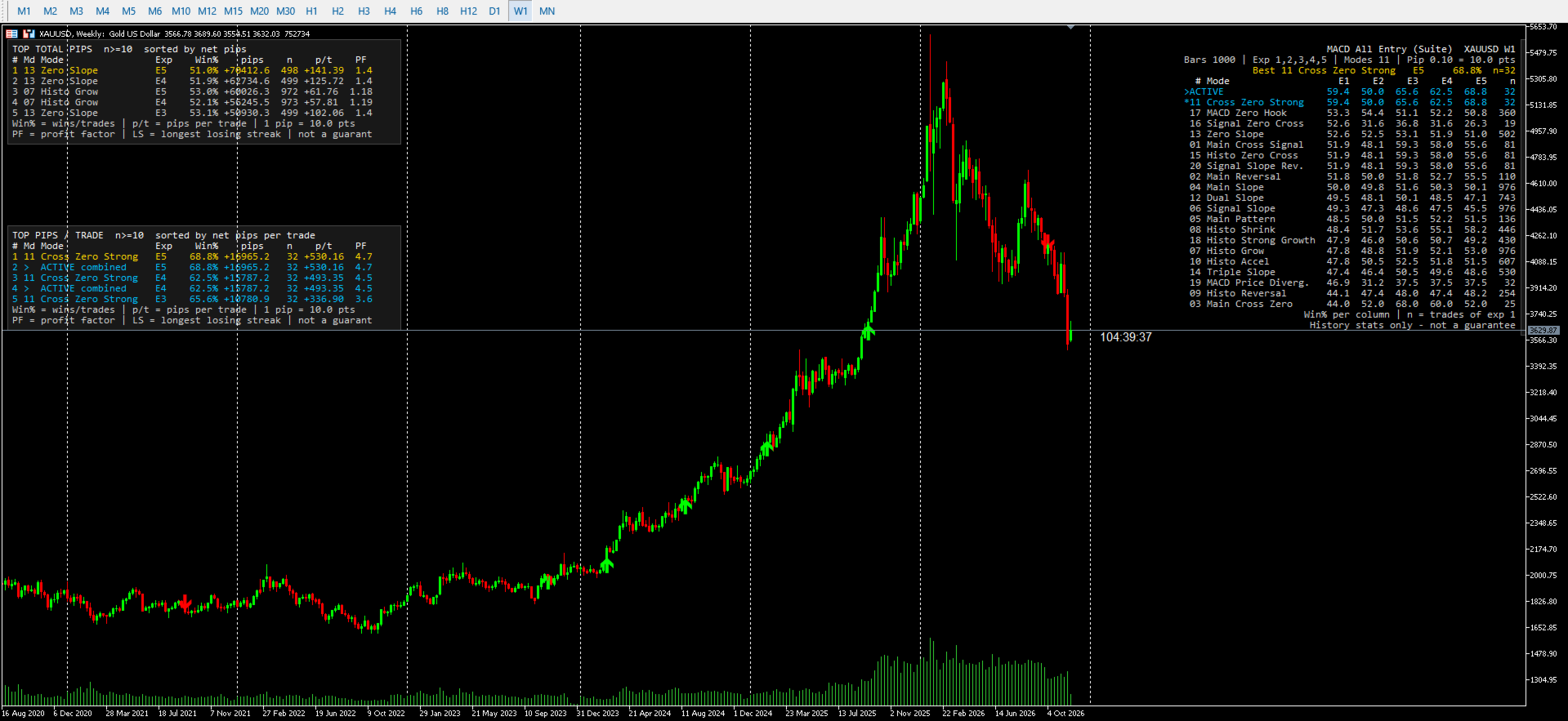
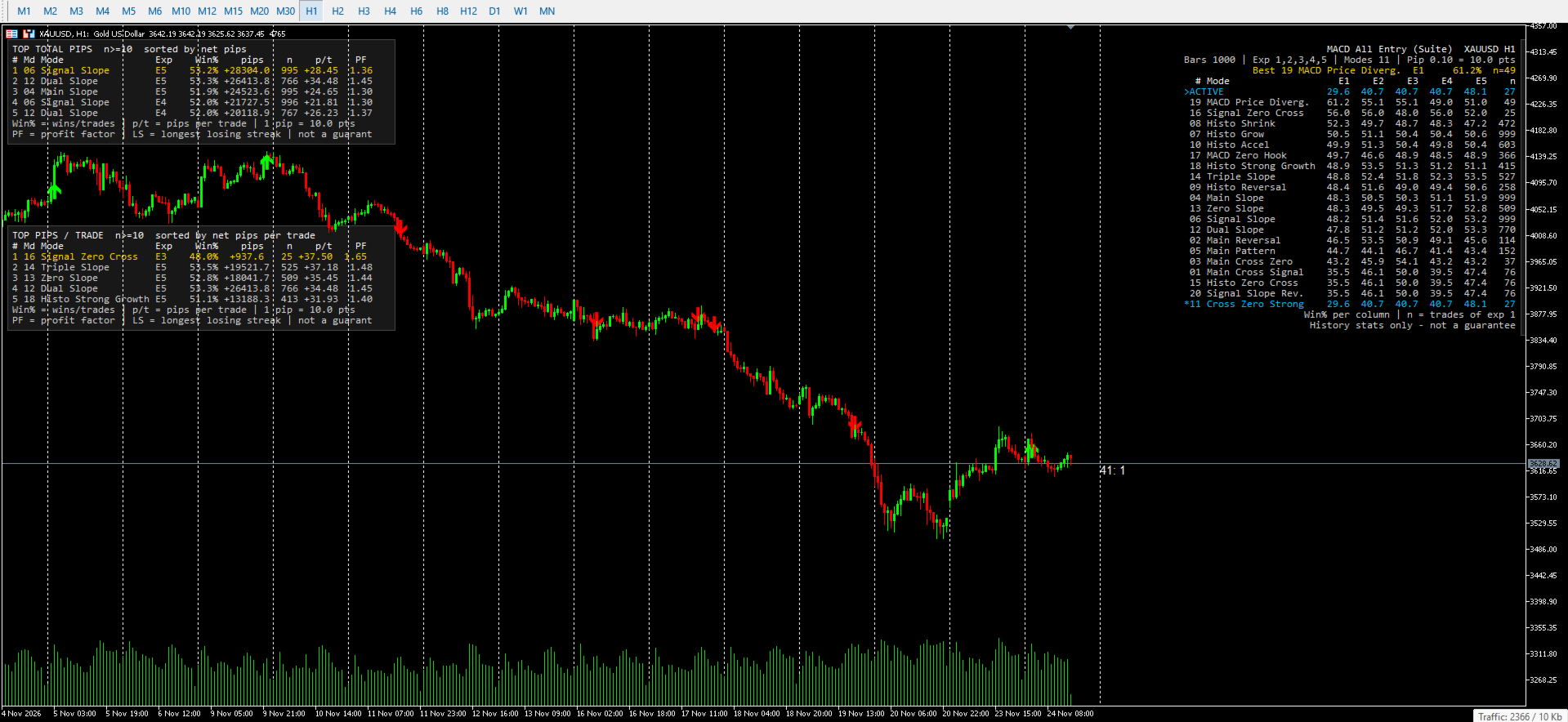
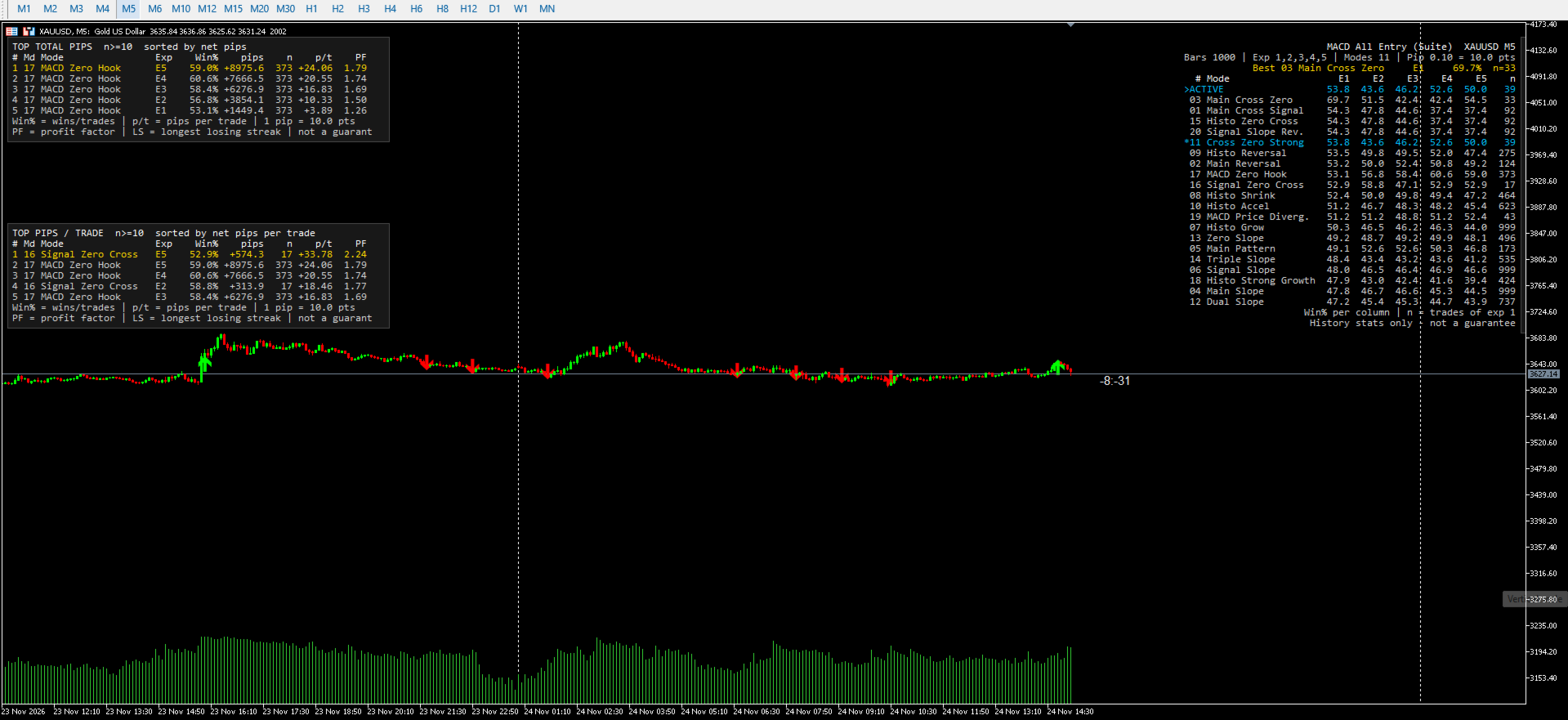
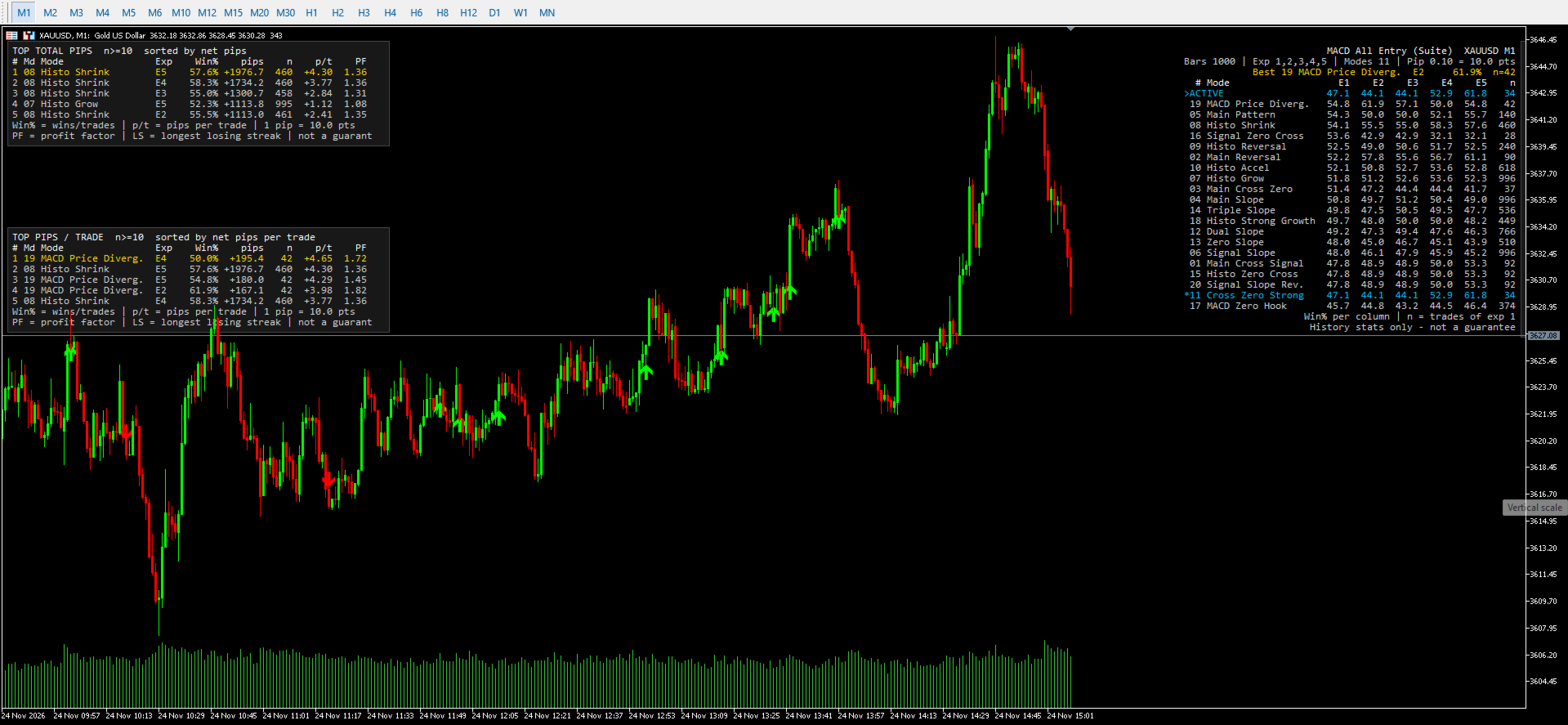
Legacy panel — InpShowPanel + InpPanelView
MATRIX win% per expiration, one row per mode:
  # Mode                E1    E2    E3    E4    E5    n
> ACTIVE              62.5  58.1  60.0  57.4  55.0   48
*11 Cross Zero Strong 62.5  58.1  60.0  57.4  55.0   48
 05 Main Pattern      58.0  54.2  51.0  49.0  47.5   96
| Element | Meaning |
|---|---|
| > | ACTIVE row — all enabled modes combined (one signal = one trade) |
| * | this mode is enabled |
| E1..E5 | win% when the trade is held that many bars |
| n | trades of the first expiration |
DETAIL win%, trades and net pips for the first expiration only.
PIPS net pips per mode × expiration, with row totals and column sums:
# Mode E1 E2 E3 E4 E5 Total > ACTIVE +12.5 -8.0 +31.2 +10.4 -2.1 +44.0 *11 Cross Zero Strong +12.5 -8.0 +31.2 +10.4 -2.1 +44.0 COL SUM (all modes) +40.0 +12.0 +55.0 +18.0 +5.0 +130.0
Column sums add every mode together — an overview, not a portfolio.
4 · The two ranking tables
Each table is an independent panel with its own on/off switch, corner and offset.
Sorted by total net pips. High-frequency rules naturally rank high; that is not “better per trade”.
Sorted by average pips per trade — a quality view for risk-conscious traders.
TOP TOTAL PIPS  n>=10  sorted by net pips
  # Md Mode                Exp  Win%    pips    n    p/t    PF LS
1 11 Cross Zero Strong     E3   62.5  +180.4   48   3.76  2.90  3
| Column | Meaning |
|---|---|
| # | rank inside this table |
| Md | mode 1..20; > = ACTIVE (combined) |
| Mode | mode name |
| Exp | bars held |
| Win% | wins ÷ (wins + losses) |
| pips | net pips of the combo |
| n | trades used |
| p/t | pips per trade (expectancy) |
| PF | gross win ÷ gross loss; inf = no losing trade yet |
| LS | longest losing streak |
InpShowWorstPips / InpShowWorstAvg append a WORST block to each table; InpTopN sets rows per block (1..5). Combos below InpMinTrades are never ranked.
5 · Pips — set this correctly
| Asset | Example | 1 pip | Setting |
|---|---|---|---|
| EURUSD, GBPUSD (5 digits) | 1.08542 | 0.0001 | PIP_AUTO |
| USDJPY, GBPJPY (3 digits) | 149.523 | 0.01 | PIP_AUTO |
| XAUUSD (2 digits) | 2650.15 | 0.1 = 10 points | PIP_TEN_POINTS |
| US500 / NAS100 | 5200.5 | 0.1 or 1.0 | PIP_TEN_POINTS or PIP_CUSTOM |
| BTCUSD / ETHUSD | ~100000 | 1.0 or 0.1 | PIP_CUSTOM |
- PIP_AUTO — 3/5 digits → 10 points, otherwise 1 point (old behaviour)
- PIP_POINTS — 1 pip = 1 point
- PIP_TEN_POINTS — 1 pip = 10 points
- PIP_CUSTOM — 1 pip = InpPipCustomPoints points
6 · Research workflow
- Pick a symbol and timeframe you understand.
- Set the pip definition and verify the Pip … = … pts line.
- Set InpActiveModes (use ALL while exploring).
- Open the table you need: TOP total pips or TOP pips/trade.
- Choose a mode + expiration where n is high, Win% and p/t agree, and LS is acceptable.
- Record it, or enable InpExportCSV once to keep the table.
- Switch the panels off and leave only the chosen mode active.
- Hand the chart or the indicator buffers to your EA.
Switching panels off never changes signals or buffers — it only removes chart objects.
7 · CSV export
- Enable InpExportCSV ; the file is rewritten on each stats recalculation.
- Location: MQL5\Files\EntrySuite_MACD_<SYMBOL>_<TF>.csv .
- Header rows: symbol, timeframe, server_time, stats_bars, active_modes, min_trades, pip_mode, pip_points .
- Then ACTIVE,combined and one row per mode with E{k}_win% , E{k}_n , E{k}_pips .
8 · Input reference
| Group | Input | Default | Meaning |
|---|---|---|---|
| MACD | InpFastEMA | 12 | fast EMA |
| MACD | InpSlowEMA | 26 | slow EMA |
| MACD | InpSignalEMA | 9 | EMA of MACD |
| MACD | InpAppliedPrice | PRICE_CLOSE | price source |
| Entry | InpExpList | "1,2,3,4,5" | expirations, max 8 |
| Entry | InpActiveModes | "11" | enabled modes, e.g. "1,5,7-10" or ALL |
| Pips | InpPipMode | PIP_AUTO | pip definition |
| Pips | InpPipCustomPoints | 10.0 | points per pip (PIP_CUSTOM) |
| Divergence | InpFractalBars | 2 | fractal swing width |
| Divergence | InpDivLookback | 60 | bars to search the previous swing |
| Divergence | InpDivFirstBreak | true | only the first break |
| Statistics | InpStatsBars | 1000 | history bars used |
| Statistics | InpMinTrades | 10 | minimum trades to rank / find best |
| Statistics | InpStatsOnSignalOnly | false | recalc only on a new arrow |
| Statistics | InpLogStats | false | print stats to the journal |
| Display | InpShowArrows / InpShowModeTag | true / true | arrows and mode tag |
| Display | InpArrowOffsetPts | 10 | arrow distance (points) |
| Display | InpPanelView | PANEL_VIEW_MATRIX | MATRIX / DETAIL / PIPS |
| Display | InpSortByWinRate | true | sort rows by first-expiration win% |
| Display | InpPanelCorner/X/Y | RIGHT_UPPER / 12 / 22 | main panel position |
| Tables | InpShowTopPips / InpShowTopAvg | true / true | show ranking tables |
| Tables | InpShowWorstPips / InpShowWorstAvg | false / false | append WORST rows |
| Tables | InpTopN | 5 | rows per block (1..5) |
| Tables | InpTopPipsCorner/X/Y | LEFT_UPPER / 12 / 22 | position of the pips table |
| Tables | InpTopAvgCorner/X/Y | LEFT_UPPER / 12 / 250 | position of the pips/trade table |
| Alerts | InpAlertPopup/Sound/Push/Email | true / false / false / false | notification channels |
9 · The 20 modes
m = MACD line, s = signal, h = histogram; SELL is the exact mirror of BUY.
| # | Mode | BUY condition |
|---|---|---|
| 1 | Main Cross Signal | m crosses above s |
| 2 | Main Reversal | m hooks up (m1>m2, m2<m3, m1<m3) |
| 3 | Main Cross Zero | m crosses above 0 |
| 4 | Main Slope | m1 > m2 |
| 5 | Main Pattern | pullback, then turn up |
| 6 | Signal Slope | s1 > s2 |
| 7 | Histo Grow | h1 > h2 |
| 8 | Histo Shrink | negative histogram shrinking |
| 9 | Histo Reversal | histogram turns up |
| 10 | Histo Accel | histogram accelerating up |
| 11 | Cross Zero Strong | m crosses above s and m > 0 |
| 12 | Dual Slope | m and s rising |
| 13 | Zero Slope | m > 0 and rising |
| 14 | Triple Slope | m , s , h rising |
| 15 | Histo Zero Cross | h crosses above 0 |
| 16 | Signal Zero Cross | s crosses above 0 |
| 17 | MACD Zero Hook | m > 0 then hooks up |
| 18 | Histo Strong Growth | positive histogram growing 3 bars |
| 19 | MACD Price Divergence | price lower low, MACD higher low (fractal) |
| 20 | Signal Slope Rev. | s turns up |
10 · Using it from an Expert Advisor
| Buffer | Value |
|---|---|
| 0 / 1 | Buy / Sell arrow (price or EMPTY_VALUE ) |
| 2..21 | mode 1..20: 1.0 buy, -1.0 sell, 0.0 none |
| 22 / 23 | Buy / Sell combined (enabled modes) |
| 24 / 25 / 26 | MACD / Signal / Histogram |
// pass only leading inputs, the rest use indicator defaults int h = iCustom(_Symbol, _Period, "Entry Suite\\MACD All Entry (Suite)", 12, 26, 9, PRICE_CLOSE, "1,2,3,4,5", "11"); if(h == INVALID_HANDLE) return; double buy[]; if(CopyBuffer(h, 22, 0, 3, buy) > 0 && buy[0] > 0.5) { // combined BUY signal (buffer 23 = SELL) }
Inputs are positional. To set a later input, pass every earlier one: Fast, Slow, Signal, AppliedPrice, ExpList, ActiveModes, PipMode, PipCustomPoints, FractalBars, DivLookback, DivFirstBreak, StatsBars, MinTrades, StatsOnSignalOnly, LogStats, ShowArrows, ShowModeTag, ColorTag, ExportCSV, ArrowOffsetPts, ShowPanel, PanelView, SortByWinRate, PanelCorner, PanelX, PanelY, FontSize, PanelBack, ColorTitle, ColorText, ColorActive, ColorBest, ColorBg, ShowTopPips, ShowTopAvg, ShowWorstPips, ShowWorstAvg, TopN, TopPipsCorner, TopPipsX, TopPipsY, TopAvgCorner, TopAvgX, TopAvgY, AlertPopup, AlertSound, SoundFile, AlertPush, AlertEmail. Call IndicatorRelease(h) in the EA’s OnDeinit .
11 · Troubleshooting
| Symptom | Fix |
|---|---|
| Not in Navigator | press Refresh; check the file is in MQL5\Indicators\Entry Suite\ |
| No arrows | InpShowArrows off, history too short, or no signal in that period |
| “no combo reaches N trades yet” | lower InpMinTrades or raise InpStatsBars |
| Pips look wrong on gold / indices | wrong InpPipMode (section 5) |
| Panels overlap | increase InpTopAvgY or use different corners |
| Inputs seem ignored | press OK in the properties dialog to reload the indicator |
| Leftover objects | delete objects starting with MACD_ENTRY_SUITE_ , MACD_ES_TOPP_ , MACD_ES_TOPA_ |
12 · Limits and risk
- All statistics are in-sample on the loaded history — not a forward test.
- Picking the best of 20 modes × many expirations on one dataset is curve fitting; validate elsewhere.
- No SL/TP is modelled: “pips” means hold N bars and exit at the close.
- High win% with negative p/t is possible — read them together.
- PF = inf means “no losing trade in this window”, not low risk.
- Past results do not guarantee future results. Not investment advice.
13 · Pre-live checklist
- Pip mode matches the asset and the panel pip line looks right
- InpStatsBars 1000–3000 and InpMinTrades ≥ 10
- Chosen combo has enough trades, agreeing win% / pips per trade, acceptable losing streak
- Re-tested on another period or neighbouring timeframe
- CSV saved as evidence
- Unused panels switched off before handing the chart to an EA
- SL, TP and position size handled by your EA