Keylevel Multi Pair
- Indicatori
- Versione: 1.20
- Attivazioni: 10

Name: KeyLevel Mask – Custom Round Number & Key Price Levels for Any Symbol
Short description:
Draw round-number and key price levels on any symbol using a simple digit mask. Five independent KeyLevel sets with custom color, style, width, zone fill and price tags.
Full description:
What it does
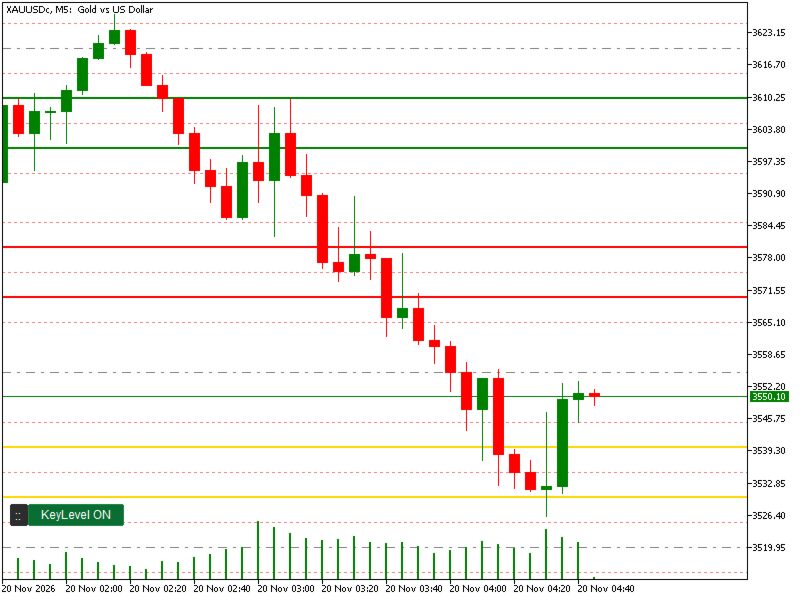
KeyLevel Mask automatically draws horizontal key levels on your chart based on a price pattern (a “mask”) that you define. Instead of drawing lines by hand, you describe the pattern once and the indicator draws every matching level above and below the current price, on any symbol.
How the mask works
- * = any digit (free), 0-9 = fixed digit, . = optional separator (visual only).
- Mask length is 1–10 digits, so it fits symbols with few or many digits.
- You can enter several masks in one KeyLevel, separated by commas.
Examples:
- XAUUSD (price 4500.00, 4 digits): **00 draws 4500, 4600, 4700 … and **10 draws 4510, 4610, 4710 …
- XAUUSD multiple levels: **00,**10,**30,**40,**70,**80
- EURUSD (1.08500): *.**500 draws 1.08500, 1.09500, 1.10500 …
- Synthetic indices, crypto and indices: just use as many * and fixed digits as the price needs.
Features
- Works on any symbol and any timeframe: forex, gold, indices, crypto, synthetic indices.
- 5 independent KeyLevel sets. Each one has its own on/off switch, mask, line color, line style, line width, zone fill and price tag.
- Zone fill with custom color between pairs of lines (lines 1-2, 3-4, 5-6 …), for example the 00–10, 30–40 and 70–80 zones of every 100 on gold.
- Price tag boxes on the right side of each line, with automatic text contrast so prices are easy to read.
- Draggable ON/OFF button to hide or show all KeyLevels instantly for a cleaner chart. Button position and state are remembered.
- Lines are drawn only around the visible price range, with a limit on the number of lines per KeyLevel, so the chart stays fast.
- Draws static levels only. It does not repaint, open trades or give buy/sell signals.
Inputs
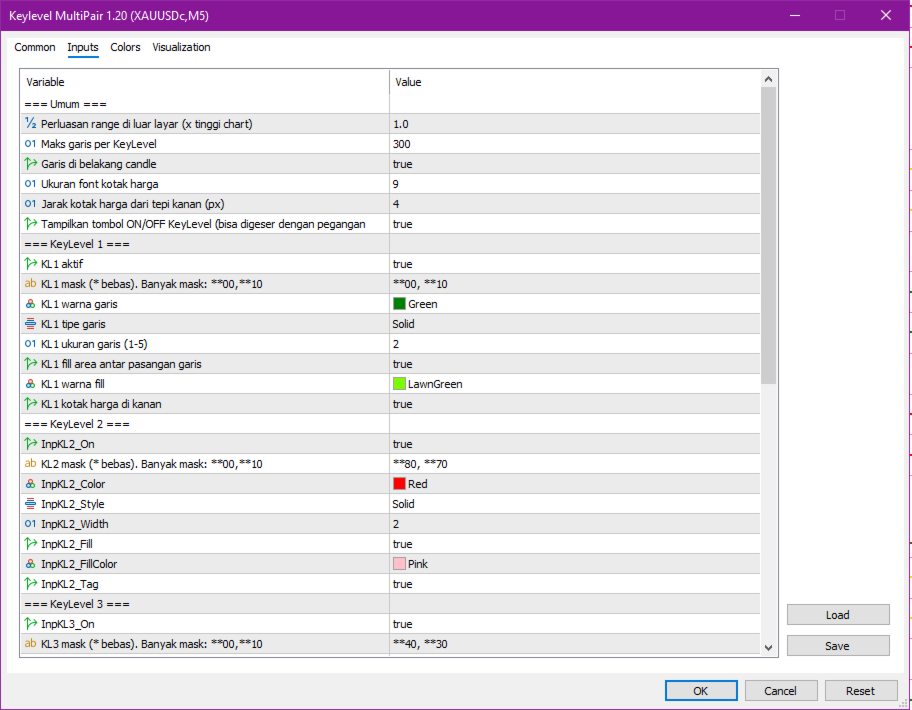
- General: range extension, maximum lines per KeyLevel, draw lines behind candles, price tag font size and distance, show/hide the ON/OFF button.
- Per KeyLevel (1–5): enable, mask, line color, line style, line width (1–5), fill on/off, fill color, price tag on/off.
How to use
- Attach the indicator to a chart.
- Open the inputs and write your mask in KeyLevel 1 (for example **00 ).
- Choose color, style and width. Enable fill or price tags if you want.
- Use the ON/OFF button to hide or show the levels. Drag the :: handle to move the button.
Notes
- Dotted and dashed styles are only visible with line width 1 (MetaTrader limitation).
- Zone fill in MetaTrader is not transparent, so a soft or dark fill color is recommended.
- This is a visual analysis tool and does not guarantee any trading result. Trading involves risk.