DYJ Trend Sniper Pro
- Indicatori
-
Daying Cao
 Ciao!
Sono un ingegnere del software con molti anni di esperienza nello sviluppo, dotato di un mio sistema di trading unico e di una vasta esperienza nel trading con EA. Le valute principali sono EUR/USD, GBP/USD, USD/JPY, AUD/USD, USD/CAD, l'oro e il cross valutario EUR/NZD. - Versione: 20.0
- Aggiornato: 19 novembre 2026
- Attivazioni: 5
Professional Multi-Symbol Trend Scanner for MetaTrader 5
Discover Trends. Measure Strength. Focus on Opportunities.
Stop switching between dozens of charts to find trending markets.
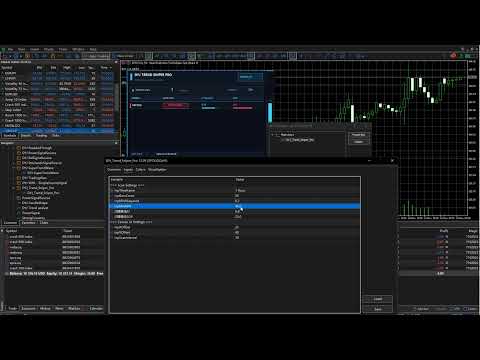
DYJ Trend Sniper Pro is a professional multi-symbol trend-scanning indicator designed to monitor the instruments available in your MetaTrader 5 Market Watch and identify markets that meet your trend analysis criteria.
Combining Linear Regression R-Squared (R²) and the Average Directional Index (ADX), the indicator evaluates market conditions from two complementary perspectives: linear trend fit and trend strength.
All results are displayed in a premium neon dashboard, giving you a clear overview of multiple markets from a single chart.
KEY FEATURES
1. Multi-Symbol Market Scanner
Automatically scans the symbols available in Market Watch and identifies instruments that satisfy your selected trend filters.
Monitor multiple markets from one chart without manually switching between instruments.
2. Linear Regression R-Squared (R²)
Uses linear regression to analyze recent price behavior and calculates R² to measure how closely prices fit the regression line.
A higher R² indicates a closer linear fit within the selected lookback period.
3. ADX Trend Strength Analysis
Uses the Average Directional Index (ADX) to evaluate the strength of market trends.
ADX measures trend strength, not direction. The trend direction is determined independently by the slope of the linear regression.
4. Dual-Threshold Neon Highlight
A distinctive visual feature designed to help important trend candidates stand out.
Set independent R² and ADX thresholds for the dynamic neon breathing effect.
The direction badge starts flashing only when BOTH conditions are satisfied:
-
R² reaches or exceeds the configured R² threshold.
-
ADX reaches or exceeds the configured ADX threshold.
Symbols that do not meet both highlight conditions remain visible with a static directional border.
5. Premium Neon Dashboard
A modern dark interface presents essential market information in a clear and organized layout:
-
Symbol name
-
Trend direction: UP or DOWN
-
R² value
-
ADX value
-
Visual indicator bars
-
Market scan statistics
-
Last scan time
6. Interactive Scrollbar
Browse the complete list of detected symbols using the integrated scrollbar.
Conveniently navigate through scan results when many instruments meet your filtering criteria.
7. Flexible Analysis Settings
Customize the analysis timeframe, regression lookback period, minimum R², minimum ADX, and independent visual highlighting thresholds.
Adapt the scanner to different instruments and trading styles.
8. Built-in Fake Data Mode
An optional simulated-data mode generates test results so you can explore the dashboard, scrollbar interaction, and neon highlighting effects without waiting for live market conditions.
9. DYJ GameDevice Signal Integration – Indicator Signal Following
DYJ Trend Sniper Pro now supports direct trend signal transmission to DYJ GameDevice, enabling indicator-based signal following and automated trading integration.
When a scanned symbol passes the minimum scanning filters and satisfies BOTH configured neon highlighting thresholds, the indicator automatically publishes its trend direction through MetaTrader 5 Global Variables.
Signal Protocol:
-
UP Trend: Sends signal 3 – Maintain BUY direction.
-
DOWN Trend: Sends signal 4 – Maintain SELL direction.
Signal Transmission Conditions:
Both conditions must be satisfied simultaneously:
-
R² ≥ Flash Minimum R²
-
ADX ≥ Flash Minimum ADX
Integration Features:
-
Automatically transmits qualified bullish and bearish trend signals.
-
Supports independent signal transmission for each scanned Market Watch symbol.
-
Uses MT5 Global Variables for direct communication with DYJ GameDevice.
-
No additional signal-transmission EA required.
-
No DLL or Python dependency.
Important: Signal transmission is triggered by the configured flash thresholds during market scanning. When the conditions are not met, the previously published signal is retained rather than automatically cleared.
This integration allows DYJ GameDevice to receive trend signals directly from DYJ Trend Sniper Pro and use them according to its configured trading rules.
Note: Built-in Fake Data Mode is intended for dashboard testing only and does not transmit trading signals to DYJ GameDevice.
HOW IT WORKS
DYJ Trend Sniper Pro combines two complementary analytical measurements.
Trend Direction
Determined by the slope of the linear regression:
-
Positive slope: UP
-
Negative slope: DOWN
Trend Fit and Strength
-
R² measures how closely the observed prices fit the linear regression line.
-
ADX measures the strength of the market trend.
A symbol is included in the scan results only when it meets BOTH minimum scanning conditions:
-
R² ≥ Minimum R²
-
ADX ≥ Minimum ADX
The neon highlight uses a separate pair of thresholds. This allows you to display qualifying symbols normally while reserving the dynamic visual effect for symbols meeting your higher highlight criteria.
DYJ Trend Sniper Pro = Multi-Symbol Trend Scanner + Neon Signal Alerts + DYJ GameDevice Signal Integration.INPUT PARAMETERS
A. Scan Settings
InpTimeframe
The timeframe used for market analysis, such as M15, M30, H1, H4, or D1.
InpBarsCount
The number of historical bars used for linear regression and R² calculation.
InpMinRSquared
The minimum R² value required for a symbol to appear in the scan results.
InpMinADX
The minimum ADX value required for a symbol to appear in the scan results.
B. Flash Highlight Settings
InpFlashMinRSquared
The minimum R² value required to activate the dynamic neon breathing effect.
InpFlashMinADX
The minimum ADX value required to activate the dynamic neon breathing effect.
Both conditions must be satisfied simultaneously.
These settings control visual highlighting and DYJ GameDevice signal transmission. They do not change the main scanning filters.
C. Canvas UI Settings
InpXOffset
Horizontal position of the dashboard on the chart.
InpYOffset
Vertical position of the dashboard on the chart.
InpScanInterval
The interval between market scans, in seconds. The dashboard animation refreshes independently of the scanning interval.
D. Test Data Settings
InpUseFakeData
Enables or disables simulated test data.
InpFakeDataCount
The number of simulated result rows generated in test mode.
E. Signal Integration Settings
InpSignalSourceName
The signal source name used to identify DYJ Trend Sniper Pro in MetaTrader 5 Global Variables.
It determines the Global Variable naming format used to transmit trend signals to DYJ GameDevice.
Default value: DYJTrendSniperPro.
SUGGESTED STARTING SETTINGS
| Parameter | Suggested Value |
|---|---|
| Timeframe | H1 |
| Bars Count | 50 |
| Minimum R² | 0.70 |
| Minimum ADX | 25.0 |
| Flash Minimum R² | 0.90 |
| Flash Minimum ADX | 35.0 |
| Scan Interval | 30 seconds |
| Fake Data | false |
These values are suggested starting points, not universally optimal settings. Users can adjust them according to their preferred instruments, timeframes, and market conditions.
IMPORTANT INFORMATION
- This product is a multi-symbol market scanning and trend analysis indicator with direct signal integration for DYJ GameDevice. It does not independently execute trades.
-
It does not open, modify, or close trades.
-
A strong trend reading does not guarantee future price movement.
-
ADX measures trend strength, not bullish or bearish direction.
-
R² measures linear regression fit, not future prediction accuracy.
-
All scanning and highlighting thresholds are configurable.
SCAN SMARTER. SEE THE TREND. STAY FOCUSED.
DYJ Trend Sniper Pro
Your Multi-Symbol Trend Intelligence Dashboard for MetaTrader 5.