MultiAsset SuperTrend Trader MT5
- Experts
-
Norbert Hubert Pajak
 My professional career and interests are connected to the financial markets. For over a decade, I have attended almost every trading session.
I create automated trading algorithms (robots, bots), known as Expert Advisors, in MQL4 and MQL5. I can also assist with conversions from Pinescript. - Versione: 2.2
- Attivazioni: 10
MultiAsset SuperTrend Trader — the trend engine for MetaTrader 5
My offer also includes a more advanced version of this EA with an extended list of filters and methods for generating trading signals and placing the Stop Loss: MultiAsset SuperTrend Trader Pro, available on my profile.
Up to 10 instruments, one chart, one risk budget. Pure SuperTrend trend following, confirmed by up to three SuperTrend filters on higher timeframes.
Are you looking for a strategy that combines pure trend following with the safety of portfolio diversification? MultiAsset SuperTrend Trader is not just another Expert Advisor. While most robots watch a single symbol, this EA monitors, filters and trades up to 10 instruments simultaneously from a single chart: Forex, indices, gold and silver, oil or crypto, whatever your broker offers. Build a balanced portfolio of uncorrelated assets, smooth out your equity curve and let one shared risk budget keep the whole basket under control.
Any account currency, any broker. Interface in English, German, Spanish and Polish.
User guide (EN, DE, ES, PL): every input explained, with what each one changes in the strategy — download it from the blog post: https://www.mql5.com/en/blogs/post/779479
The philosophy: fractal trend capture
The core idea is simple and robust: align the trend across timeframes. A trend on a 5-minute chart is noise; a trend confirmed by the H4 and Daily charts is an opportunity. The EA uses a Triple-SuperTrend system, so it enters the market only when the short-term momentum agrees with the dominant, long-term flow.
1. True multi-asset trading: 10 instrument slots
■ Slot = instrument. Enter 1 to 10 symbols (e.g. EURUSD, GOLD, US500, BTCUSD). An empty symbol means the slot is not used.
■ Per-slot settings: fixed lot (0 = minimum lot of the symbol), minimum profit for profit-only closing, Take Profit (none / % / points) and the hedging method.
■ Automatic instrument data: tick size and tick value are taken from the broker. If the broker does not provide them, the EA works them out itself and converts them into the account currency (the currency pair is found even with broker suffixes such as USDPLN.pro or USD/PLN). Manual override inputs exist per slot (0 = auto).
■ Safe with any broker: a symbol the broker does not offer is skipped and reported in the journal.
■ One EA, many baskets: each instance has its own Magic Number, so different baskets can run side by side.
2. The "Triple-SuperTrend" precision system
False signals are the enemy of every trader. You get 3 independent filter slots. In each one you can activate a SuperTrend with its own timeframe, period and multiplier. A trade is considered only if all active filters agree.
■ Example setup for maximum safety:
– Filter 1: SuperTrend on D1 (the macro trend),
– Filter 2: SuperTrend on H4 (the swing trend),
– Filter 3: SuperTrend on H1 (the immediate bias).
■ Result: the EA ignores every buy signal unless the D1, H4 and H1 SuperTrends all point up. This keeps you out of choppy markets and makes you trade with the tide, never against it.
■ The filters can be read from the closed bar (no repaint) or from the current bar.
■ SuperTrend distance filter (optional): entries only when the price is within your minimum / maximum distance from a SuperTrend line (in % or points), so the EA does not chase stretched moves.
3. The "Perfect Flip" entry
Once the higher-timeframe filters give the green light, the EA waits for the signal SuperTrend to change direction (flip) on your signal timeframe (default H1). You do not guess bottoms or tops: you enter exactly when the price breaks into a new trend leg, with the weight of the higher timeframes behind you.
Long, short or both, with a maximum number of positions per instrument and a minimum number of candles between entries.
4. Intelligent exit strategies
■ Signal exit: close the trade when the SuperTrend turns against you, or choose no close signal and let Stop Loss, Take Profit and Trailing Stop manage the position.
■ Profit protection: exit signals can be ignored while the position has not reached the slot's minimum profit (in % of the open price or in points; commission and swap included). Combined with No Stop Loss on long positions in instruments without expiry (e.g. index CFDs), this lets positions ride out corrections, even long ones, until they turn profitable. Keep enough funds in the account to survive the drawdown.
■ Take Profit per slot: none, % distance or points.
■ Time management: trading days, entry hours (entries only, or entries and exits) and a Friday close at a chosen hour (all positions or only those in profit) to avoid weekend gaps.
5. Stop Loss and trailing
■ Initial Stop Loss: at the SuperTrend line of any timeframe (dynamic support / resistance), at a fixed % distance from the open price, or no Stop Loss if you want to wait for profit on every position. An additional % buffer can be added to the calculated level; SL and TP are checked against the broker's minimum distance before every entry.
■ Smart trailing: along the SuperTrend line, by %, by points or by ATR distance, with a minimum step. As the trend strengthens, the SuperTrend tightens and secures your gains automatically.
■ Profit-only activation: the Trailing Stop can start only once the trade is in profit.
6. Hedge per instrument
Each slot can be protected by a hedge (hedging account; on MetaTrader 4 every account works this way):
■ Hedge on SuperTrend or Hedge on EMA: when the hedge timeframe turns down, the EA opens an opposite position of the same volume; when the trend returns, the hedge is closed.
■ Hedge positions use their own Magic Number and follow the volume of the main positions. The activation level is shown on the panel.
■ Optional intrabar opening and removal (“Open hedge intrabar (activation lvl crossed)?”, “Remove hedge intrabar (activation lvl crossed)?”, each with its own buffer, 1% by default): the hedge opens or closes as soon as the price crosses the activation level by the buffer during the candle; from the next candle of the hedge timeframe the candle close decides again.
A hedge is designed for no-Stop-Loss strategies. It reduces the drawdown, and you pay for that with part of the return and the swap on both legs.
7. Institutional-grade risk management
■ EA capital: decide what part of the account the EA may use (1–100 %) and whether it is based on balance or equity.
■ Position size: fixed lot per slot, or automatic lot from % risk per trade (calculated from the Stop Loss distance).
■ Global portfolio risk cap: the combined risk of all open positions including the new one may not exceed your limit (default 4 %). Signals beyond the cap are skipped, so the portfolio cannot become over-leveraged.
■ Pre-trade checks: trading permissions, volume limits and free margin are verified for every symbol before an order is sent. Optional spread filter.
8. The interactive command dashboard
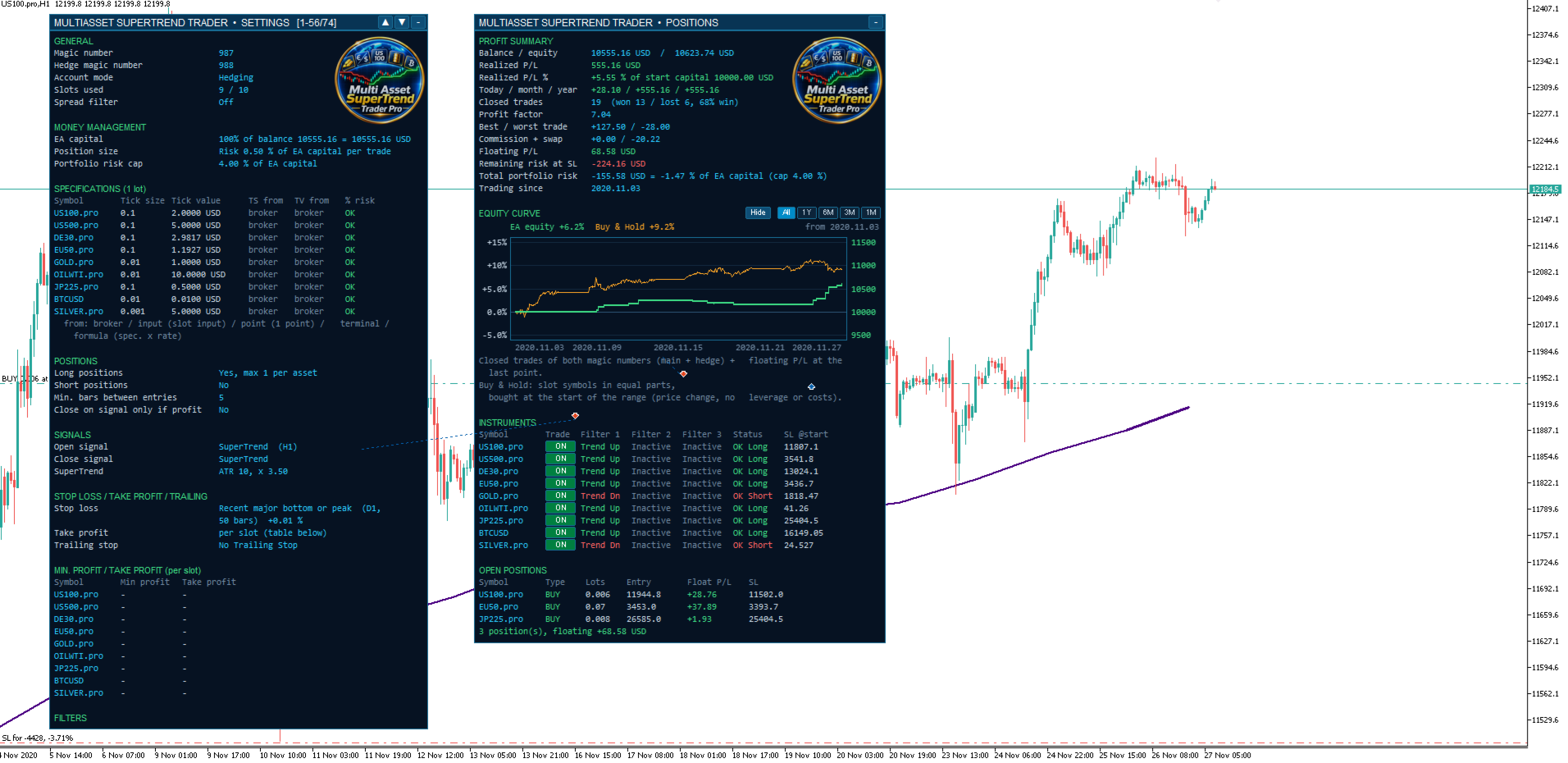
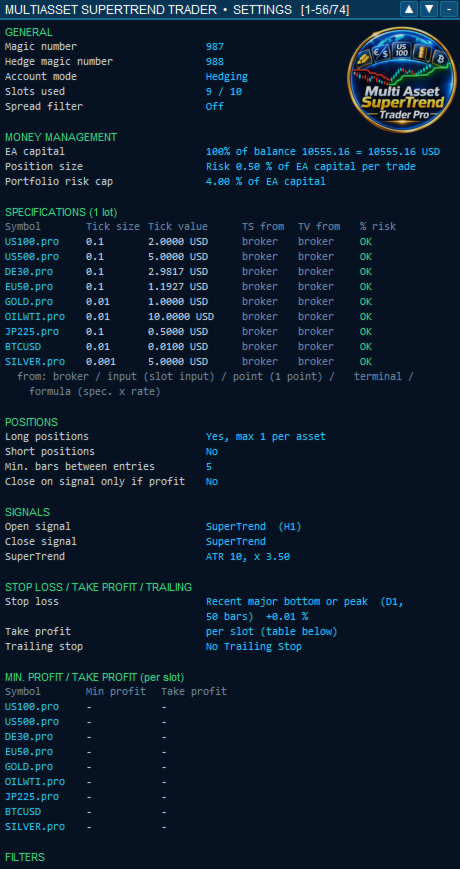
Two movable, collapsible panels that fit their width to the content and remember their position:
■ SETTINGS panel: a readable summary of the active strategy and the instrument specifications actually used (tick size, tick value and their source).
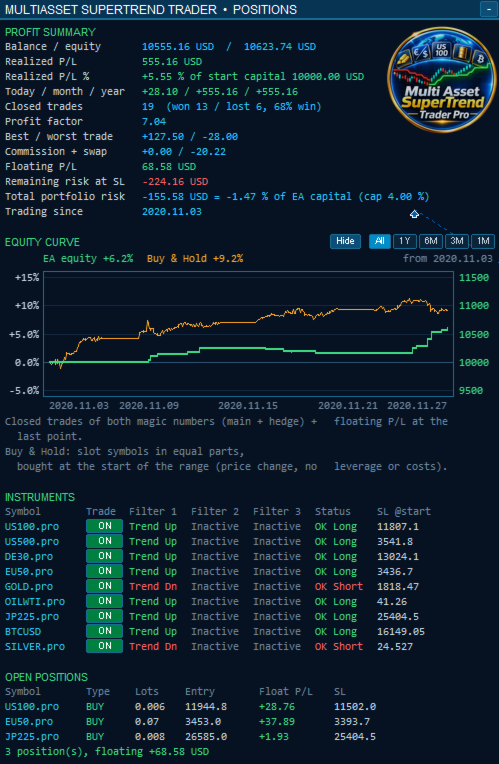
■ POSITIONS panel:
– Profit summary: balance / equity, realized and floating P/L, today / month / year, closed trades with win rate, profit factor, total portfolio risk and risk remaining at SL,
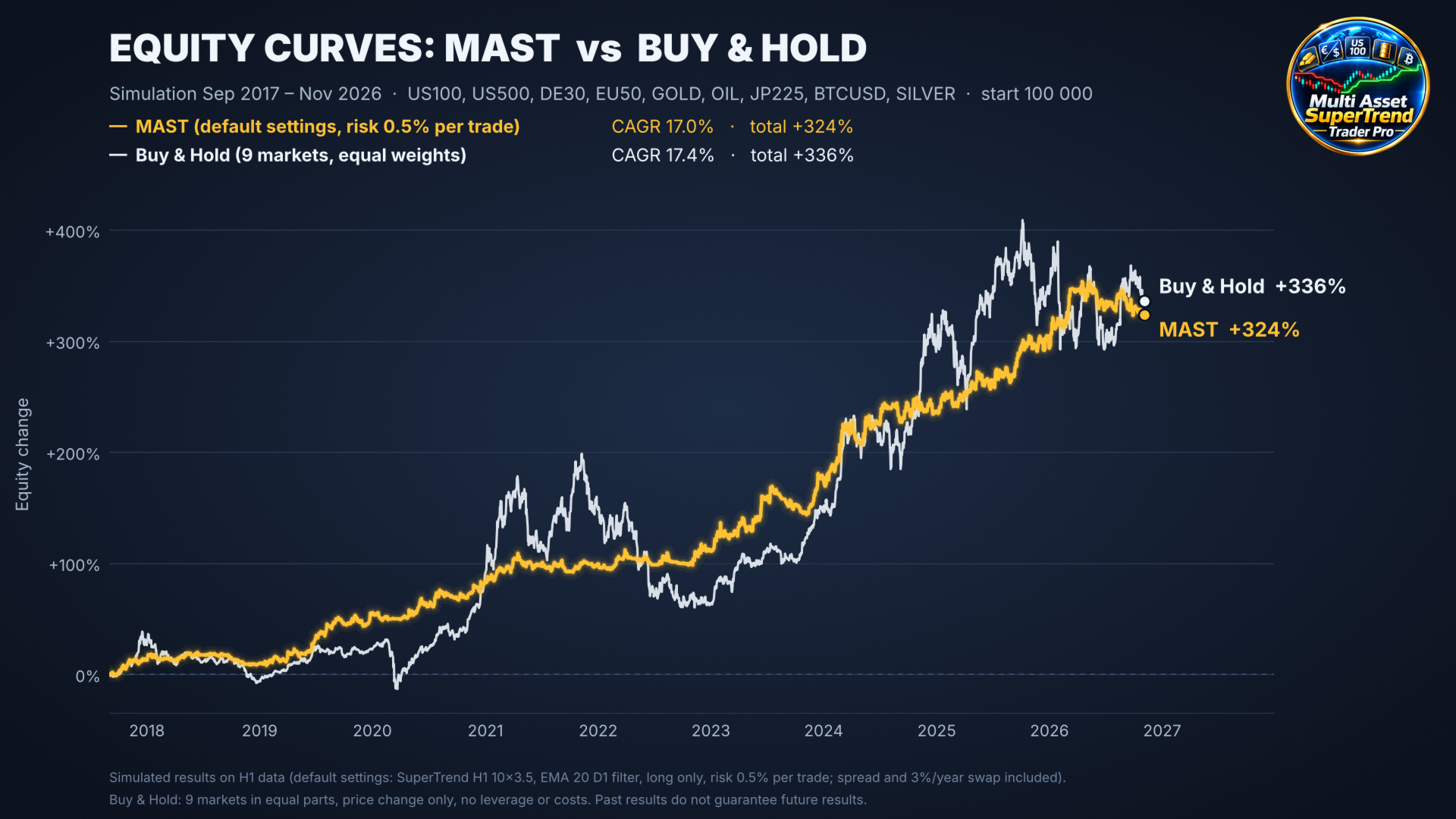
– Equity curve of the EA against a Buy & Hold portfolio of the slot symbols,
– Instruments: the state of all 3 filters for every symbol (Trend Up / Trend Down) and the final decision, plus an ON/OFF button per instrument. Switch off a symbol instantly without restarting the EA,
– Open positions with their stops.
■ Chart lines: the signal and filter SuperTrends are drawn on the chart.
■ Transparent journal: every buy / sell signal is logged with its outcome, either the position opened or the exact reason it was rejected (filter, risk cap, spread, time window…), with the server time.
Ready-to-use setups
Each setup lists the inputs to change from the defaults. Always verify a setup in the Strategy Tester on your own instruments and broker before trading live.
1. Default settings
■ SuperTrend H1 (10 × 3.5) for entry and exit, long only.
■ Filter 1: SuperTrend D1 (10 × 3.5). Stop Loss at the SuperTrend line of D1.
■ Risk: 0.5 % per trade, 4 % maximum for the portfolio.
2. The "Fractal Alignment"
Best for: major Forex pairs and gold, long and short.
■ Signal timeframe: M30. Filter 1: SuperTrend D1, Filter 2: SuperTrend H4, Filter 3: SuperTrend H1.
■ Stop Loss at the SuperTrend line (H4). Trailing Stop at the SuperTrend line (H1), only in profit.
3. The "Swing Rider"
Best for: indices and commodities. Fewer trades, bigger moves.
■ Signal timeframe: H4. Filter 1: SuperTrend D1.
■ Close signal: none. Exit only by the Trailing Stop at ATR distance (H4), Stop Loss 3 % from the open price.
4. The "Trend Guardian" (no Stop Loss, with hedge)
Best for: index CFDs without expiry, long term, long only.
■ Stop Loss: No Stop Loss; position size: fixed lot per slot.
■ Close on signal only in profit: on, with a minimum profit per slot (e.g. 0.5 %).
■ Hedging per slot: Hedge on SuperTrend (D1).
■ Keep a large capital reserve: without SL, the margin and the swaps must be covered.
Want more? MultiAsset SuperTrend Trader Pro
The Pro version adds more ways to open and manage trades:
■ signals: Close crosses EMA, Fast EMA crosses Slow EMA and Price rebound from the local low / high (with an RSI filter and one entry per low),
■ filters: Close vs EMA and ADX level next to the SuperTrend,
■ Stop Loss: at the recent major low / high and at the previous bar's low / high.
Important: the EA is a tool to execute a systematic strategy. It does not guarantee profit and cannot prevent all losses. Trading without a Stop Loss and with leverage can lead to large drawdowns. Past and simulated results do not guarantee future results.