Follow Trend Steps MT4

Follow Trend Steps

Follow Trend Steps: See Your Price Zones Before the Market Moves

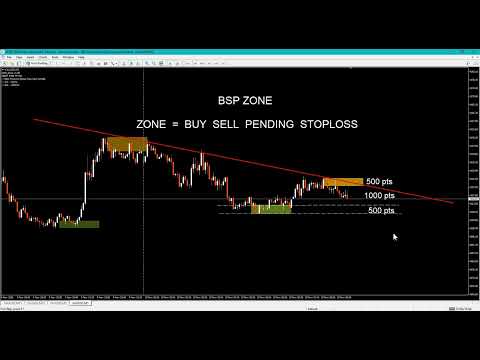
Plan your trades around clear price zones, not guesswork. Follow Trend Steps draws clean, color-coded zones directly on your chart, showing where price has recently turned and where it may react again, so you can plan entries, exits and risk with confidence. Available for Meta Trader 4 and Meta Trader 5.

Why traders use Follow Trend Steps
Every chart is full of noise. Support and resistance lines are drawn differently by every trader, and it is easy to lose time marking levels by hand. Follow Trend Steps does the marking for you. It reads recent price action, filters it with a trend reference, and places a zone box where price has shown a meaningful reaction.

The result is a chart that tells you at a glance:
  • Where the upper zones are, areas above the trend reference where price has pulled back.
  • Where the lower zones are, areas below the trend reference where price has bounced.
  • Which zones are the most recent, because older zones fade away gradually.
You spend less time drawing and more time deciding.

Built for planning
A zone is more than a line. It has a top and a bottom, so you can see a whole area of interest instead of a single price. That makes it easier to:
  • Plan entry areas and pending orders around zones
  • Place stop-loss levels beyond a zone edge
  • Set take-profit targets at the next zone in the opposite direction
  • Compare the distance to a zone with your intended risk
  • Prepare a trading plan before the session starts
Zones extend forward to the right of the price action, so you can see where they sit relative to the current price while you plan.

Clear at a glance
Follow Trend Steps was designed so the chart stays readable, even with many zones.
  • Two colors, two meanings. Upper zones and lower zones use different colors, so you know the side immediately.
  • Fading history. The newest zones are shown at full strength. Older zones blend gradually into the chart background, so your eyes go to what matters now.
  • Pending zones are marked differently. A zone that is still developing is drawn as a dashed outline. Once it is confirmed, it becomes a solid box. You always know which zones are final and which are still forming.
  • One zone per move. When price keeps pushing in the same direction, the indicator keeps only the strongest zone of that move, instead of stacking boxes on top of each other.
  • No clutter. The indicator uses lightweight chart objects that stay behind the price candles and cannot be moved by accident.
Fully adjustable
Every trader works differently. Follow Trend Steps lets you shape the display to match your own style and your own chart.
You can keep it minimal, with only a few of the newest zones visible, or keep a wider history for context. Change a setting and the chart updates immediately.

Works on your chart, your way

  • Works on short-term chart timeframes from M1 up to H1
  • Works on forex, metals, indices and other instruments offered by your broker
  • Updates live as new price data arrives
  • Light on resources, with no heavy calculation or lag
  • Zones are tied to price and time, so they stay in the right place as you scroll and zoom
  • Includes an on-chart information note showing your broker and account type
Who is it for?
  • Manual traders who want clear areas of interest on the chart without drawing them by hand
  • Intraday traders who plan each session around key price areas
  • Risk-focused traders who want to see the distance to a zone before they enter
  • Traders building a routine, who want the same objective zones every day instead of subjective levels
Quick start
  1. Attach Follow Trend Steps to any chart from M1 to H1.
  2. Pick your upper and lower zone colors.
  3. Set how far the zones extend to the left and to the right.
  4. Choose your look-back range.
  5. Use the zones to plan your entries, stops and targets.
The default settings are ready to use right away. Adjust them whenever you like.

A tool to support your decisions
Follow Trend Steps is a visual planning tool. It does not open or close trades, and it does not predict the future. Zones show areas where price has reacted before, and price may or may not react there again. Use it together with your own analysis and sound risk management.

Trading involves risk. Past price behavior does not guarantee future results. Only trade with money you can afford to lose.

Get Follow Trend Steps today

Add clear, customizable price zones to your Meta Trader chart and plan your next trade with a clearer picture of the market. Download Follow Trend Steps and see your chart in a new way.

_______________________________

https://youtu.be/bjftRn3DmWM

_______________________________

PC , Laptop , Pocket PC

Minimum Requirements:

OS: Windows 7 SP1 or later

CPU: 500 MHz processor (Pentium IV or comparable)

RAM: 512 MB

Hard Disk: 20 MB free space

_______________________________

Thank you for your support

Subscribe & Follow to stay updated on new gadgets.

_______________________________
Altri dall’autore
Symbol Spec MT5
Sakda Prempreenon
Symbol Spec MT5 Stop guessing what your broker charges or allows. This clean,  draggable panel puts the key contract specifications of your chart symbol right in front of you,  updated automatically. What you see: Stop Level Minimal Volume Swap Long and Swap Short, with the unit shown 3-Day Swap day (Mon-Fri), so you know when triple swap hits Broker name, Account type  Real / Contest Built for comfort: Click the header to move it anywhere; position is remembered Minimize and expand with one
FREE
Drawdown Alert
Sakda Prempreenon
4.5 (2)
Drawdown Alerts Free ! Meta Trader 4 Indicator. Please leave a review about this product to help other users benefit from it. This Drawdown Alerts indicator shows the drawdown percentage in real time and alerts you when the limit you specify is reached. Calculation of drawdown depends on the amount of the trade balance. ! New version upgraded ::  + Drag & Drop  + Symbol  + TF  + Alert On Off Button  You can customize Drawdown Alerts for Corner - Left , Right , Up , Down X Y Color Number of deci
FREE
Symbol Spec MT4
Sakda Prempreenon
Symbol Spec MT4 Stop guessing what your broker charges or allows. This clean,  draggable panel puts the key contract specifications of your chart symbol right in front of you,  updated automatically. What you see: Stop Level Minimal Volume Swap Long and Swap Short, with the unit shown 3-Day Swap day (Mon-Fri), so you know when triple swap hits Broker name, Account type  Real / Contest Built for comfort: Click the header to move it anywhere; position is remembered Minimize and expand with on
FREE
Export Order History Free ! Meta Trader 4 script Please leave a review about this product to help other users benefit from it. Export trades history into a CSV file ( Excel sheet ) The summary is saved into a file in MQL4\Files folder. Choose  /  A ccount history  /  C ustom   period from your MT4  Select period Click OK to Export file directory  Open MT4 data folder CSV file ( Excel sheet ) Order  >  Open time  >  Close time  >  Type  >  Symbol  >  Size  >  Entry price  >  Exit price  >  T/P  >
FREE
Candles Size ( Points ) Please leave a review about this product to help other users benefit from it. This simple tool provides crucial insights into current and historical market conditions, helping traders make informed decisions. Identify the longest candlestick over a customizable historical period. This information helps you spot significant price movements. See on YOUTUBE for key features This indicator is compatible with MetaTrader 4 The indicator   is easy to install and use, making it
FREE
Open Popup Notification Please leave a review about this product to help other users benefit from it. " Free " Script to turn on pop-up notifications to view past trading alert messages including displaying account information. This script is compatible with MetaTrader 4 The script is easy to install and use, making it suitable for traders of all experience levels. There's nothing to worry about, including a freezing screen and any kind of effects on other chart windows. Disclaimer: This script
FREE
Close Pending Active chart. Closing - Deleting, all pending orders For only the window you selected Please leave a review about this product to help other users benefit from it. Key Features: Effortless Order Management: This script streamlines your trading by allowing you to close all pending orders on the active chart with a single click. Comprehensive Order Handling: It's not just about market orders! Our script closes Buy Limit, Sell Limit, Buy Stop, and Sell Stop orders, ensuring a thorough
Close All Selected Chart Overview: This is one of the smart choices to help you make your trading management a lot easier. Especially when you have to manage a large number of orders. This utility will work like a helping hand to close all the unrelated order windows in less than no time, plus without making any kind of unwanted effects. :: 3 simple steps to use :: 1. Select your chart window.  2. Click "Close All" 3. Click "OK" Note: For the better understanding on how this utility works, plea
Modify  TP SL  Multi-Order Selected chart. Please leave a review about this product to help other users benefit from it. Looking for an easy-to-use multiple trading helper? This is the right choice! Why? + User-friendly utility + Help adjusting Stop Loss & Take Profit for all your running orders automatically + Compatible with orders Sell , Buy , Sell Limit , Buy Limit , Sell Stop , Buy Stop + Easily edit all orders with appropriate new P&L values + The indicator works only on the select
Modify TP SL Pending Orders Selected chart. Please leave a review about this product to help other users benefit from it. This script avoids modifying existing BUY and  SELL ( TP & SL ) orders. + User-friendly utility + Help adjusting Take Profit and Stop Loss points for all your running orders automatically + Compatible with orders Sell Limit , Buy Limit , Sell Stop , Buy Stop + Easily edit all orders with appropriate new P&L values + The indicator works only on the selected window. There's no
BSRRRpanel
Sakda Prempreenon
TRADE  ASSISTANT  PANEL Updated to version 2.2 Trade faster, manage risk clearly, and keep your whole chart under control from one clean, draggable panel. ::What you get:: One-click trading: Set your lot size, enter your target profit and stop loss in USD, and press BUY or SELL. TP and SL are calculated for you. Pending order ladders: Buy Limit, Sell Limit, Buy Stop and Sell Stop panels let you place many orders at once. Set the start offset, TP, SL, order count and step distance. Trailing stop:
Panel AccSummary
Sakda Prempreenon
Account Summary Panel: Your Trading Results at a Glance Stop digging through the History tab. This indicator puts your daily, weekly and monthly performance on your chart in one clean dashboard, updated automatically as you trade. Your capital, your rules Set your own Initial Balance, whether that’s your full account or just the amount assigned to this month’s plan. Every percentage is measured against the number you choose. Built-in goal tracking Enter one Weekly Goal % and the panel does th
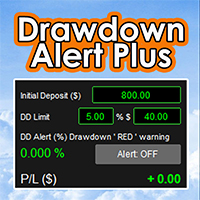
Drawdown Alert Plus: Know Your Drawdown at a Glance Drawdown comes first Live drawdown, always visible. The panel shows your account’s floating loss (profit plus swap, all open orders) as a percentage of your Initial Deposit, updated with every price move. Three-level colour warning. Green when risk is low, orange when you pass your warning level, red when you reach your drawdown limit. You choose the colours and the warning level. Set your limit your way. Type the limit in % or in $, and the o
Panel AccountSum
Sakda Prempreenon
Account Summary Panel: Your Trading Results at a Glance Stop digging through the History tab. This indicator puts your daily, weekly and monthly performance on your chart in one clean dashboard, updated automatically as you trade. Your capital, your rules Set your own Initial Balance, whether that’s your full account or just the amount assigned to this month’s plan. Every percentage is measured against the number you choose. Built-in goal tracking Enter one Weekly Goal % and the panel does th
One4Allassistant
Sakda Prempreenon
One4Allassistant: Your All-in-One Manual Trading Assistant for MT5 Version 2.2 Trade faster, manage risk clearly, and keep your whole chart under control from one clean, draggable panel. ::What you get:: One-click trading: Set your lot size, enter your target profit and stop loss in USD, and press BUY or SELL. TP and SL are calculated for you. Pending order ladders: Buy Limit, Sell Limit, Buy Stop and Sell Stop panels let you place many orders at once. Set the start offset, TP, SL, order count
Drawdown Alert x Plus: Know Your Drawdown at a Glance Drawdown comes first Live drawdown, always visible. The panel shows your account’s floating loss (profit plus swap, all open orders) as a percentage of your Initial Deposit, updated with every price move. Three-level colour warning. Green when risk is low, orange when you pass your warning level, red when you reach your drawdown limit. You choose the colours and the warning level. Set your limit your way. Type the limit in % or in $, and the
Follow Trend Steps Follow Trend Steps: See Your Price Zones Before the Market Moves Plan your trades around clear price zones, not guesswork. Follow Trend Steps draws clean, color-coded zones directly on your chart, showing where price has recently turned and where it may react again, so you can plan entries, exits and risk with confidence. Available for Meta Trader 4 and Meta Trader 5. Why traders use Follow Trend Steps Every chart is full of noise. Support and resistance lines are drawn dif
Filtro:
Nessuna recensione
Rispondi alla recensione