MTFScannerHub
- Indicatori
- Versione: 5.10
- Attivazioni: 10

Stop switching between charts. Organize your market analysis. Spot developing setups. Stay in control of your trading decisions.
Are you tired of monitoring multiple symbols, checking different timeframes, and manually searching for trading setups across dozens of charts?
You check the higher timeframe for market direction, switch to another chart to inspect the price action, and then look for a potential entry on a lower timeframe. Meanwhile, other markets continue to move.
MTF Scanner Hub was designed to make multi-market monitoring more organized and efficient.
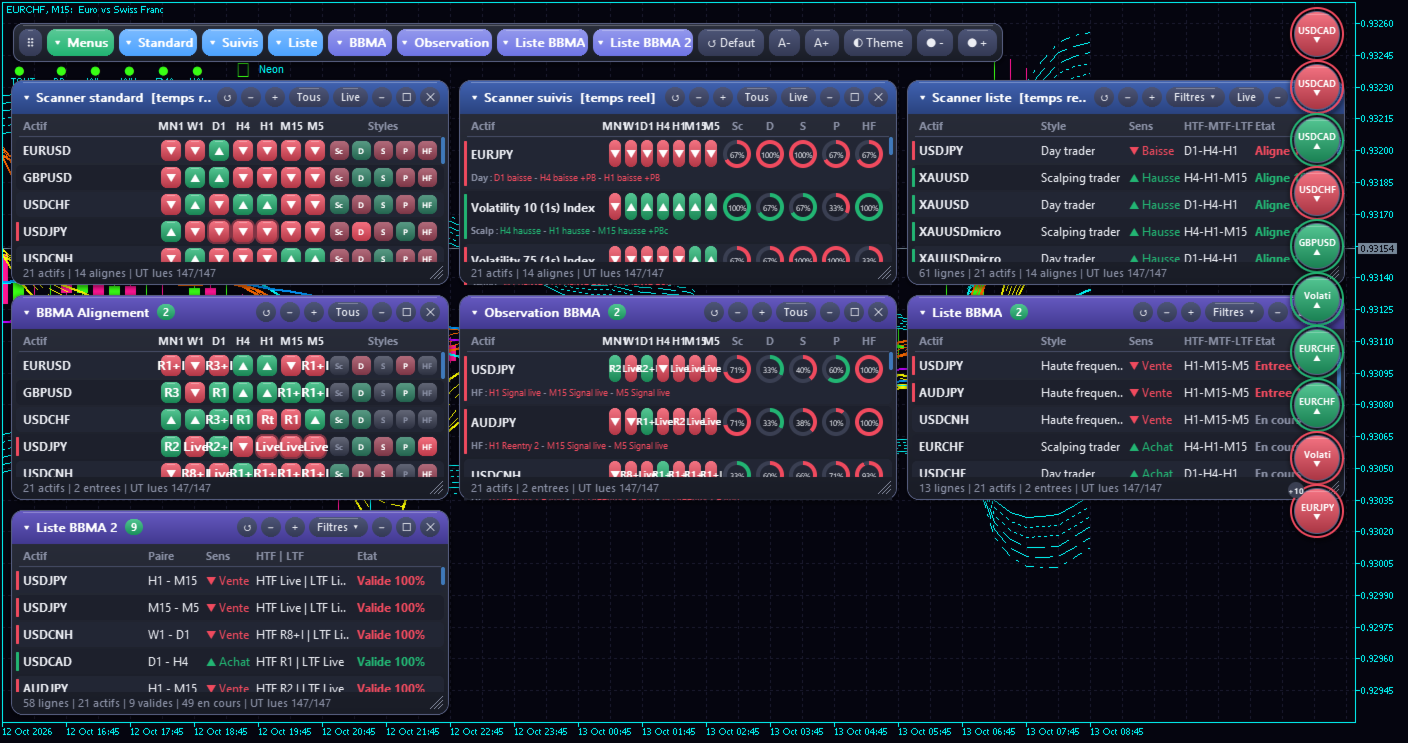
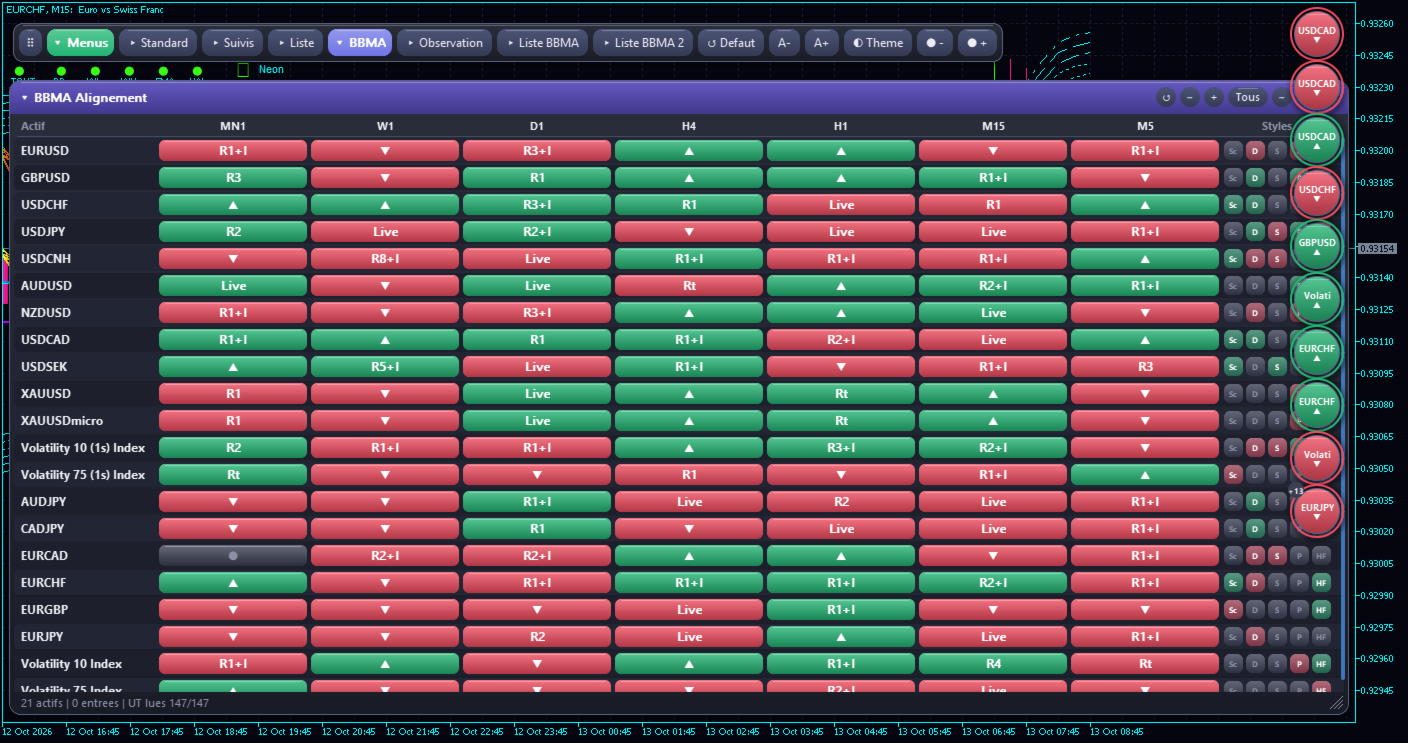
This MetaTrader 5 indicator brings together a multi-symbol candlestick scanner, pullback analysis, multi-timeframe alignment, and BBMA setup monitoring in one interactive dashboard.
Monitor multiple instruments, follow the development of technical setups, and identify market conditions that deserve closer attention — all without constantly switching between charts.
The goal is simple: help you organize your analysis, monitor your preferred setups, and apply your trading method more systematically.
KEY FEATURES
1. Multi-Symbol Market Scanner
Monitor multiple instruments from one centralized dashboard.
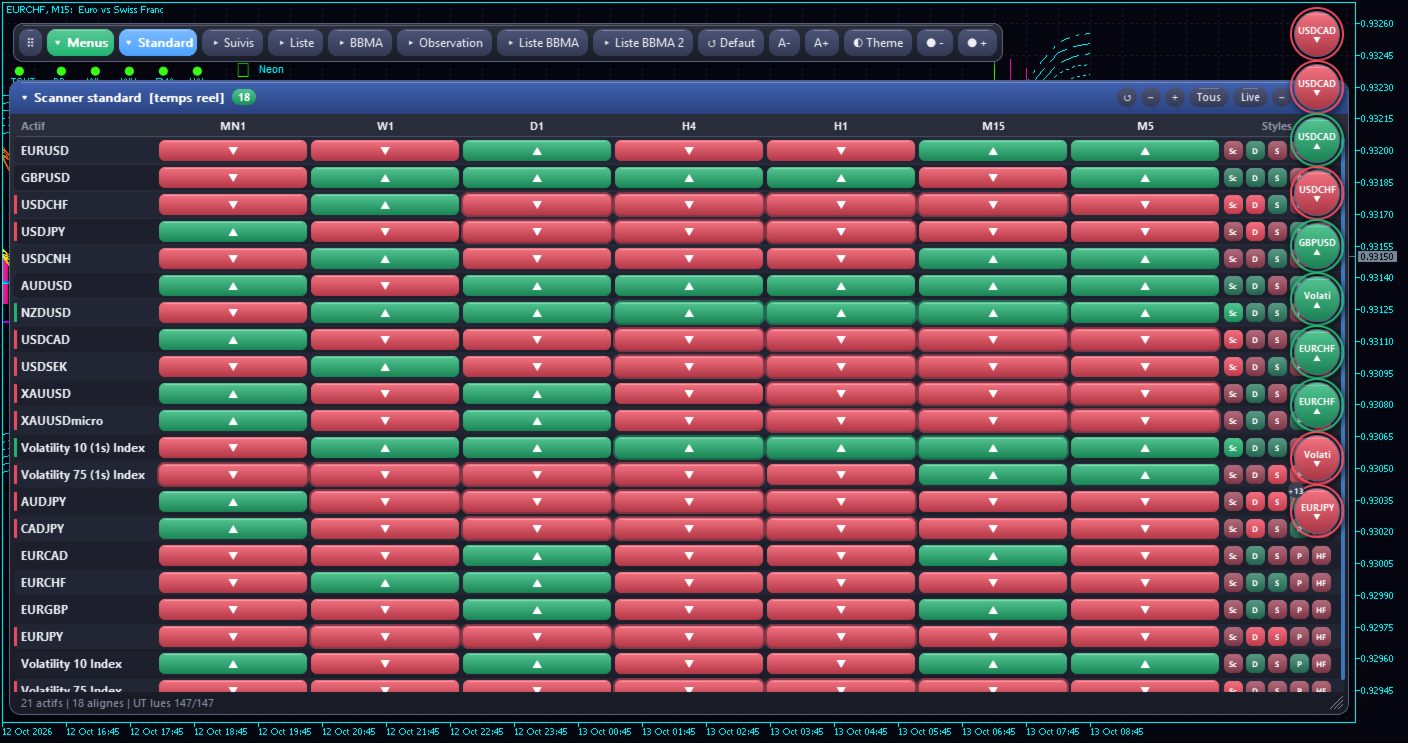
MTF Scanner Hub can scan symbols available in your Market Watch or a custom symbol list, with support for up to 60 symbols using the default maximum setting.
Whether you follow Forex pairs, gold, indices, or other instruments, the scanner helps you organize your market watchlist in one place.
Symbol availability depends on your broker and the instruments accessible through your MetaTrader 5 terminal.
2. Multi-Timeframe Analysis
Monitor seven timeframes simultaneously:
-
M5
-
M15
-
H1
-
H4
-
D1
-
W1
-
MN1
Compare market conditions across different timeframes without repeatedly opening individual charts.
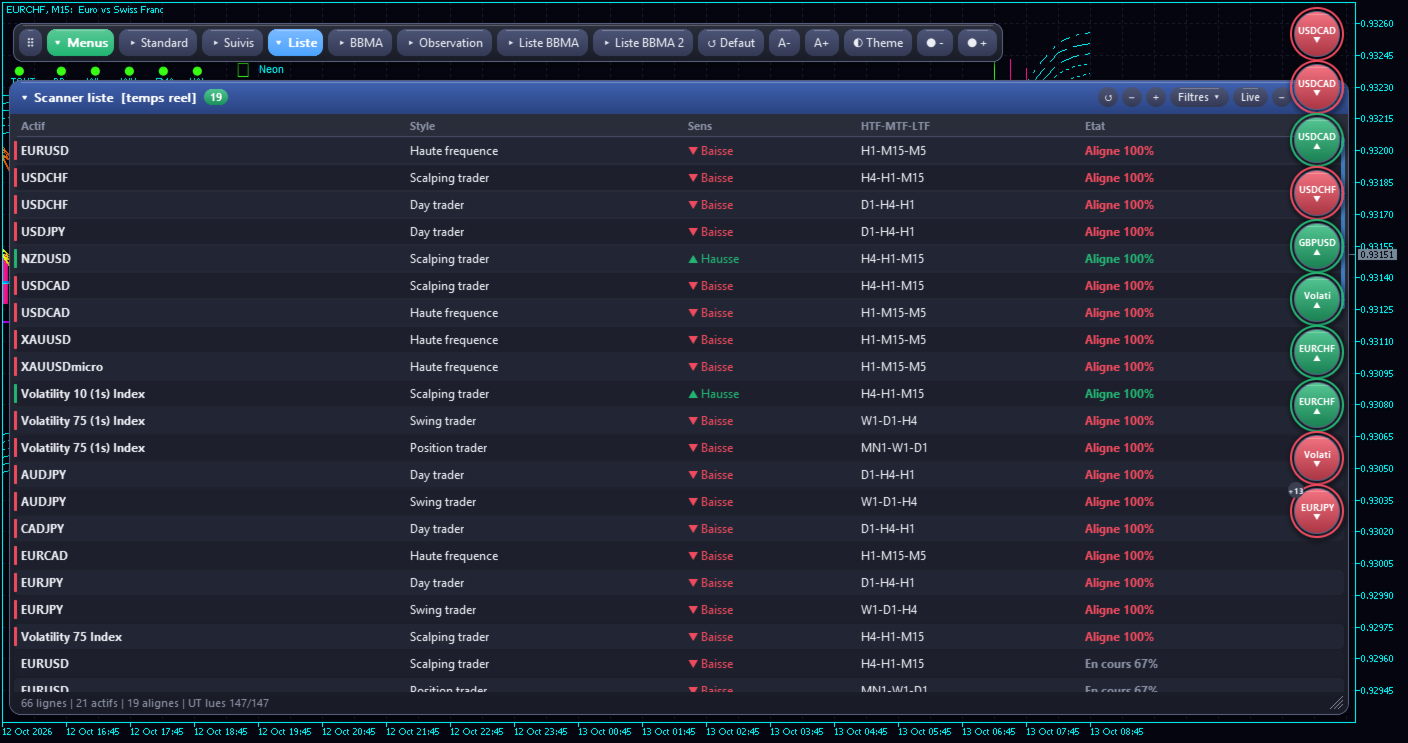
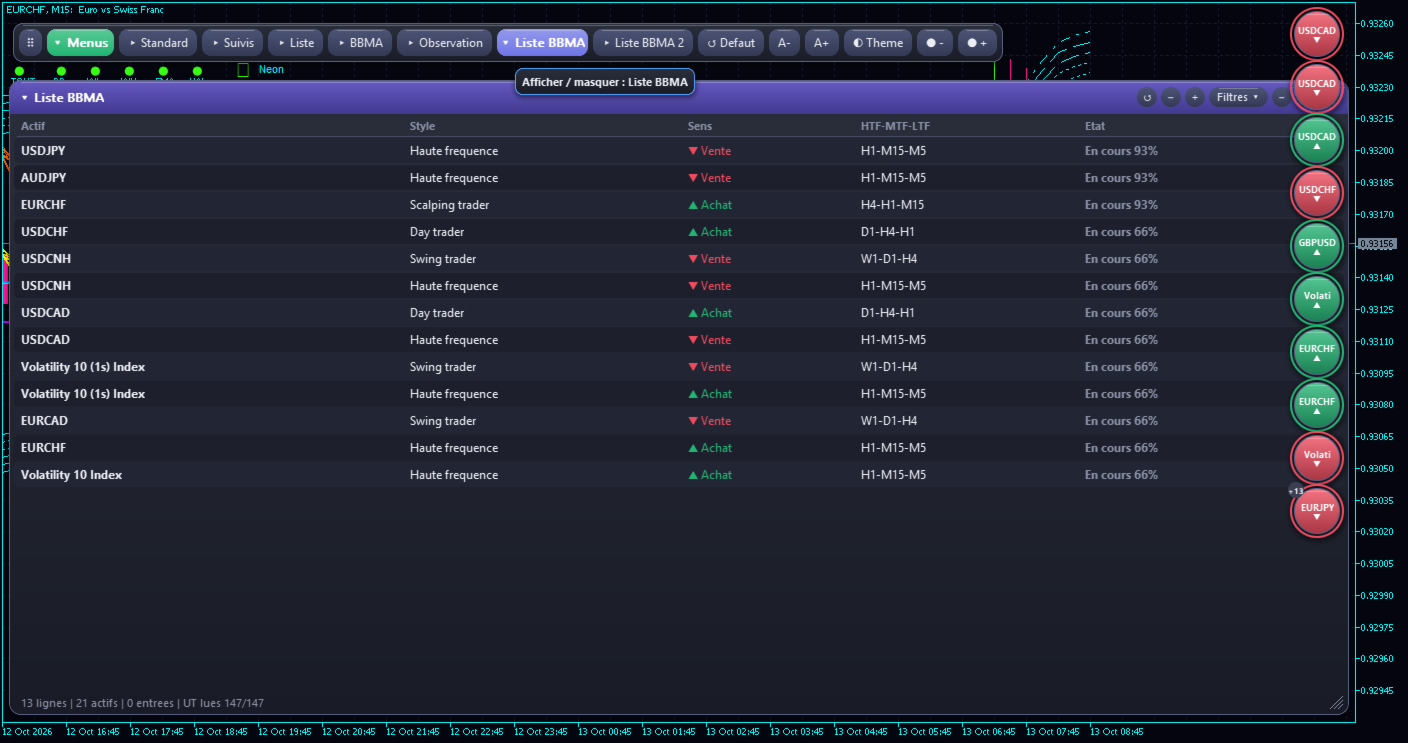
The dashboard includes five predefined analysis profiles:
-
Scalping: H4 – H1 – M15
-
Day Trading: D1 – H4 – H1
-
Swing Trading: W1 – D1 – H4
-
Position Trading: MN1 – W1 – D1
-
Short-Term Analysis: H1 – M15 – M5
These profiles provide convenient ways to organize your monitoring according to your preferred trading horizon.
3. Candlestick Direction and Pullback Scanner
The candlestick module monitors bullish and bearish candle direction and distinguishes between real-time observations and closed-candle analysis.
It also identifies simple and complex pullbacks according to the configured conditions.
The hierarchical alignment option allows higher-timeframe conditions to be considered before lower-timeframe conditions in the scanner's candlestick analysis.
Instead of examining isolated candles, you can monitor directional conditions and pullback development across multiple timeframes.
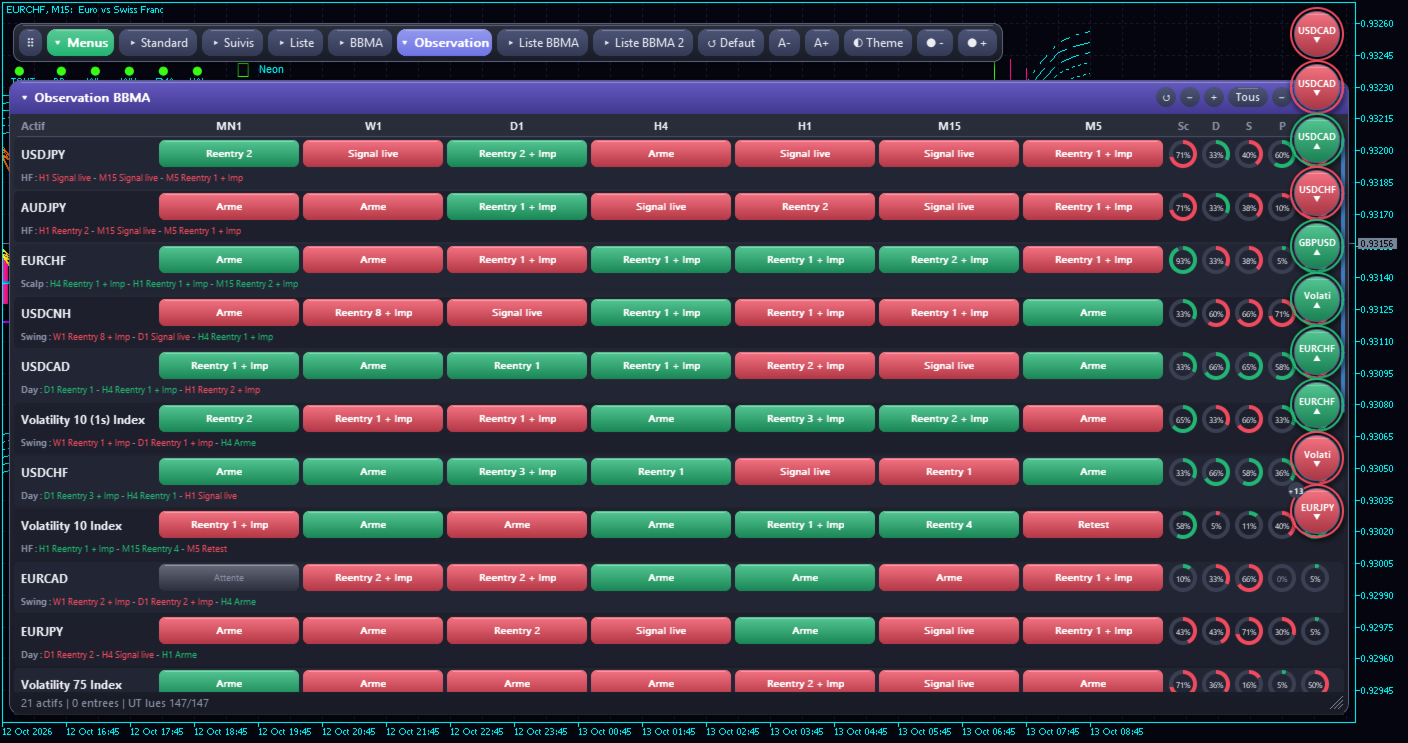
4. BBMA Scanner – Follow the Development of a Setup
Do you use the BBMA trading method and want a more organized way to monitor its conditions across multiple timeframes?
The BBMA module uses Linear Weighted Moving Averages on High and Low prices, with configurable periods.
Its state-based logic tracks the progression of a setup through several stages, including:
-
Setup activation.
-
Retest monitoring.
-
Rejection and reentry conditions.
-
Impulse confirmation when required.
-
Multi-timeframe progression across HTF, MTF, and LTF.
The scanner evaluates the conditions defined by its programmed logic and updates the setup state as those conditions change.
An ongoing setup is not automatically treated as a confirmed entry. The dashboard distinguishes setup stages according to the rules implemented in the indicator.
Follow the progression of your BBMA setups instead of relying only on isolated signals.
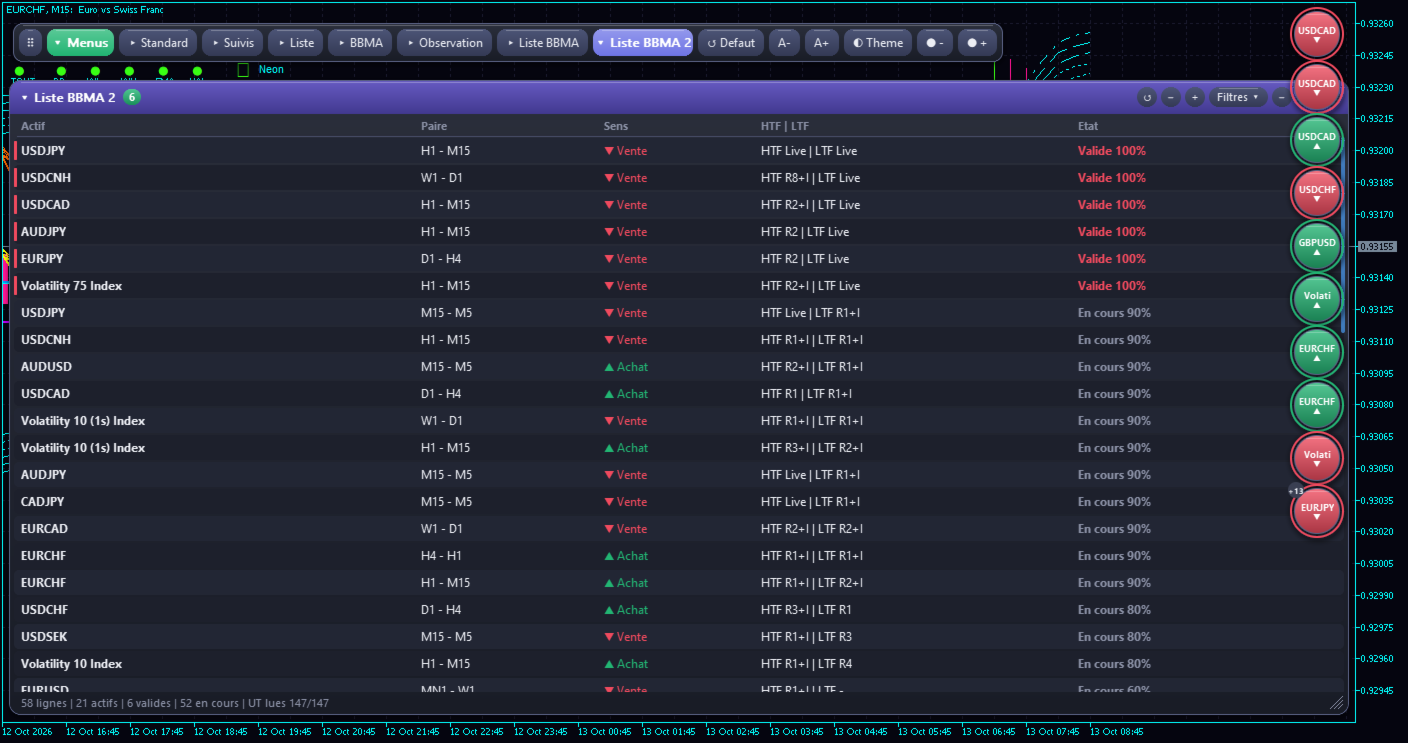
5. BBMA List 2 – Six Higher-Timeframe and Lower-Timeframe Combinations
Need a more direct way to monitor relationships between two timeframes?
The BBMA List 2 module tracks six predefined timeframe combinations:
-
MN1 – W1
-
W1 – D1
-
D1 – H4
-
H4 – H1
-
H1 – M15
-
M15 – M5
It monitors the progression of BBMA conditions between the higher and lower timeframe.
The displayed states help distinguish an ongoing setup from one that has reached the validation conditions defined by the indicator.
This module is especially useful for traders whose analysis relies on specific relationships between two timeframes.
6. Seven Interactive Dashboard Panels
MTF Scanner Hub combines seven complementary panels:
-
Standard Scanner
-
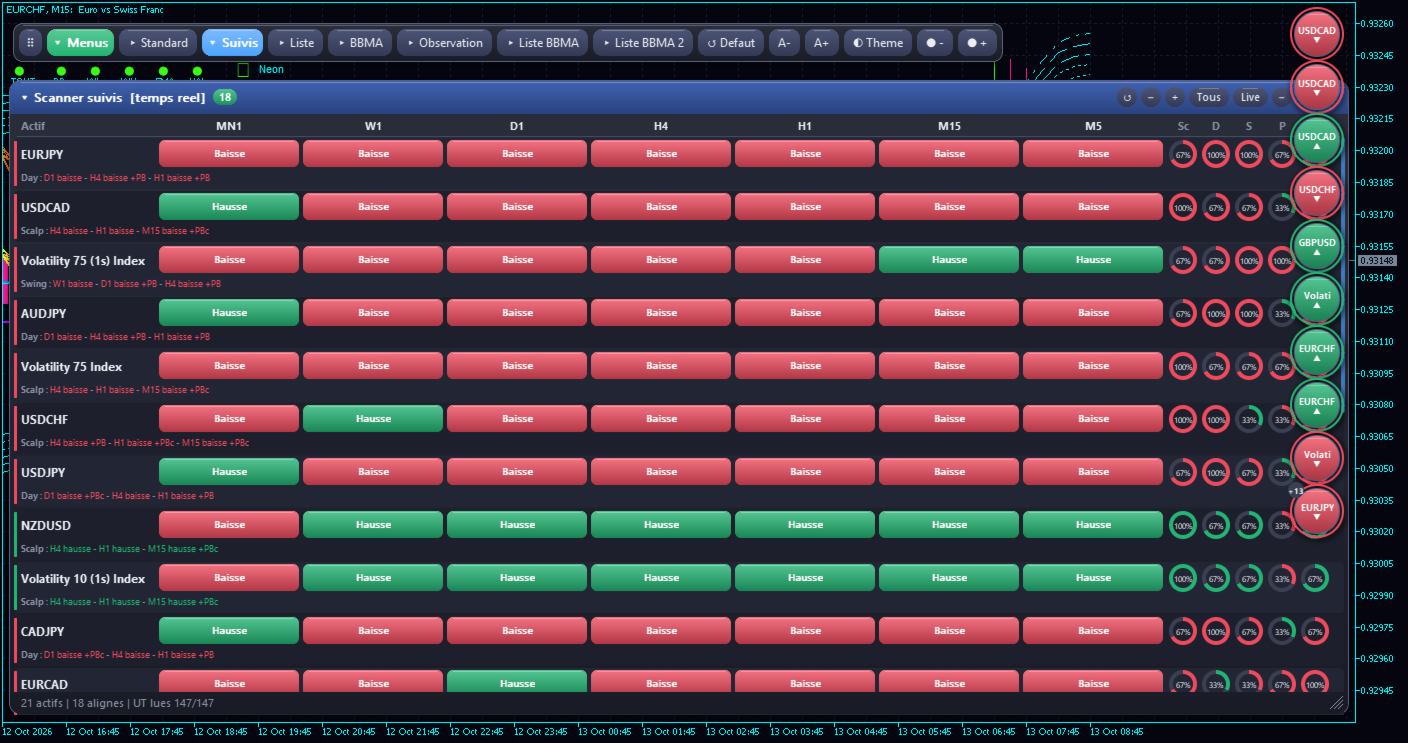
Followed Symbols Scanner
-
List Scanner
-
BBMA Alignment
-
BBMA Observation
-
BBMA List
-
BBMA List 2
The interface includes directional and setup filters, a dark or light theme, automatic scaling options, and controls for organizing the displayed panels.
Customize your workspace to focus on the information most relevant to your trading routine.
7. Configurable Notifications
You do not want to monitor every dashboard cell throughout the day?
MTF Scanner Hub offers configurable notifications to help you notice selected setup changes.
Depending on your settings, you can use:
-
Integrated BBMA signal notifications.
-
MetaTrader 5 pop-up alerts.
-
Push notifications through your configured MetaTrader 5 terminal.
Push notifications require the appropriate terminal configuration.
These features are designed to help you notice developments that may deserve further analysis, without having to watch every symbol continuously.
WHO IS THIS INDICATOR FOR?
MTF Scanner Hub is designed for traders who want to structure their market monitoring and technical analysis.
It may be particularly useful for:
-
BBMA traders monitoring reentries and multi-timeframe alignment.
-
Forex and gold traders following multiple instruments.
-
Discretionary traders using candlestick direction and pullback analysis.
-
Multi-timeframe traders comparing higher- and lower-timeframe conditions.
-
MetaTrader 5 users who want to centralize their market monitoring.
The indicator is intended to complement an existing trading method, not replace it.
WHY USE A MULTI-TIMEFRAME SCANNER?
Manual chart analysis remains valuable, but monitoring many instruments across several timeframes can require considerable time and attention.
A centralized scanner can help you:
-
Reduce repetitive chart switching.
-
Identify configurations that deserve closer examination.
-
Compare directional conditions across timeframes.
-
Follow the progression of BBMA setups.
-
Organize your analysis and decision-making process.
The objective is not to treat every market movement as a trading opportunity. It is to help you identify relevant conditions and apply your own trading rules more consistently.
TECHNICAL SPECIFICATIONS
-
Platform: MetaTrader 5
-
Product type: Multi-symbol, multi-timeframe monitoring indicator
-
Reference source-code version: 5.10
-
Supported timeframes: M5, M15, H1, H4, D1, W1, MN1
-
Maximum symbols: 60 by default
-
Analysis modules: Candlesticks, pullbacks, BBMA, multi-timeframe alignment, BBMA List 2
-
Notifications: Configurable pop-up alerts, push notifications, and integrated signal notifications
-
Automatic order execution: Not included
IMPORTANT TRADING DISCLAIMER
MTF Scanner Hub is a market-monitoring and technical-analysis tool. It does not guarantee profits, predict future price movements with certainty, or replace a complete trading strategy and appropriate risk management.
Market conditions change, and a technically valid setup can still fail. Real-time observations may also change while a candle is forming.
All signals and setup states should be interpreted according to the indicator's implemented logic and the trader's own analytical process.
Every trader remains solely responsible for their own trading decisions, entries, exits, position sizing, risk management, and any financial consequences resulting from their trading activity.
MTF Scanner Hub provides an organized view of market conditions. The final decision always belongs to you.
Organize Your Analysis. Monitor Your Setups. Trade With a Plan.