GoldBotPro
- Experts
- Versione: 7.29
- Attivazioni: 5

Overview
GoldBotPro is a fully automated Expert Advisor designed specifically for XAUUSD (Gold) on the M15 timeframe. It combines a TSS (Trend-Strength) engine, UTBot confirmation, multi-timeframe filtering (HTF + M5), DXY correlation filter, ADX strength filter, and a proprietary Post-Spike Guard to avoid trading after violent price spikes.
The EA is built for traders who want consistent, risk-controlled exposure to Gold without emotional decision-making. Every entry passes through up to 8 independent confirmation layers before a position is opened.
Why GoldBotPro?
Gold is one of the most volatile instruments in the market. Most Gold EAs fail because they:
-
Enter too early during spikes
-
Ignore higher-timeframe context
-
Over-leverage during choppy conditions
-
Do not adapt to changing volatility regimes
GoldBotPro was engineered to solve each of these problems with layered confirmation, adaptive risk, and strict capital protection.
Key Features
1. Multi-Layer Entry Confirmation
Every trade must pass through:
-
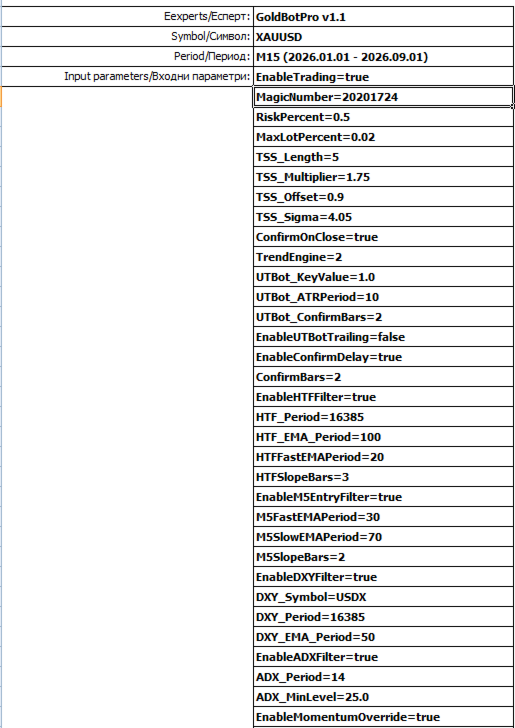
TSS Trend Engine (TSS_Length=5, Multiplier=1.75, Sigma=4.05)
-
UTBot ATR confirmation (KeyValue=1.0, ATR Period=10, ConfirmBars=2)
-
HTF Filter (EMA 100 + Fast EMA 20 + Slope check over 3 bars)
-
M5 Entry Filter (Fast EMA 30 / Slow EMA 70 + slope)
-
DXY Filter (USDX EMA 50 — avoids trades against dollar strength)
-
ADX Filter (ADX > 25 — only trades in trending markets)
-
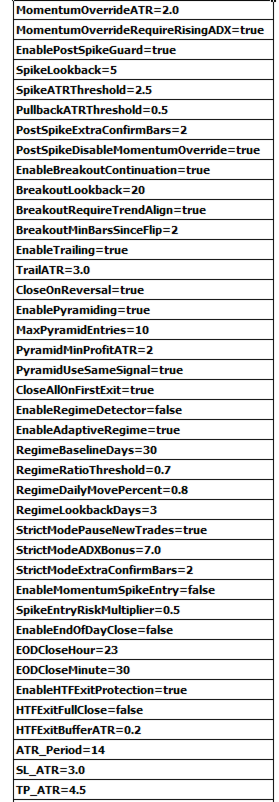
Momentum Override (ATR > 2.0 with rising ADX)
-
Breakout Continuation (20-bar breakout with trend alignment)
2. Post-Spike Guard (Unique Protection)
After a spike of > 2.5 ATR within the last 5 bars, the EA:
-
Requires an extra 2 confirmation bars
-
Disables the Momentum Override
-
Waits for a pullback of at least 0.5 ATR
This single feature prevents most "buy the top / sell the bottom" disasters on Gold.
3. Adaptive Risk Management
-
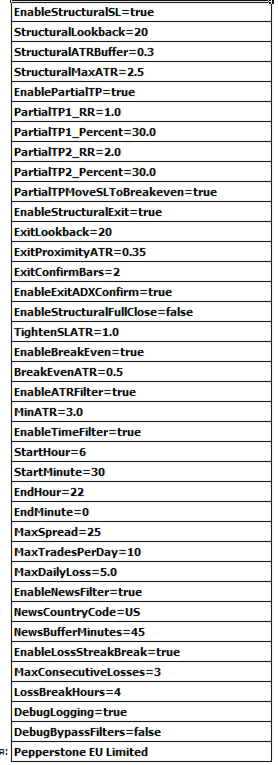
RiskPercent = 0.5% per trade (default)
-
MaxLotPercent = 0.02 cap
-
MaxDailyLoss = 5% — trading stops for the day
-
MaxTradesPerDay = 10
-
Loss Streak Break — after 3 consecutive losses, pause for 4 hours
4. Smart Exit System
-
Structural Stop Loss (20-bar lookback + 0.3 ATR buffer, max 2.5 ATR)
-
ATR-based SL/TP (SL = 3.0 ATR, TP = 4.5 ATR)
-
Partial TP1 at 1.0 RR (30%) and TP2 at 2.0 RR (30%)
-
Move to Breakeven after TP1
-
ATR Trailing Stop (3.0 ATR)
-
Structural Exit with ADX confirmation
-
HTF Exit Protection (buffer 0.2 ATR)
-
Close on Reversal
5. Pyramiding (Optional)
Up to 10 pyramid entries allowed, but only when:
-
Position is already 2 ATR in profit
-
The same signal repeats
-
First exit closes all positions ( CloseAllOnFirstExit=true )
6. Filters & Protection
-
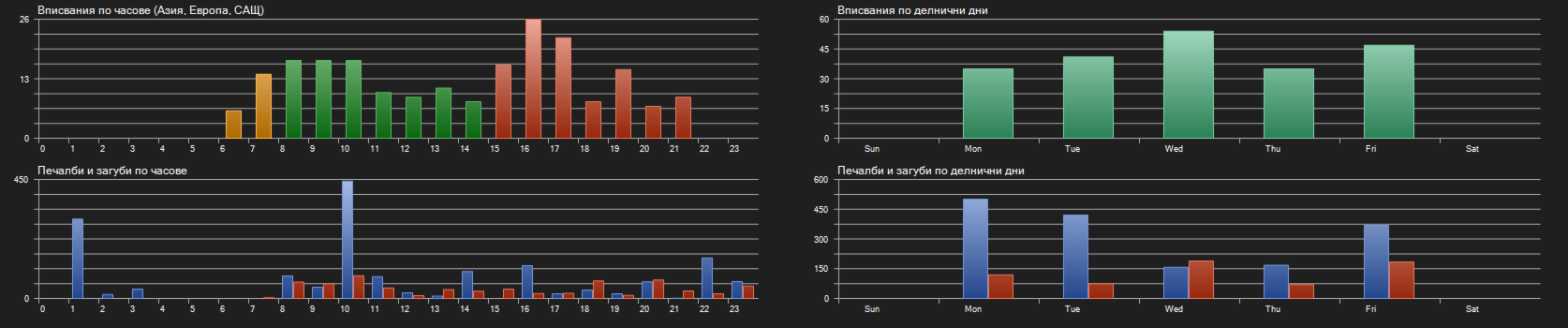
Time Filter: 06:30 – 22:00 (server time)
-
News Filter: US news, 45-minute buffer
-
Max Spread: 25 points
-
Min ATR Filter: 3.0 (avoids dead markets)
-
End-of-Day Close: optional
Symbol: XAUUSD | Timeframe: M15 | Broker: Pepperstone EU Live
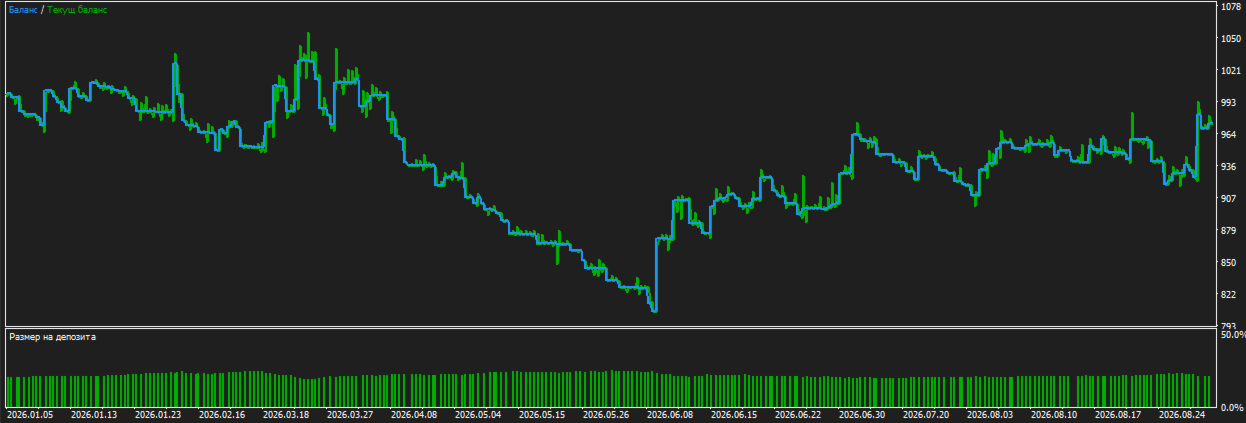
Deposit: €1,000 | Leverage: 1:100 | Data: 100% real ticks (44,860,787 ticks)
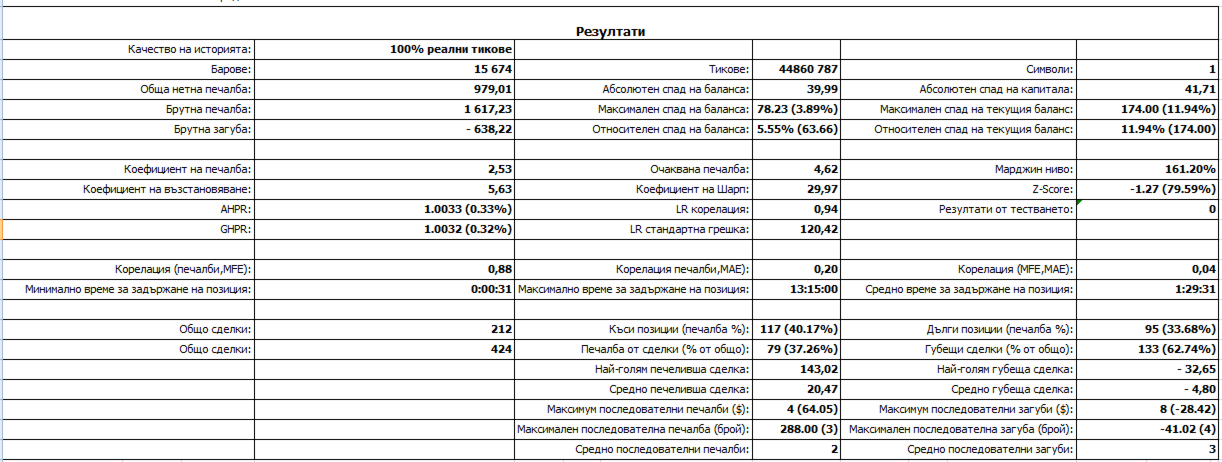
| Metric | Value |
|---|---|
| Total Net Profit | €979.01 |
| Gross Profit | €1,617.23 |
| Gross Loss | -€638.22 |
| Profit Factor | 2.53 |
| Recovery Factor | 5.63 |
| Sharpe Ratio | 29.97 |
| Expected Payoff | €4.62 |
| Max Balance Drawdown | 78.23 (3.89%) |
| Max Equity Drawdown | 174.00 (11.94%) |
| Total Trades | 212 |
| Win Rate | 37.26% |
| Average Win | €20.47 |
| Average Loss | -€4.80 |
| Largest Win | €143.02 |
| Largest Loss | -€32.65 |
| Max Consecutive Wins | 4 |
| Max Consecutive Losses | 8 (-€28.42) |
| Avg Hold Time | 1:29:31 |
How the Results Were Achieved
-
Low win rate (37%) is intentional. The EA uses a small, tight stop loss and lets winners run with partial TPs. The average win is 4.3× the average loss, which is where the edge comes from.
-
Risk per trade is only 0.5%. Even 8 consecutive losses produce only a -2.84% drawdown (see max consecutive loss: -€28.42 on a €1,000 account).
-
Profit Factor 2.53 and Sharpe 29.97 indicate a smooth, consistent equity curve with very low volatility relative to returns.
Recommended Settings
| Parameter | Value |
|---|---|
| Symbol | XAUUSD |
| Timeframe | M15 |
| Min Deposit | $500 / €500 |
| Recommended Deposit | $1,000+ |
| Leverage | 1:100 or higher |
| Account Type | ECN / Raw Spread |
| VPS | Required (24/5) |
| Broker | Low-spread Gold broker (Pepperstone, IC Markets, etc.) |
Installation Guide
-
Purchase GoldBotPro from MQL5 Market.
-
Open MetaTrader 5 → File → Open Data Folder → MQL5 → Experts.
-
Copy GoldBotPro.ex5 into the Experts folder.
-
Restart MT5 or refresh the Navigator.
-
Open XAUUSD M15 chart.
-
Drag GoldBotPro onto the chart.
-
Enable AutoTrading.
-
Verify EnableTrading=true and MagicNumber=20201724 .
Risk Disclaimer
Trading foreign exchange and CFDs on margin carries a high level of risk and may not be suitable for all investors. Past performance is not indicative of future results. The backtest shown was performed on 100% real tick data but does not guarantee future profits. Always test on a demo account before live trading. Never risk more than you can afford to lose.